
1. Introduction
The CHOICEMMED Bluetooth Finger Pulse Oximeter MD300C1218R is a compact, non-invasive device designed for spot-checking and continuous monitoring of blood oxygen saturation (SpO2), pulse rate (PR), respiration rate (RR), and Perfusion Index (PI). This device is intended for sporting and aviation use only, not for medical diagnosis or treatment. It features Bluetooth connectivity for data management via a dedicated application.

Image 1.1: The CHOICEMMED Bluetooth Finger Pulse Oximeter shown with its carrying pouch, lanyard, and two AAA batteries.
2. What's in the Box
- CHOICEMMED Bluetooth Finger Pulse Oximeter
- User Instruction Manual
- 2 x AAA Batteries
- Lanyard
- Carrying Pouch
3. Product Components
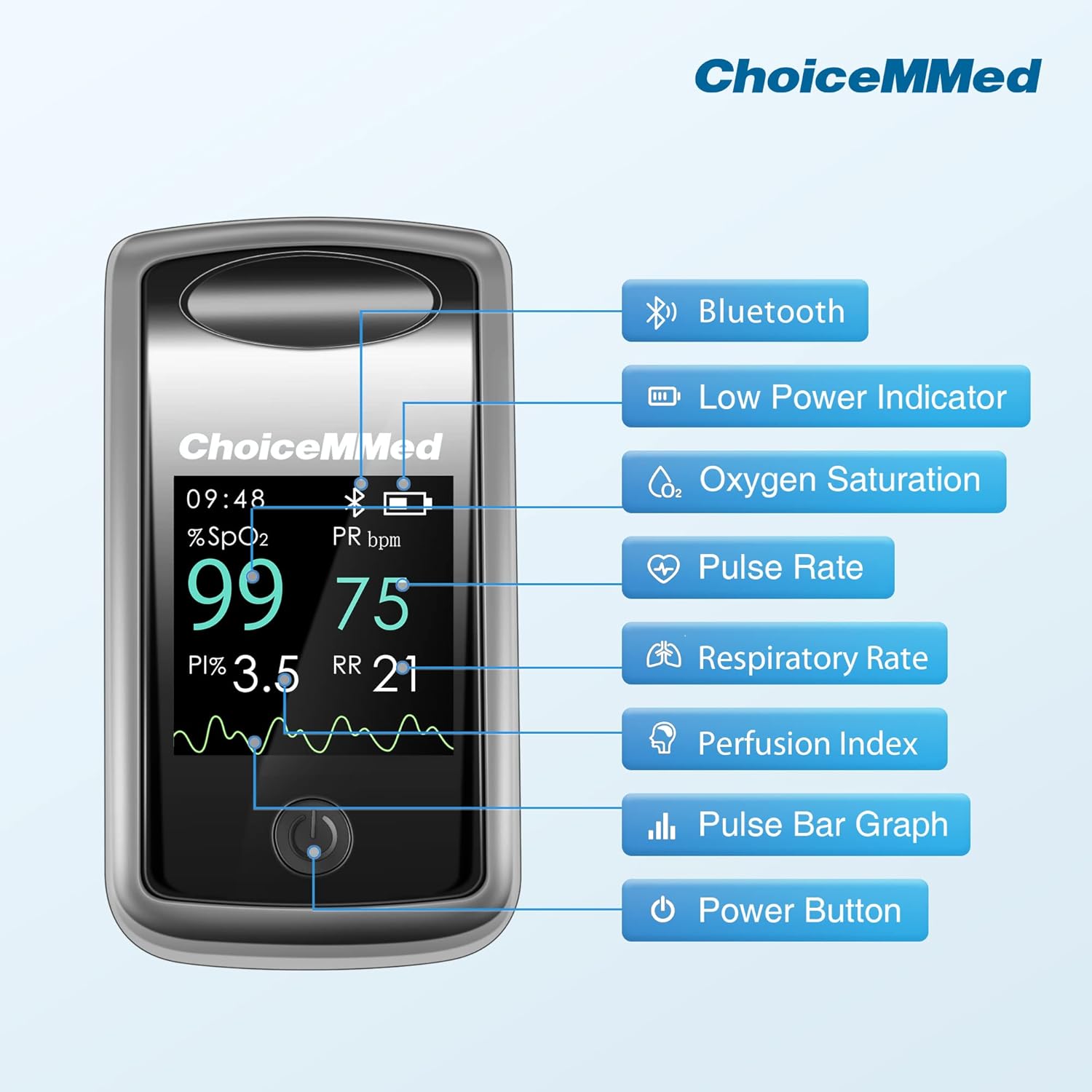
Image 3.1: Diagram illustrating the various display components of the pulse oximeter, including Bluetooth indicator, low power indicator, oxygen saturation (SpO2), pulse rate (PR), respiratory rate (RR), perfusion index (PI), pulse bar graph, and power button.
The device features a clear display showing:
- Bluetooth Indicator: Shows when Bluetooth is active and connected.
- Low Power Indicator: Alerts when batteries need replacement.
- Oxygen Saturation (SpO2): Percentage of hemoglobin carrying oxygen.
- Pulse Rate (PR bpm): Heart rate in beats per minute.
- Respiratory Rate (RR): Breathing rate.
- Perfusion Index (PI): Indicates the strength of the pulse signal.
- Plethysmograph: A waveform representing blood flow.
- Power Button: Used to turn the device on and change display modes.
4. Setup
4.1 Battery Installation
- Open the battery compartment cover located on the back of the device.
- Insert the two AAA batteries according to the polarity indicators (+/-) inside the compartment.
- Close the battery compartment cover securely.
4.2 App Installation and Bluetooth Connection
- Download the official CHOICEMMED app from your smartphone's app store (iOS or Android).
- Ensure Bluetooth is enabled on your smartphone.
- Open the CHOICEMMED app and follow the on-screen instructions to pair your device. The oximeter will automatically attempt to connect when powered on.
- Once connected, the Bluetooth icon on the oximeter display will illuminate.
5. Operating Instructions
5.1 Taking a Measurement

Image 5.1: A visual guide demonstrating the four steps to take a measurement: 1. Open the oximeter, 2. Place your finger inside, 3. Press the power button, 4. Wait for results.
- Open the clamp of the oximeter.
- Insert one of your fingers (preferably the index finger) into the rubber opening of the oximeter, ensuring your fingertip is positioned correctly.
- Release the clamp.
- Press the power button once to turn on the device.
- Keep your hand still. The measurement results (SpO2, PR, RR, PI) will appear on the display within a few seconds.
- The device will automatically power off after approximately 8 seconds of inactivity.
5.2 Understanding the Display
The oximeter display provides real-time data:
- SpO2 (%): Your blood oxygen saturation level.
- PR (bpm): Your current pulse rate.
- RR (breaths/min): Your respiration rate.
- PI (%): Perfusion Index, indicating pulse strength.
- Plethysmograph: A graphical representation of your pulse.

Image 5.2: The oximeter display showing real-time Respiratory Rate (RR) and Perfusion Index (PI) values, alongside SpO2 and Pulse Rate.
5.3 Multi-Directional Display
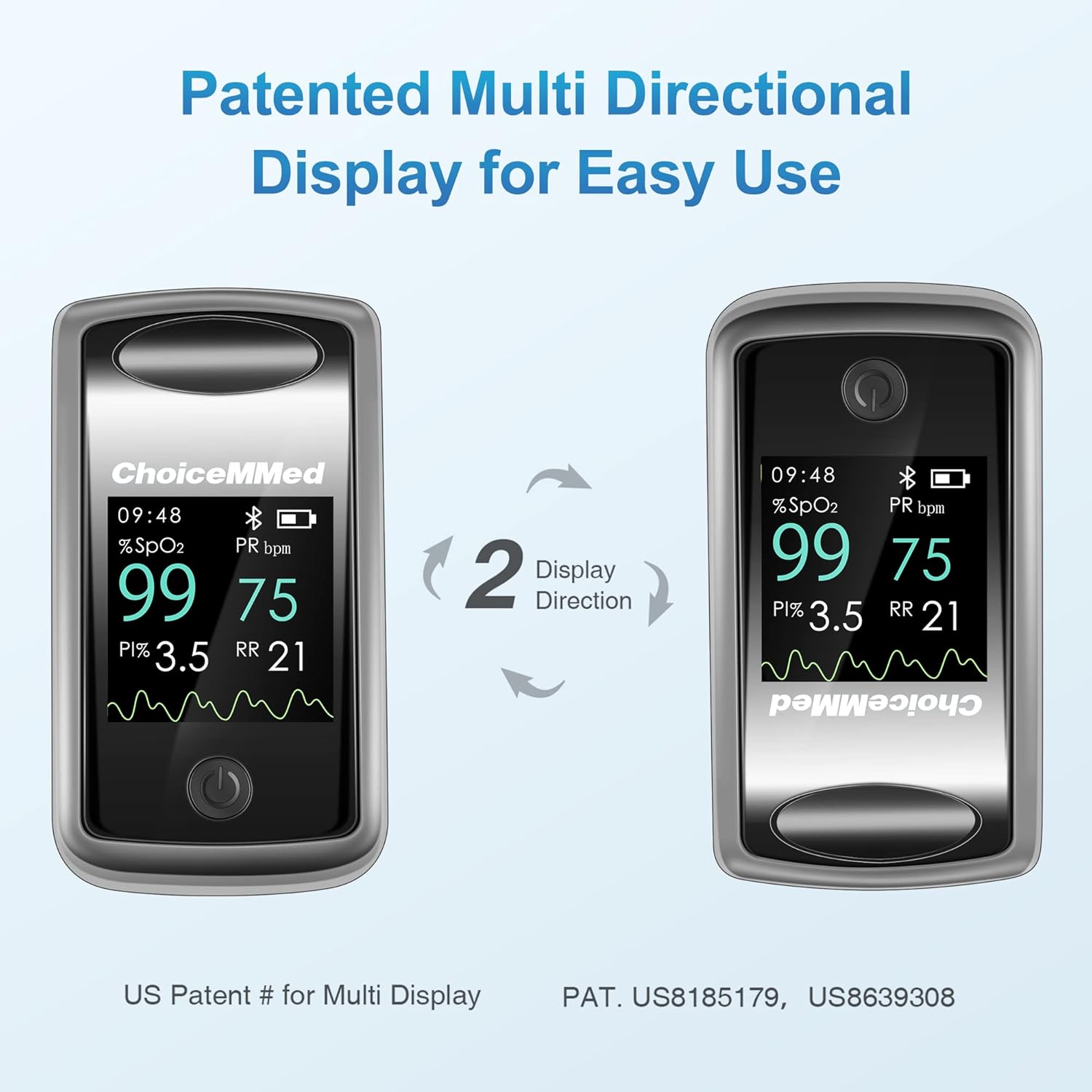
Image 5.3: Illustration of the oximeter's multi-directional display feature, allowing the screen orientation to rotate for easy viewing from different angles.
The device features a patented multi-directional display. Briefly press the power button while the device is on to rotate the display orientation, allowing for easy viewing from various angles.
5.4 Data Management with App

Image 5.4: A smartphone screen displaying the CHOICEMMED app's 'Spot-check' interface, showing current SpO2, PR, RR, and PI readings received from the connected pulse oximeter.

Image 5.5: A smartphone screen displaying the CHOICEMMED app's 'Historical Trend' interface, showing graphs of SpO2, PR, and RR over time, with the pulse oximeter device visible next to it.
The CHOICEMMED app allows you to:
- View real-time measurements.
- Record and store data continuously over time.
- Analyze historical results and trends (daily, weekly, monthly, yearly).
- Manage data for up to 10 users, with individual profiles.
- Share data with others if desired.
6. Maintenance
6.1 Cleaning
- Clean the surface of the oximeter with a soft cloth dampened with a mild disinfectant (e.g., 70% isopropyl alcohol).
- Do not immerse the device in water or any cleaning solution.
- Ensure the device is completely dry before reuse.
6.2 Storage
- Store the oximeter in a cool, dry place, away from direct sunlight and extreme temperatures.
- If the device will not be used for an extended period, remove the batteries to prevent leakage.
6.3 Durability Features

Image 6.1: Two images illustrating the durability of the oximeter: one showing it intact after a drop test from 3.2ft, and another showing it submerged in water, indicating its waterproof capability.
The MD300C1218R is designed for durability:
- It has undergone a 750,000 open-close cycle test for the sensor unit, maintaining normal measurements.
- It has passed a 10-minute waterproof test per IEC 60529 standard.
- It remained functional after 100 drops from 3.2ft onto a hard surface.
7. Troubleshooting
| Problem | Possible Cause | Solution |
|---|---|---|
| No display after power on | Batteries incorrectly installed or depleted. | Check battery polarity; replace batteries. |
| Display shows '---' or '?' | Finger not inserted properly; excessive movement; cold finger. | Reinsert finger, ensure it's warm and still; avoid bright light. |
| Bluetooth connection failure | Bluetooth off on phone; app not open; device too far. | Ensure phone Bluetooth is on; open app; keep device within range. |
| Inaccurate readings | Nail polish; artificial nails; poor circulation. | Remove nail polish; use another finger; warm hands. |
8. Specifications
| Feature | Detail |
|---|---|
| Model Number | MD300C1218R |
| Measurement Accuracy | +/- 1% |
| Measuring Range (SpO2) | 0% - 100% |
| Power Source | 2 x AAA batteries (included) |
| Battery Life | Approximately 30 hours of continuous operation |
| Display Type | Multi-directional OLED display |
| Connectivity | Bluetooth |
| Dimensions | 6 x 4 x 1 inches (Package) |
| Weight | 7.2 ounces (Package) |
9. Important Safety Information
- This device is intended for sporting and aviation use only. It is not a medical device and should not be used for medical diagnosis or treatment.
- Consult a medical professional for any health concerns.
- Keep out of reach of children.
- Do not use the device in an MRI or CT environment.
10. Warranty and Support
For warranty information or technical support, please refer to the contact details provided with your product packaging or visit the official CHOICEMMED website. Please retain your purchase receipt for warranty claims.