
Introduction
This manual provides instructions for the ECONTROLLY L-27-5KEY replacement remote control. This remote is designed to be compatible with various Optoma projector models without requiring any programming or setup. Simply insert batteries and begin use.
Setup
Battery Installation
The remote control requires two AAA batteries (not included).
- Locate the battery compartment cover on the back of the remote control.
- Press down on the tab and slide the cover off.
- Insert two AAA batteries, ensuring the positive (+) and negative (-) terminals align with the markings inside the compartment.
- Slide the battery compartment cover back into place until it clicks securely.

Operating Instructions
Basic Operation
This remote control is pre-programmed and requires no setup. Simply insert batteries and point the remote towards your Optoma projector to operate it.
Compatible Projector Models
This remote control is compatible with the following Optoma projector models:
- HD2200, HD22, HD20-LV, HD200X-LV
- VDHDNG, VDHDNZ, HD180, HD65
- HD70S, HD71S, HD50, BR-3042B
- HD21, HD200X, HD20, HD23
Key Functions
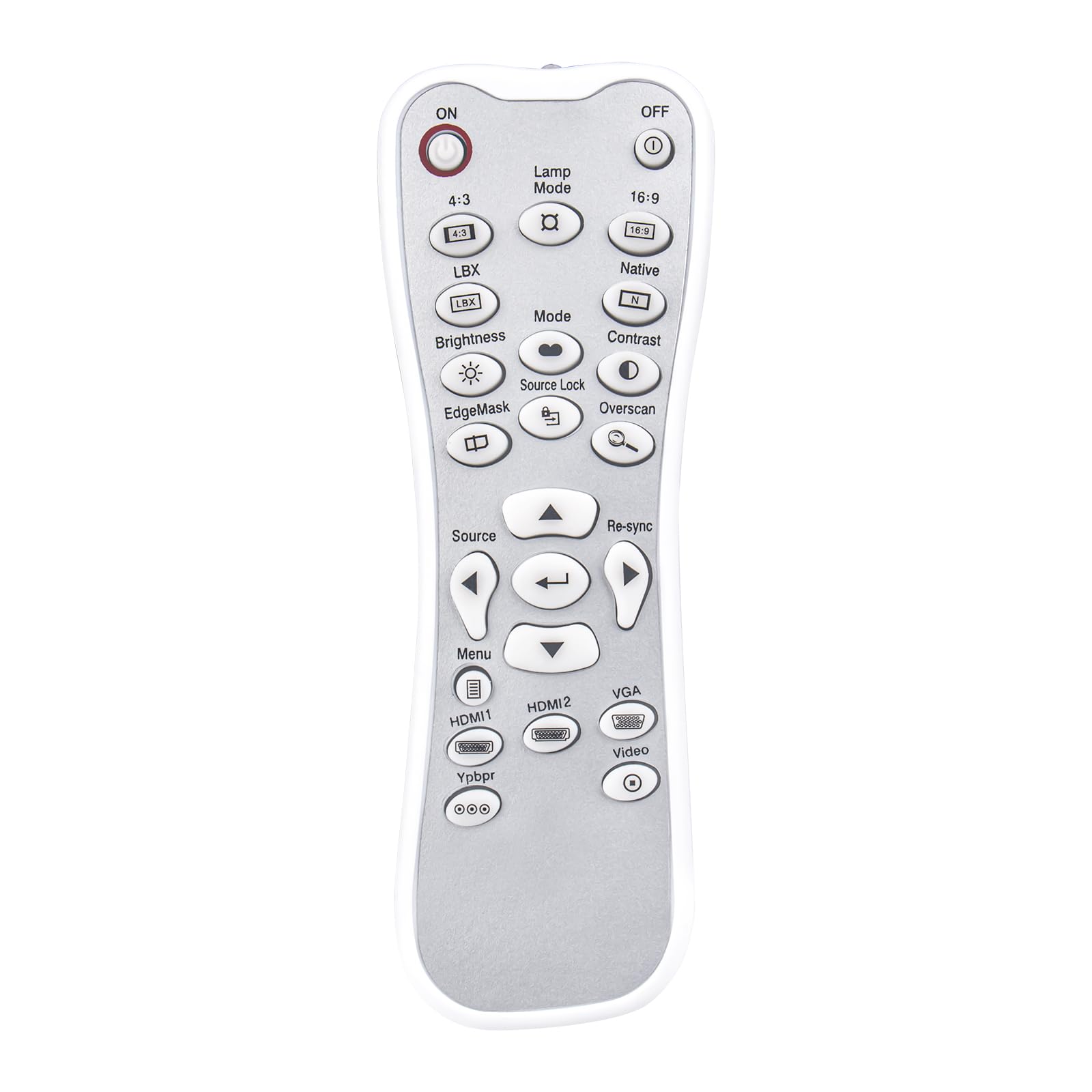
The remote features standard projector control buttons. Refer to your projector's manual for specific functions of each button. Common buttons include:
- ON/OFF: Powers the projector on or off.
- Lamp Mode: Adjusts lamp brightness settings.
- Source: Selects input sources (HDMI1, HDMI2, VGA, Video, YPbPr).
- Menu: Accesses the projector's on-screen menu.
- Navigation Buttons: Up, Down, Left, Right arrows for menu navigation.
- Enter/OK: Confirms selections.
- Re-sync: Resynchronizes the input signal.
- Contrast/Brightness: Adjusts image contrast and brightness.
- Mode: Cycles through display modes.
- Aspect Ratio: 4:3, 16:9, Native, LBX.
Maintenance
Cleaning
Wipe the remote control with a soft, dry cloth. Do not use abrasive cleaners, solvents, or harsh chemicals, as these may damage the surface or internal components.
Battery Replacement
Replace batteries when the remote control's performance degrades or stops functioning. Always replace both batteries at the same time with new AAA batteries. Do not mix old and new batteries or different types of batteries.
Storage
Store the remote control in a cool, dry place away from direct sunlight, extreme temperatures, and high humidity. Remove batteries if the remote will not be used for an extended period to prevent leakage.
Troubleshooting
| Problem | Possible Cause | Solution |
|---|---|---|
| Remote not responding | Dead or incorrectly installed batteries | Check battery orientation and replace with fresh AAA batteries. |
| Remote has limited range | Obstruction between remote and projector; weak batteries | Ensure a clear line of sight to the projector's IR receiver. Replace batteries. |
| Specific buttons not working | Projector model incompatibility for that function | While the remote is broadly compatible, some specific functions may vary by projector model. Refer to your projector's manual for detailed button functionality. |
If issues persist after troubleshooting, please contact customer support for further assistance.
Specifications
- Model Name: L-27-5KEY
- Brand: ECONTROLLY
- Connectivity Technology: Infrared
- Controller Type: Button Control
- Maximum Range: 33 Feet (approximately 10 meters)
- Item Weight: 1 Ounce (approximately 28 grams)
- Dimensions (L x W x H): 5"L x 2"W x 0.6"H (approximately 12.7 cm x 5.08 cm x 1.52 cm)
- Power Source: 2 x AAA Batteries (not included)
- Special Feature: No Programming Required
- Compatible Devices: Optoma Projectors (specific models listed in Operating Instructions)

Warranty Information
All ECONTROLLY products undergo testing before shipping to ensure proper functionality. This remote control is designed for durability and wear resistance. For specific warranty details, please refer to the seller's policy at the time of purchase.
Customer Support
If you have questions about compatibility or require further assistance, please contact us. You can leave a message online, and we will provide guidance.
Note: If your specific projector model is not listed in the compatibility section, please contact support before purchasing to confirm compatibility.
