
1. Introduction
The Varstrom EKD01 is a 2.4-inch IPS color TFT LCD display designed for electric bicycle motor kits. This display provides essential riding data, offers multiple language options, and includes Bluetooth connectivity for enhanced functionality. It is specifically engineered for compatibility with certain BAFANG motor systems.

Image: The Varstrom EKD01 Display installed on an e-bike, providing a clear view of its interface.
2. Compatibility and Setup
2.1 Compatibility
- Motor Protocol: Exclusively compatible with BAFANG electric motors utilizing the UART communication protocol (versions 5.0 to 5.8). This includes models such as BBS02B, BBS01B, and HD.
- Incompatible Motors: Not compatible with BAFANG CAN series motors, BBS Wheel Hub Motors, or motors from other brands.
- Connector Type: Features a 5-PIN round female connector. Ensure your motor kit has a matching 5-PIN male connector.
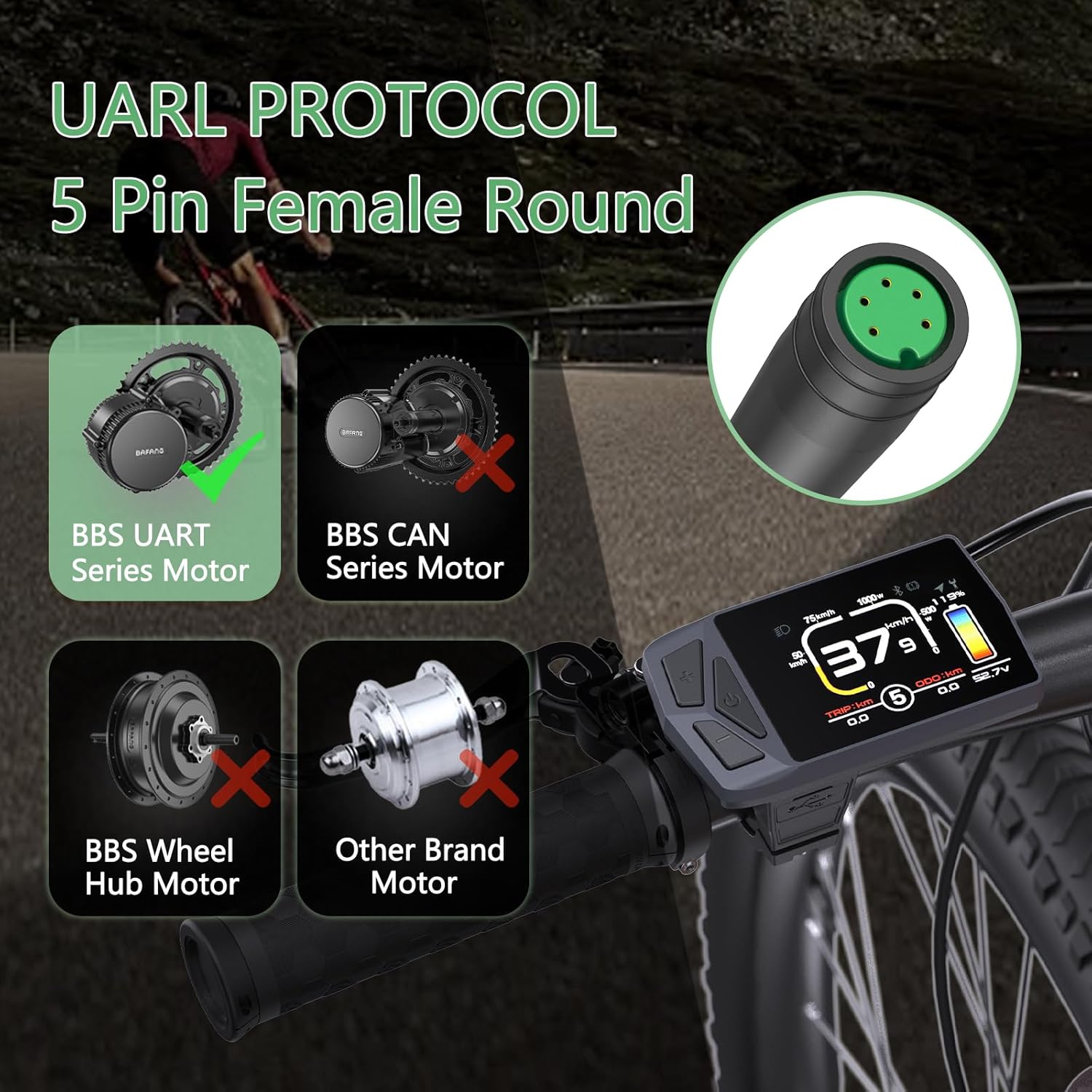
Image: Visual guide to motor compatibility and the 5-pin female round connector type.
2.2 Installation
- Handlebar Mounting: The display is designed to fit handlebars with a diameter of 22.2mm or 25.4mm. Securely mount the display to your preferred position on the handlebar using the provided bracket.
- Cable Connection: Connect the display's 5-PIN female connector to the corresponding male connector from your BAFANG motor kit. Ensure the connection is firm and secure.
- Wiring Verification: It is crucial to confirm that the wiring diagram of your motor's cable matches the display's wiring. If the wiring diagrams are different, the display will not function correctly. Consult the detailed cable parameters section for reference.
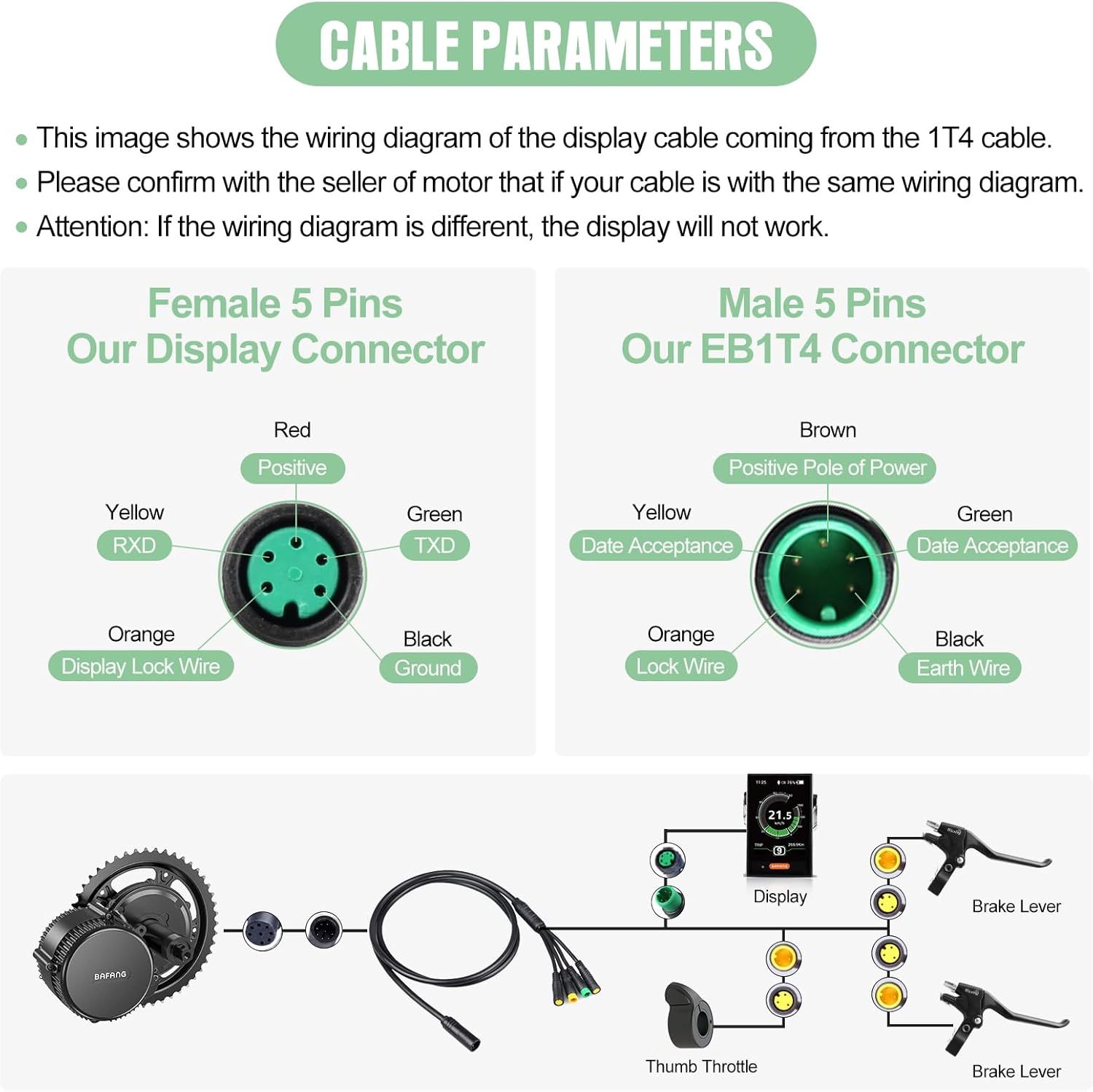
Image: Detailed cable parameters illustrating the wiring for the display and EB1T4 connectors.
3. Operating Instructions
3.1 Display Features
- Screen: 2.4-inch IPS color TFT LCD for clear visibility.
- Buttons: Three integrated buttons for easy navigation and control.
- PAS Levels: Adjustable Power Assist System (PAS) levels from 0 to 9, allowing customization of motor assistance.
- USB Port: Type-C charging port for convenience.
- Multilingual Support: Supports 8 languages: English, French, German, Spanish, Italian, Polish, Dutch, and Czech.
- Bluetooth Connectivity: Enables real-time navigation and data synchronization with compatible devices.
- Navigation Function: Provides navigation assistance (initial 5 trials are free, continued use may require payment).
- ODO Reset: The odometer (total distance) can be reset.
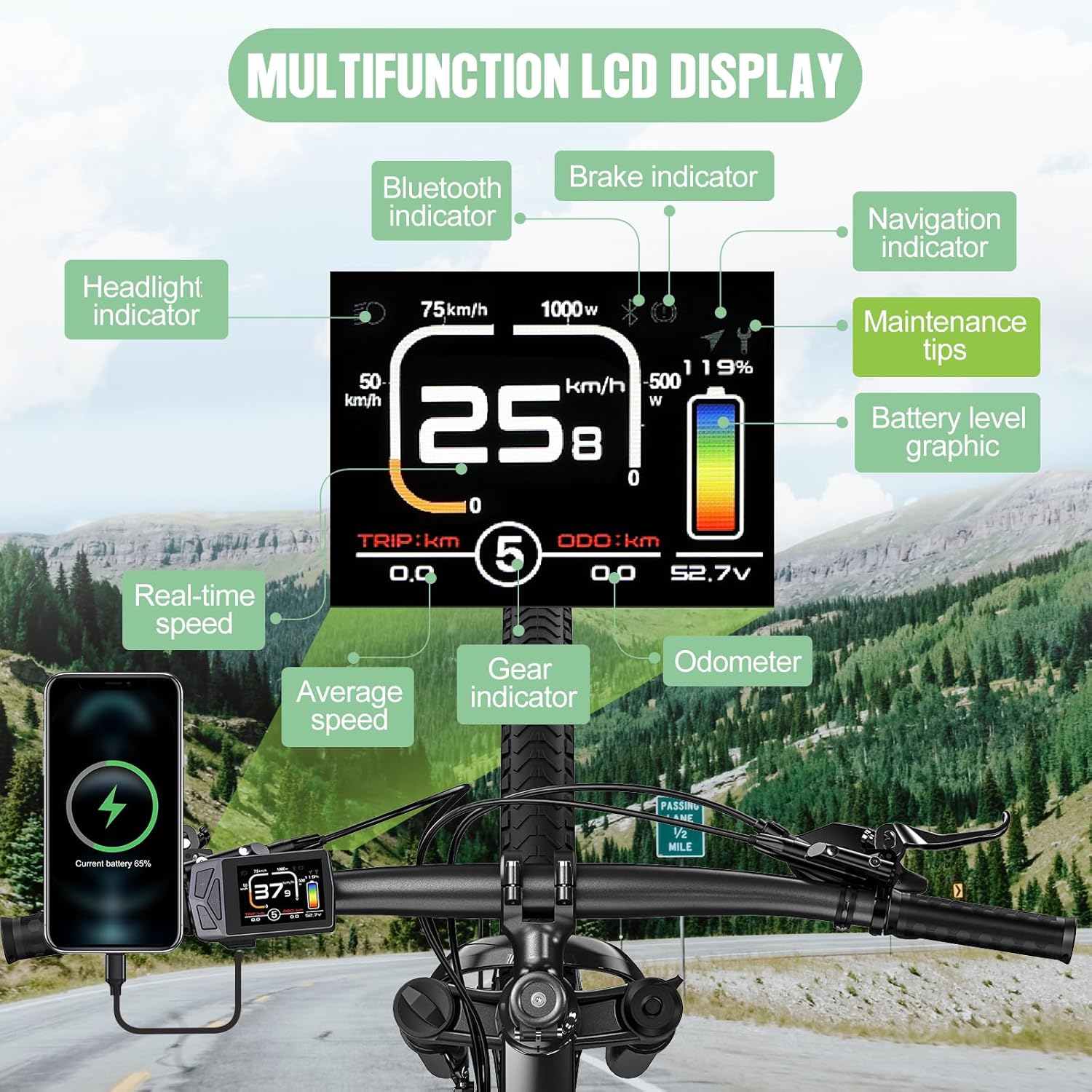
Image: Overview of the multifunction LCD display and its various indicators.
3.2 Basic Operation
Detailed operating instructions for button functions and menu navigation will be provided in the full product manual. Generally, the integrated buttons allow you to power on/off, adjust PAS levels, access settings, and view different riding metrics.
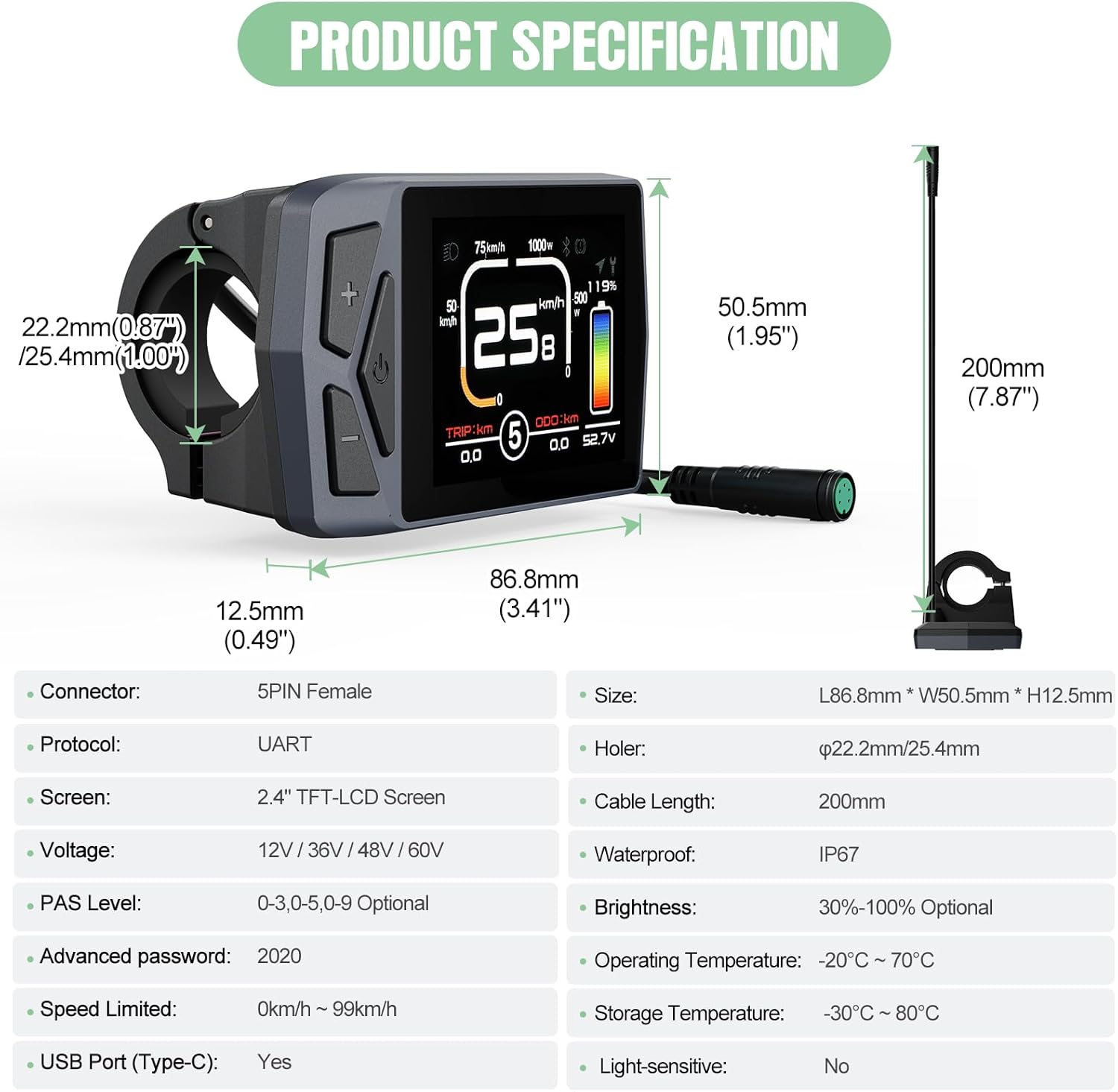
Image: Key features of the EKD01 display, including its technical specifications and user-configurable options.
4. Product Specifications
| Feature | Specification |
|---|---|
| Connector Type | 5-PIN Female |
| Communication Protocol | UART |
| Screen Type | 2.4" TFT-LCD Color IPS |
| Voltage Compatibility | 12V / 36V / 48V / 60V |
| PAS Level Options | 0-3, 0-5, 0-9 (Optional) |
| Default Password | 2020 |
| Speed Limit Range | 0 km/h - 99 km/h |
| USB Port | Type-C |
| Dimensions (L x W x H) | 86.8 mm x 50.5 mm x 12.5 mm |
| Handlebar Clamp Diameter | 22.2 mm / 25.4 mm |
| Cable Length | 200 mm |
| Waterproof Rating | IP67 |
| Brightness Adjustment | 30% - 100% (Optional) |
| Operating Temperature | -20°C ~ 70°C |
| Storage Temperature | -30°C ~ 80°C |
| Light-sensitive | No |
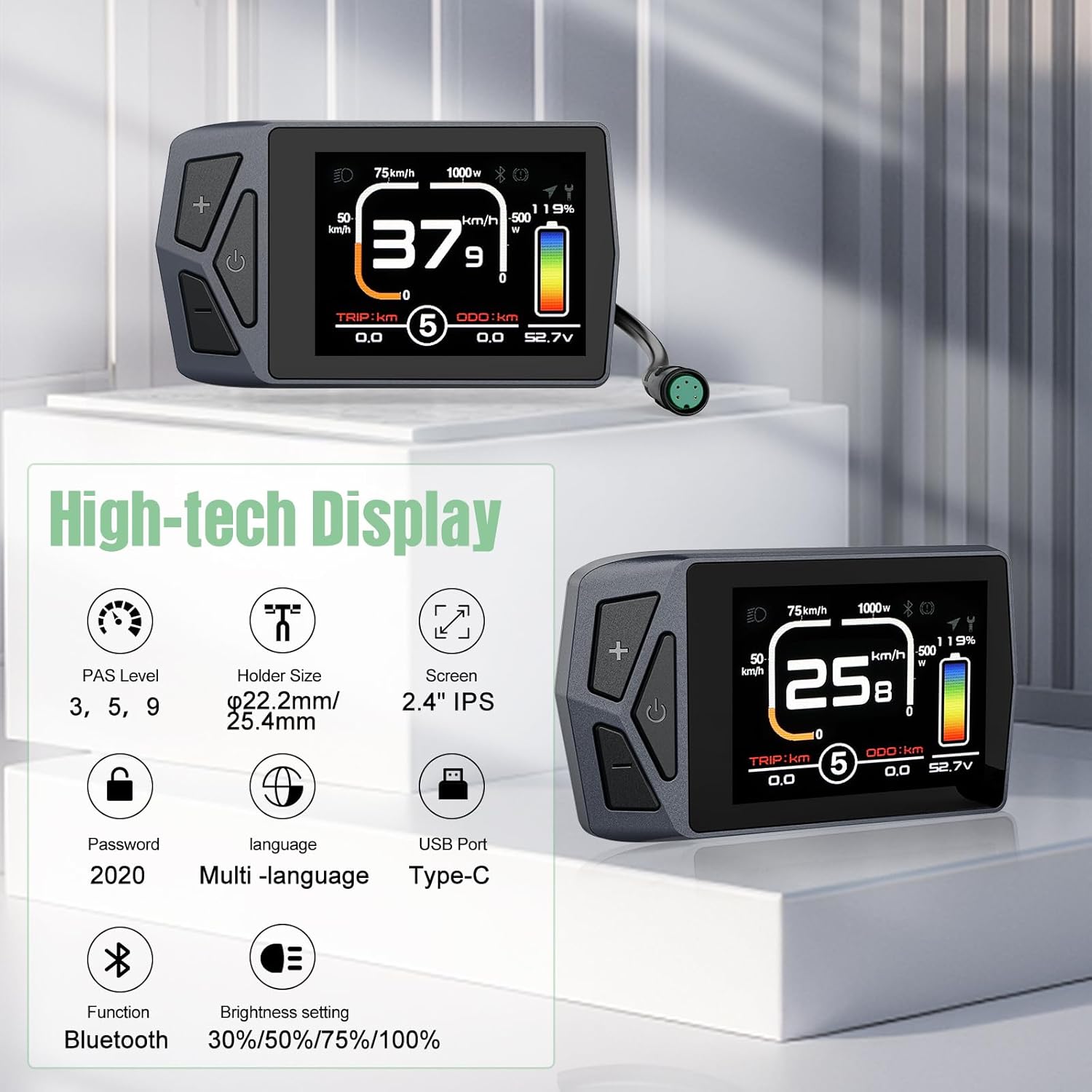
Image: Comprehensive product specifications and dimensions of the EKD01 display.
5. Maintenance
- Cleaning: The display housing is made of good quality ABS plastic with an IP67 waterproof rating. Clean the display regularly with a soft, damp cloth. Avoid using abrasive cleaners or solvents that could damage the screen or housing.
- Environmental Conditions: While the display is designed for a wide range of operating and storage temperatures, avoid prolonged exposure to extreme heat or cold, and direct sunlight when not in use, to ensure longevity.
- Connector Care: Keep the 5-PIN connector clean and free from dirt or moisture to ensure reliable electrical contact.
6. Troubleshooting
- Display Not Powering On:
- Check all cable connections, especially the 5-PIN connector, to ensure they are securely seated.
- Verify that your BAFANG motor kit is powered on and functioning correctly.
- Ensure the motor's communication protocol is UART (versions 5.0-5.8) and not CAN Bus.
- Incorrect Readings or Malfunctions:
- If the wiring diagram of your motor's cable does not match the display's, the display will not work correctly. Refer to the 'Cable Parameters' image in the Setup section and consult with your motor's seller for verification.
- Check for any physical damage to the display or cables.
- Bluetooth Connectivity Issues:
- Ensure Bluetooth is enabled on both the display and your pairing device.
- Move closer to the display to ensure a strong signal.
- Navigation Not Working:
- Confirm that the navigation function has available trials or has been activated for continued use.
- Ensure your paired device has a stable GPS signal.
For persistent issues, please contact customer support.
7. Warranty and Support
7.1 Product Warranty
The Varstrom EKD01 Display comes with a One Year Limited Warranty from the date of purchase. This warranty covers manufacturing defects and material faults under normal use. Please retain your proof of purchase for warranty claims.
7.2 Customer Support
Varstrom is committed to providing excellent customer service. We have professional technical teams located in the UK and Poland to offer expert support both before and after your purchase. For technical assistance, troubleshooting, or warranty inquiries, please contact our support team through the official Varstrom website or your retailer.


