
1. Introduction
The Autel MaxiDiag MD600CV is a professional diagnostic and service tool designed for 12-24V diesel trucks, buses, trailers, and commercial vehicles. This handheld device offers extensive system coverage and service functions for Class 3 to Class 9 vehicles, providing comprehensive diagnostic capabilities and maintenance solutions.
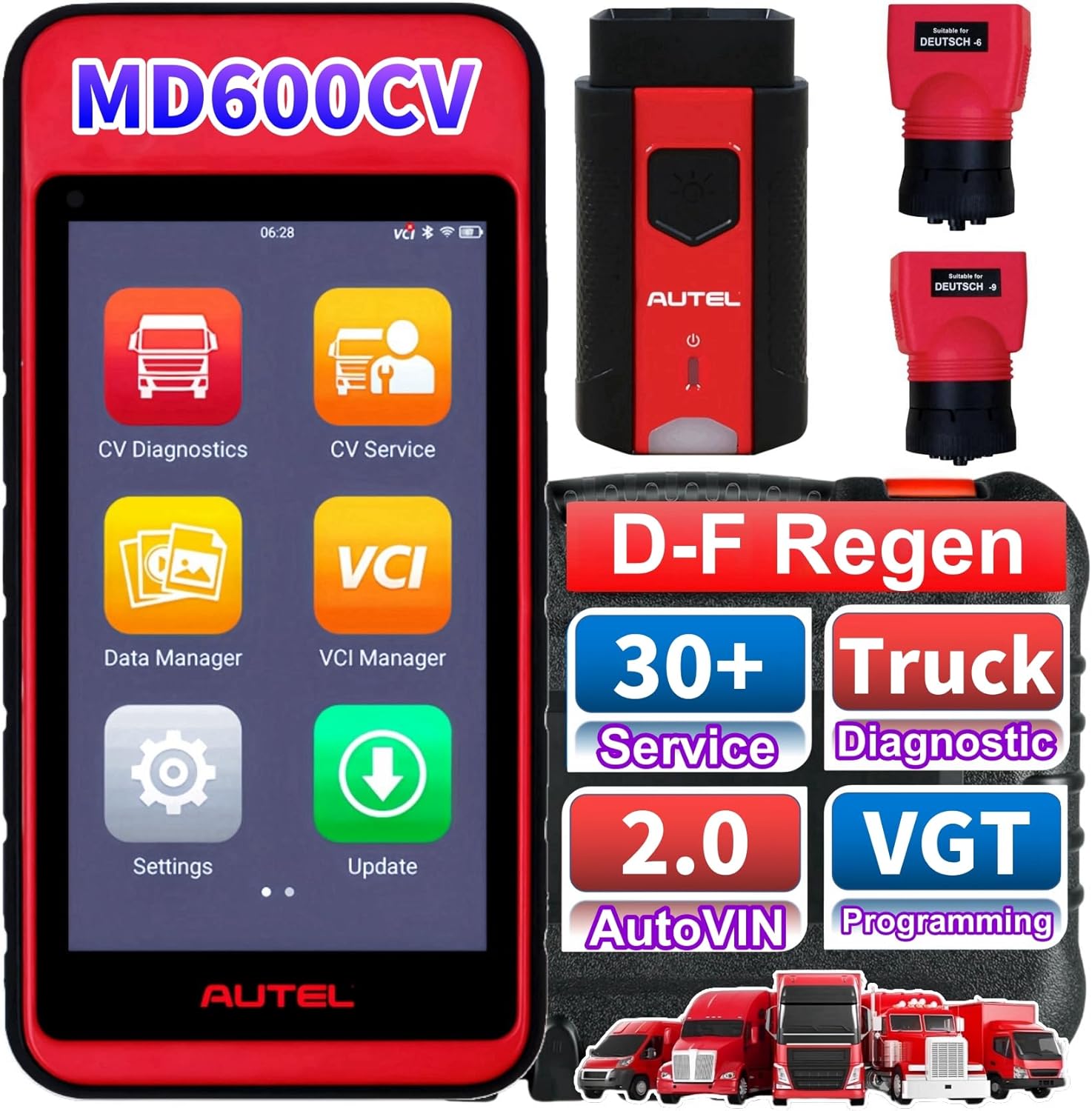
Figure 1.1: Autel MaxiDiag MD600CV Scan Tool, showing the tablet, VCI, and Deutsch connectors, highlighting key features like DPF Regen, 30+ Service, Truck Diagnostic, 2.0 AutoVIN, and VGT Programming.
2. Setup
2.1 Package Contents
- MaxiVCIV200 (Wireless Bluetooth VCI)
- MD600CV tablet
- Deutsch 6-pin adapter
- Deutsch 9-pin adapter
- Necessary cables and power adapters
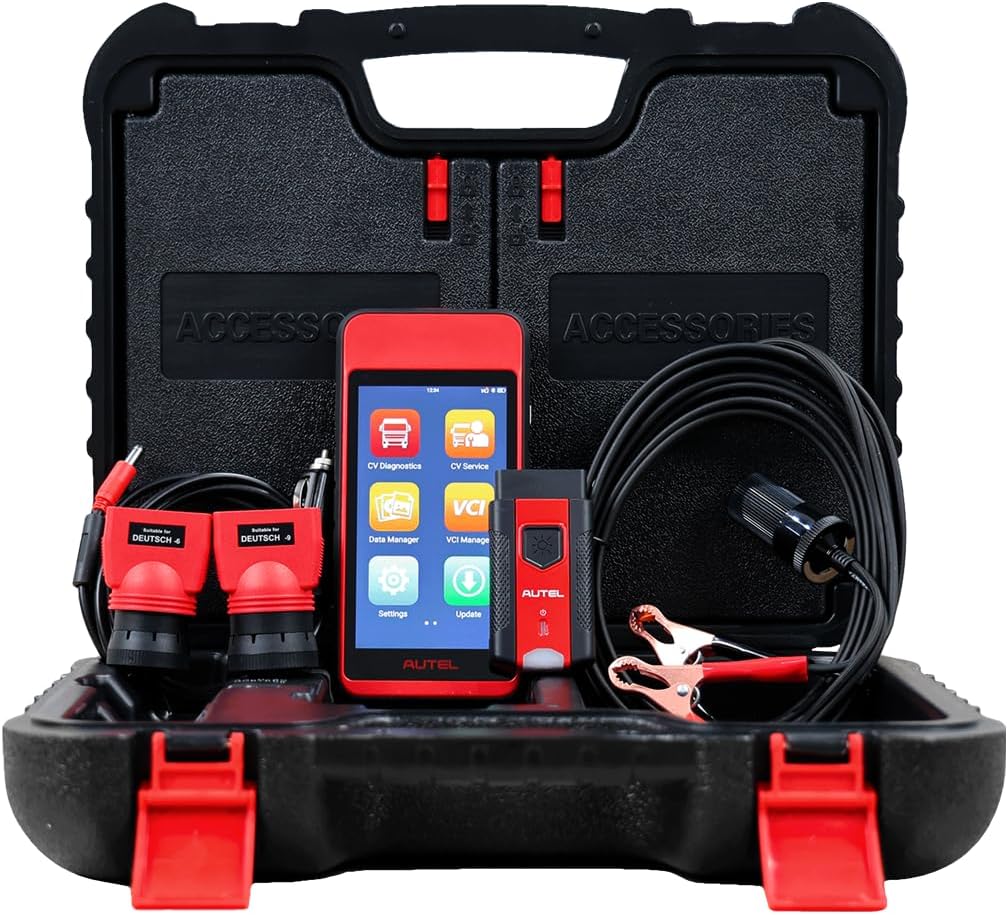
Figure 2.1: The complete Autel MaxiDiag MD600CV kit, including the tablet, VCI, cables, and Deutsch connectors, neatly organized in its protective hard case.
2.2 Initial Connection
- Ensure the MD600CV tablet is sufficiently charged.
- Connect the MaxiVCIV200 to the vehicle's diagnostic port using the appropriate Deutsch adapter (6-pin or 9-pin).
- Power on the MD600CV tablet. The tablet will automatically establish a wireless Bluetooth connection with the VCI.
- Follow the on-screen prompts to select the vehicle type and begin diagnostics.
3. Operating Instructions
3.1 All System Diagnostics
The MD600CV provides comprehensive diagnostics for all available systems in supported vehicles. This includes reading and clearing diagnostic trouble codes (DTCs), viewing ECU information, and displaying live data streams and freeze frame data.

Figure 3.1: Visual representation of the professional system diagnosis process, illustrating how the tool can Read/Clear Codes, access ECU Information, View Live Data, view Freeze Frame Data, and perform Auto Scan on a truck.
3.2 Auto Scan & AutoVIN
The Auto Scan feature automatically identifies the vehicle and scans all available systems for faults, significantly improving diagnostic efficiency. AutoVIN technology allows for quick identification of vehicle make, model, and year information with a single click.

Figure 3.2: The Auto Scan VIN interface, demonstrating options for Auto Scan 2.0, Auto VIN, Manual Input, and Scan VIN, with a truck in the background, emphasizing faster vehicle identification.
3.3 Service Functions
The MD600CV is equipped with over 30 common maintenance and service tasks. Key service functions include:
- DPF Regeneration: Supports DPF regeneration, DPF reset, DPF related information reset, DPF state reset, and DPF forced regeneration.
- Oil Light Reset: Resets the oil service light after an oil change.
- Brake Bleed: Performs brake bleeding procedures.
- Throttle Body Relearn: Adapts the throttle body after replacement or cleaning.
- Injector Coding/Reset: Codes new injectors or resets existing ones.
- VGT Programming: Variable Geometry Turbocharger programming.
- Idle Shutoff: Adjusts idle shutoff parameters.
- SAS Reset: Steering Angle Sensor reset.
- BMS: Battery Management System reset.
- Airbag Reset: Resets airbag system faults.

Figure 3.3: Icons representing various service functions available on the MD600CV, such as Oil Reset, ABS Bleeding, Injector Coding, SAS Reset, Suspension, VGT Learning, BMS, Air Suspension, and SRS.

Figure 3.4: Illustration of the DPF Regeneration function, showing the tablet and VCI alongside a truck and a DPF component, indicating the tool's capability to manage exhaust aftertreatment system problems.
3.4 Vehicle Coverage and Protocols
The MD600CV supports a wide range of vehicle types and communication protocols:
- Light Duty Vehicles: Mercedes-Benz, Ford, Hino, Chevrolet, Dodge, Isuzu.
- Buses: Thomas Built, IC Bus, Volkswagen, Volvo.
- Heavy Duty Vehicles: Freightliner, International, Kenworth, Mack, Peterbilt, Sterling, Volkswagen, Volvo, Ford, Thomas Built, Cummins, Detroit, Caterpillar, Navistar, Paccar, GM, Dodge, Nissan, Agrale, DAF, Isuzu.
- Engine Coverage: Detroit, Mack, Cummins, Caterpillar, Navistar, Paccar, Hino, Isuzu, MWM, PSI.
- ABS System Coverage: Bendix, WABCO.
- Supported Protocols: J1708, J1939, J1587, CDL, PLC.
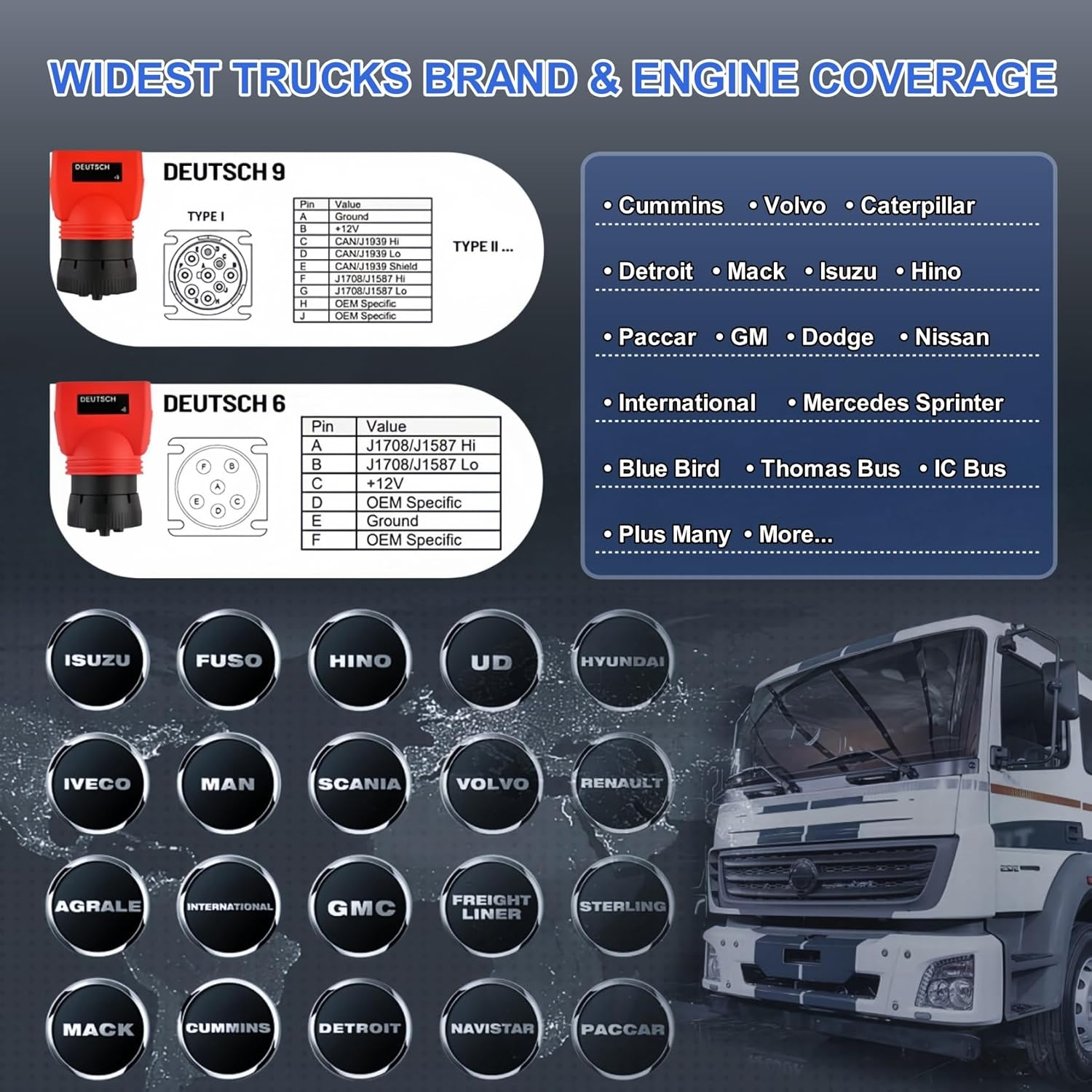
Figure 3.5: Detailed graphic showing the extensive truck brand and engine coverage, including Deutsch 9 and 6 pin connector specifications, and a comprehensive list of supported manufacturers.
3.5 Expert Mode
Expert Mode provides direct access to OE-specific system components, allowing for in-depth diagnostics and control over systems such as Engine, Exhaust, Gearbox, ABS, EBS, SUS, and BCM.
3.6 Official Product Video
Video 3.1: Autel MD600CV Detailed Function Introduction Video. This video provides an overview of the Autel MaxiDiag MD600CV, showcasing its features, compact design, extensive vehicle coverage for light to heavy-duty vehicles, and various diagnostic and service functions. It highlights the tool's ease of use and its utility for both owner-operators and fleet technicians.
4. Maintenance
To ensure optimal performance and longevity of your Autel MaxiDiag MD600CV, regular maintenance is recommended:
- Software Updates: Regularly check for and install software updates to ensure the latest vehicle coverage and diagnostic functions. The tablet features an 'Update' icon for easy access to new software versions.
- Cleaning: Keep the tablet and VCI clean and free from dust and debris. Use a soft, dry cloth for cleaning.
- Storage: Store the device in its protective case when not in use to prevent damage.
- Battery Care: Charge the tablet regularly to maintain battery health. The Android-based touchscreen offers great battery life.
- Data Management: Utilize the 64GB of software and data storage capacity efficiently. Regularly back up important diagnostic reports.
5. Troubleshooting
If you encounter issues with your Autel MaxiDiag MD600CV, consider the following basic troubleshooting steps:
- No Power: Ensure the tablet is fully charged or connected to a power source. Check power cables and connections.
- Connection Issues: Verify that the MaxiVCIV200 is securely connected to the vehicle's OBD-II port and that Bluetooth is enabled on the tablet. Restart both the tablet and the vehicle's ignition.
- Diagnostic Errors: Ensure the correct vehicle brand and model are selected. Check for any pending software updates. If a specific code is displayed, refer to the vehicle's service manual or an online database for detailed information.
- Slow Performance: Close any unnecessary applications running in the background. Ensure sufficient storage space is available.
- Software Glitches: Try restarting the tablet. If issues persist, consider performing a factory reset (note: this will erase all user data, so back up important files first).
For persistent or complex issues, contact Autel customer support or an authorized service center.
6. Specifications
| Feature | Specification |
|---|---|
| Model | Autel scanner MD600CV |
| Operating System | Android 9.0 |
| Display Resolution | 1280x720 |
| Item Weight | 5.85 pounds |
| Package Dimensions | 14.84 x 11.69 x 4.76 inches |
| Camera | 8 Megapixel |
| Storage Capacity | 64 GB |
| Connectivity | Wireless Bluetooth VCI (MaxiVCIV200) |
| Supported Protocols | J1708, J1939, J1587, CDL, PLC |
7. Warranty and Support
For detailed information regarding the product warranty, please refer to the warranty card included with your Autel MaxiDiag MD600CV or visit the official Autel website. For technical support, software updates, and service inquiries, please contact Autel customer service or an authorized Autel dealer. Keep your purchase receipt and product serial number handy for faster assistance.