
Zunate SC-TS01
Zunate 5.0 Earbuds User Manual
Model: SC-TS01
1. Introduction
Thank you for choosing the Zunate 5.0 Earbuds. These earbuds are designed to provide a high-quality audio experience with convenience and durability. Featuring advanced 5.0 technology, a comfortable in-ear design, and an IPX4 waterproof rating, they are suitable for various activities, including sports. This manual will guide you through the setup, operation, and maintenance of your new earbuds.

Image: The Zunate panda-shaped charging case, featuring a white top with large black eyes and a black base, designed for storing and charging the earbuds.
2. Package Contents
Please check the package contents to ensure all items are present:
- 2 x Zunate Earbuds (Left and Right)
- 1 x Panda-shaped Charging Case
- 4 x Earphone Sleeves (various sizes)
- 1 x Lanyard
- 1 x Micro USB Charging Cable
- 1 x User Manual (this document)

Image: All components included in the Zunate Earbuds package: the panda charging case, a Micro USB cable, and multiple pairs of earphone sleeves.
3. Product Overview
Earbuds
- Ergonomic Design: 45° in-ear design for comfortable and secure fit.
- Touch Control: Intuitive controls for music playback and call management.
- Charging Contacts: Located on the bottom of each earbud for charging within the case.
- Microphone: Integrated for hands-free calls and noise cancelling.

Image: A close-up top view of the left and right Zunate earbuds, highlighting their smooth finish and the charging contact points.
Charging Case
- Panda Design: Unique and portable charging case.
- Charging Slots: Dedicated slots for each earbud with charging pins.
- Micro USB Port: For charging the case itself.

Image: The Zunate panda charging case with the earbuds removed, revealing the charging contacts inside the earbud slots.
4. Specifications
| Feature | Detail |
|---|---|
| Chip | Jerry |
| Bluetooth Version | V5.0 |
| Bluetooth Protocols | HFP, HSP, A2DP, AVRCP |
| Wireless Distance | 10 m / 32.8 ft |
| Earbud Battery Capacity | 50mAh (Lithium Battery) |
| Charging Case Battery Capacity | 500mAh (Lithium Battery) |
| Music Playtime | Approx. 4 hours |
| Charging Time | Approx. 2 hours |
| Charging Port | Micro USB |
| Waterproof Rating | IPX4 |
| Horn Diameter | Approx. 8 mm / 0.3 in |

Image: The underside of the Zunate charging case, displaying the model name 'SC-TS01' and input/capacity details.
5. Setup
5.1 Charging the Earbuds and Case
Before first use, it is recommended to fully charge both the earbuds and the charging case.
- Charge Earbuds: Place the earbuds into their respective slots in the charging case. Ensure the charging contacts align. The earbuds will begin charging automatically.
- Charge Case: Connect the Micro USB charging cable to the charging port on the back of the case and the other end to a USB power source (e.g., wall adapter, computer USB port).
- Charging Indicators: Refer to the LED indicators on the case and earbuds (if present) for charging status. A full charge typically takes about 2 hours.
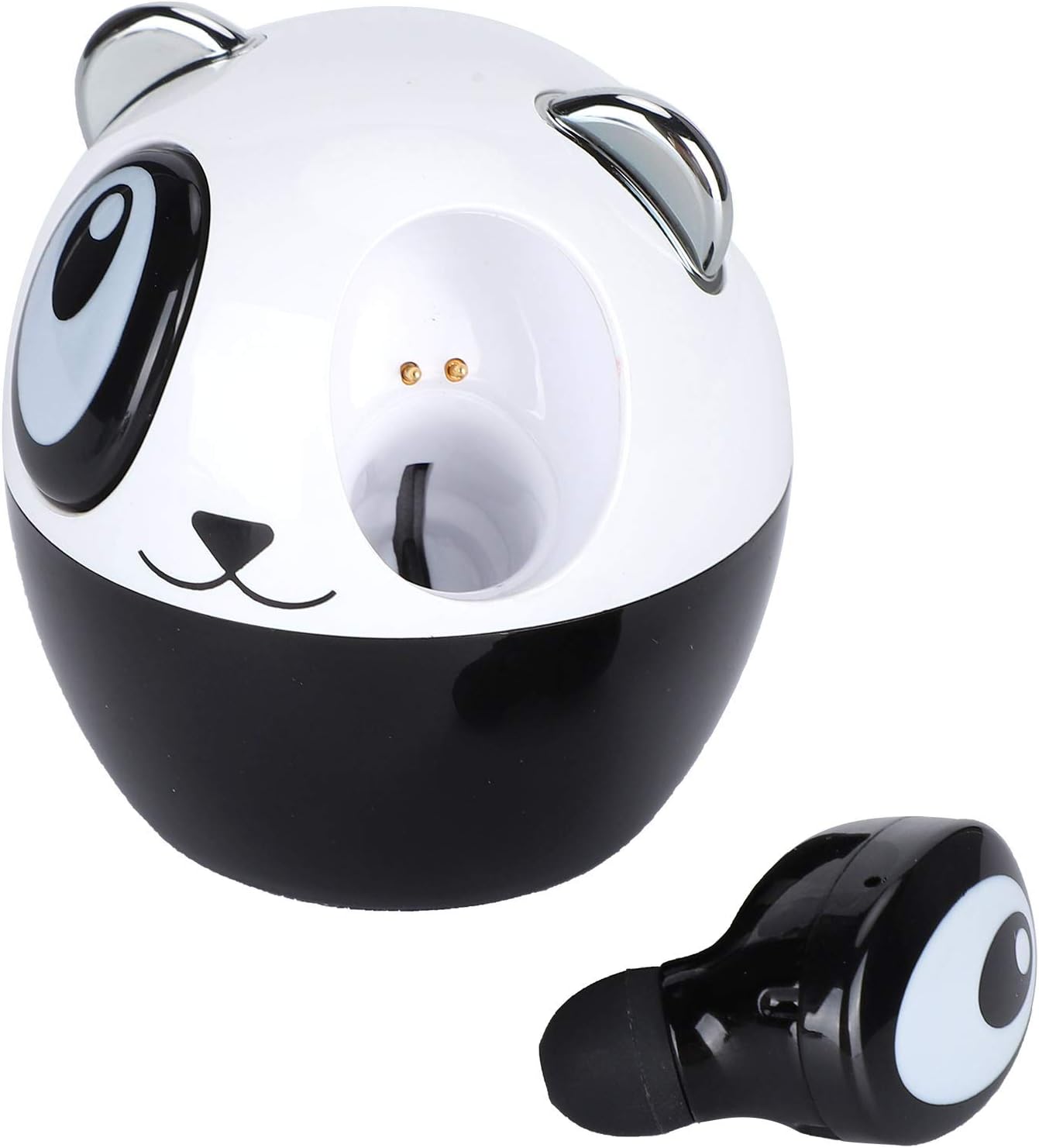
Image: The Zunate panda charging case with one earbud placed inside, illustrating how the earbud sits in its charging slot.
5.2 Pairing with Your Device
Follow these steps to pair your Zunate Earbuds with your smartphone or other device:
- Power On: Take both earbuds out of the charging case. They will automatically power on and enter pairing mode. You may hear an audible prompt.
- Activate Bluetooth: On your device, go to the Bluetooth settings and ensure Bluetooth is enabled.
- Select Device: Look for "Zunate Earbuds" or a similar name in the list of available Bluetooth devices. Tap on it to connect.
- Confirmation: Once connected, you will hear a confirmation sound from the earbuds, and your device will show them as connected.
Note: If the earbuds do not connect automatically, try placing them back in the case and taking them out again. If pairing fails, try resetting the earbuds (refer to Troubleshooting section).
6. Operating the Earbuds
The Zunate Earbuds feature touch controls for easy management of your audio and calls.
6.1 Music Playback
- Play/Pause: Single tap on either earbud.
- Next Track: Double tap the right earbud.
- Previous Track: Double tap the left earbud.
- Volume Up: Triple tap the right earbud.
- Volume Down: Triple tap the left earbud.
6.2 Phone Calls
- Answer/End Call: Single tap on either earbud.
- Reject Call: Press and hold either earbud for 2 seconds.
6.3 Voice Assistant
- Activate Voice Assistant: Press and hold either earbud for 3 seconds (e.g., Siri, Google Assistant).

Image: A visual representation of the Zunate earbuds, emphasizing their HIFI sound capabilities and ergonomic 45-degree in-ear design for comfort.
7. Maintenance and Care
Proper care will extend the lifespan of your Zunate Earbuds:
- Cleaning: Regularly clean the earbuds and charging case with a soft, dry, lint-free cloth. Do not use harsh chemicals or abrasive materials.
- Earphone Sleeves: Remove and clean the earphone sleeves periodically with mild soap and water. Ensure they are completely dry before reattaching.
- Charging Contacts: If charging issues occur, gently clean the charging contacts on both the earbuds and the case with a cotton swab dipped in rubbing alcohol. Ensure they are dry before use.
- Storage: When not in use, always store the earbuds in their charging case to protect them and keep them charged.
- Water Resistance: The earbuds are IPX4 waterproof, meaning they are resistant to splashing water from any direction. Do not submerge them in water or expose them to heavy rain. Dry them thoroughly if they get wet.

Image: The Zunate panda charging case and an earbud, set against a backdrop of a person exercising, highlighting the IPX4 waterproof rating for sweat and light rain resistance.
8. Troubleshooting
If you encounter any issues with your Zunate Earbuds, please refer to the following common problems and solutions:
| Problem | Possible Solution |
|---|---|
| Earbuds won't turn on. | Ensure earbuds are charged. Place them in the charging case for a few minutes, then take them out. |
| Earbuds won't pair with device. |
|
| Only one earbud is working. |
|
| No sound or low volume. |
|
| Charging case not charging. | Check the USB cable and power adapter. Try a different cable or power source. Ensure the charging port is clean. |
8.1 Earbud Reset Procedure
If you experience persistent pairing or connection issues, a factory reset may help:
- Delete "Zunate Earbuds" from your device's Bluetooth paired list.
- Place both earbuds back into the charging case.
- While earbuds are in the case, press and hold the touch area on both earbuds simultaneously for approximately 10-15 seconds until you see an indicator light flash (if applicable) or hear a reset sound.
- Close the charging case lid, then open it and take out the earbuds to re-enter pairing mode.
- Attempt to pair with your device again.
9. Safety Information
- Do not disassemble, repair, or modify the product. This may cause fire, electronic breakdown, or even complete damage to the product.
- Keep the product away from extreme temperatures (hot or cold), direct sunlight, and moisture.
- Avoid dropping or subjecting the earbuds and case to strong impacts.
- Do not use the earbuds at excessively high volumes for prolonged periods, as this may cause hearing damage.
- Keep out of reach of children and pets. Small parts may pose a choking hazard.
- Dispose of the product responsibly according to local regulations. Do not dispose of with household waste.
10. Warranty and Support
Zunate products are designed for reliability and performance. For any warranty claims or technical support, please refer to the retailer or platform where you purchased the product. Keep your proof of purchase for warranty purposes.
For more information or assistance, please visit the official Zunate store or contact customer support through the platform of purchase.
Visit the Zunate Store on Amazon.