
1. Introduction
The Bosch Professional Detector GMS 120-27 is designed for quick and accurate location of various materials within walls, ceilings, and floors. This device assists in identifying metal (magnetic and non-magnetic), live electrical cables, and wooden substructures, ensuring safer drilling and construction activities. Its user-friendly interface and robust design make it suitable for professional use on construction sites.
2. Safety Information
Always read and understand all safety warnings and instructions before operating the device.
- Ensure the device is used within its specified operating conditions.
- Do not attempt to modify the device.
- Keep the device away from moisture and extreme temperatures.
- Always verify detection results with other information sources if possible, especially before drilling.
3. Package Contents
Verify that all items are present in the package:
- Bosch Professional Detector GMS 120-27
- Protective Case
- 2 x AA Alkaline Batteries
- Marker Pen
4. Product Overview
The GMS 120-27 detector features a robust design with a shock-absorbing rubber housing, providing durability and an IP54 rating for protection against dust and splashing water. Key components include a simplified mode selection interface, a central display, and an LED ring for clear object indication.
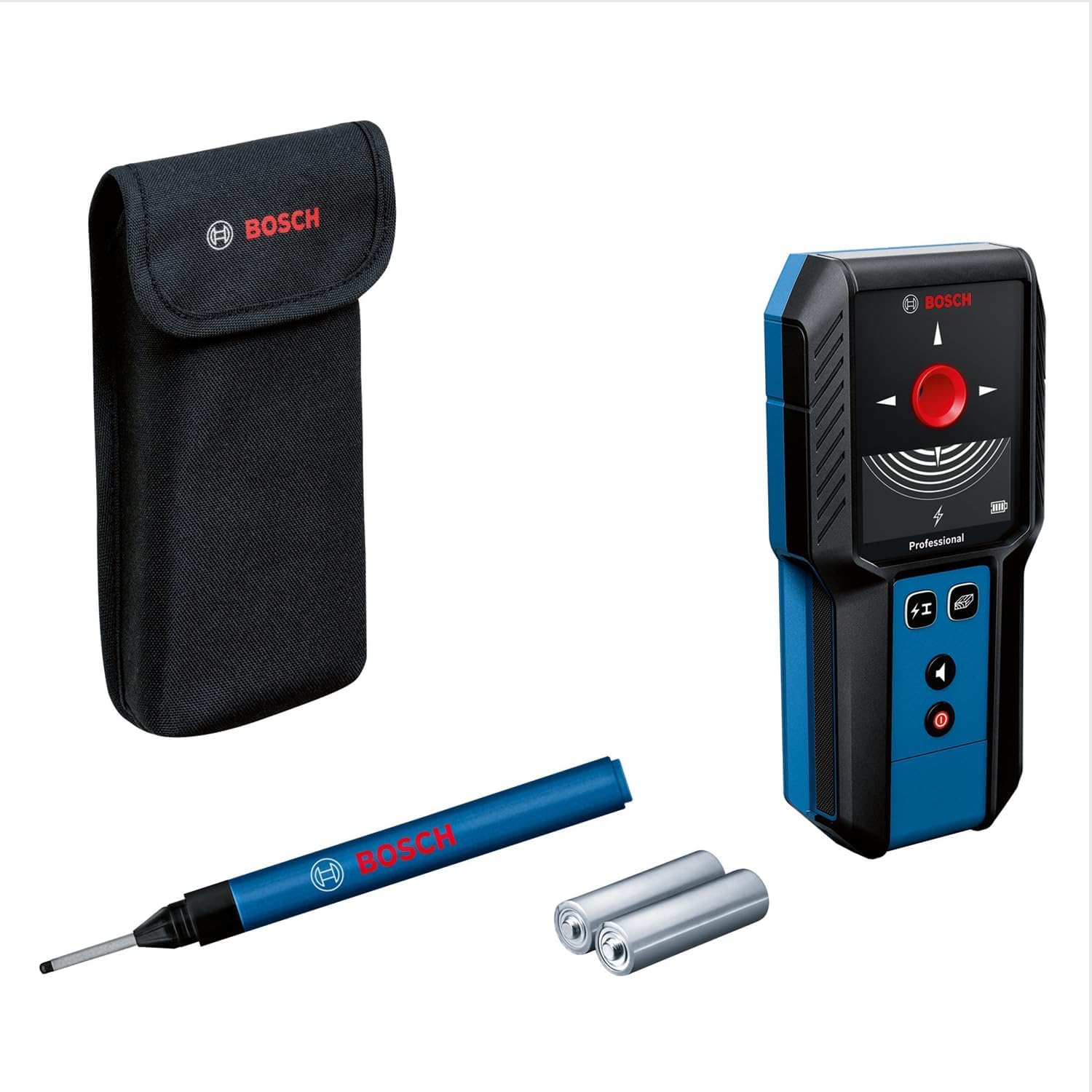
Image showing the Bosch Professional Detector GMS 120-27, highlighting its compact design and display.
Key Features:
- Tri-colour LED Ring: Indicates detection status (red for object detected, yellow for approaching object, green for no object).
- Material Identification: Distinguishes between magnetic metal, non-magnetic metal, live lines, and non-metallic materials.
- Simplified Mode Selection: Easy switching between detection modes.
- Robust Housing: Shock-absorbing rubber housing with IP54 protection.
5. Setup
5.1 Battery Installation
- Locate the battery compartment on the back of the device.
- Open the battery compartment cover.
- Insert the two AA alkaline batteries, ensuring correct polarity (+/-).
- Close the battery compartment cover securely.
5.2 Powering On/Off
- Press the power button to turn the device on.
- Press and hold the power button to turn the device off.
6. Operating Instructions
6.1 Mode Selection
The GMS 120-27 offers simplified mode selection for different detection tasks. Refer to the device's display for current mode indication.
6.2 Detection Process
- Select the appropriate detection mode for the material you are searching for.
- Place the detector flat against the surface to be scanned.
- Move the device slowly and steadily across the surface.
- Observe the LED ring and central display for indications.
- When an object is detected, the LED ring will glow yellow as you approach it, and red when directly over it. The display will also provide information on the type of material detected.
- Use the included marker pen to mark the detected location if necessary.
6.3 Detection Depths
The maximum detection depths are as follows:
- Non-magnetic Metal: 120 mm
- Magnetic Metal: 100 mm
- Voltage-conducting Wires: 50 mm
- Wood: 30 mm
7. Maintenance
7.1 Cleaning
- Clean the device with a soft, damp cloth. Do not use abrasive cleaners or solvents.
- Ensure the detection surface is free from dirt and debris for accurate readings.
7.2 Storage
- Store the device in its protective case when not in use.
- Remove batteries if the device will not be used for an extended period to prevent leakage.
- Store in a dry, dust-free environment, away from direct sunlight and extreme temperatures.
8. Troubleshooting
If the device is not functioning as expected, consider the following:
| Problem | Possible Cause | Solution |
|---|---|---|
| Device does not power on. | Low or dead batteries; incorrect battery installation. | Replace batteries with new AA alkaline batteries; ensure correct polarity. |
| Inaccurate detection. | Surface not clean; rapid movement; interference from other devices. | Clean the scanning surface; move the device slowly and steadily; avoid strong electromagnetic fields. |
| LED ring not responding. | No objects detected; device malfunction. | Ensure you are scanning an area with potential objects; if problem persists, contact customer support. |
9. Specifications
| Brand | Bosch Professional |
| Model Number | 0601081702 |
| Detection Depth (Non-magnetic Metal) | 120 mm |
| Detection Depth (Magnetic Metal) | 100 mm |
| Detection Depth (Voltage-conducting Wires) | 50 mm |
| Detection Depth (Wood) | 30 mm |
| Power Source | Battery Powered |
| Battery Type | 2 x AA Alkaline Batteries |
| Display Type | LED |
| Item Weight | 0.24 Kilograms |
| Material | Plastic |
| Protection Class | IP54 |
| Recommended Use | Construction site location |
10. Warranty and Support
For warranty information and customer support, please refer to the documentation provided with your purchase or visit the official Bosch Professional website.


