
1. Introduction
This manual provides detailed instructions for the safe and efficient use of your Beuiouer Portable USB Sport Mini MP3 Music Player. Please read this manual thoroughly before operating the device and retain it for future reference.
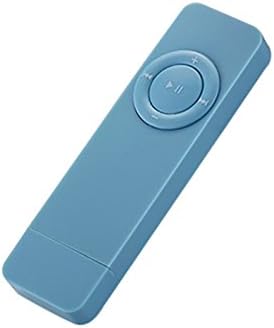
Image 1.1: The Beuiouer Portable USB Sport Mini MP3 Music Player, shown in blue. This compact device features a central control pad with play/pause and navigation buttons.
Key Features:
- Supports MP3 and WMA audio formats.
- Built-in rechargeable lithium battery for extended playback.
- Compact and lightweight design, suitable for sports and travel.
- Functions as a USB disk and TF card reader.
- Supports TF/SD cards up to 32GB (card not included).
2. Package Contents
Please verify that all items are present in your package:
- 1 x Beuiouer MP3 Player
- 1 x Rope (Lanyard)
Note: Other products, such as headphones or a TF card, are not included unless specified.
3. Setup
3.1 Charging the Device
- Locate the USB port on the MP3 player.
- Connect the MP3 player to a computer's USB port or a USB wall adapter (not included) using a compatible USB cable (not included).
- The device will begin charging. A full charge provides approximately 10 hours of playback time.

Image 3.1: Several Beuiouer MP3 players in various colors connected to a laptop via USB, illustrating the charging or data transfer process.
3.2 Inserting a TF/SD Card
- Ensure the MP3 player is powered off.
- Locate the TF/SD card slot on the side of the device.
- Gently insert a compatible TF/SD card (up to 32GB, not included) into the slot until it clicks into place. Ensure the card is inserted in the correct orientation.
Note: The device does not include internal storage; a TF/SD card is required for music playback.
3.3 Connecting Headphones
- Locate the 3.5mm headphone jack on the device.
- Insert your 3.5mm headphones (not included) firmly into the jack.
4. Operating Instructions
4.1 Power On/Off
- To power on: Press and hold the Play/Pause button (central button) for a few seconds until the device activates.
- To power off: Press and hold the Play/Pause button for a few seconds until the device shuts down.
4.2 Music Playback
- Ensure a TF/SD card with MP3 or WMA music files is inserted.
- Power on the device.
- Press the Play/Pause button to start or pause music playback.
- Use the "Previous Track" (<<) and "Next Track" (>>) buttons to navigate between songs.

Image 4.1: A person wearing the blue Beuiouer MP3 player with a lanyard, demonstrating its portability and ease of access during use.
4.3 Volume Control
- Press the "+" button to increase the volume.
- Press the "-" button to decrease the volume.
4.4 Using as a USB Disk / Card Reader
- Connect the MP3 player to your computer via a USB cable.
- The computer will recognize the device as a removable disk.
- You can now transfer music files to the inserted TF/SD card or use the device to read files from the card.
- Safely eject the device from your computer before disconnecting the USB cable.
5. Maintenance
- Cleaning: Use a soft, dry cloth to clean the device. Do not use liquid cleaners or solvents.
- Storage: Store the device in a cool, dry place away from direct sunlight and extreme temperatures.
- Battery Care: To prolong battery life, avoid fully discharging the battery frequently. Charge the device regularly, even if not in use for extended periods.
- Water Exposure: This device is not waterproof. Avoid exposure to water or high humidity.
6. Troubleshooting
6.1 Device Does Not Power On
- Ensure the battery is charged. Connect the device to a power source and allow it to charge for at least 30 minutes before attempting to power on again.
- Verify that the power button is being pressed and held correctly.
6.2 No Sound
- Check if headphones are properly connected to the 3.5mm jack.
- Increase the volume using the "+" button.
- Ensure the music files on the TF/SD card are not corrupted and are in a supported format (MP3, WMA).
- Try different headphones to rule out a headphone issue.
6.3 Cannot Transfer Files to TF/SD Card
- Ensure the device is properly connected to the computer via USB.
- Verify that the TF/SD card is correctly inserted and not damaged.
- Check if the TF/SD card has sufficient free space.
- Try formatting the TF/SD card (Note: This will erase all data on the card.).
6.4 Short Battery Life
- Ensure the device is fully charged before use.
- Battery performance can degrade over time with repeated charge cycles.
- Extreme temperatures can affect battery life.
7. Specifications
| Feature | Specification |
|---|---|
| Model | 56306A4 |
| Play Time | Approximately 10 hours |
| Standby Time | 48 hours |
| Dimensions | 8.5 x 2.5 x 0.9 cm (3.35 x 0.98 x 0.71 inches) |
| Weight | 17.9 g (0.776 ounces) |
| Battery Capacity | 260 mA (Built-in special lithium battery) |
| Memory Support | 2/4/8/16GB/32GB SD/TF card (not included) |
| Operation Mode | Keystroke |
| Interface | USB 2.0 |
| Headphone Interface | 3.5mm |
| Supported Audio Formats | MP3, WMA |
| Manufacturer | Beuiouer |
8. Warranty and Support
For warranty information and customer support, please refer to the documentation provided at the time of purchase or contact your retailer. Keep your proof of purchase for any warranty claims.
For further assistance, you may also visit the official Beuiouer website or contact their customer service department.