
1. Product Overview
The MekedeTech DUDUAUTO DUDU7 is a 13-inch 2K IPS touch screen car radio stereo designed for intelligent navigation and multimedia entertainment. It features an Android 13 operating system, 6GB RAM, and 64GB ROM, powered by an 8-core UIS7870 processor. This head unit supports both wired and wireless Carplay and Android Auto, offering advanced connectivity and audio capabilities. Please note that this specific model does not include a built-in 360-degree camera chip.
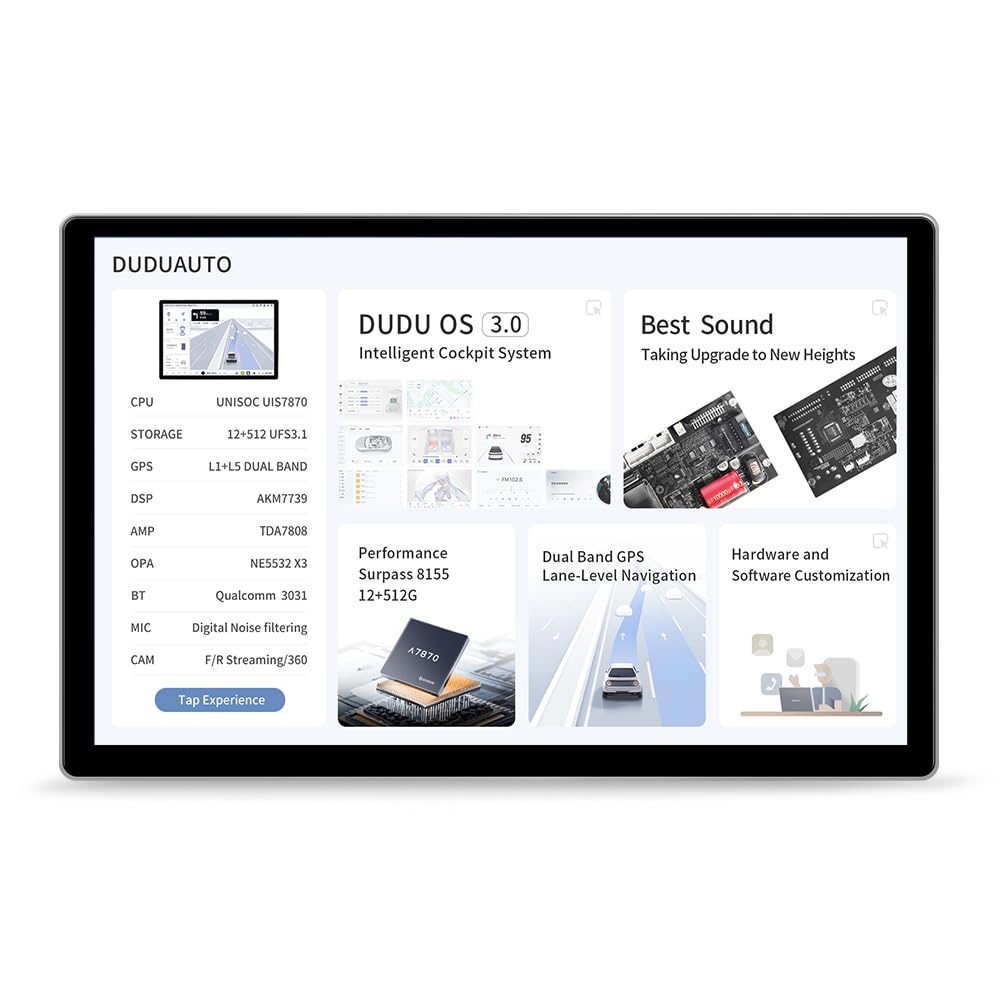
Image: Front view of the MekedeTech DUDUAUTO DUDU7 13-inch Car Radio Stereo.
2. Specifications
| Feature | Description |
|---|---|
| Operating System | Android 13 |
| CPU | 8 Core UIS7870 (A76 2.7Ghz 6nm processor) |
| Memory (RAM) | 6GB |
| Storage (ROM) | 64GB (UFS 3.1) |
| Display | 13-inch 2K IPS Touch Screen (2000x1200 resolution) |
| GPS | Dual Band 6 mode (L1 L5 B1 B2a E1 E5a) |
| Microphone | Digital Noise Cancellation Microphone |
| USB Ports | 1x USB 3.2 GEN1 (Type-C), 3x USB 2.0 |
| Power Amplifier | TDA7808 Digital AB type |
| DSP | AKM7739 Velvet Audio Technology |
| Bluetooth | Qualcomm 3031 (BT5.0, supports aptx HD protocol) |
| Audio Output | Optical + Coaxial, RCA 5.1 Channel Outputs |
| WiFi | 802.11a/b/g/n/ac (Supports 5G WiFi) |
| Radio IC | TDA7708 |
| Working Voltage | 9V~16V |
| Smartphone Integration | Wired and Wireless Carplay, Wired and Wireless Android Auto |
| 360 Camera Support | Not supported (requires 8G RAM or above version) |
Performance Highlights
- High-Resolution Display: Enjoy a 2000x1200 2K display for clear visuals.
- Fast Performance: UFS 3.1 memory offers significantly faster read/write speeds compared to previous generations, improving application loading and boot times.
- Precise Navigation: Built-in Dual Band PS 6-mode positioning chip supports L1 + L5 joint positioning for enhanced speed and accuracy, enabling lane-level navigation.
- Clear Communication: Digital Noise Cancelling Microphone with audio noise reduction algorithm ensures clear voice transmission, even at high speeds or in noisy environments.
- Superior Audio: AKM7739 DSP Velvet Audio Technology provides a natural, comfortable, and immersive acoustic experience.

Image: Diagram illustrating the UIS 7870 CPU performance and UFS 3.1 read/write speed improvements.

Image: Visual representation of Dual Band GPS (L1+L5) for better positioning and signal, and the Digital Noise Cancelling Microphone for clear voice delivery.

Image: Diagram detailing the AKM7739 DSP Velvet Audio Technology and TDA7808 digital amplifiers for enhanced audio quality.
3. Package Contents
Verify that all items listed below are included in your product package:
- DUDUAUTO Head Unit (Main Machine)
- Microphone (MIC)
- RCA Cable
- Reversing Camera Cable
- Audio Out Cable
- Fakra 4G Antenna
- Fakra GPS Antenna
- USB Plug x3
- Wiring Diagram
- Warranty Card

Image: Visual representation of the DUDUAUTO head unit and included accessories such as cables, antennas, and microphone.
Video: This video demonstrates the unboxing process and shows all items included in the MekedeTech DUDUAUTO DUDU7 package, including the head unit, cables, and documentation.
4. Setup and Installation
Proper installation is crucial for optimal performance and safety. It is highly recommended to have this unit installed by a qualified professional. Incorrect installation can lead to damage to the unit or your vehicle.
General Installation Notes:
- Vehicle Compatibility: For vehicle-specific installations, a compatible plate trim cover and CANBUS box may be required (sold separately).
- Power Supply: Connect the power supply cable (G) to your vehicle's power system, ensuring correct voltage (9V-16V).
- Antennas: Connect the Fakra 4G Antenna (6) and Fakra GPS Antenna (5) for optimal signal reception.
- USB Connections: Utilize the USB 3.2 GEN1 (Type-C) port (1) and USB 2.0 ports (D, E) for connecting external devices.
- Audio Connections: Connect RCA cables (A) for audio input/output and utilize the Optical + Coaxial outputs for high-quality audio.
- Camera Inputs: Connect your reversing camera (F) and front camera (C) if applicable. Note that this model does not support 360-degree panorama cameras.
- External Microphone: Connect the external MIC (H) for improved call clarity.
- Cooling Fan: The unit includes a cooling fan (B) to maintain optimal operating temperature.
Refer to the included wiring diagram for detailed connection points and instructions specific to your vehicle's setup. Ensure all connections are secure before powering on the unit.
5. Operating Instructions
The DUDUAUTO DUDU7 operates on Android 13 with a custom DUDU OS 3.0 interface, offering intuitive navigation and a range of features.
Basic Operation:
- Power On/Off: The unit typically powers on with the vehicle's ignition. Long press the power button (if available) or use the vehicle's ignition to turn it on or off.
- Touch Screen: Navigate the interface using the responsive 13-inch IPS touch screen.
- Home Screen: The home screen provides quick access to frequently used applications and widgets.
- App Drawer: Access all installed applications from the app drawer.
- Settings: Adjust system settings, display options, audio preferences, and connectivity settings through the 'Settings' application.
Key Features:
- Carplay & Android Auto: Connect your smartphone wirelessly or via USB to access navigation, music, calls, and messages through the unit's interface.
- Navigation: Utilize the dual-band GPS for accurate real-time navigation. Pre-installed or downloadable navigation apps can be used.
- Bluetooth 5.0: Pair your phone for hands-free calling and audio streaming with aptx HD protocol support for high-quality sound.
- Multimedia Playback: Play music and videos from USB drives, streaming services, or local storage.
- Radio: Access FM/AM radio stations using the built-in TDA7708 radio IC.
- Split Screen Functionality: The DUDU OS 3.0 allows for split-screen multitasking, enabling you to run two applications simultaneously (e.g., navigation and music).

Image: Screenshots showcasing the DUDU OS 3.0 user interface, including dynamic wallpapers and light/dark modes.
Video: This video demonstrates the simple user interface of the DUDU7, including how to switch between applications and adjust window sizes for multitasking.
6. Maintenance
Regular maintenance helps ensure the longevity and optimal performance of your DUDUAUTO DUDU7 head unit.
- Cleaning the Screen: Use a soft, lint-free cloth to gently wipe the touch screen. For stubborn smudges, slightly dampen the cloth with water or a screen-safe cleaner. Avoid harsh chemicals or abrasive materials.
- Software Updates: Periodically check for system updates via the 'OTA Update' application or the settings menu. Keeping the software updated ensures you have the latest features, bug fixes, and security enhancements.
- Cable Connections: Ensure all cables connected to the unit are secure and free from damage. Loose connections can lead to intermittent issues.
- Environmental Conditions: Avoid exposing the unit to extreme temperatures, direct sunlight for prolonged periods, or excessive moisture.
7. Troubleshooting
If you encounter issues with your DUDUAUTO DUDU7, refer to the following common troubleshooting steps:
Common Issues and Solutions:
- No Power:
- Check all power connections and fuses in your vehicle.
- Ensure the vehicle's ignition is on.
- No Sound:
- Verify volume settings on the unit and your vehicle's amplifier (if applicable).
- Check speaker connections and audio output settings.
- Ensure the correct audio source is selected.
- GPS Signal Loss/Inaccuracy:
- Ensure the GPS antenna is properly connected and has a clear view of the sky.
- Check GPS settings within the unit.
- Bluetooth Connectivity Issues:
- Ensure Bluetooth is enabled on both the head unit and your device.
- Delete previous pairings and re-pair your device.
- Move your device closer to the head unit.
- Carplay/Android Auto Not Connecting:
- For wired connections, try a different USB cable.
- Ensure your phone's operating system is updated.
- Check Carplay/Android Auto settings on both the unit and your phone.
- Touch Screen Unresponsive:
- Restart the unit by turning off and on your vehicle's ignition.
- If the issue persists, a factory reset might be necessary (consult support before performing).
If these steps do not resolve the issue, please contact MekedeTech customer support for further assistance.
8. Warranty and Support
Your MekedeTech DUDUAUTO DUDU7 head unit comes with a warranty. Please refer to the included Warranty Card for detailed terms and conditions, including coverage period and claim procedures. It is important to retain your proof of purchase for warranty validation.
Customer Support:
For technical assistance, troubleshooting not covered in this manual, or warranty inquiries, please contact MekedeTech customer support. Contact information can typically be found on the warranty card or the official MekedeTech website.
When contacting support, please have your product model (DUDU7-6-64-13) and purchase details readily available to expedite the service process.