
1. Introduction
This manual provides essential instructions for the setup, operation, maintenance, and troubleshooting of your SYLVOX 15.6'' Portable Smart TV, Model PT16A0KGGB. Please read this manual thoroughly before using the product to ensure proper function and safety.
2. What's in the Box
Verify that all components are present upon unpacking:
- SYLVOX 15.6'' Portable Smart TV
- Remote Control
- Instruction Manual (this document)
- Power Adapter
- AAA Batteries (x2) for Remote Control
- Screwdriver
- Warranty Card

Image: The SYLVOX 15.6 inch Portable Smart TV and its included accessories, such as the remote control, power adapter, and user manual.
3. Product Overview
3.1 Key Features
- Display: 15.6-inch FHD 1080P LED screen with 300nit brightness and 178° viewing angle.
- Operating System: Google TV with built-in voice assistant.
- Connectivity: Built-in WiFi (5G support), USB port, RF antenna input, Wireless Connection, ARC & CEC functions.
- Power: 10000mAH built-in battery for portable use, supports 12V DC power supply.
- Durability: IP66 waterproof rating, V0 grade fireproof casing, explosion-proof tempered glass.
- Audio: Built-in dual waterproof speakers.
- Design: 360-degree rotating stand, installation-free.
- Additional: Supports screen mirroring for mobile devices, ATSC tuner for over-the-air broadcasts.
3.2 TV Components and Ports

Image: Front view of the SYLVOX Portable Smart TV, displaying the screen and integrated control buttons below the screen.
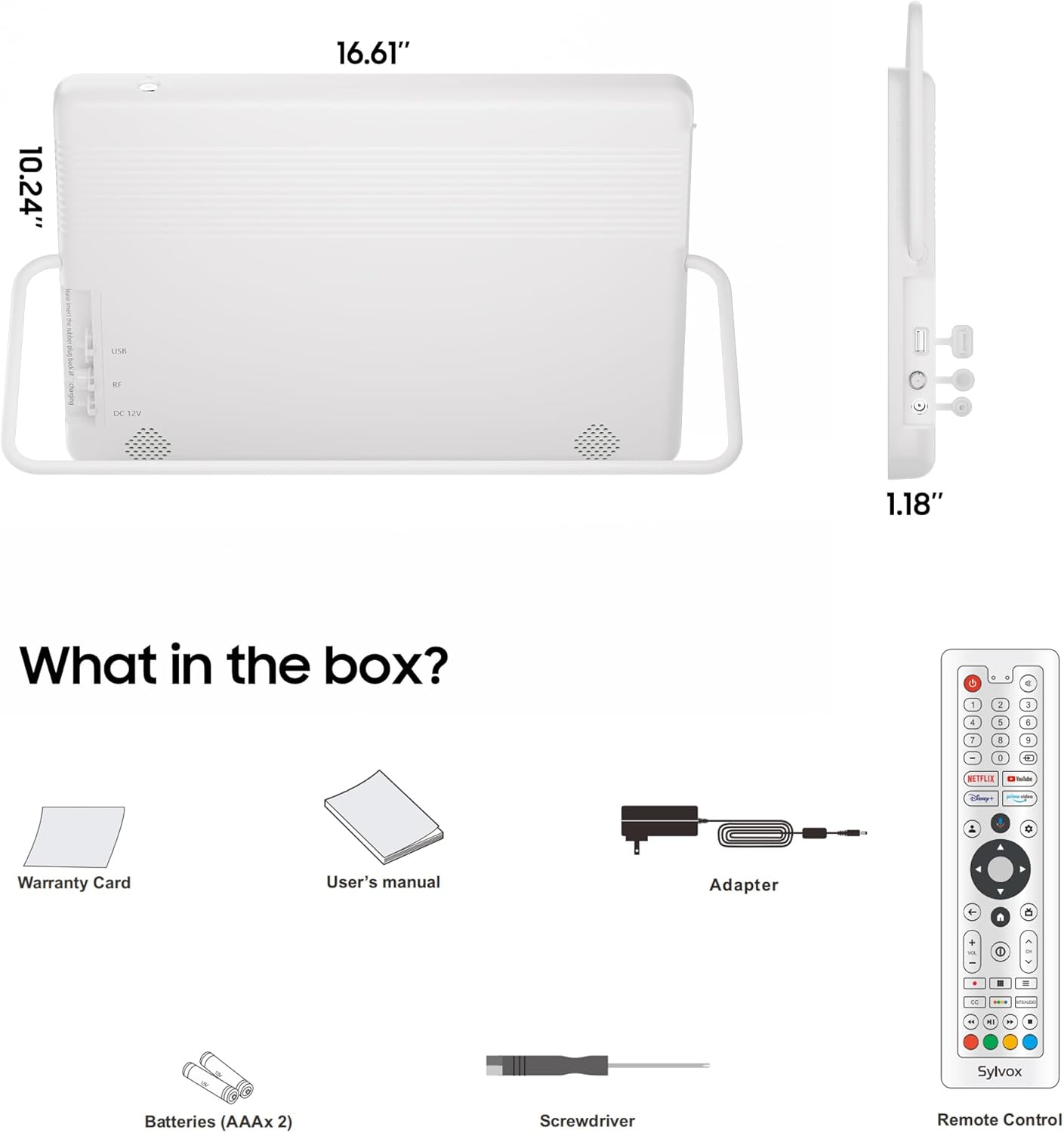
Image: Side profile of the SYLVOX Portable Smart TV, showing the DC 12V power input, USB port, and RF antenna connection point, all protected by covers.
4. Setup
4.1 Charging the Battery
Before initial use, fully charge the TV's internal 10000mAH battery using the provided power adapter. Connect the adapter to the DC 12V port on the side of the TV and plug it into a power outlet. The charging indicator light will show the charging status.
4.2 Powering On/Off
- To Power On: Press the Power button on the TV or the remote control.
- To Power Off: Press and hold the Power button on the TV or the remote control until the power-off options appear, then select 'Power Off'. A short press will put the TV into standby mode.
4.3 Initial Google TV Setup
Upon first power-on, the TV will guide you through the Google TV setup process. This includes selecting your language, connecting to a Wi-Fi network, and logging into your Google account. Follow the on-screen prompts.
4.4 Connecting to Wi-Fi
During the initial setup or via the settings menu, select your desired Wi-Fi network and enter the password to connect the TV to the internet. This enables access to streaming apps and online features.
4.5 Antenna Connection
For receiving over-the-air broadcast channels, connect an external antenna to the RF input port on the side of the TV. After connecting, navigate to the TV's settings to perform a channel scan.

Image: The SYLVOX Portable Smart TV shown with an external antenna connected to its RF input, illustrating how to prepare for receiving broadcast television signals.
Video: This video demonstrates various use cases for the SYLVOX Portable TV, including outdoor camping, showcasing its portability and smart features in different environments.
5. Operating Instructions
5.1 Using the Remote Control
The included remote control allows full navigation of the Google TV interface, volume adjustment, channel selection, and access to various functions. Familiarize yourself with the button layout for optimal control.
5.2 Navigating Google TV Interface
The Google TV home screen provides access to your installed apps, recommended content, and various settings. Use the directional pad and OK button on the remote to navigate through menus and select options.
5.3 Installing Applications
Access the Google Play Store from the home screen to download and install your favorite streaming applications, games, and other utilities. A Google account is required for app installation.

Image: The SYLVOX Portable Smart TV screen showing a selection of popular streaming app icons, indicating its smart TV capabilities.
5.4 Screen Mirroring
The TV supports Miracast for screen mirroring from compatible mobile devices. Refer to your device's instructions for initiating screen mirroring and select the SYLVOX TV from the available devices.
5.5 Adjusting Settings
Access the settings menu to customize picture quality (brightness, contrast, color), sound modes, network connections, and other system preferences. The remote control's 'Settings' button or navigating through the Google TV interface can access these options.
5.6 Voice Assistant
Utilize the built-in voice assistant by pressing the dedicated microphone button on your remote control. Speak commands or questions to search for content, control smart home devices, or get information.
6. Maintenance
6.1 Cleaning the TV
To clean the screen, gently wipe it with a soft, lint-free cloth. For stubborn marks, slightly dampen the cloth with water or a screen-cleaning solution. Avoid harsh chemicals or abrasive materials. For the TV body, use a soft, dry cloth.
6.2 Waterproofing Considerations (IP66)
The TV has an IP66 waterproof rating, meaning it is protected against powerful water jets and dust. Ensure all port covers are securely closed when using the TV in wet environments, such as near a pool or in a bathroom. Do not submerge the TV for extended periods.

Image: The SYLVOX Portable Smart TV floating on the surface of a swimming pool, illustrating its waterproof design for outdoor use.
Video: This video showcases the SYLVOX Portable TV being used in various settings, including a kitchen, bathroom, and camping, highlighting its versatility and waterproof features.
6.3 Battery Care
To prolong battery life, avoid fully discharging the battery frequently. Store the TV in a cool, dry place when not in use for extended periods. If storing for a long time, charge the battery to approximately 50% every few months.
7. Troubleshooting
This section addresses common issues you might encounter with your SYLVOX Portable Smart TV.
- No Power: Ensure the power adapter is securely connected and plugged into a working outlet, or that the internal battery is charged. Try pressing the power button on the TV itself.
- No Picture/Sound: Check all cable connections. Ensure the correct input source is selected. If using an antenna, perform a channel scan.
- Remote Control Not Working: Replace the batteries in the remote control. Ensure there are no obstructions between the remote and the TV's IR receiver.
- Wi-Fi Connection Issues: Verify your Wi-Fi password. Restart your router and the TV. Ensure the TV is within range of your Wi-Fi network.
- Apps Not Loading/Crashing: Check your internet connection. Try clearing the app's cache or reinstalling the app. Ensure the TV's software is up to date.
- Short Battery Life: Ensure the TV is fully charged. Reduce screen brightness or disable unused features (e.g., Wi-Fi, Bluetooth) to conserve power.
If you experience issues not covered here, or if troubleshooting steps do not resolve the problem, please contact customer support.
8. Specifications
| Feature | Detail |
|---|---|
| Model Number | PT16A0KGGB |
| Screen Size | 15.6 inches |
| Display Technology | LCD, LED |
| Resolution | 1080p |
| Refresh Rate | 60 Hz |
| Maximum Display Brightness | 250 nit (300 nit peak) |
| Contrast Ratio | 3000:1 |
| Operating System | Google TV |
| Connectivity Technology | USB, Wi-Fi (5G support) |
| Wireless Technology | Wi-Fi, Bluetooth 5.0 |
| Screen Mirroring | Miracast |
| Tuner Type | ATSC |
| Audio Output Mode | Stereo (Dual waterproof speakers) |
| Battery Capacity | 10000mAH Lithium Ion |
| Voltage | 12 volts_of_direct_current |
| Wattage | 18 watts |
| Product Dimensions (D x W x H) | 1.3" x 14.6" x 10" |
| Waterproof Rating | IP66 |
| VESA Mount Standard | 100 x 100 mm |
9. Warranty and Support
9.1 Warranty Information
Your SYLVOX Portable Smart TV comes with a limited warranty. Please refer to the included Warranty Card for specific terms, conditions, and duration of coverage. Keep your proof of purchase for warranty claims.
9.2 Customer Support
For technical assistance, troubleshooting beyond this manual, or warranty inquiries, please contact SYLVOX customer support. Contact information can typically be found on the warranty card, the official SYLVOX website, or through your retailer.


