Introduction
Thank you for choosing the DUMOS TV Stand. This entertainment center is designed to accommodate TVs up to 55-60 inches, offering smart storage solutions and a mid-century modern aesthetic. Crafted from durable engineered wood, it provides a stable and stylish foundation for your media devices. This manual provides detailed instructions for assembly, operation, maintenance, and troubleshooting to ensure optimal use and longevity of your product.

Figure 1: DUMOS TV Stand (Ink Black)
Important Safety Information
Please read and understand all instructions before assembly and use. Failure to follow these instructions may result in injury or damage to the product. Keep this manual for future reference.
- Always follow the assembly instructions carefully.
- Use appropriate tools and safety gear when assembling the TV stand.
- Do not overload the TV stand. The maximum weight capacity is 150 lbs.
- Ensure the TV stand is placed on a stable and level surface to prevent tipping.
- Keep small parts and packaging materials away from children to prevent choking hazards.
Product Features
- Accommodates Large TVs: Designed to hold TVs up to 55 and 60 inches, with dimensions of 53.54"W x 15.75"D x 18.9"H and a maximum weight capacity of 150 lbs.

Figure 2: Dimensions and Weight Capacity
- Smart Storage & Cable Management: Features two spacious cabinets with soft-close hinges for quiet and smooth operation. Each cabinet includes a cable hole at the back for organized wire management.

Figure 3: Cable Management Hole
- 3-Level Adjustable Shelf: The center shelf can be adjusted to three different heights, allowing you to customize storage space for various media devices or decorative items.
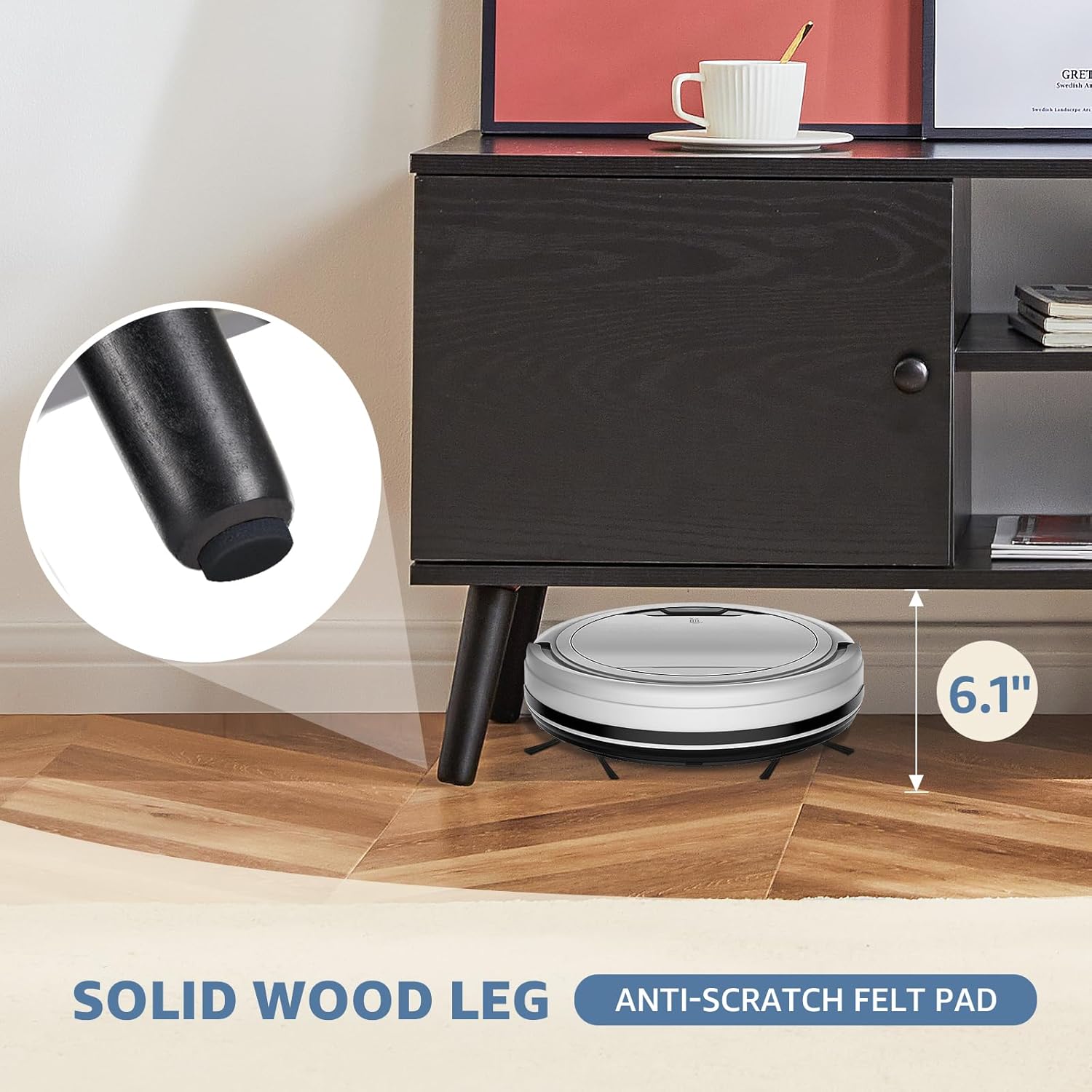
Figure 4: Adjustable Shelf Levels
- Solid & Durable Construction: Built from high-quality engineered wood with five strong legs for stable support. Each leg is equipped with foot pads to protect your floors from scratches.

Figure 5: Durable Engineered Wood Material
Product Overview Video
Video 1: Overview of DUMOS TV Stand features and design.
Setup and Assembly
The DUMOS TV Stand is designed for easy assembly. All parts are numbered, and a detailed installation manual along with necessary tools are included. For visual guidance, please refer to the assembly video below.
Assembly Video Guide
Video 2: Step-by-step assembly instructions for the DUMOS TV Stand.
Key Assembly Steps:
- Unpack and Identify Parts: Lay out all numbered wooden boards (A-I) and hardware. Refer to the included parts list to ensure all components are present.
- Assemble Base Structure: Attach the side boards (C, D, E) to the bottom board (A) using the provided screws and dowels. Ensure proper alignment.
- Install Top Board: Secure the top board (B) to the assembled base structure.
- Attach Legs: Screw the five wooden legs into the designated mounting plates on the underside of the TV stand. Ensure they are tightened securely.

Figure 6: Attaching the Legs
- Install Adjustable Shelf: Place the adjustable shelf (F) into the center compartment at your desired height using the provided shelf pins.
- Attach Cabinet Doors: Mount the cabinet doors (G) using the soft-close hinges. Adjust hinges as needed to ensure doors close securely and quietly.
- Final Checks: Verify all connections are tight and the stand is stable before placing your TV and media devices.
Operating Instructions
The DUMOS TV Stand is designed for straightforward use. Here are some tips for optimal functionality:
- Adjusting Shelves: To change the height of the center shelf, simply remove the shelf pins, reposition them to one of the three available levels, and reinsert the shelf.
- Cable Management: Utilize the pre-drilled cable holes in the back of the cabinets to neatly route and organize power cords and media cables, keeping your entertainment area tidy.
- Soft-Close Hinges: The cabinet doors are equipped with soft-close hinges. Gently push the doors to close them, and they will slowly and quietly retract into place, preventing slamming.
Maintenance
To keep your DUMOS TV Stand in excellent condition, follow these simple maintenance guidelines:
- Cleaning: Wipe with a dry cloth for general dusting. For spills or stains, wipe with a damp cloth immediately, then dry thoroughly. Avoid harsh chemicals or abrasive cleaners.
- Protection: The engineered wood surface is designed to be waterproof, stain-resistant, and anti-scratch. However, it is recommended to use coasters for drinks and protective pads under heavy or sharp objects to prevent potential damage.
- Regular Checks: Periodically check all screws and connections to ensure they remain tight. Re-tighten if necessary.
Troubleshooting
If you encounter any issues with your DUMOS TV Stand, please refer to the common solutions below:
- Cabinet Doors Not Closing Properly:
- Check the soft-close hinges. They may require adjustment. Turn the screws on the hinges counter-clockwise to loosen, adjust the door panel position, and then tighten the screws.
- Ensure no objects are obstructing the door's path.
- Stand Wobbles or is Uneven:
- Verify that all legs are securely tightened.
- The center leg at the bottom of the TV stand is adjustable. Rotate it to compensate for uneven floors and ensure stability.
- Confirm the stand is on a flat, level surface.
- Missing or Damaged Parts:
- If any parts are missing or damaged upon arrival, please contact DUMOS customer support for assistance.
Specifications
| Brand | DUMOS |
| Model Number | DMDSG-BK-1 |
| Color | Ink Black |
| Product Dimensions | 15.75"D x 53.54"W x 18.9"H |
| Material | Engineered Wood |
| Weight Limit | 150 Pounds |
| Number of Shelves | 3 (1 adjustable) |
| Number of Compartments | 2 (with doors) |
| Assembly Required | Yes |
| Care Instructions | Wipe with Dry, Wipe with Damp Cloth |
Warranty and Support
DUMOS is committed to providing high-quality products and excellent customer service.
- Return Policy: This product is eligible for a 30-day easy return policy. Please refer to your purchase platform for specific return procedures.
- Customer Support: For any questions, concerns, or assistance with your DUMOS TV Stand, please contact our customer support team.


