
PKPOWER ANU-120200A
Contents
PKPower AC Replacement DC Adapter for Night Owl WNIP-8LTA-BS-V2 Instruction Manual
Model: ANU-120200A
Introduction
This manual provides essential instructions for the safe and effective use of your PKPower AC Replacement DC Adapter, Model ANU-120200A. This adapter is designed for compatibility with the Night Owl 4K HD Wireless Security WNIP-8LTA-BS-V2 system. Please read this manual thoroughly before use and retain it for future reference.
Important Safety Information
To ensure safe operation and prevent damage, observe the following precautions:
- Use the adapter only with compatible devices as specified.
- Do not expose the adapter to water, moisture, or extreme temperatures.
- Avoid dropping or subjecting the adapter to severe impact.
- Do not attempt to disassemble or modify the adapter.
- Ensure the power outlet voltage matches the adapter's input specifications (100-240V AC).
- Unplug the adapter during lightning storms or when unused for extended periods.

Figure 1: Built-in Safety Protections. This adapter features multiple safety mechanisms including protection against over-charge, over-voltage, short-circuit, over-current, and over-temperature to ensure safe and reliable operation.
Setup Instructions
- Verify Compatibility: Ensure your device requires a 9V/2A DC power input and is compatible with the Night Owl 4K HD Wireless Security WNIP-8LTA-BS-V2 system.
- Connect to Device: Insert the DC output plug of the PKPower adapter firmly into the power input port of your Night Owl security system or compatible device.
- Connect to Power Outlet: Plug the AC input prongs of the adapter into a standard 100-240V AC wall outlet.
- Power On: Once connected, your device should receive power. Observe the device's indicators to confirm proper power supply.

Figure 2: PKPower AC Adapter. The image displays the main unit of the PKPower AC Replacement DC Adapter, showing the input specifications (100-240V AC) and the attached 6.6-foot DC output cable, ready for connection.
Operating the Adapter
The PKPower AC Replacement DC Adapter operates automatically once connected to a power source and a compatible device. It provides a stable 9V/2A DC output. No user interaction is required for its basic operation.
- Ensure the adapter is always plugged into a functional power outlet.
- The 6.6-foot cable provides flexibility in device placement.
- If the connected device is not powering on, refer to the Troubleshooting section.
Care and Maintenance
Proper care extends the life of your adapter:
- Cleaning: Disconnect the adapter from the power outlet and the device before cleaning. Use a soft, dry cloth to wipe the exterior. Do not use liquid cleaners or solvents.
- Storage: Store the adapter in a cool, dry place when not in use. Avoid wrapping the cable too tightly to prevent damage.
- Inspection: Periodically inspect the adapter and cable for any signs of damage, such as frayed wires or cracked casing. Discontinue use if damage is observed.
Troubleshooting
| Problem | Possible Cause | Solution |
|---|---|---|
| Device not powering on. |
|
|
| Adapter feels unusually hot. |
|
|
Product Specifications
- Model: ANU-120200A
- Input: 100-240V AC, 50/60Hz
- Output: 9V DC, 2A
- Cable Length: 6.6 feet (approximately 2 meters)
- Dimensions: Approximately 2.76 x 1.57 x 1.18 inches (L x W x H)
- Weight: Approximately 3 ounces (85 grams)
- Color: Black
- Compatibility: Night Owl 4K HD Wireless Security WNIP-8LTA-BS-V2
- Safety Features: Over-charge, Over-voltage, Short-circuit, Over-current, Over-temperature protection.
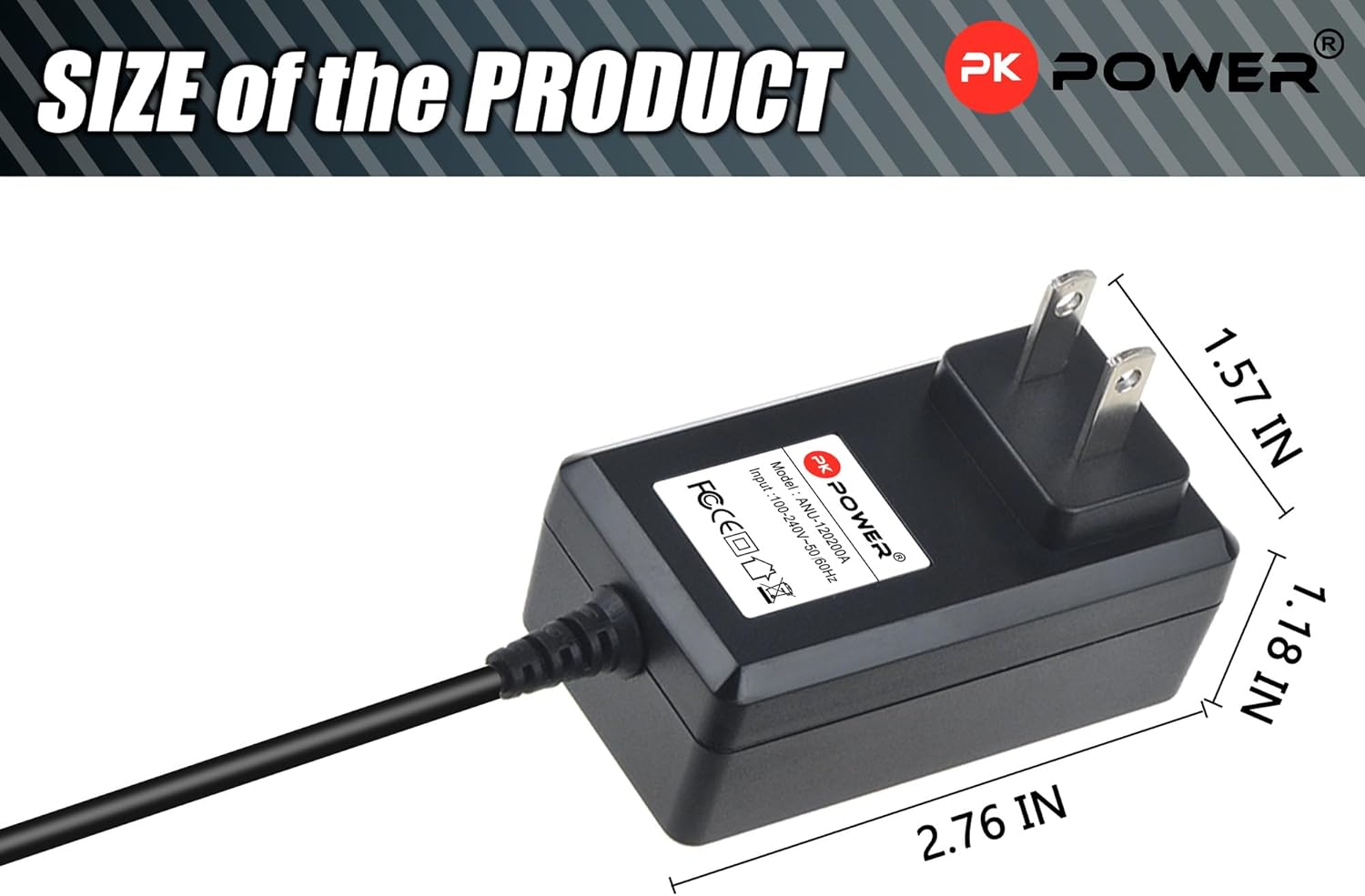
Figure 3: Product Dimensions. The image illustrates the physical dimensions of the PKPower AC Adapter, measuring approximately 2.76 inches in length, 1.57 inches in width, and 1.18 inches in height.
Warranty Information
This PKPower AC Adapter comes with a 12-month warranty from the date of purchase. This warranty covers manufacturing defects and ensures reliable operation under normal use. Please retain your proof of purchase for warranty claims. The warranty does not cover damage caused by misuse, accidents, unauthorized modifications, or improper installation.
Customer Support
If you encounter any issues or have questions regarding your PKPower AC Replacement DC Adapter, please do not hesitate to contact us. Our customer service team is available to provide assistance and ensure your satisfaction.
For support, please refer to the contact information provided by your retailer or visit the official PKPOWER website.
Documents and downloads
Ask a question about this manual
Ask about setup, troubleshooting, compatibility, parts, safety, or missing instructions. Manuals+ will review the question and use this page’s manual context to help answer it.