
1. Overview
The Tecmojo 1U Foldable Vertical Rack and Wall Mountable Patch Panel Bracket is designed for organizing 19-inch server and data equipment in various environments. Constructed from robust cold-rolled steel, this bracket offers a weight capacity of 44 lbs (20 kg) and features an electrostatic powder coat for corrosion resistance. Its foldable design allows for flexible installation either vertically on a wall or horizontally under a desk, optimizing space and providing easy access for equipment management and cable routing.
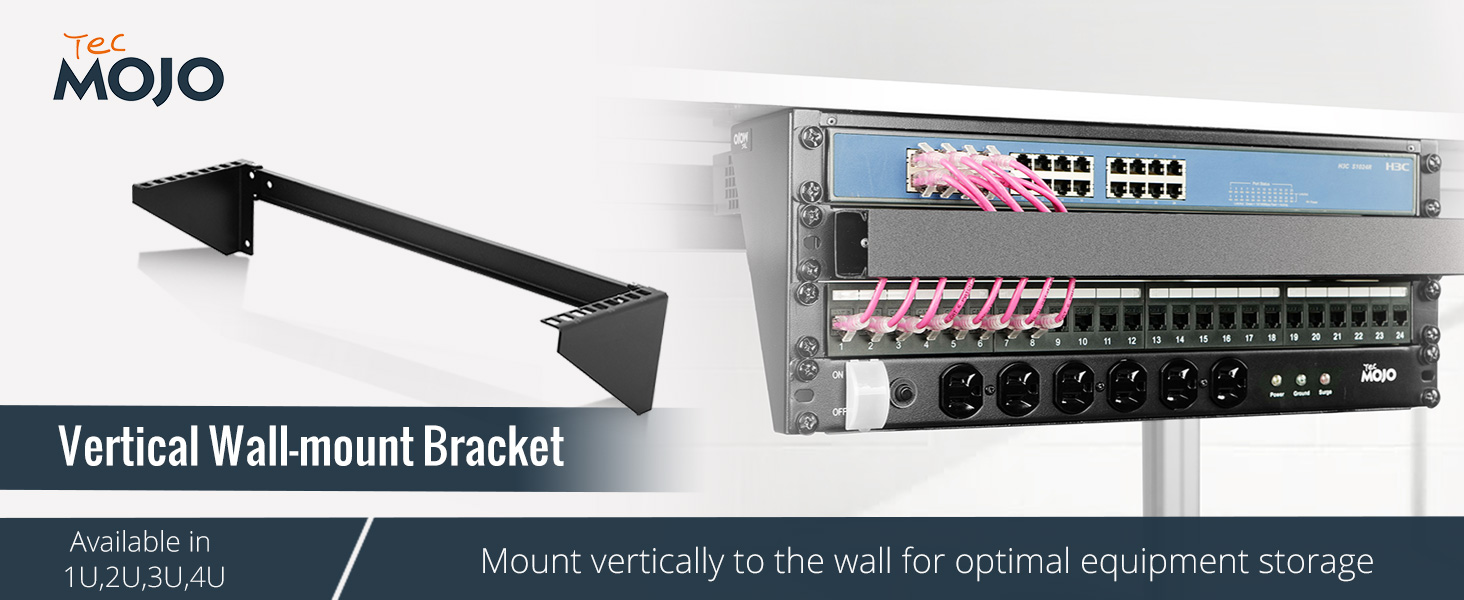
Image: The Tecmojo 1U Foldable Vertical Rack and Wall Mountable Patch Panel Bracket, showcasing its design and versatility.
Key Features:
- Robust Construction: Made from cold-rolled steel with an electrostatic powder coat for durability and resistance to rust and corrosion.
- High Weight Capacity: Supports up to 44 lbs (20 kg) of equipment.
- Versatile Mounting: Can be installed vertically on a wall or horizontally under a desk to suit specific space requirements.
- Easy Access: Designed to allow unimpeded inspection, replacement, arrangement, and cable management of equipment.
- Space-Saving Design: Lightweight and compact, ideal for home offices, audio setups, or studio environments. The bracket can be folded when not in use.
- Complete Hardware: Includes 12-24 Screws, Cage Nuts, and M5 Mounting Screws for immediate installation.
Product Video:
Video: An official overview of the Tecmojo Vertical Mount Wall Rack, demonstrating its features and potential applications.
2. Setup and Installation
The Tecmojo 1U bracket is designed for straightforward installation. It comes pre-assembled and includes all necessary mounting hardware.
2.1 Included Components:
- 1U Foldable Vertical Rack and Wall Mountable Patch Panel Bracket
- 12-24 Screws (x4)
- 12-24 Cage Nuts (x4)
- M5 Wall Mounting Screws (x4)

Image: All components included with the Tecmojo 1U bracket, ready for installation.
2.2 Mounting Options:
The bracket offers two primary mounting configurations:
- Vertical Wall Mount: Mount the bracket vertically to a wall for optimal equipment storage. The mounting holes are spaced 16 inches apart to accommodate standard stud placement. This configuration is ideal for patch panels, switches, and other shallow server equipment.
- Horizontal Under-Desk Mount: Install the bracket horizontally under a desk or workstation. This provides easy access to network and A/V equipment, keeping it organized and off the floor or desktop.

Image: Demonstrates both vertical wall mount and horizontal under-desk installation methods for the bracket.

Image: Illustrates the 16-inch mounting hole spacing for wall installation and the various U-height options available for this product line.
2.3 Installation Steps:
- Choose Mounting Location: Select a suitable location on a wall or under a desk, ensuring it can support the bracket's weight capacity (44 lbs / 20 kg) plus the weight of your equipment. For wall mounting, identify wall studs for secure attachment.
- Mark Pilot Holes: Hold the bracket in the desired position and mark the pilot holes for the M5 wall mounting screws. Ensure the bracket is level.
- Drill Pilot Holes: Drill pilot holes at the marked locations. Use an appropriate drill bit size for the M5 screws and your wall material.
- Secure the Bracket: Attach the bracket to the wall or underside of the desk using the provided M5 wall mounting screws. Ensure it is firmly secured.
- Install Equipment: Mount your 19-inch rack-mountable equipment onto the bracket using the provided 12-24 screws and cage nuts. The square rack holes are designed for easy installation of cage nuts.
- Cable Management: Route and manage cables as needed, taking advantage of the open design for unimpeded access.

Image: Detail view of the square rack holes on the bracket, designed for cage nuts and equipment mounting.
3. Operating the Bracket
The Tecmojo 1U Foldable Vertical Rack and Wall Mountable Patch Panel Bracket is a passive component designed to securely hold your 19-inch rack-mountable equipment. Once installed, its primary function is to provide a stable and accessible platform for your devices.
- Equipment Access: The open design allows for easy access to the front and rear of your mounted equipment for maintenance, cable changes, or configuration adjustments.
- Cable Management: Utilize the space around and through the bracket for efficient cable routing, helping to maintain an organized and tidy setup.
- Folding Mechanism: The bracket features a folding mechanism. When not in use or for storage, the arms can be folded inward to reduce its footprint. Ensure no equipment is mounted when folding the bracket.
Video: A short demonstration of the bracket's folding mechanism, highlighting its compact storage capability.
4. Maintenance
The Tecmojo 1U bracket requires minimal maintenance to ensure its longevity and continued performance.
- Regular Cleaning: Periodically wipe down the bracket with a soft, dry cloth to remove dust and debris. Avoid abrasive cleaners or solvents that could damage the electrostatic powder coat.
- Check Fasteners: Over time, vibrations or environmental factors may cause fasteners to loosen. Periodically check all mounting screws and equipment screws to ensure they are securely tightened.
- Inspect for Damage: Visually inspect the bracket for any signs of wear, damage, or corrosion. If any damage is observed, address it promptly to prevent further issues.
5. Troubleshooting
This section addresses common issues you might encounter with the Tecmojo 1U bracket.
5.1 Equipment Not Sitting Level:
If mounted equipment appears uneven or the bracket arms do not extend to a perfect 90-degree angle:
- Check Mounting Surface: Ensure the wall or desk surface where the bracket is mounted is flat and level. Irregularities can cause misalignment.
- Verify Installation: Double-check that all mounting screws are tightened evenly and that the bracket is not warped during installation.
- Inspect Hinge Points: For foldable models, ensure the hinge points are free of obstructions and operate smoothly. Minor adjustments might be needed if manufacturing tolerances cause slight deviations from a perfect angle.
5.2 Difficulty Installing Cage Nuts or Equipment:
If you encounter resistance when inserting cage nuts or mounting equipment:
- Correct Cage Nut Orientation: Ensure the cage nut is oriented correctly before attempting to insert it into the square hole.
- Proper Tool Use: Use a cage nut tool if available, or apply firm, even pressure to snap the cage nut into place.
- Align Equipment: Ensure your equipment's mounting holes are perfectly aligned with the cage nuts before inserting screws. Do not force screws, as this can strip threads.
6. Specifications
| Feature | Detail |
|---|---|
| Brand | Tecmojo |
| Model | 1U Foldable Vertical Rack and Wall Mountable Patch Panel Bracket |
| Size | 1U |
| Color | Black |
| Material | Alloy Steel (Cold Rolled Steel) |
| Product Dimensions (D x W x H) | 2.3"D x 19.3"W x 4"H (58.1mm D x 489mm W x 101.6mm H) |
| Item Weight | 1.38 Pounds (0.63 kg) |
| Weight Capacity | 44 lbs (20 kg) |
| Compatible Devices | 19-inch Server and Data Equipment |
| Mounting Type | Wall Mount / Under Desk Mount |
| Assembly Required | No (Pre-assembled) |
| Compliance | EIA/ECA-310-E Compliant |
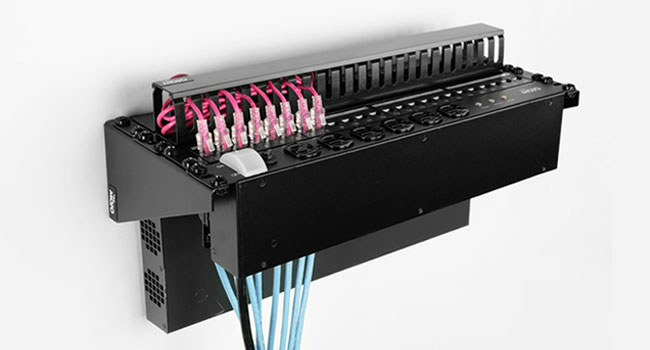
Image: Technical drawing with key dimensions and specifications of the 1U bracket.
7. Warranty and Support
7.1 Manufacturer's Warranty:
This Tecmojo product is covered by a 3-year manufacturer's warranty from the date of purchase. This warranty covers defects in materials and workmanship under normal use. It does not cover damage caused by improper installation, misuse, accidents, or unauthorized modifications.
Please retain your proof of purchase for warranty claims.
7.2 Technical Support:
For technical assistance, troubleshooting, or warranty inquiries, please contact Tecmojo customer support. Our team is available to help you with any questions or issues you may have regarding your product.
Contact Information:
- Website: Visit the Tecmojo Official Store on Amazon
- Email: support@tecmojo.com (Placeholder - actual email not provided)
- Phone: 1-800-XXX-XXXX (Placeholder - actual phone not provided)
Please have your product model (1U) and purchase details ready when contacting support.


