
1. Product Overview
The TMEEIHNSS Silent Rain Cloud Humidifier is designed to enhance your indoor environment with humidification, ambient lighting, and soothing rain sounds. This device features a 300ml water capacity, ultrasonic atomization, and a quiet operation at 36dB. It includes 7 lighting colors with 3 brightness levels, a Bluetooth music function, and can be controlled via a smart digital display or remote control. It also functions as an aroma diffuser.
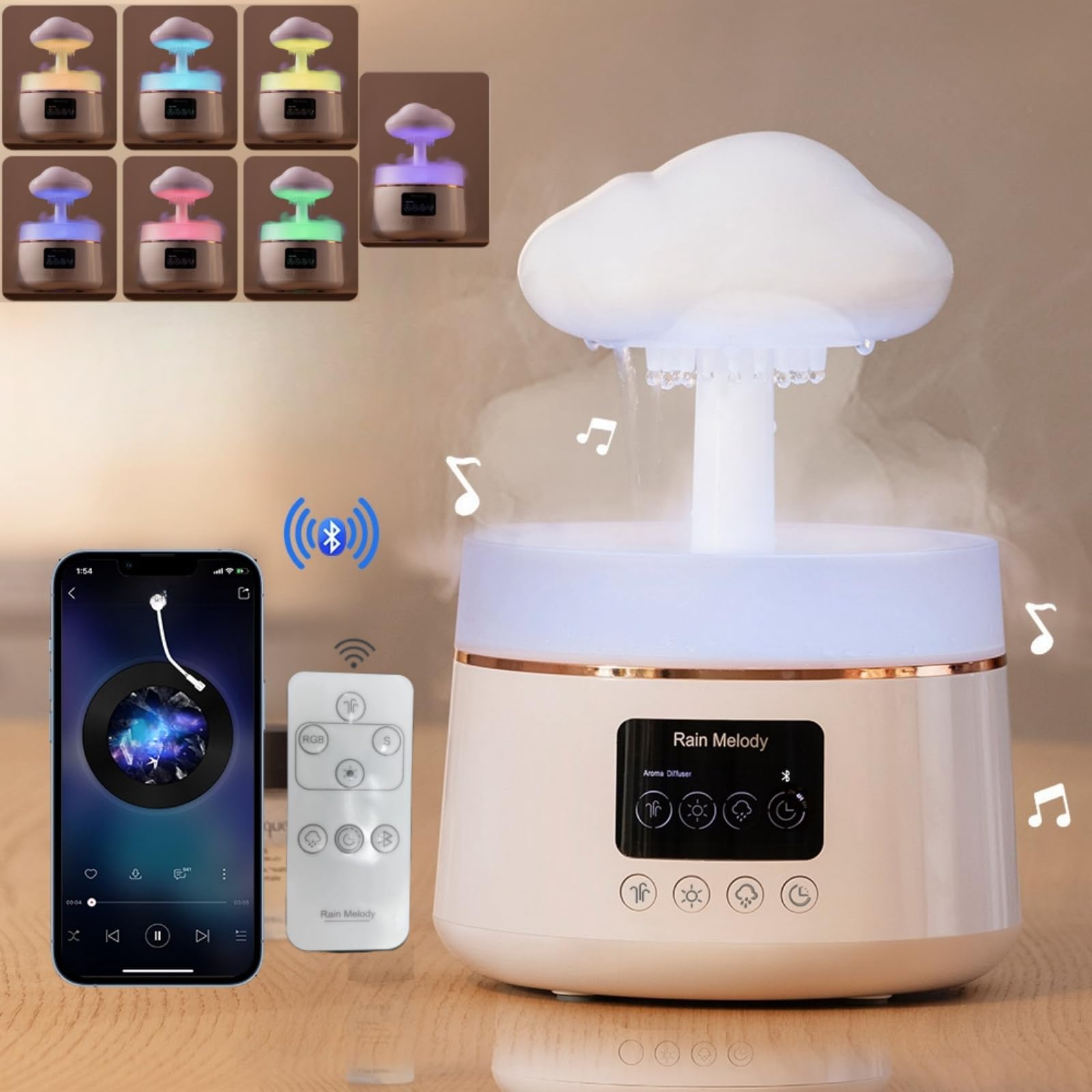
Image 1.1: The humidifier operating quietly in a bedroom, providing ambient light and humidification.

Image 1.2: Key features of the TMEEIHNSS Silent Rain Cloud Humidifier, including quiet operation, ultrasonic atomization, and Bluetooth music.
2. Package Contents
Please check the package for the following items:
- 1 x TMEEIHNSS Silent Rain Cloud Humidifier
- 1 x Remote Control (requires 2 AAA batteries, not included)
- 1 x Cleaning Needle
- 1 x USB Data Cable (requires a 5V 2A power supply, not included)

Image 2.1: Contents of the product package, including the humidifier, remote, and cables.
3. Setup Instructions
- Placement: Place the humidifier on a flat, stable surface away from direct sunlight or heat sources.
- Remove Top Cover: Gently lift and remove the cloud-shaped top cover and the transparent water tank cover.
- Fill Water Tank: Fill the water tank with clean tap water up to the maximum fill line (300ml capacity). Do not overfill.
- Add Essential Oils (Optional): If desired, add a few drops of water-soluble essential oils directly into the water tank.
- Replace Covers: Securely place the transparent water tank cover and then the cloud-shaped top cover back onto the humidifier.
- Connect Power: Connect the USB data cable to the humidifier and then to a 5V 2A power supply (e.g., a USB wall adapter, not included).

Image 3.1: Removing the top cover.

Image 3.2: Filling the water tank.

Image 3.3: Adding essential oils.
4. Operating Instructions
The humidifier can be operated using the touch buttons on the front panel or the included remote control.

Image 4.1: Digital display and control panel.
4.1 Power On/Off
- Press the power button (usually the leftmost button on the panel or remote) to turn the humidifier on or off.
4.2 Humidification Modes (Spray & Raindrop)
- Spray Mode: Press the 'Spray' button (icon resembling mist) to activate the continuous mist function.
- Raindrop Mode: Press the 'Raindrop' button (icon resembling rain cloud) to activate the simulated rain effect. You can adjust the rain speed if available via the remote control.
4.3 Lighting Control
- Press the 'Light' button (sun icon) to cycle through 7 emotional colors (white, red, yellow, green, cyan, blue, purple).
- Hold the 'Light' button to set a fixed color.
- The humidifier offers 3 levels of light brightness. Adjust as needed for your environment.
4.4 Bluetooth Music
- Activate Bluetooth on your mobile device.
- Search for the humidifier's Bluetooth name (refer to the product manual or display for the exact name, typically 'Rain Melody' or similar).
- Pair your device. Once connected, you can play music through the humidifier's integrated speaker.
4.5 Timer Function
- Press the 'Timer' button (clock icon) to set an operating duration. Available timer settings may vary (e.g., 1H, 3H, 6H).
4.6 Remote Control Usage
- Insert 2 AAA batteries (not included) into the remote control.
- Use the remote to control all functions: power, spray mode, raindrop mode, lighting, brightness, and timer settings.
Video 4.2: This video demonstrates the various usage scenarios and functions of the TMEEIHNSS Silent Rain Cloud Humidifier, including its mist, rain, and lighting effects.
5. Maintenance
Regular cleaning ensures optimal performance and extends the lifespan of your humidifier.
5.1 Daily Maintenance
- Water Replacement: Always use fresh water. Do not leave stagnant water in the tank for extended periods.
- Wipe Down: Wipe the exterior of the humidifier with a soft, damp cloth.
5.2 Weekly Cleaning
- Unplug: Ensure the humidifier is unplugged before cleaning.
- Empty Water: Drain any remaining water from the tank.
- Clean Tank: Use a soft brush or cloth to clean the inside of the water tank. For mineral buildup, a solution of white vinegar and water (1:1 ratio) can be used. Let it soak for 15-20 minutes, then rinse thoroughly.
- Clean Atomizer: Use the provided cleaning needle to gently clear any blockages in the mist outlet or rain holes.
- Dry Thoroughly: Allow all components to air dry completely before reassembling and refilling.
6. Troubleshooting
| Problem | Possible Cause | Solution |
|---|---|---|
| No mist or weak mist | Low water level; Atomizer blocked; Unit not powered on. | Refill water tank; Clean atomizer with cleaning needle; Ensure power cable is connected and unit is on. |
| No rain effect | Rain holes blocked; Insufficient water. | Clean rain holes with cleaning needle; Ensure water level is adequate. |
| Lights not working | Light function off; Power issue. | Press the 'Light' button to activate; Check power connection. |
| Bluetooth not connecting | Humidifier not in pairing mode; Device too far; Incorrect pairing. | Ensure humidifier is on; Keep device within range; Re-attempt pairing from your phone's Bluetooth settings. |
| Unusual noise | Low water level; Unit not on a flat surface; Internal component issue. | Refill water; Place on a stable, flat surface; If noise persists, contact customer support. |
7. Specifications
| Feature | Detail |
|---|---|
| Brand | TMEEIHNSS |
| Model Name | Silent Rain Cloud |
| Item Model Number | rain humidifier water drip |
| ASIN | B0D93TC2MQ |
| UPC | 764965528367 |
| Dimensions | 6.1 x 6.1 x 8.9 inches |
| Capacity | 300 Milliliters |
| Operation Mode | Ultrasonic |
| Voltage | 5 Volts (DC) |
| Special Features | Adjustable Humidity Control, Bluetooth Speaker, Digital Display, 7 Color Lighting, Raindrop Effect |
| Noise Level | 36dB (approx.) |
| Room Type | Bedroom |

8. Warranty and Support
For warranty information or technical support, please refer to the documentation included with your purchase or contact TMEEIHNSS customer service directly. Keep your purchase receipt for warranty claims.