
1. Introduction
This manual provides detailed instructions for the Beuiouer S9 Voice Changer, Model 500452752. This device is designed to modify your voice with various effects and functions, suitable for use with phones and computers. Please read this manual thoroughly before operating the device to ensure proper usage and to maximize its capabilities.
2. Safety Information
- Do not expose the device to water or excessive moisture.
- Avoid extreme temperatures.
- Do not attempt to disassemble or repair the device yourself. Refer to qualified personnel for service.
- Keep out of reach of children.
- Use only the provided charging cable and audio connection cable.
3. Package Contents
Verify that all items are present in your package:
- 1 x Beuiouer S9 Voice Changer
- 1 x Audio Connection Cable
- 1 x Charging Cable

Image 3.1: The Beuiouer S9 Voice Changer device shown with its accompanying audio connection cable and charging cable. The voice changer is a black rectangular unit with various buttons and a display area. The cables are black and white, respectively.
4. Product Overview
The Beuiouer S9 Voice Changer features a compact design with intuitive controls for voice modification and sound effects.
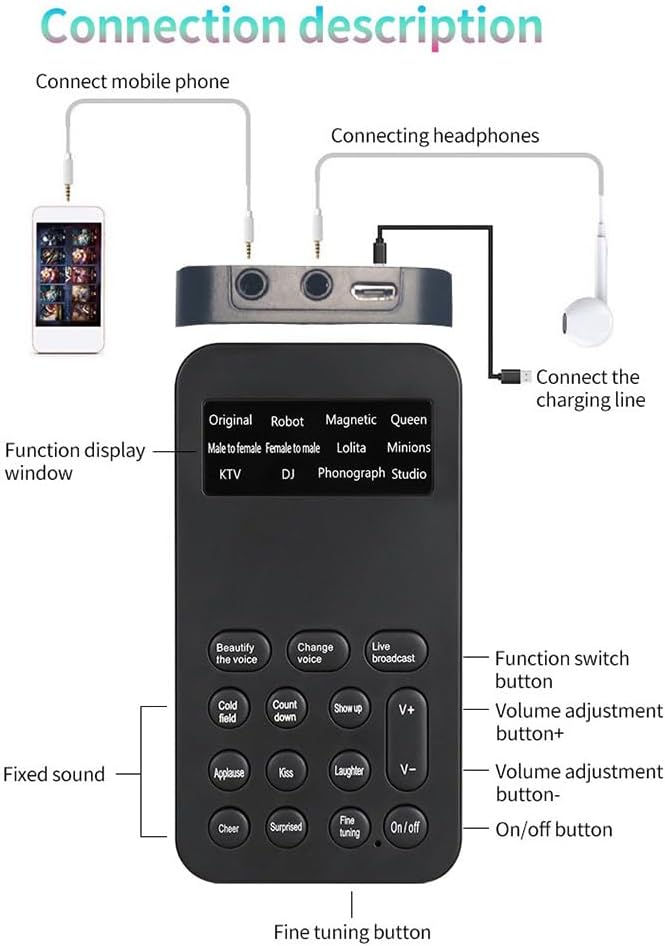
Image 4.1: A diagram illustrating the Beuiouer S9 Voice Changer connected to a mobile phone and headphones. Labels point to the "Function display window", "Function switch button", "Volume adjustment button+", "Volume adjustment button-", "On/off button", "Fine tuning button", and "Fixed sound" buttons.
4.1 Key Features
- 12 Voice Changing Modes: Includes Original, Robot, Magnetic, Queen, Male to Female, Female to Male, Lolita, Minions, Baby sound, KTV, DJ, Phonograph, and Studio.
- 8 Sound Effects: Features effects such as Beautify the voice, Change voice, Live broadcast, Cold field, Count down, Show up, Applause, Kiss, Laughter, Cheer, Surprised, and Fine tuning.
- Adjustable Voice Functions: Supports fine adjustment for more realistic sound effects.
- Plug and Play: Easy to connect and use with various devices.
- Noise Reduction: Intelligent noise reduction for clear audio output.

Image 4.2: The Beuiouer S9 Voice Changer with an overlay highlighting its 12 sound change modes and 8 interesting sound effects. The modes are listed on the device's screen, and the effects are represented by various buttons.
5. Setup
Follow these steps to connect your Beuiouer S9 Voice Changer:
- Charge the Device: Connect the provided charging cable to the charging port on the voice changer and a USB power source. The charging indicator will show the charging status.
- Connect to Phone/Computer: Use the audio connection cable to link the voice changer to your mobile phone or computer's audio input/output jack. One end goes into the voice changer's phone/computer port, and the other into your device.
- Connect Headphones/Microphone: Plug your headphones or microphone into the designated port on the voice changer. Ensure a secure connection for optimal audio.
Image 5.1: A visual guide demonstrating how to connect the voice changer to a mobile phone, headphones, and the charging cable. The diagram clearly labels each connection point.
6. Operating Instructions
6.1 Power On/Off
- Press and hold the On/Off button to power on or power off the device.
6.2 Selecting Voice Changing Modes
The device offers 12 distinct voice changing modes. Use the dedicated buttons or controls to cycle through modes such as:
- Original
- Robot
- Magnetic
- Queen
- Male to Female
- Female to Male
- Lolita
- Minions
- Baby sound
- KTV
- DJ
- Phonograph
- Studio
6.3 Using Sound Effects
Activate various sound effects by pressing the corresponding buttons:
- Beautify the voice: Enhances vocal clarity.
- Change voice: Toggles voice modification.
- Live broadcast: Optimizes sound for live streaming.
- Cold field: Adds a specific ambient effect.
- Count down: Plays a countdown sound.
- Show up: Plays an entrance sound.
- Applause: Plays an applause sound.
- Kiss: Plays a kiss sound effect.
- Laughter: Plays a laughter sound effect.
- Cheer: Plays a cheering sound effect.
- Surprised: Plays a surprise sound effect.

Image 6.1: The Beuiouer S9 Voice Changer with an emphasis on its 8 interesting sound effects, which are activated by dedicated buttons on the device's interface.
6.4 Fine Tuning
Some voice modes support fine-tuning for more precise adjustments. Press the Fine tuning button and use the volume controls (V+, V-) to adjust the parameters of the selected voice effect.

Image 6.2: The Beuiouer S9 Voice Changer with the "Fine tuning" button prominently displayed, indicating its function for adjusting sound parameters for more realistic output.
6.5 Volume Adjustment
Use the V+ and V- buttons to increase or decrease the output volume.
6.6 Clear Sound Output
The device is designed for clear audio output with intelligent noise reduction, ensuring a high-quality sound experience, especially for mobile karaoke or live broadcasts.

Image 6.3: The Beuiouer S9 Voice Changer with a visual representation of clear sound output, highlighting its ability to produce audio without noise, ideal for mobile karaoke.
7. Maintenance
- Clean the device with a soft, dry cloth. Do not use liquid cleaners.
- Store the device in a cool, dry place when not in use.
- Avoid dropping or subjecting the device to strong impacts.
8. Troubleshooting
- No Sound Output:
- Ensure the device is powered on.
- Check all cable connections (audio, headphones/mic).
- Verify the volume is not set to minimum.
- Confirm the connected phone/computer's audio settings are correctly configured.
- Voice Effects Not Working:
- Ensure a voice changing mode is selected.
- Check if the "Change voice" function is activated.
- Some effects may require fine-tuning; adjust as needed.
- Device Not Charging:
- Verify the charging cable is securely connected to both the device and the power source.
- Try a different USB power source or charging cable.
9. Specifications
| Parameter | Value |
|---|---|
| Signal to Noise Ratio | 106dB |
| Dynamic Range | 106dB |
| Battery Capacity | 250mA/3.7V |
| Charging Input | DV5V/1A |
| Battery Effectiveness | Approx. 3-4 hours at full power |
| Product Dimensions | 3.94 x 3.94 x 0.79 inches |
| Item Weight | 2.31 ounces |
| Model Number | 500452752 |
| Manufacturer | Beuiouer |
10. Official Product Video
Watch this video for a visual guide on the Beuiouer S9 Voice Changer and its features.
Video 10.1: An official product video demonstrating the Beuiouer S9 Voice Changer, showcasing its design, connections, and various voice modification capabilities. This video provides a practical overview of the device's functionality.
11. Warranty and Support
For warranty information and customer support, please refer to the contact details provided with your purchase or visit the official Beuiouer website. Keep your proof of purchase for any warranty claims.