
Black Shark BS 3 Pro
Contents
Black Shark FunCooler 3 Pro User Manual
Model: BS 3 Pro
Brand: Black Shark
1. Introduction
The Black Shark FunCooler 3 Pro is an advanced semiconductor heatsink cooling device designed to maintain optimal performance for your iOS and Android smartphones. It features powerful cooling capabilities, smart fan speed settings, and app control, ensuring your device remains cool during intensive use, such as gaming or live streaming.

Image: The Black Shark FunCooler 3 Pro, a sleek black device with purple accents and a central fan, designed to attach to a smartphone for cooling.
2. Package Contents
Please verify that all items are present in your package:
- Black Shark Phone Cooler 3 Pro
- 1.5m Type-C Fast Charging Cable
- Instruction Manual
- Magnetic Sheet (for magnetic attachment, if applicable to your model)

Image: The package contents laid out, including the FunCooler 3 Pro device, a USB-C cable, and documentation.
3. Setup
3.1 Attaching the Cooler to Your Smartphone
The Black Shark FunCooler 3 Pro is designed to fit smartphones with a width between 67mm and 88mm (2.63-3.46 inches). Ensure your phone is within this range for a secure fit.
- Gently extend the cooler's clamps to accommodate your phone's width.
- Position the cooler on the back of your smartphone, ensuring the cooling plate makes direct contact with the phone's surface, ideally near the processor area for maximum efficiency.
- Release the clamps to securely grip the phone.

Image: A diagram illustrating the adjustable width of the cooler, showing it can fit various smartphone models from 67mm to 88mm.
3.2 Power Connection
Connect the provided 1.5m Type-C fast charging cable to the cooler's Type-C port and plug the other end into a power adapter (not included). For optimal cooling performance, a 25W or higher power adapter is recommended.
4. Operating Instructions
4.1 Basic Operation
Once connected to power, the cooler will automatically begin operating. The fan will spin, and the RGB lighting effects will activate. The device is designed for rapid cooling, achieving significant temperature drops within seconds.
Video: An official Black Shark video demonstrating the rapid cooling capabilities of the FunCooler 3 Pro, showing temperature drop and freezing progress.
4.2 App Control (Shark Arsenal)
For advanced control and customization, download the "Shark Arsenal" app from your device's app store. Connect the FunCooler 3 Pro via Bluetooth to unlock additional features:
- Intelligent Temperature Control: Adjusts fan speed based on the phone's temperature.
- Manual Temperature Control: Allows manual regulation of fan speed.
- RGB Efficacy: Customize the colorful LED lighting effects.
- Timer Off Functions: Set a timer for the cooler to automatically shut off.
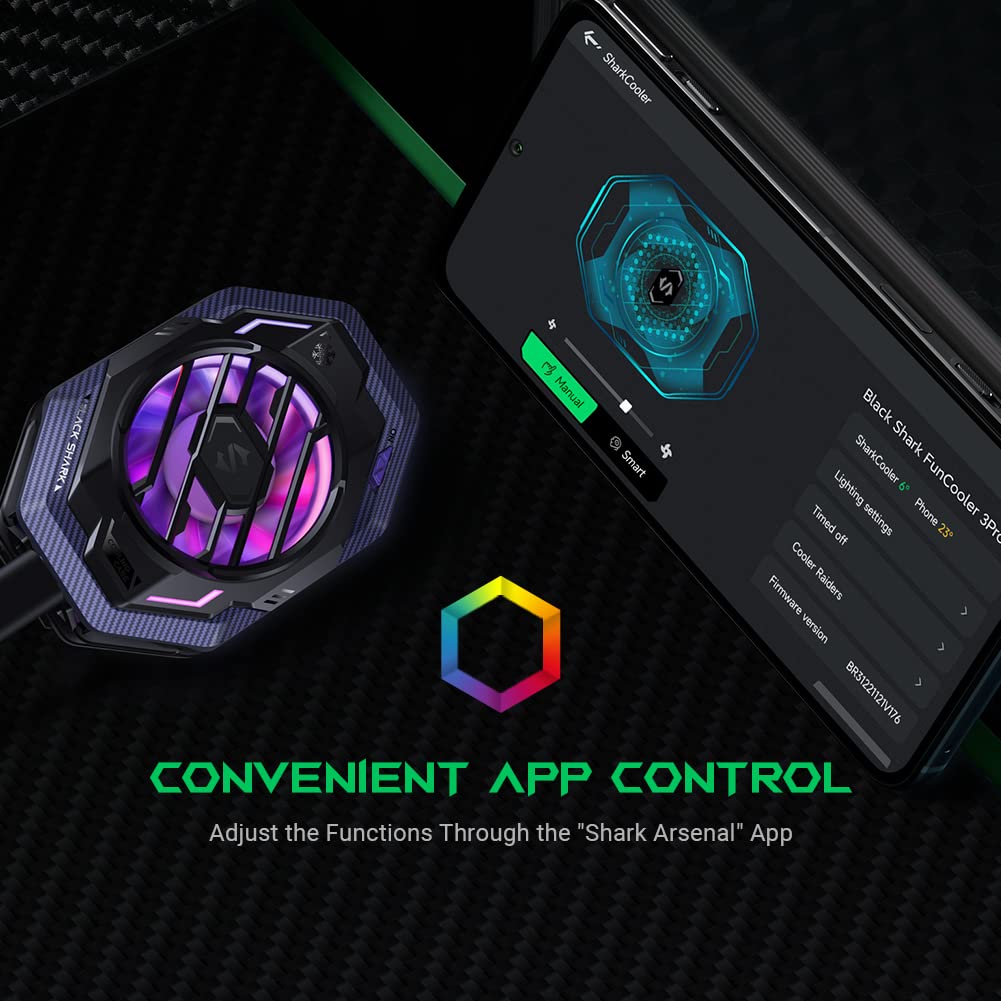
Image: A visual representation of the Black Shark FunCooler 3 Pro connected to a smartphone displaying the "Shark Arsenal" app interface, highlighting customizable settings.

Image: A detailed graphic showing the app's interface for temperature control (manual and intelligent) and light effect settings (streamer, breathe, flow, flicker).
4.3 Usage Scenarios
The FunCooler 3 Pro is ideal for various scenarios where smartphone overheating is a concern:
- Mobile Gaming: Prevents performance throttling and ensures smooth gameplay.
- Live Streaming: Maintains device stability during extended streaming sessions.
- Mobile Navigation: Keeps phone cool during prolonged GPS use in vehicles.
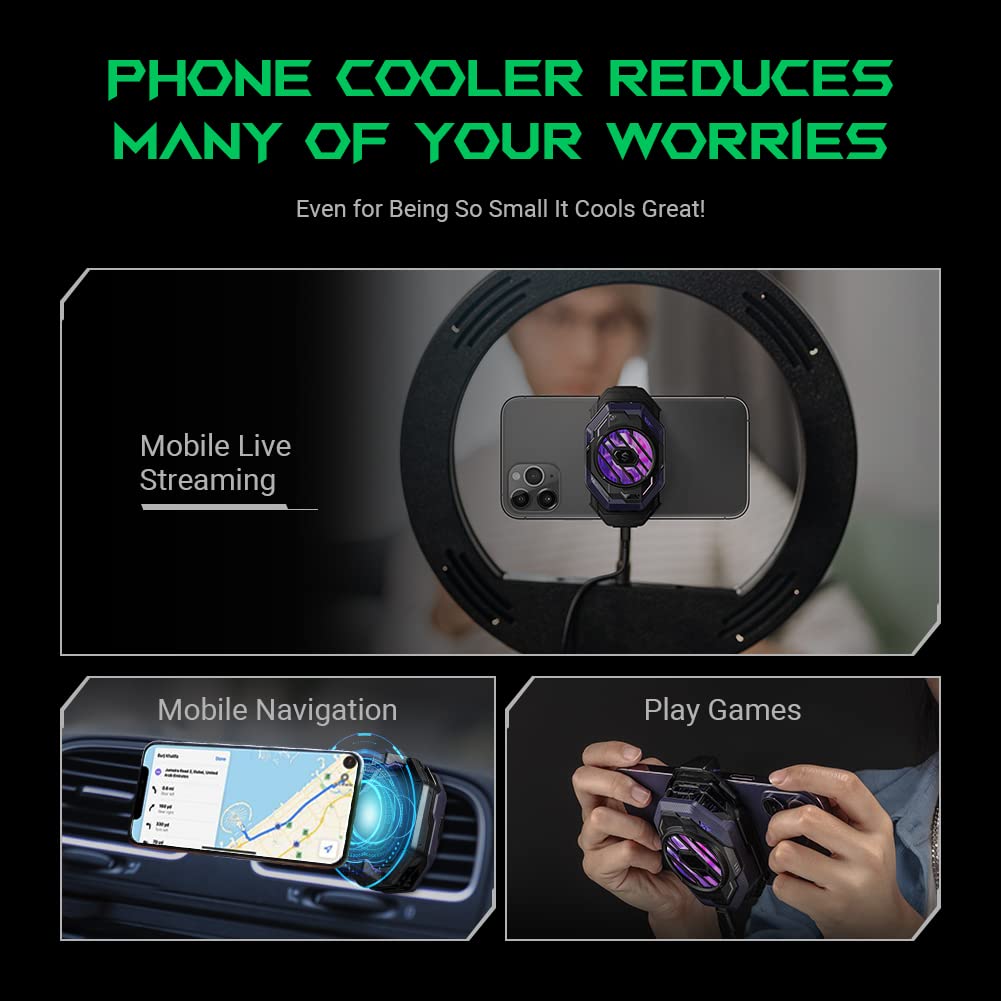
Image: Three panels depicting the phone cooler in use: during mobile live streaming, mobile navigation in a car, and while playing games.
5. Maintenance
- Keep the cooling plate clean and free of dust or debris to ensure efficient heat transfer.
- Avoid prolonged operation in high humidity environments without active cooling, as this may lead to condensation on the cooling plate.
- Store the device in a cool, dry place when not in use.
6. Troubleshooting
| Issue | Possible Cause | Solution |
|---|---|---|
| Cooler not turning on. | No power or insufficient power supply. | Ensure the Type-C cable is securely connected to both the cooler and a power source. Use a 25W or higher power adapter. |
| Poor cooling performance. | Poor contact with phone, dust on cooling plate, or low power. | Ensure the cooler is firmly attached and the cooling plate makes full contact. Clean the cooling plate. Verify power supply meets requirements. |
| Condensation on phone/cooler. | High humidity environment combined with low cooling temperature. | This is normal in humid conditions. Wipe away condensation. Avoid running for extended periods when not actively gaming to prevent excessive condensation inside the phone. |
| App connection issues. | Bluetooth not enabled or app not updated. | Ensure Bluetooth is enabled on your phone. Restart the app and cooler. Check for app updates. |
7. Specifications
| Feature | Detail |
|---|---|
| Model Number | BS 3 Pro |
| Cooling Power | 20W |
| Cooling Chip Area | 1404mm² |
| Compatible Phone Width | 67mm - 88mm (2.63 - 3.46 inches) |
| Product Dimensions | 3.8"L x 1.8"W x 5.7"H (9.65cm x 4.57cm x 14.48cm) |
| Item Weight | 150 Grams (5.29 ounces) |
| Material | Plastic |
| Power Input | USB Type-C (25W or higher adapter recommended) |
| Features | Vertical Air Outlet, App Control (Intelligent/Manual Temp, RGB, Timer), Silent Operation |

Image: An exploded view diagram illustrating the internal components of the FunCooler 3 Pro, including the 7-blade high-speed fan, heat sink, and 1404mm² cooling wafer.
8. Warranty and Support
For warranty information and customer support, please refer to the official Black Shark website or contact their customer service directly. Keep your purchase receipt for warranty claims.
Note: Some user reviews indicate a 15-day warranty period. Please confirm the exact warranty terms with the manufacturer or seller at the time of purchase.
For further assistance, visit the Black Shark Store on Amazon.
Documents and downloads
Ask a question about this manual
Ask about setup, troubleshooting, compatibility, parts, safety, or missing instructions. Manuals+ will review the question and use this page’s manual context to help answer it.