1. Introduction
The Kenko PRO1D Pro ND Series filter is a high-precision neutral density (ND) filter designed to provide excellent color reproduction and light reduction for photographic and videographic applications. This filter is engineered with a PRO1D ND coating that emphasizes flat permeability properties, ensuring an extremely neutral color balance in your images.
Neutral Density filters are essential tools for photographers and videographers who need to control the amount of light entering the camera lens. They allow for greater creative control by enabling the use of slower shutter speeds or wider apertures in bright lighting conditions, which would otherwise result in overexposed images.
This manual provides detailed information on the features, proper usage, maintenance, and specifications of your Kenko PRO1D Pro ND8 filter.
2. Package Contents
Upon opening the package, please verify that all components are present and undamaged.
- Kenko PRO1D Pro ND8 (N) ND Filter (55mm)

Figure 2.1: Kenko PRO1D Pro ND8 filter and its retail packaging.
3. Setup and Installation
The Kenko PRO1D Pro ND8 filter is designed for easy attachment to compatible camera lenses. Ensure your lens has a 55mm filter thread size before installation.
- Prepare Your Lens: Ensure the front element of your camera lens is clean and free of dust or smudges.
- Align the Filter: Carefully align the filter's threads with the filter threads on the front of your camera lens. The filter features knurling on its frame to provide a secure grip during attachment and removal.
- Attach the Filter: Gently rotate the filter clockwise until it is securely fastened to the lens. Avoid overtightening, as this can make removal difficult.
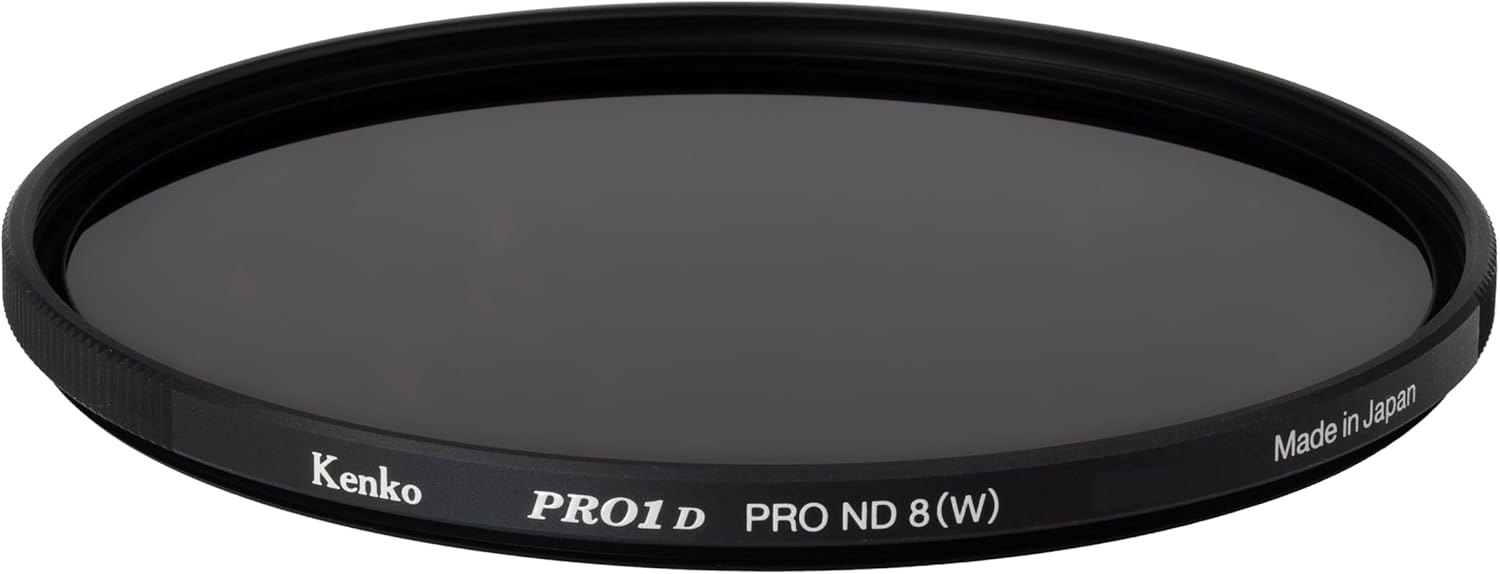
Figure 3.1: The Kenko PRO1D Pro ND8 filter, showing its knurled edge for easy handling.
The filter's thin frame design minimizes the risk of vignetting, even when used with wide-angle lenses.
4. Operating Instructions
The Kenko PRO1D Pro ND8 filter reduces the amount of light entering your camera by 3 stops (1/8th of the light). This fixed density type filter is ideal for situations where a consistent reduction in light is required.
4.1. Applications in Photography
- Motion Blur Effects: Use the filter to achieve slower shutter speeds in bright conditions, allowing you to capture motion blur in elements like flowing water, clouds, or moving vehicles. This creates a silky, ethereal effect.
- Wide Aperture in Bright Light: When shooting portraits or shallow depth-of-field images in bright sunlight, an ND filter allows you to open your aperture (e.g., f/1.4, f/2.8) without overexposing the image. This helps achieve pleasing background blur (bokeh).
- Preventing Overexposure: In extremely bright environments, even at the lowest ISO and fastest shutter speed, your camera might still overexpose. The ND8 filter provides the necessary light reduction to achieve proper exposure.

Figure 4.1: Example of motion blur effect on a waterfall achieved with an ND filter (left) compared to without (right).
4.2. Applications in Videography
For video recording, ND filters are crucial for maintaining the "180-degree rule" for natural-looking motion blur. This rule suggests that your shutter speed should be approximately double your frame rate (e.g., 1/60th of a second for 30 frames per second). In bright conditions, achieving this shutter speed often requires an ND filter to prevent overexposure, especially when using a wide aperture.
4.3. Key Features for Optimal Performance
- Color Neutrality: The PRO1D ND coating ensures that the filter does not introduce any unwanted color cast to your images, maintaining accurate color reproduction.
- Fixed Density: As a fixed density filter, it provides a consistent 3-stop light reduction, making it reliable for specific lighting scenarios without the potential for uneven concentration sometimes found in variable ND filters.
- Thin Frame Design: The slim profile of the filter frame helps prevent vignetting, particularly when using wide-angle lenses, ensuring full image coverage.
- Knurled Edge: The textured edge of the filter frame provides a secure grip, making it easier to attach and remove the filter from your lens.

Figure 4.2: Illustration of the filter's thin frame, knurled edge, and multi-coating technology.
5. Care and Maintenance
Proper care of your Kenko PRO1D Pro ND8 filter will ensure its longevity and optimal performance.
- Cleaning: Use a soft, clean microfiber cloth specifically designed for optical surfaces to gently wipe away dust or smudges. For stubborn marks, a small amount of lens cleaning solution applied to the cloth (not directly to the filter) can be used. Avoid abrasive materials or harsh chemicals.
- Storage: When not in use, store the filter in its protective case or a dedicated filter pouch to prevent scratches and dust accumulation. Keep it away from extreme temperatures and high humidity.
- Handling: Always handle the filter by its edges to avoid leaving fingerprints on the glass surface.
6. Troubleshooting
This section addresses common questions or issues you might encounter with your ND filter.
- Vignetting (Dark Corners):
Issue: Darkening appears in the corners of your images, especially with wide-angle lenses.
Solution: The Kenko PRO1D Pro ND8 filter features a thin frame design to minimize vignetting. If it still occurs, ensure the filter is fully seated on the lens. In rare cases with extremely wide-angle lenses, stacking multiple filters can cause vignetting; avoid stacking if possible.
- Color Cast:
Issue: Images appear to have an unnatural color tint (e.g., magenta, green).
Solution: The Kenko PRO1D Pro ND series is designed for excellent color neutrality. If a color cast is observed, verify your camera's white balance settings. In some extreme lighting conditions, minor adjustments in post-processing may be necessary, but significant color shifts are not expected from this filter.
- Filter Stuck on Lens:
Issue: The filter is difficult to remove from the lens.
Solution: Ensure you are gripping the knurled edge firmly. Apply gentle, even pressure while twisting counter-clockwise. Avoid using excessive force or tools that could damage the filter or lens threads.
7. Product Specifications
| Product Name | Kenko PRO1D Pro ND8 (N) ND Filter |
| Model Number | 255636 |
| Filter Diameter | 55 mm |
| Light Reduction | 1/8 (3 stops) |
| Material | Glass, Aluminum |
| Coating Description | Multi Coating (PRO1D ND coating) |
| Product Dimensions | 2.24 x 2.24 x 0.04 inches |
| Item Weight | 0.6 ounces |
| Water Resistance Level | Not Water Resistant |
| Country of Manufacture | Japan |
8. Warranty and Support
For information regarding warranty coverage, technical support, or service inquiries, please refer to the official Kenko website or contact Kenko customer service directly. Keep your purchase receipt as proof of purchase for warranty claims.
Official Kenko Website: www.kenko-tokina.co.jp/english/


