
Introduction
This manual provides essential information for the safe and efficient operation of your Candy CS 1292DWRR4/1-S front-load smart washing machine. Please read these instructions carefully before using the appliance and keep them for future reference. This appliance is designed for residential use only.
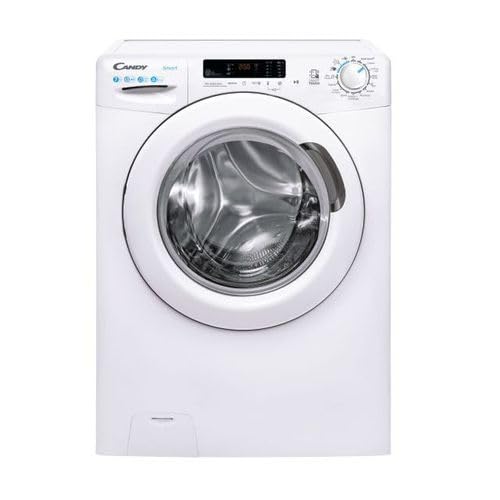
Figure 1: Front view of the Candy CS 1292DWRR4/1-S washing machine.
1. Setup and Installation
Proper installation is crucial for the safe and correct operation of your washing machine.
1.1 Unpacking
- Remove all packaging materials, including the polystyrene base and any inserts in the drum.
- Remove the transport bolts located at the rear of the machine. These bolts secure the drum during transit and must be removed before use to prevent damage.
- Keep all packaging materials out of reach of children.
1.2 Placement and Leveling
- Place the washing machine on a firm, flat floor.
- Adjust the feet of the machine to ensure it is perfectly level. Use a spirit level to check. A level machine reduces vibration and noise during operation.
1.3 Water Connection
- Connect the water inlet hose to a cold water tap with a 3/4" thread.
- Ensure the hose is securely tightened to prevent leaks. Do not overtighten.
1.4 Drain Connection
- Position the drain hose at a height between 50 cm and 85 cm from the floor.
- Ensure the drain hose is not kinked or obstructed.
1.5 Electrical Connection
- Connect the power plug to a properly grounded electrical outlet.
- Ensure the voltage and frequency match the specifications on the rating plate of the appliance.
- Do not use extension cords or multiple adapters.
2. Operating Instructions
Familiarize yourself with the control panel and washing programs for optimal results.
2.1 Control Panel Overview
The washing machine features a touch control panel. Refer to the diagram below for a general layout (specific button functions may vary slightly by model).
(Note: A diagram of the control panel would typically be included here in a physical manual. For this digital format, please refer to the appliance itself for button identification.)
2.2 Loading Laundry
- Open the door and load laundry into the drum. Do not overload the machine; respect the maximum capacity of 9 kg.
- Close the door firmly until it clicks.
2.3 Detergent Dispenser
- Pull out the detergent dispenser drawer.
- Add detergent to the main wash compartment and fabric softener to the designated compartment. Follow detergent manufacturer's recommendations.
- Push the dispenser drawer back in completely.
2.4 Program Selection
- Turn the program selector knob to choose the desired washing program. The machine offers 16 programs.
- The display will show the program duration and default settings.
2.5 Special Functions
- Delayed Start: Press the "Delayed Start" button to set a delay for the program start, up to 24 hours.
- Rapid Programs: Select one of the rapid cycles (under one hour) for quick washes.
- Kilo Detector: This sensor automatically adjusts water and electricity consumption based on the load size, optimizing efficiency.
- NFC Connectivity (Smart Touch): For Android smartphones with compatible NFC technology, download the Simply-Fi app. Tap your smartphone to the designated area on the machine to access additional cycles, statistics, and smart check-up features.
2.6 Starting a Cycle
- After selecting the program and any desired options, press the "Start/Pause" button to begin the cycle.
- The door will lock, and the washing process will commence.
3. Maintenance
Regular maintenance ensures the longevity and optimal performance of your washing machine.
3.1 Cleaning the Detergent Dispenser
- Pull out the dispenser drawer completely.
- Rinse it under running water to remove any detergent residue.
- Clean the housing of the dispenser drawer with a brush.
- Reinsert the drawer.
3.2 Cleaning the Filter
- Locate the filter cover at the bottom front of the machine.
- Place a shallow container beneath the filter to collect any residual water.
- Slowly unscrew the filter counter-clockwise.
- Remove any lint, coins, or foreign objects.
- Clean the filter under running water and screw it back in securely.
3.3 Cleaning the Drum and Door Seal
- Periodically run a hot wash cycle without laundry and with a descaling agent or washing machine cleaner.
- Wipe the rubber door seal with a damp cloth after each wash to prevent mold and mildew buildup.
3.4 Exterior Cleaning
- Wipe the exterior surfaces with a soft, damp cloth.
- Do not use abrasive cleaners or solvents.
4. Troubleshooting
Before contacting customer service, please refer to the following common issues and their solutions.
4.1 Common Issues
| Problem | Possible Cause | Solution |
|---|---|---|
| Machine does not start | No power, door not closed, program not selected. | Check power supply, ensure door is latched, select a program and press start. |
| Water not filling | Water tap closed, inlet hose kinked, water pressure too low. | Open water tap, straighten hose, check water supply. |
| Water not draining | Drain hose kinked or blocked, filter clogged. | Straighten drain hose, clean the filter (refer to Section 3.2). |
| Excessive vibration/noise | Machine not level, transport bolts not removed, uneven load. | Level the machine, ensure transport bolts are removed, redistribute laundry. |
4.2 Smart Check-up Function
Utilize the Smart Check-up function via the Simply-Fi app (NFC connectivity) to monitor the appliance's health status. In case of an error or malfunction, the app can help identify the issue and suggest solutions.
5. Specifications
Key technical specifications for the Candy CS 1292DWRR4/1-S washing machine.
| Feature | Value |
|---|---|
| Brand | Candy |
| Model Number | CS 1292DWRR4/1-S |
| Loading Type | Front Load |
| Capacity | 9 Kilograms |
| Maximum Spin Speed | 1200 RPM (Revolutions Per Minute) |
| Dimensions (W x D x H) | 60 cm x 53 cm x 85 cm |
| Color | Anthracite |
| Special Feature | Smart Connectivity (NFC) |
| Control Type | Touch |
| Material | Stainless Steel and Plastic |
| Operating Mode | Automatic |
6. Warranty and Support
For detailed information regarding the warranty terms and conditions, please refer to the warranty card provided with your appliance or visit the official Candy website.
If you encounter issues that cannot be resolved using the troubleshooting guide, please contact Candy customer support. Have your model number (CS 1292DWRR4/1-S) and serial number ready when contacting support.
Online Support: Visit Candy Support Website


