1. Introduction
Thank you for choosing the MDHL Sonic Vibration Toothbrush. This manual provides important information on how to set up, operate, and maintain your new toothbrush. Please read it thoroughly before first use and keep it for future reference.
This sonic toothbrush is designed for effective oral cleaning, featuring a super soft brush head and carefully adjusted vibration frequency and amplitude. It is suitable for individuals with sensitive teeth, weak enamel, or easily bleeding gums, and can also be used for children during tooth replacement.
2. Package Contents
Please check the package contents to ensure all items are present:
- 1 x MDHL Sonic Vibration Toothbrush Handle
- 3 x Super Soft Brush Heads
- 1 x Charging Base
- 1 x USB Charging Cable
- 1 x User Manual (this document)

Image: All components included in the MDHL Sonic Vibration Toothbrush package.
3. Product Features
- Super Soft Bristles: Equipped with MDHL ultra-fine soft bristles, each finely polished to ensure effective cleaning while preventing irritation or damage to teeth and gums.
- Two Cleaning Modes: Offers "Clean" mode for daily thorough cleaning and "Soft" mode for gentle cleaning, suitable for sensitive teeth.
- Intelligent Timing: Features a 2-minute smart timer, recommended by dentists, and a 30-second zone change reminder to ensure even cleaning of all four quadrants of your mouth.
- Long Battery Life: Provides approximately 50 days of use on a single 4-hour charge.
- IPX7 Waterproof: The toothbrush is fully washable and safe for use in the shower.

Image: Detailed view of the toothbrush head design, highlighting round bristles and W-arc for effective cleaning.
4. Setup
- Charge the Toothbrush: Before first use, fully charge the toothbrush. Connect the USB charging cable to the charging base and plug it into a compatible USB power adapter (not included). Place the toothbrush handle onto the charging base. The indicator light will show charging status. A full charge takes approximately 4 hours.
- Attach a Brush Head: Align the brush head with the metal shaft on the toothbrush handle and push it down until it clicks into place. Ensure it is securely attached.
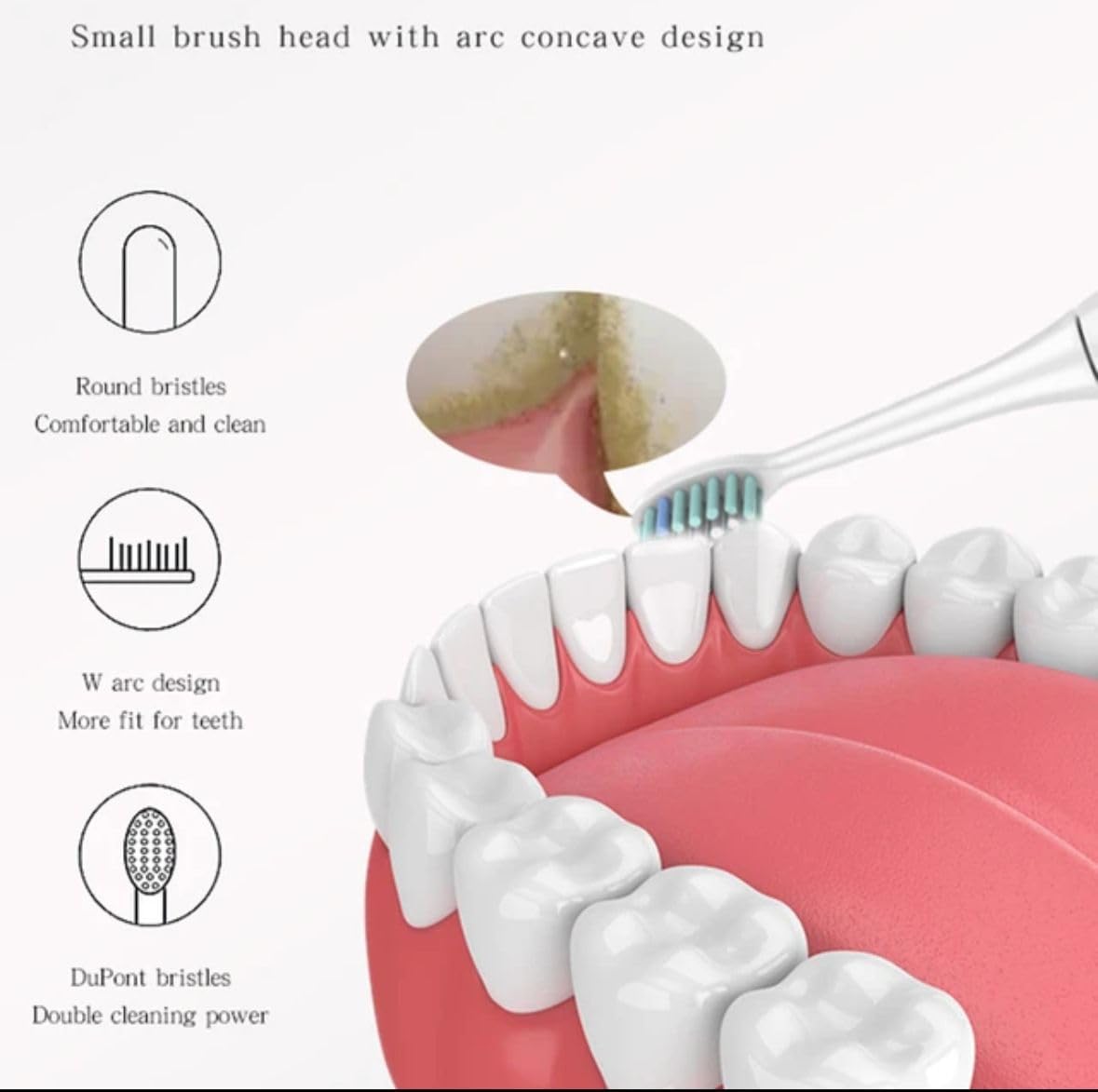
Image: The MDHL Sonic Vibration Toothbrush handle placed on its charging base, with additional brush heads.
5. Operating Instructions
- Wet the Brush Head: Wet the bristles and apply a small amount of toothpaste.
- Place in Mouth: Place the brush head against your teeth at a slight angle towards the gum line.
- Power On: Press the power button to turn on the toothbrush. It will start in the last used mode.
- Select Mode: Press the power button repeatedly to cycle through the "Clean" and "Soft" modes.
- Brush: Gently move the brush head slowly from tooth to tooth, allowing the sonic vibrations to clean. Do not scrub.
- Quadrant Timer: The toothbrush will pause briefly every 30 seconds to remind you to move to the next quadrant of your mouth.
- Auto Shut-off: The toothbrush will automatically turn off after 2 minutes of brushing.
- Power Off Manually: To turn off the toothbrush before the 2-minute cycle is complete, press and hold the power button for 2 seconds.
- Rinse: After brushing, rinse your mouth and the brush head thoroughly under running water.
6. Maintenance
6.1 Cleaning the Toothbrush
- After each use, rinse the brush head and bristles thoroughly under running water.
- Wipe the toothbrush handle with a damp cloth. Do not immerse the handle in water for extended periods, although it is IPX7 waterproof.
- Clean the charging base periodically with a dry cloth. Ensure the charging base is unplugged before cleaning.
6.2 Replacing the Brush Head
Dentists recommend replacing your toothbrush head every 3 months, or sooner if the bristles become frayed or worn. To replace:
- Grip the brush head firmly and pull it straight off the handle.
- Align the new brush head with the metal shaft and push it down until it clicks into place.
7. Charging and Battery Life
- The toothbrush uses a rechargeable battery.
- A full charge takes approximately 4 hours and provides up to 50 days of brushing (based on two 2-minute brushes per day).
- When the battery is low, the indicator light may flash or change color (refer to specific model indicator behavior if available).
- Always use the provided charging base and USB cable.
8. Troubleshooting
| Problem | Possible Cause / Solution |
|---|---|
| Toothbrush does not turn on. |
|
| Vibration is weak. |
|
| Toothbrush stops during use. |
|
| Charging indicator not working. |
|
9. Specifications
- Model: DS-05
- Brand: Generic (MDHL)
- Power Source: Battery Powered (Rechargeable)
- Battery Life: Up to 50 days (based on 2x daily, 2-minute brushing)
- Charging Time: Approximately 4 hours
- Waterproof Rating: IPX7
- Bristle Firmness: Soft
- Age Range: Adult
- Product Dimensions: 8 x 8 x 2 inches (approximate package dimensions); 1.21 Pounds (approximate package weight)
- Manufacturer: All American
10. Safety Information
- Do not use this product for any purpose other than oral cleaning.
- Keep out of reach of children unless supervised by an adult.
- If you have any oral health concerns, consult your dentist before using this product.
- Do not attempt to disassemble or repair the toothbrush. Contact customer support if issues arise.
- Do not place the charging base in water or use it in a wet environment.
- If the product is damaged, discontinue use immediately.
11. Warranty and Support
This product comes with a standard manufacturer's warranty. For specific warranty details, please refer to the documentation included with your purchase or contact the retailer where the product was purchased.
For technical support or inquiries, please contact the manufacturer or retailer.


