
Introduction
Thank you for choosing the Medcursor Rechargeable Heated Eye Mask. This device is designed to provide soothing heat therapy and cold therapy for your eyes, helping to alleviate dry eyes, reduce eye fatigue, and promote relaxation. It features an external controller for easy temperature and timer adjustments, a large capacity battery for cordless use, and a washable cover for hygiene. Please read this manual thoroughly before use to ensure proper operation and maintenance.
Product Overview
The Medcursor Heated Eye Mask offers a versatile solution for eye care, combining heat and cold therapy with convenient features. Below is a comparison of its key attributes:

Image: Feature comparison of Medcursor Eye Mask.
Key Features:
- Versatile Use: Functions as a sleep mask and provides both heat and cold therapy.
- External Controller: Allows for easy adjustment of settings.
- High Capacity Battery: 2500 mAh rechargeable battery for extended cordless operation.
- Adjustable Heat: Five distinct heat levels ranging from 104°F to 140°F (40°C to 60°C).
- Cold Therapy Option: Includes a cooling pad for cold compress application.
- Customizable Timer: Six timer options (10, 20, 30, 40, 50, 60 minutes) for personalized sessions.
- Light Blocking Design: Effectively blocks light for a dark environment, ideal for sleeping or relaxation.
- Easy Maintenance: Features a comfortable, washable cloth cover.
Safety Information
Please adhere to the following safety guidelines to prevent injury or damage to the product:
- Always follow the instructions provided with the product.
- Keep the mask away from direct heat sources.
- Do not use the mask while sleeping if you have difficulty breathing or removing the mask by yourself.
- Consult a healthcare professional if you have any medical conditions that may be affected by the use of this product.
- Do not attempt to open or repair the battery pack or controller. If the battery appears swollen or damaged, discontinue use immediately and dispose of it safely.
Setup
1. Charging the Battery
Before first use, fully charge the eye mask's 2500 mAh battery. Connect the Type-C charging cable to the controller and plug the other end into a compatible USB power source (e.g., laptop, power bank, or a 5V/2A wall charger, not included). The controller display will indicate charging status. A full charge provides approximately 150-390 minutes of use depending on the heat level.

Image: Charging options for the eye mask controller.
2. Attaching the Controller
Ensure the eye mask is securely connected to the external controller via its cable. The controller allows you to manage all settings.
3. Preparing for Use (Washable Cover)
The eye mask comes with a washable cloth cover. For optimal hygiene and comfort, ensure the cover is properly fitted over the mask before use. This cover can be removed for cleaning.
Operating Instructions
1. Powering On/Off
Press and hold the power button on the external controller to turn the device on or off. The display will illuminate when powered on.
2. Adjusting Heat Levels
The eye mask offers five heat levels. Press the heat button on the controller to cycle through the temperature settings (104°F, 113°F, 122°F, 131°F, 140°F). It is recommended to start at the lowest level and gradually increase to your preferred comfort.

Image: Available heat settings for soothing warmth.
3. Setting the Timer
Choose from six timer options (10, 20, 30, 40, 50, 60 minutes) to automatically shut off the mask. Press the timer button on the controller to select your desired duration. This feature ensures undisturbed relaxation or sleep.

Image: Timer options for automatic shut-off.
4. Using Cold Therapy
For cold therapy, detach the controller and place the included cooling pad in a refrigerator for a period sufficient to chill it. Insert the chilled pad into the eye mask. No controller connection is required for cold compress use. This helps alleviate eye puffiness.

Image: Steps for using the eye mask for cold therapy.
5. Cordless and Wired Operation
The eye mask supports both cordless and wired usage. Use it cordlessly when fully charged for maximum freedom. When the battery is low, you can plug it into a power source and continue using it while charging.
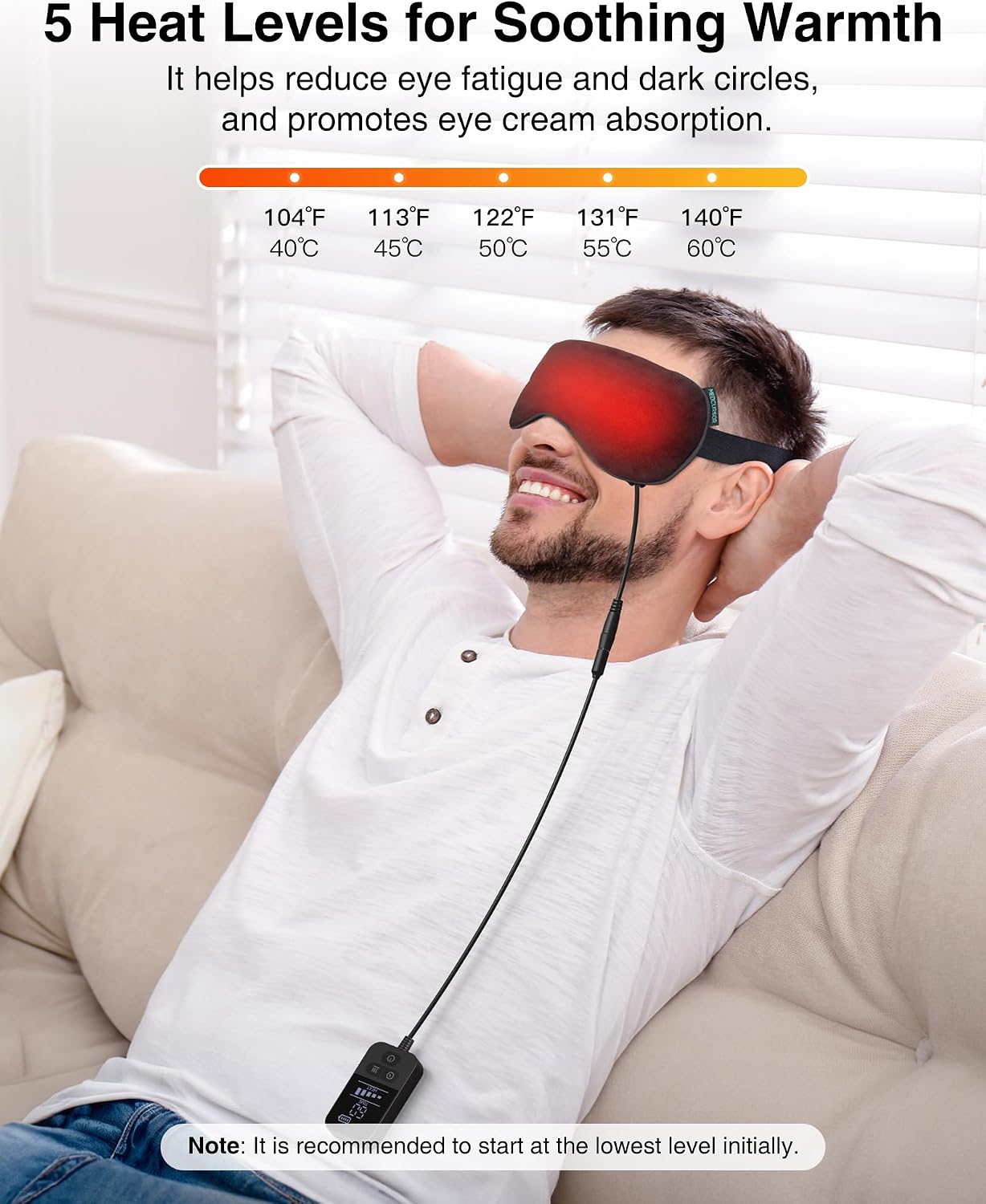
Image: Cordless and wired usage options.
6. Usage Scenarios
The Medcursor Heated Eye Mask is suitable for various situations to provide relief and relaxation:
- Work & Study: Take a short break to relieve eye strain.
- Travel: Enjoy soothing comfort during flights or long journeys.
- Sleep Aid: Promote relaxation for better sleep.
- Eye Care: Regular use for general eye health and relaxation.

Image: Various scenarios for using the eye mask.
Maintenance
1. Cleaning the Eye Mask
The eye mask features a removable and washable cloth cover. Gently remove the cover from the mask. Hand wash the cover with mild soap and cold water, then air dry completely before reattaching. Do not wash the electronic components of the mask or the controller.
2. Storage
Store the eye mask and its components in a cool, dry place away from direct sunlight and extreme temperatures. Ensure the device is fully charged before storing for extended periods to maintain battery health.
Troubleshooting
| Problem | Possible Cause | Solution |
|---|---|---|
| Device does not turn on. | Battery is depleted. | Charge the eye mask fully using the provided Type-C cable. |
| No heat or insufficient heat. | Heat level not selected or set too low. | Ensure the device is powered on and press the heat button to select a higher temperature setting. |
| Device turns off unexpectedly. | Timer has expired or battery is low. | Check the timer setting and reset if necessary. Recharge the battery if it is low. |
| Controller display is not working. | Device is off or battery is critically low. | Ensure the device is powered on. Charge the battery. If the issue persists, contact customer support. |
| Washable cover feels loose or uncomfortable. | Cover not properly fitted. | Adjust the cover to ensure it is snug and evenly distributed over the mask. |
Specifications
- Model Number: A07-EM03-BKUS-BN
- Battery Capacity: 2500 mAh
- Heat Levels: 5 (104°F - 140°F / 40°C - 60°C)
- Timer Settings: 6 (10, 20, 30, 40, 50, 60 minutes)
- Charging Port: Type-C
- Material: Natural fabric with removable, washable cover
- Dimensions: 8.74 x 4.49 x 1.65 inches
- Weight: Approximately 12.63 ounces
- Manufacturer: Medcursor
- Date First Available: July 8, 2024
Warranty and Support
Medcursor is committed to providing quality products and customer satisfaction. For any questions, concerns, or technical support regarding your Heated Eye Mask, please contact our customer service team. We offer 24/7 support to assist you.
Please refer to the product packaging or the official Medcursor website for specific warranty details and contact information.
