
Introduction
Welcome to your BIG BOOM Y5 Smart Watch. This device is designed to help you track your fitness activities, monitor your heart rate, and stay connected. Please read this manual carefully to ensure proper use and maintenance of your smart watch.
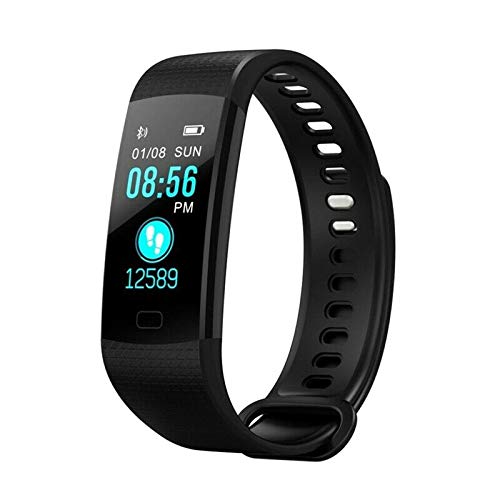
Figure 1: Front view of the BIG BOOM Y5 Smart Watch displaying time, date, and step count.
Setup
1. Unboxing
Carefully remove the smart watch and its accessories from the packaging. The package includes the BIG BOOM Y5 Smart Watch and a case.
2. Charging the Device
Before first use, fully charge your smart watch. Locate the USB charging port on the back of the watch. Connect it to a standard USB power source. The charging indicator will show the charging status on the screen.
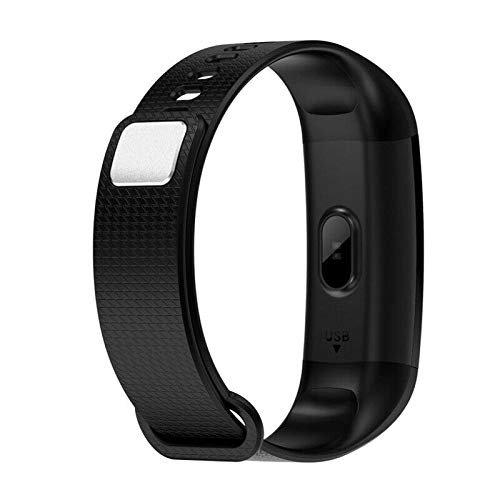
Figure 2: Rear view of the BIG BOOM Y5 Smart Watch, showing the USB charging port and sensor.
3. Power On/Off
To power on, press and hold the side button until the screen illuminates. To power off, navigate to the power off option in the settings menu or press and hold the side button.
4. App Installation & Pairing
For full functionality, download the companion app on your smartphone. Refer to the packaging or quick start guide for the specific app name. Enable Bluetooth on your phone and follow the app's instructions to pair your Y5 Smart Watch.
5. Adjusting Bands
The Y5 Smart Watch features adjustable bands for a comfortable fit. Adjust the strap to ensure the sensor on the back makes proper contact with your skin for accurate readings.
Operating Instructions
1. Basic Navigation
The Y5 Smart Watch features a touch-sensitive screen. Swipe up, down, left, or right to navigate through menus and functions. Tap to select an option.
2. Time Display
The main screen displays the current time, date, and battery status.
3. Activity Tracking
Your Y5 Smart Watch automatically records your daily steps, distance covered, and calorie consumption. You can view this data directly on the watch or in the companion app.

Figure 3: The BIG BOOM Y5 Smart Watch tracking steps, with examples of users engaged in fitness activities.
4. Heart Rate Monitoring
To measure your heart rate, navigate to the heart rate function. Ensure the watch is worn snugly on your wrist. The watch will display your current heart rate after a few moments.
5. Sports Modes
The watch includes various sports modes to track specific activities. Select the desired mode before starting your workout for more accurate data.
Maintenance
1. Cleaning
Regularly clean your smart watch and band with a soft, dry cloth. Avoid using harsh chemicals or abrasive materials. If the watch gets wet, dry it thoroughly before charging or prolonged use.
2. Charging Best Practices
Always use the provided charging cable. Do not expose the charging port to moisture. Avoid overcharging the device to prolong battery life.
3. Storage
Store the watch in a cool, dry place when not in use. Avoid extreme temperatures and direct sunlight.
Troubleshooting
1. Watch Not Turning On
Ensure the watch is fully charged. If it still doesn't turn on, try connecting it to a different USB power source or checking the charging cable for damage.
2. Not Pairing with Phone
Check if Bluetooth is enabled on your phone and the watch. Ensure the watch is within range of your phone. Restart both devices and try pairing again. Verify the correct companion app is installed.
3. Inaccurate Readings
Ensure the watch is worn snugly on your wrist, with the sensor making good contact with your skin. Clean the sensor regularly to remove dirt or sweat buildup.
4. Screen Unresponsive
Try restarting the watch by holding down the side button. If the issue persists, ensure the screen is clean and dry. If unresponsive after a restart, contact customer support.
Specifications
| Manufacturer | BIG BOOM |
| Item Model Number | EP-66268BIG BOOM |
| Product Dimensions | 15 x 5 x 10 cm |
| Included Components | Case |
| Net Quantity | 1.00 Count |
Warranty and Support
For any queries, technical assistance, or support regarding your BIG BOOM Y5 Smart Watch, please contact BIG BOOM customer service. Refer to your purchase documentation or the official BIG BOOM website for specific warranty details and contact information.