
Roinvou Roinvou 4+64G
Roinvou Car Radio Instruction Manual
Model: Roinvou 4+64G | For VW Volkswagen Beetle 2004-2010
Introduction
This manual provides detailed instructions for the installation, operation, and maintenance of your Roinvou 9-inch Touch Screen Car Radio. Please read this manual thoroughly before installation and use to ensure proper function and safety. Keep this manual for future reference.
Safety Information
- Professional Installation Recommended: Due to the complexity of car electrical systems and potential dashboard modifications, professional installation is highly recommended.
- Power Supply: Ensure the car radio is connected to a 12V DC power supply with negative grounding.
- Wiring: Incorrect wiring can cause damage to the unit or vehicle. Follow all wiring diagrams carefully.
- Driving Safety: Do not operate the unit in a way that distracts you from driving. Always prioritize road safety.
- Temperature: Avoid exposing the unit to extreme temperatures or direct sunlight for prolonged periods.
Package Contents
Verify that all items listed below are included in your package:
- Roinvou Volkswagen Beetle Car Stereo
- Power Cable
- Antenna Head Adapter
- Radio Antenna
- RCA Harness
- GPS Antenna
- AHD Backup Camera
- External Microphone
- Rear Camera Input Cable
- Dual USB Cable
- Installation Tool & Accessories
Setup and Installation
This car radio is designed for VW Volkswagen Beetle models from 2004 to 2010. It comes with a plug-and-play cable for simplified connection. Some dashboard modification may be required for a proper fit.
1. Pre-Installation Check
- Confirm vehicle compatibility (VW Beetle 2004-2010).
- Disconnect the vehicle's battery before starting installation.
- Carefully remove the original car radio and dashboard trim.
2. Wiring Connections
Refer to the 'Connection Reference & Package List' diagram for detailed wiring instructions. Ensure all cables are securely connected.

Image Description: A detailed diagram illustrating the various connection points on the back of the car stereo unit, including power, USB, GPS, and camera inputs. Alongside, a visual list of all included components such as cables, antennas, and the backup camera.
3. Backup Camera Installation
Connect the AHD backup camera using the provided cables. The reverse input cable must be plugged in even if the camera is not used, as it affects Bluetooth and WiFi signal reception.

Image Description: A diagram showing how to connect the backup camera to the car stereo. It illustrates the video output, power connections (red wire to reversing lamp, black to ground), and the camera power cable.
4. Steering Wheel Control (SWC)
Without CANBUS Decoder: Connect the steering wheel control wires (Key1/Key2) in the power cable to the corresponding port of your original car. Then, access the 'Steering Wheel Key' manual match in settings to activate button functions.
With CANBUS Decoder: Connect the CANBUS before powering on the machine. Navigate to Apps > Settings > Factory Settings (8888/8317) > Vehicle > Automotive type. Select the brand of the CANBUS decoder and then the matching model and year.

Image Description: An illustration of a car's steering wheel with an overlay showing the on-screen interface for configuring steering wheel controls. Text provides instructions for both CANBUS and non-CANBUS setups.
5. Final Installation
Once all connections are made, carefully mount the car radio into the dashboard. Reconnect the vehicle's battery and test all functions.
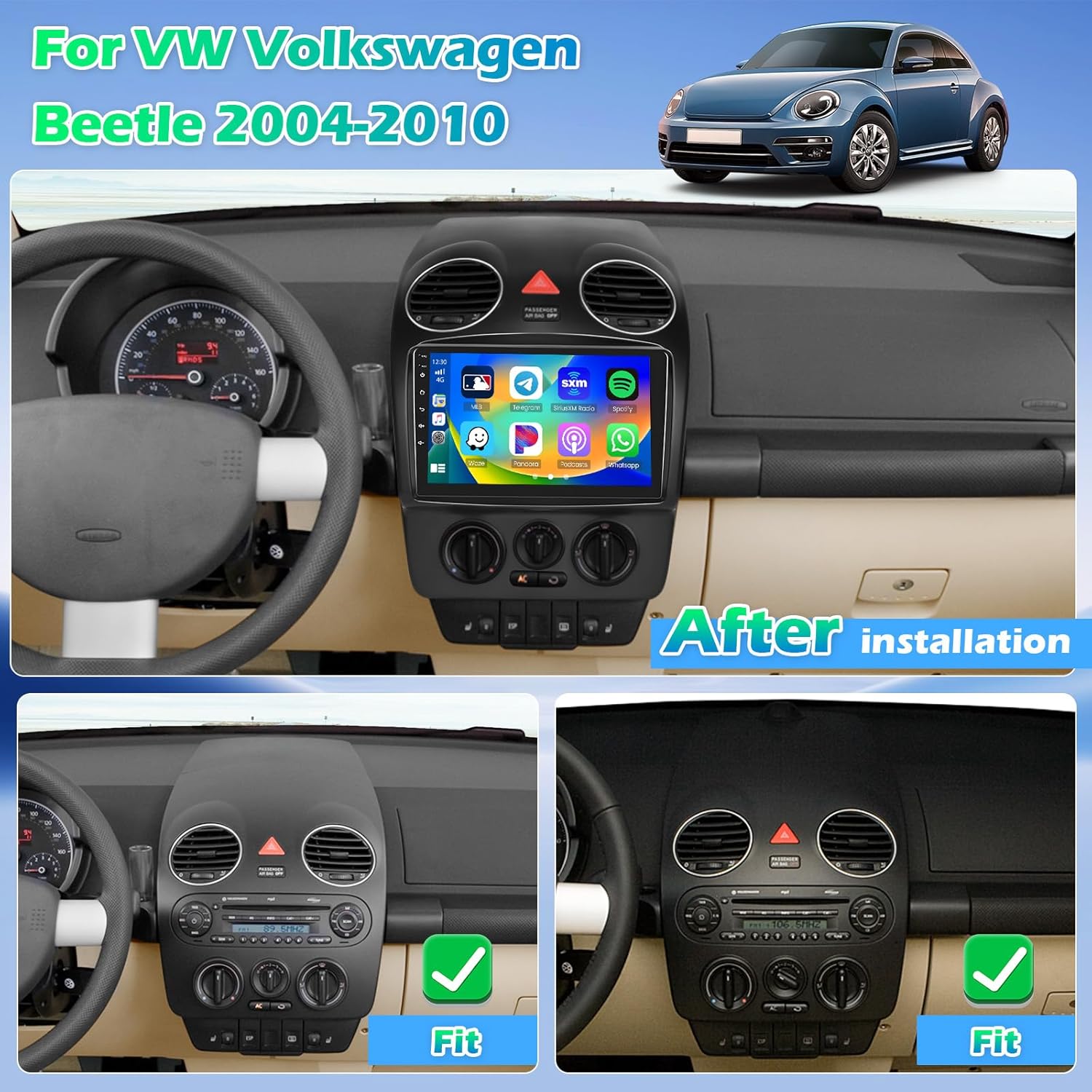
Image Description: A view of the Roinvou car radio seamlessly integrated into the dashboard of a Volkswagen Beetle, showing the modern touch screen display in place of the original radio.
Operating Instructions
1. Power On/Off
Press and hold the power button (usually located on the front panel) to turn the unit on or off. A short press typically mutes or unmutes the audio.
2. Touch Screen Interface
The unit features a 9-inch 1280*720 HD capacitive touch screen. Navigate through menus and applications by tapping, swiping, and pinching gestures similar to a smartphone.
3. Wireless CarPlay & Android Auto
Connect your smartphone wirelessly via Bluetooth to access CarPlay or Android Auto. This allows for hands-free calls, navigation, music playback, and app management directly from the car radio screen.

Image Description: A split screen view demonstrating the user interfaces for both Apple CarPlay and Android Auto, showing various applications like maps, music, and communication tools, emphasizing wireless connectivity.
4. Bluetooth 5.0
Pair your mobile device via Bluetooth for audio streaming and hands-free calling. Access the Bluetooth menu in settings to search for and connect to devices.
5. FM/RDS Radio
Tune into your favorite radio stations. The built-in FM/RDS radio allows for preset stations and displays real-time traffic and weather information where available.

Image Description: A three-panel image showcasing the user interfaces for Bluetooth connectivity (dialer screen), FM/RDS radio (station tuning), and the 32-band equalizer for audio adjustments.
6. GPS Navigation & WiFi
The unit includes built-in GPS navigation. Download offline maps from the Play Store for navigation without an internet connection. Connect to WiFi to use online maps and download various applications.

Image Description: A visual representation of the GPS navigation interface showing a map with a route, alongside various app icons indicating WiFi connectivity and access to online services.
7. Mirror Link Function
Synchronize your Android or iOS smartphone screen to the car radio display to enjoy videos and other content on a larger screen.

Image Description: An image showing a smartphone screen being mirrored onto the car radio display, illustrating the Mirror Link function for both iOS and Android devices via WiFi.
8. Sound Adjustment (32 EQ)
Utilize the pre-installed car tuning software with 32-band EQ technology to adjust frequencies and sound types, optimizing audio quality to your preference.
9. Split Screen Function
The unit supports a split-screen feature, allowing you to run two applications simultaneously, such as navigation and music playback.

Image Description: A visual demonstration of the split-screen functionality, showing two applications running side-by-side on the car radio display, along with various customizable user interface themes.
Maintenance
- Cleaning: Use a soft, dry cloth to clean the screen and unit. Avoid abrasive cleaners or solvents.
- Software Updates: Periodically check for software updates to ensure optimal performance and access to new features. Updates can typically be downloaded via WiFi.
- Environmental Conditions: Protect the unit from extreme heat, cold, and moisture.
Troubleshooting
| Problem | Possible Cause | Solution |
|---|---|---|
| Unit does not power on | Incorrect wiring; Blown fuse; Insufficient power supply | Check all power connections; Inspect vehicle fuses; Ensure 12V DC power. |
| No audio output | Speaker wires disconnected; Volume too low; Mute activated | Verify speaker connections; Adjust volume; Check mute status. |
| CarPlay/Android Auto not connecting | Bluetooth not paired; Phone settings; Software issue | Ensure Bluetooth is on and paired; Check phone's CarPlay/Android Auto settings; Restart unit and phone. |
| Backup camera not displaying | Camera not connected; Reverse trigger wire not connected; Faulty camera | Check camera and reverse trigger wire connections; Test camera functionality. |
| Unit freezes or overheats | Software glitch; Poor ventilation; Excessive load | Restart the unit; Ensure adequate ventilation around the unit; Close unnecessary applications. If persistent, contact support. |
| Steering Wheel Controls not working | Incorrect wiring; SWC not configured | Verify Key1/Key2 wiring; Perform SWC learning/configuration in settings. |
Specifications
- Screen Size: 9 Inches
- Resolution: 1280 x 720
- Operating System: Android (Version not specified, but typically Android 13 for 4-core models)
- Processor: 4-Core
- RAM: 4GB
- Internal Storage (ROM): 64GB
- Bluetooth: Version 5.0
- WiFi: 5G WiFi support
- Equalizer: 32-band EQ
- Connectivity: Bluetooth, USB, Wi-Fi
- Mounting Type: Dashboard Mount
- Vehicle Service Type: Car (VW Volkswagen Beetle 2004-2010)
- Item Weight: 5.54 pounds
- Package Dimensions: 19 x 12 x 11 inches

Image Description: A stylized diagram illustrating the internal 4-core processor and its specifications, including Android 13, 4GB RAM, and 64GB ROM, highlighting the unit's processing power.
Warranty and Support
For any questions, technical assistance, or warranty claims, please contact Roinvou customer support. You can reach us via email at roinvouservices@163.com. Please provide your product model and purchase details for faster service.

Image Description: An image detailing customer support options, including a contact email address and instructions on how to reach out for assistance.
Related documentsRoinvou 4+64G


Ask a question about this manual
Ask about setup, troubleshooting, compatibility, parts, safety, or missing instructions. Manuals+ will review the question and use this page’s manual context to help answer it.