
1. Introduction
The DBIT TXE210 8-Port Gigabit Ethernet Switch is designed to expand your network connectivity with high-speed, reliable performance. This unmanaged network switch offers a simple plug-and-play solution for home and small office environments, requiring no software configuration. It features 8 Gigabit RJ45 ports, including a dedicated independent uplink port, and supports VLAN isolation for enhanced network management and security. Its fanless design ensures quiet operation, and the compact form factor allows for flexible desktop or wall-mount installation.
2. Package Contents
Verify that your package contains the following items:
- 1x DBIT TXE210 8-Port Gigabit Ethernet Switch
- 1x Power Adapter
- 1x User Manual

Figure 2.1: The DBIT TXE210 switch, power adapter, and user manual included in the package.
3. Product Overview
3.1 Front Panel
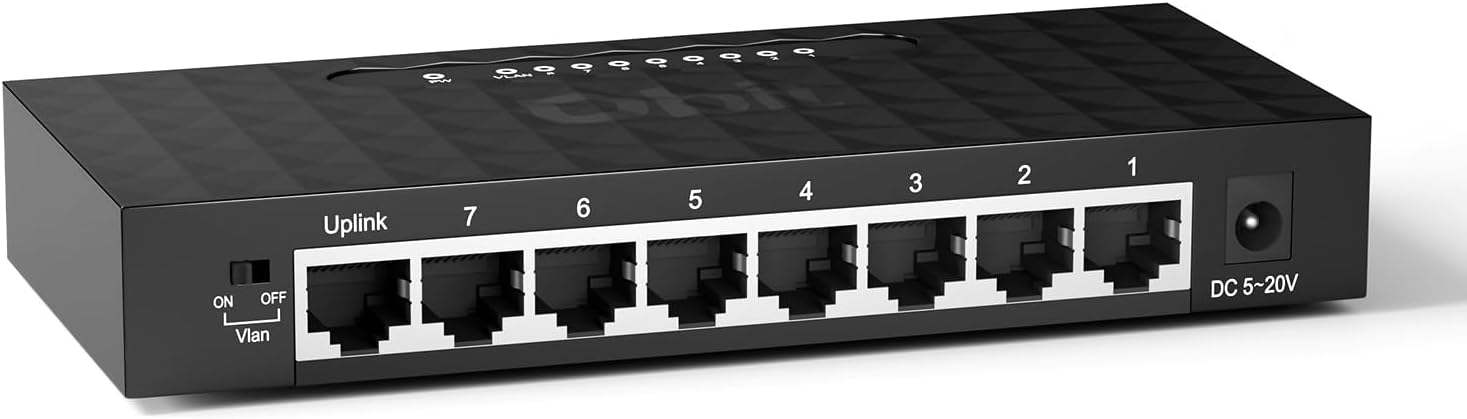
Figure 3.1: Front view of the DBIT TXE210 switch, showing 8 RJ45 ports, VLAN switch, and power input.
- RJ45 Ports (1-7): 10/100/1000Mbps Ethernet ports for connecting network devices.
- Uplink Port: Dedicated Gigabit port for connecting to a router or modem.
- VLAN Switch: Toggle switch to enable/disable VLAN isolation mode.
- DC 5-20V: Power input port.
3.2 Rear Panel and Mounting Options

Figure 3.2: Rear view of the DBIT TXE210 switch, highlighting the wall mounting holes for flexible installation.
The switch features integrated wall-mounting holes on its underside, allowing for secure installation on a wall or under a desk. It can also be placed on a desktop due to its compact size.
3.3 Key Features
- 8 Gigabit RJ45 Ports: Provides 10/100/1000Mbps auto-negotiation and auto MDI/MDIX.
- VLAN Isolation Mode: Ports 1-7 can communicate only with the uplink port, enhancing network security and management.
- Independent Uplink Port: Dedicated Gigabit uplink for high-bandwidth, low-latency connections.
- Plug & Play: No software installation or configuration required.
- Fanless Design: Ensures quiet operation.
- IEEE 802.3x Flow Control: Prevents data packet loss and ensures efficient network operation.
- IEEE 802.3az Standard: Improves energy efficiency.
4. Setup
The DBIT TXE210 switch is designed for simple plug-and-play installation. Follow these steps to set up your network switch:
4.1 Connecting the Power Adapter
- Connect the power adapter to the DC 5-20V port on the switch.
- Plug the other end of the power adapter into a standard electrical outlet.
- Verify that the Power LED on the switch illuminates, indicating it is receiving power.
4.2 Connecting Network Devices
- Connect an Ethernet cable from your router or modem to the Uplink port on the DBIT TXE210 switch.
- Connect Ethernet cables from your network devices (e.g., desktop computers, laptops, gaming consoles, printers, security cameras) to any of the remaining RJ45 Ports (1-7) on the switch.
- The corresponding LED indicators for each connected port will light up, confirming an active connection.

Figure 4.1: Visual guide for connecting power and network devices to the DBIT TXE210 switch.

Figure 4.2: The DBIT TXE210 switch with several Ethernet cables connected to its ports, demonstrating an expanded network.
4.3 Product Overview Video
Video 4.1: An official product overview video demonstrating the features and basic setup of the DBIT 8-Port Gigabit Ethernet Switch.
5. Operating Instructions
5.1 Standard Operation
Once the switch is powered on and devices are connected, it operates automatically. The switch intelligently detects the speed and duplex mode of connected devices and adjusts accordingly (10/100/1000Mbps, Full/Half Duplex). Data traffic will flow seamlessly between connected devices and the uplink network.
5.2 VLAN Isolation Mode
The DBIT TXE210 features a One-Key VLAN switch to enable or disable port isolation. When VLAN isolation is enabled, ports 1 through 7 can only communicate with the Uplink port and cannot communicate with each other. This function is useful for improving network performance, enhancing security, and simplifying network management in specific scenarios, such as isolating IP cameras from the main network.

Figure 5.1: Illustration of VLAN isolation mode, where ports 1-7 communicate only with the uplink port, isolating devices from each other.
- To enable VLAN isolation, slide the "Vlan" switch to the ON position.
- To disable VLAN isolation and allow all ports to communicate freely, slide the "Vlan" switch to the OFF position.

Figure 5.2: A close-up view of the VLAN toggle switch located on the side of the DBIT TXE210 switch.
6. Maintenance
- Cleaning: Use a soft, dry cloth to clean the exterior of the switch. Do not use liquid or aerosol cleaners.
- Ventilation: Ensure the switch is placed in a well-ventilated area to prevent overheating. Do not block the ventilation holes.
- Cable Management: Keep Ethernet cables organized to prevent tangles and accidental disconnections.
- Power Cycle: If the switch is unresponsive, disconnect the power adapter, wait 10 seconds, and then reconnect it.
7. Troubleshooting
| Problem | Possible Cause | Solution |
|---|---|---|
| No Power LED | Power adapter not connected or faulty. | Ensure the power adapter is securely connected to the switch and a working power outlet. Try a different outlet. |
| No Link/Activity LED for a connected device | Incorrect cable connection, faulty cable, or device is off. | Check the Ethernet cable connections at both ends. Try a different Ethernet cable. Ensure the connected device is powered on and functioning correctly. |
| Slow network speed | Cable quality, network congestion, or device limitations. | Ensure you are using Cat5e or Cat6 Ethernet cables. Check for other high-bandwidth activities on your network. Verify the network capabilities of your connected devices. |
| Devices cannot communicate with each other (VLAN enabled) | VLAN Isolation Mode is active. | If you require devices on ports 1-7 to communicate with each other, ensure the VLAN switch is in the OFF position. |
8. Specifications
| Feature | Detail |
|---|---|
| Model Number | TXE210 |
| Brand | DBIT |
| Number of Ports | 8 (7x RJ45 10/100/1000Mbps, 1x Uplink Gigabit Port) |
| Data Transfer Rate | 1000 Megabits Per Second (Mbps) |
| Interface Type | RJ45 |
| Case Material | Plastic |
| Product Dimensions | 6.26"L x 2.79"W x 1.02"H |
| Item Weight | 170 Grams (6 ounces) |
| Voltage | 110 Volts |
| Compatible Devices | Desktop/Laptop/Security Camera/Gaming Console/Printer/Router/Tablet |
| Standards | IEEE 802.3x Flow Control, IEEE 802.3az Energy Efficient Ethernet |
9. Warranty and Support
For warranty information and technical support, please refer to the official DBIT website or contact their customer service directly. Details can typically be found on the product packaging or the included user manual.
Visit the DBIT Store on Amazon for more products and information.