
Proster PST252-US
Proster Pinless Wood Moisture Meter Instruction Manual
Model: PST252-US
1. Introduction
This instruction manual provides detailed information on the operation, maintenance, and troubleshooting of your Proster Pinless Wood Moisture Meter (Model PST252-US). This non-destructive digital moisture tester is designed for accurate moisture measurement in softwoods, hardwoods, walls, drywall, wood, and masonry, eliminating the need for pins or probes that can damage surfaces. Please read this manual thoroughly before use to ensure proper and safe operation.
2. Product Overview
2.1 Components
The Proster Pinless Wood Moisture Meter package includes the following items:
- Moisture Meter x 1
- Storage Bag x 1
- Type-C Cable x 1
- Instruction Manual x 1

Figure 2.1: Package Contents of the Proster Pinless Wood Moisture Meter.
2.2 Key Features
- Accurate Moisture Measurement: Provides precise readings for carpentry, renovation, and firewood management. Non-destructive, pinless operation.
- Large LCD Color Display: Features a clear LCD color display and a color analog display bar for easy visualization of measurement results.
- Visual and Audible Alarms: Automatically alarms and quickly displays readings, visual references, and audible alarms for easy identification of potential problems.
- User-Friendly 3-Color LED Bar: Easily interprets low (green), medium (yellow), and high (red) humidity levels.
- Four Measurement Modes: Dedicated modes for Wall/Drywall, Masonry, Soft Wood, and Hard Wood.
- Non-Destructive Measurement: Measures moisture up to 19 mm below the surface without damaging the material.
- Ergonomic Design: Easy to grip and operate with individual buttons for each mode.
- Convenient Functions: Includes a "HOLD" button to record readings, auto-off function, and low battery indicator.
- Rechargeable Battery: Equipped with a rechargeable battery for convenience.

Figure 2.2: Front view of the Proster Pinless Wood Moisture Meter.
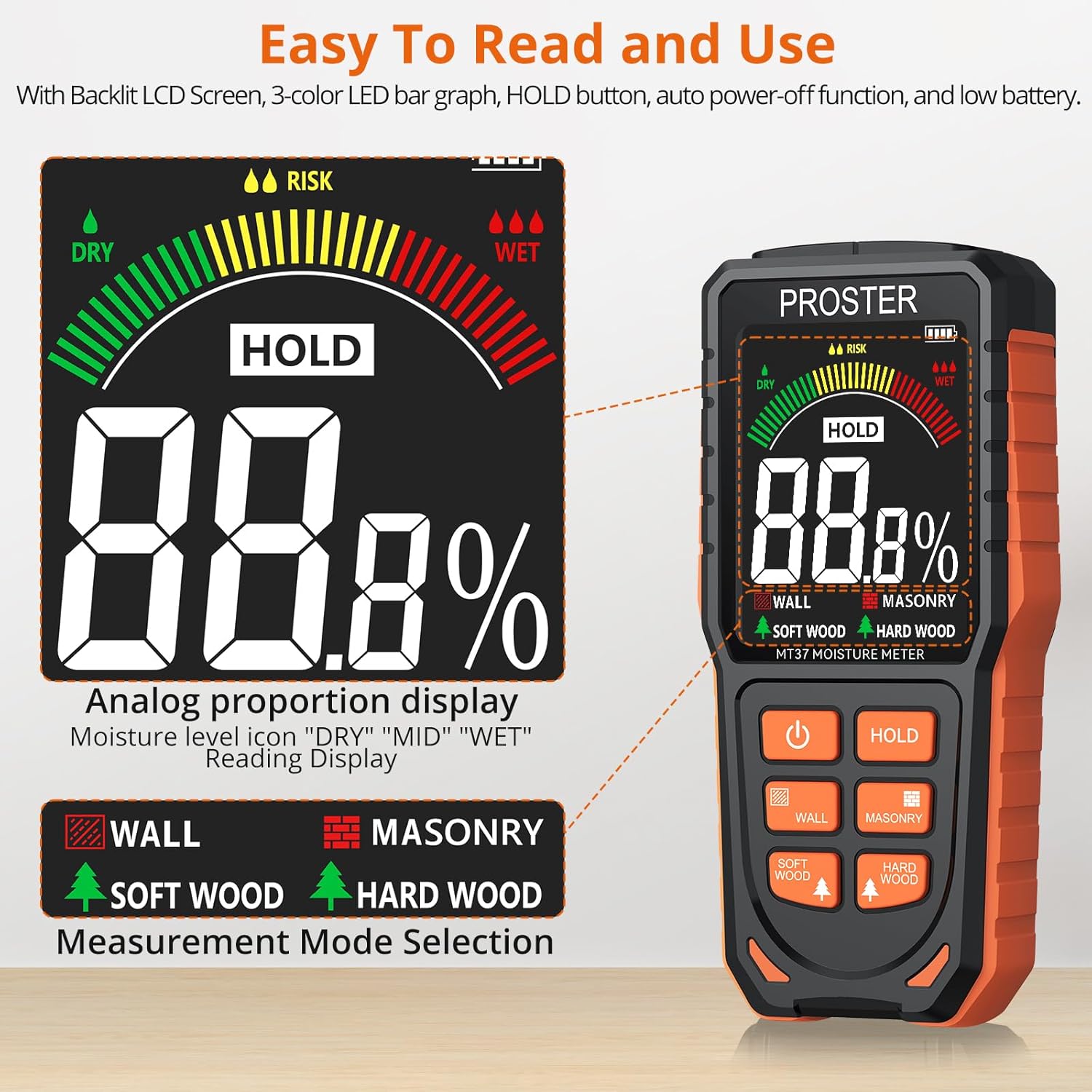
Figure 2.3: Easy-to-read LCD screen and mode selection buttons.
Video 2.1: Official product video demonstrating the Proster Rechargeable Pinless Moisture Meter's features and operation.
3. Setup
3.1 Initial Charge
Before first use, or when the low battery indicator appears, charge the device using the provided Type-C USB cable. Connect the cable to the meter's charging port and plug the other end into a standard USB power adapter (not included) or a computer USB port. The battery icon on the display will indicate charging status.

Figure 3.1: Charging the Proster Moisture Meter.
4. Operating Instructions
4.1 Power On/Off
Press the Power button to turn the meter on or off. The device features an auto-off function that will power down the unit after 5 minutes of inactivity to conserve battery life.
4.2 Selecting Measurement Mode
The meter has four dedicated measurement modes. Press the corresponding button to select the desired mode:
- WALL: For drywall and similar wall materials.
- MASONRY: For brick, concrete, and other masonry materials.
- SOFT WOOD: For softwoods.
- HARD WOOD: For hardwoods.
Figure 4.1: Mode selection buttons.
4.3 Taking a Measurement
To take a measurement, ensure the meter is powered on and the correct material mode is selected. Place the sensor panel (located on the back of the device) flat against the surface of the material you wish to measure. Ensure full contact for accurate readings. The meter will display the moisture percentage on the LCD screen.
The meter measures moisture up to 19mm (0.75 inches) below the surface. For accurate results, the depth of the object being measured must be greater than 19mm. Avoid measuring over metal, screws, or nails, as this can affect accuracy.
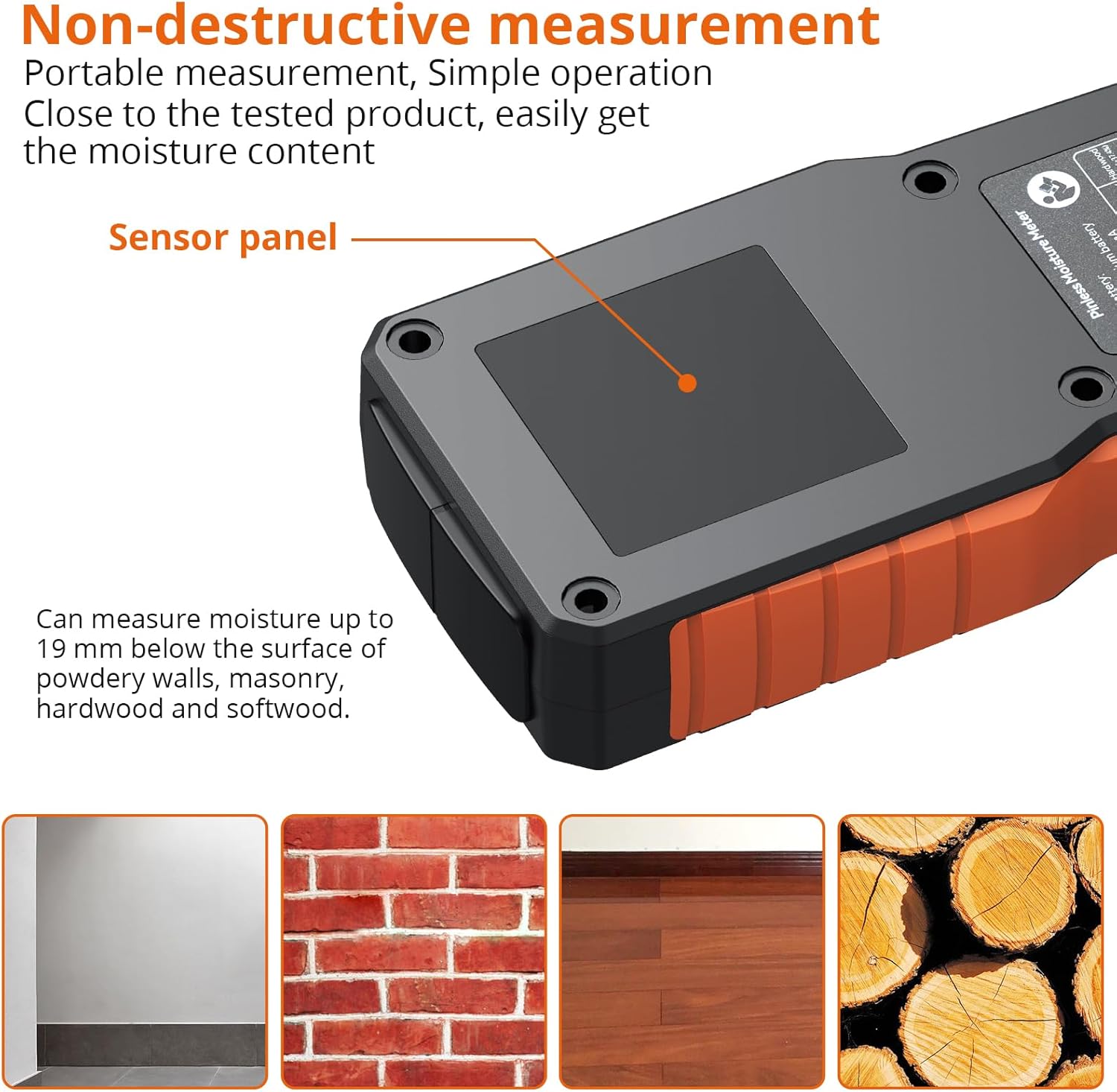
Figure 4.2: Sensor panel and non-destructive measurement capability.
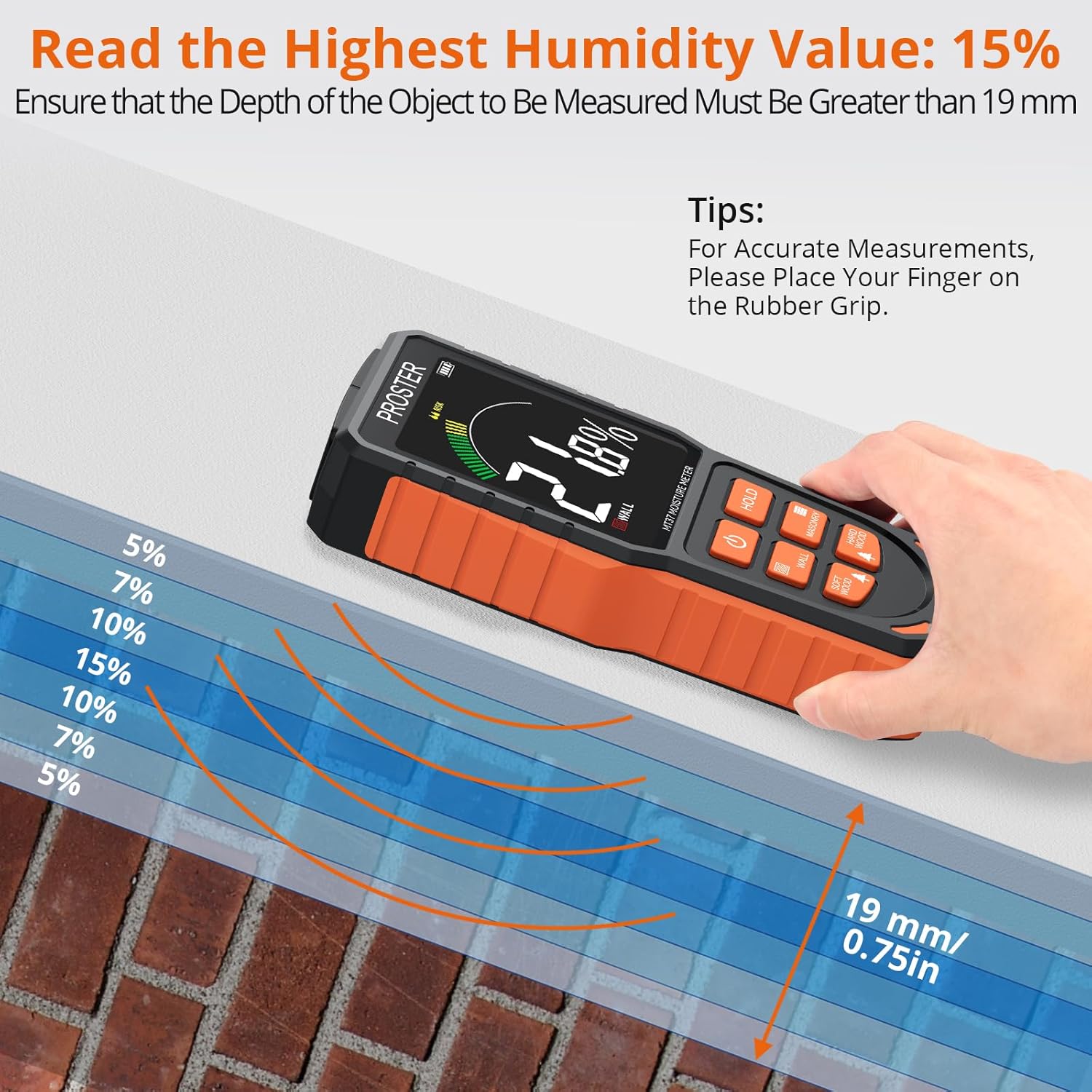
Figure 4.3: Measurement depth and technique for accurate readings.

Figure 4.4: Correct vs. incorrect measurement surfaces.
4.4 Interpreting Readings and Alarms
The meter provides visual and audible feedback:
- LCD Display: Shows the exact moisture percentage.
- 3-Color LED Bar:
- Green: Dry (low moisture)
- Yellow: Mid (risk of moisture)
- Red: Wet (high moisture)
- Audible Alarm: A beeper alert sounds when moisture levels exceed predefined thresholds for the selected material. For example, when wood is above 10% moisture, drywall above 20% wet, or masonry above 8% wet.

Figure 4.5: Visual humidity alert and alarm thresholds.

Figure 4.6: Audible out-of-range alarm indication.
4.5 HOLD Function and Calibration
Press the HOLD button to freeze the current reading on the display. This is useful for recording measurements in hard-to-reach areas. Press HOLD again to release.
To calibrate the meter, press and hold the HOLD button for 3 seconds. The display will count down from 3 to 0, indicating successful calibration. This sets the zero calibration for accurate readings.
Video 4.1: Demonstration of the HOLD function and calibration process.
5. Maintenance
- Keep the device clean and dry. Wipe the exterior with a soft, damp cloth. Do not use abrasive cleaners or solvents.
- Store the meter in its provided storage bag when not in use to protect it from dust and physical damage.
- Avoid exposing the meter to extreme temperatures, high humidity, or direct sunlight.
- Ensure the battery is charged regularly, especially if the device will not be used for an extended period.
6. Troubleshooting
| Problem | Possible Cause | Solution |
|---|---|---|
| Meter does not turn on. | Low or depleted battery. | Charge the battery using the Type-C cable. |
| Inaccurate readings. |
|
|
| Audible alarm constantly sounds. | Moisture level is above the threshold for the selected material. | This indicates high moisture. The alarm is functioning as intended. Address the moisture issue in the material. |
7. Specifications
| Feature | Detail |
|---|---|
| Model Number | PST252-US |
| Measurement Type | Pinless, Non-destructive |
| Measurement Depth | Up to 19 mm (0.75 inches) |
| Wall/Masonry Range | 0-70% (Wall/Drywall: 0.4% - 31.2%, Masonry: 0.4% - 10.8%) |
| Soft Wood/Hard Wood Range | 5%-75% (Soft Wood: 5.7% - 56.1%, Hard Wood: 3.9% - 37.4%) |
| Power Source | Battery Powered (1 Lithium Metal battery included) |
| Battery Type | Lithium Ion (Rechargeable) |
| Voltage | 3.7 Volts |
| Wattage | 1.18 watts |
| Item Weight | 4.9 ounces |
| Package Dimensions | 7.44 x 3.23 x 1.77 inches |
| Manufacturer | Proster Trading Limited |
| Country of Origin | China |
8. Warranty and Support
For warranty information or technical support, please refer to the contact details provided with your product packaging or visit the official Proster website. Keep your purchase receipt for warranty claims.
Additional protection plans may be available for purchase separately to extend coverage beyond the standard warranty period. Please check with your retailer for details.
Ask a question about this manual
Ask about setup, troubleshooting, compatibility, parts, safety, or missing instructions. Manuals+ will review the question and use this page’s manual context to help answer it.