1. Introduction
This manual provides detailed instructions for the installation, operation, and maintenance of the Weytoll WiFi 1P Intelligent Circuit Breaker (Model E25998). Please read this manual thoroughly before using the device to ensure safe and efficient operation.
The Weytoll WiFi 1P Intelligent Circuit Breaker is a single-phase digital display metering switch designed to protect electrical circuits from overcurrent, overvoltage, and undervoltage conditions. It features automatic reclosing, real-time metering, and smart control capabilities via a mobile application and voice commands.
2. Product Features
- Premium Material & Digital Display: Constructed from flame-resistant material for durability and safety. Features a digital display for real-time measurement data, including current, voltage, and power.
- Automatic Reclosing & Metering Function: Automatically cuts off power during overcurrent, overvoltage, or undervoltage events. Resets and restores power once the fault is cleared. Includes a metering function for tracking electricity consumption.
- APP Control: Control the device remotely via a mobile application. View real-time load current, voltage, and power. Access historical electricity consumption records (year, month, day, hour).
- Voice Control & Scenarios Linkage: Compatible with Google Assistant for voice control. Supports scenario linkage for integrated management of home equipment.
- Easy Installation: Compact size suitable for DIN-rail installation in distribution boxes or wall mounting. No screws required for installation.

Image Description: A Weytoll WiFi 1P Intelligent Circuit Breaker shown alongside a smartphone displaying its control application. The device is red with white markings for power, load, and WiFi status. The app shows real-time energy consumption data.
3. Specifications
| Name | Automatic Reclosing Protector |
| Material | Plastics (Flame-resistant) |
| Item Size | 87 * 18.3 * 71.4mm (3.43 * 0.72 * 2.81in) |
| Power Source | AC/DC |
| Mounting Type | DIN-rail / Wall Mount |
| Controller Type | Google Assistant |
| Control Method | Voice, APP |
| Model Number | E25998 |

Image Description: A technical drawing showing the dimensions of the Weytoll WiFi 1P Intelligent Circuit Breaker. Key measurements like 87mm, 18.3mm, 71.4mm, 50mm, and 45mm are indicated.
4. Setup and Installation
The Weytoll WiFi 1P Intelligent Circuit Breaker is designed for easy DIN-rail installation. Please ensure all power is disconnected before proceeding with installation.
- Power Disconnection: Before starting any electrical work, turn off the main power supply at your circuit breaker panel to prevent electric shock.
- Mounting: The device is suitable for installation in a distribution box or can be wall-mounted. It uses a DIN-rail mechanism, requiring no screws for attachment to a standard DIN rail.
- Wiring: Connect the input power (N and L) to the top terminals and the load (N and L) to the bottom terminals as indicated on the device. Ensure all connections are secure.
- Power Restoration: Once installation and wiring are complete and verified, restore power to the circuit.
- Initial Power-On: The digital display should illuminate, indicating the device is powered.

Image Description: A Weytoll WiFi 1P Intelligent Circuit Breaker displayed next to a list of its key features, including ON/OFF, Timing, Automatic Reclosing, Metering (Prepaid function), Adjustable Overcurrent protection, Remote control, Voice control, and Easy installation.
5. Operating Instructions
5.1. APP Control
The device can be controlled via a dedicated mobile application. Follow these steps to connect and operate:
- Download App: Download the compatible mobile application (e.g., Tuya Smart Life App) from your smartphone's app store.
- Registration/Login: Register for a new account or log in if you already have one.
- Add Device: Follow the in-app instructions to add the Weytoll WiFi 1P Intelligent Circuit Breaker. This typically involves putting the device into pairing mode (refer to the device's signal light for status) and connecting to your home WiFi network.
- Remote Control: Once connected, you can remotely turn the power ON/OFF, set timers, and monitor real-time data such as current, voltage, and power consumption.
- Data Records: The app allows you to view historical electricity consumption records by year, month, day, and hour.
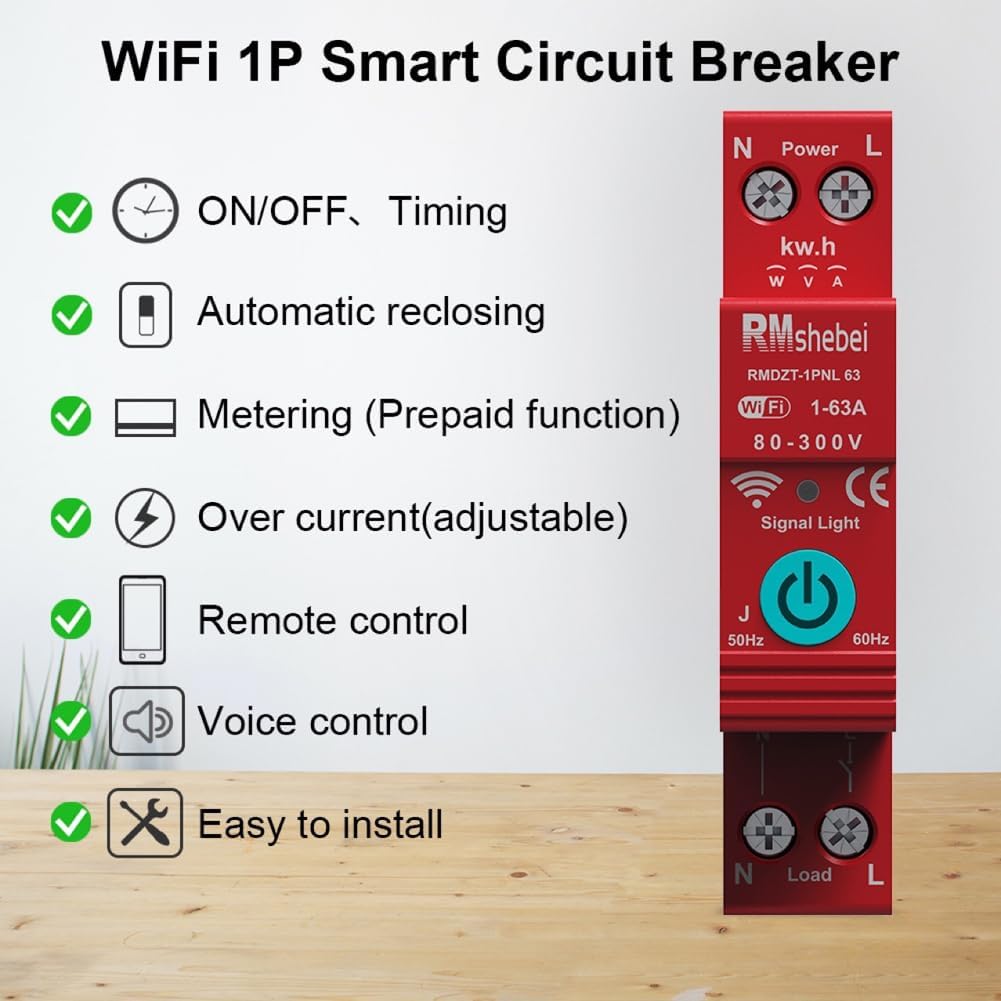
Image Description: A smartphone screen showing the "Tuya Smart Life App" interface. The app displays real-time load current (0.927A), voltage (225.2V), and power (0.172kW) for the connected circuit breaker, along with total forward energy and operation records.
5.2. Voice Control
The device is compatible with Google Assistant for voice commands.
- Link Account: In your Google Assistant app, link your mobile application account (e.g., Tuya Smart Life) to enable voice control.
- Voice Commands: Use commands such as:
- "Hey Google, turn on [Device Name]"
- "Hey Google, turn off [Device Name]"
- "Hey Google, what is the power consumption of [Device Name]?"
5.3. Automatic Reclosing and Protection
The circuit breaker automatically monitors for electrical faults:
- Overcurrent/Overvoltage/Undervoltage: If any of these conditions are detected, the device will automatically cut off the power supply to protect connected appliances and the circuit.
- Automatic Reset: Once the fault condition is eliminated, the device will automatically reset and restore power, ensuring continuous operation without manual intervention.
5.4. Metering Function
The integrated metering function allows for tracking electricity usage. This can be viewed in real-time via the digital display and the mobile application. The prepayment function, if enabled, allows for managing electricity consumption based on a prepaid balance.
6. Applications
The Weytoll WiFi 1P Intelligent Circuit Breaker is suitable for a variety of applications, including:
- Household appliance management
- Remote electricity management
- Housing rental property electricity control
- Industrial control equipment
- Intelligent upgrade of power distribution equipment

Image Description: A diagram illustrating the Weytoll WiFi 1P Intelligent Circuit Breaker as a central control point for various household devices, including a television, blender, fan, vacuum cleaner, and chandelier, demonstrating its application in smart home scenarios.
7. Maintenance
To ensure the longevity and optimal performance of your Weytoll WiFi 1P Intelligent Circuit Breaker, follow these general maintenance guidelines:
- Cleaning: Periodically clean the exterior of the device with a soft, dry cloth. Do not use abrasive cleaners or solvents. Ensure the device is powered off before cleaning.
- Inspection: Regularly inspect the device and its connections for any signs of damage, loose wiring, or overheating. If any issues are observed, disconnect power immediately and consult a qualified electrician.
- Firmware Updates: Keep the mobile application and device firmware updated to the latest versions to benefit from new features and security enhancements.
8. Troubleshooting
If you encounter issues with your Weytoll WiFi 1P Intelligent Circuit Breaker, refer to the following common troubleshooting steps:
- Device Not Powering On:
- Check the main power supply to the circuit.
- Verify all wiring connections are secure and correct.
- Ensure the device is properly seated on the DIN rail.
- WiFi Connection Issues:
- Ensure your WiFi network is active and within range.
- Restart your WiFi router.
- Attempt to re-pair the device with the mobile application.
- Verify you are using a 2.4GHz WiFi network, as many smart devices do not support 5GHz.
- Automatic Trip/Reclosing:
- This indicates an overcurrent, overvoltage, or undervoltage condition. Check connected appliances for faults or excessive load.
- If the issue persists after the fault is cleared, consult a qualified electrician.
- Inaccurate Metering Data:
- Ensure the device is correctly installed and calibrated (if calibration options are available in the app).
- Check for any loose connections that might affect readings.
For persistent issues not resolved by these steps, please contact customer support.
9. Warranty and Support
For warranty information and technical support, please refer to the documentation included with your purchase or visit the official Weytoll website. Keep your purchase receipt as proof of purchase for warranty claims.
Manufacturer: Weytoll
Model Number: E25998
Date First Available: July 8, 2024

