
1. Introduction
This manual provides instructions for the BIG BOOM RM-L1316 Universal Replacement Remote Control. This remote is designed to replace your original remote for various LCD/LED Smart TVs, offering broad compatibility and essential functions for your television viewing experience.
Please read this manual carefully before using the remote control to ensure proper operation and to maximize its functionality.
2. Setup
2.1 Battery Installation
- Locate the battery compartment on the back of the remote control.
- Slide the battery cover downwards or outwards to open it.
- Insert two (2) AAA batteries, ensuring the positive (+) and negative (-) terminals match the diagrams inside the compartment.
- Replace the battery cover by sliding it back into position until it clicks securely.
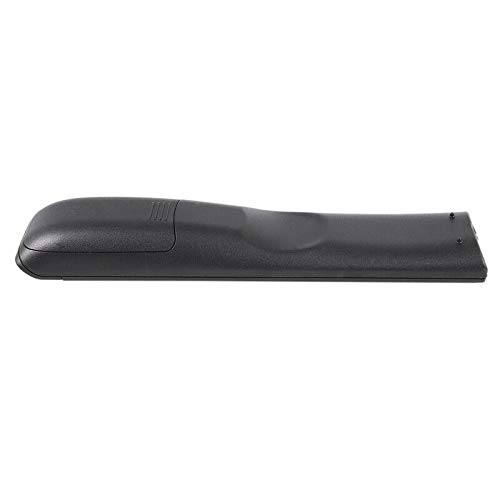
Image: Back view of the remote control, illustrating the battery compartment location.
2.2 Initial Use
The BIG BOOM RM-L1316 is a universal replacement remote control designed for direct use with many popular LCD/LED Smart TV brands. In most cases, no programming is required. Simply insert the batteries, point the remote at your TV, and begin using it.
If the remote does not function immediately with your TV, it may require a simple code setup. Refer to the packaging or a separate code list (if provided) for specific programming instructions for your TV brand. Typically, this involves holding down a 'SET' or 'CODE' button and entering a 3 or 4-digit code corresponding to your TV brand.
3. Operating Instructions
The remote control features a standard layout for easy navigation and control of your television. Below is a general guide to the main functions:
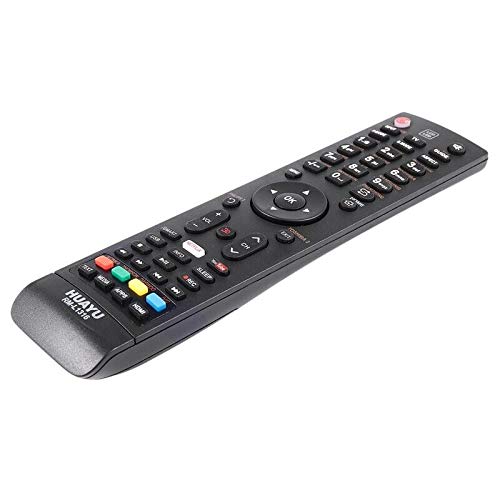
Image: Front view of the remote control, displaying the button layout.
- Power Button (⏻): Turns the TV on or off.
- Number Pad (0-9): For direct channel selection.
- Volume Up/Down (VOL+/VOL-): Adjusts the sound volume.
- Channel Up/Down (CH+/CH-): Changes TV channels.
- Mute Button (🔇): Mutes or unmutes the TV sound.
- Navigation Buttons (Up, Down, Left, Right, OK): Used to navigate menus and confirm selections.
- Input/Source Button: Switches between different input sources (HDMI, AV, etc.).
- Menu Button: Accesses the TV's main menu.
- Exit Button: Exits current menu or function.
- Smart TV/App Buttons (e.g., Netflix, YouTube): Direct access to popular streaming applications.
- Media Control Buttons (Play, Pause, Stop, Rewind, Fast Forward): Controls media playback.
4. Maintenance
4.1 Cleaning
To clean the remote control, use a soft, dry cloth. For stubborn dirt, lightly dampen the cloth with water or a mild cleaning solution. Do not use abrasive cleaners, alcohol, or solvents, as these can damage the remote's surface or internal components.
4.2 Battery Replacement
Replace batteries when the remote's response becomes sluggish or it stops functioning. Always replace both batteries at the same time with new AAA batteries. Do not mix old and new batteries, or different types of batteries.
4.3 Storage
If the remote control will not be used for an extended period, remove the batteries to prevent leakage, which can damage the device.
5. Troubleshooting
- Remote not working:
- Check if the batteries are inserted correctly with the correct polarity.
- Replace old batteries with new ones.
- Ensure there are no obstructions between the remote and the TV's infrared sensor.
- Confirm the remote is pointed directly at the TV.
- If applicable, re-enter the TV programming code.
- Some buttons not responding:
- This could indicate low battery power. Replace batteries.
- Ensure the remote is compatible with all functions of your specific TV model. Some advanced functions may not be supported by universal remotes.
- TV responds intermittently:
- Check battery strength.
- Ensure the remote's infrared emitter is clean and free from dust.
6. Specifications
| Model Number | RM-L1316 |
| Brand | BIG BOOM |
| Compatibility | Universal replacement for various LCD/LED Smart TVs |
| Power Source | 2 x AAA Batteries (not included) |
| Dimensions (LxWxH) | Approximately 15 x 5 x 10 cm |
| Included Components | 1 x Remote Control (Case mentioned in product details, but typically refers to the remote itself or minimal packaging) |
7. Warranty Information
Specific warranty details for this product may vary. Please refer to the product packaging or contact your retailer for information regarding warranty coverage and terms. Keep your purchase receipt as proof of purchase for any warranty claims.
8. Support
For further assistance, troubleshooting, or inquiries regarding the BIG BOOM RM-L1316 Universal Replacement Remote Control, please contact the seller or manufacturer directly. Contact information can typically be found on the product packaging or the retailer's website.