
1. Product Overview
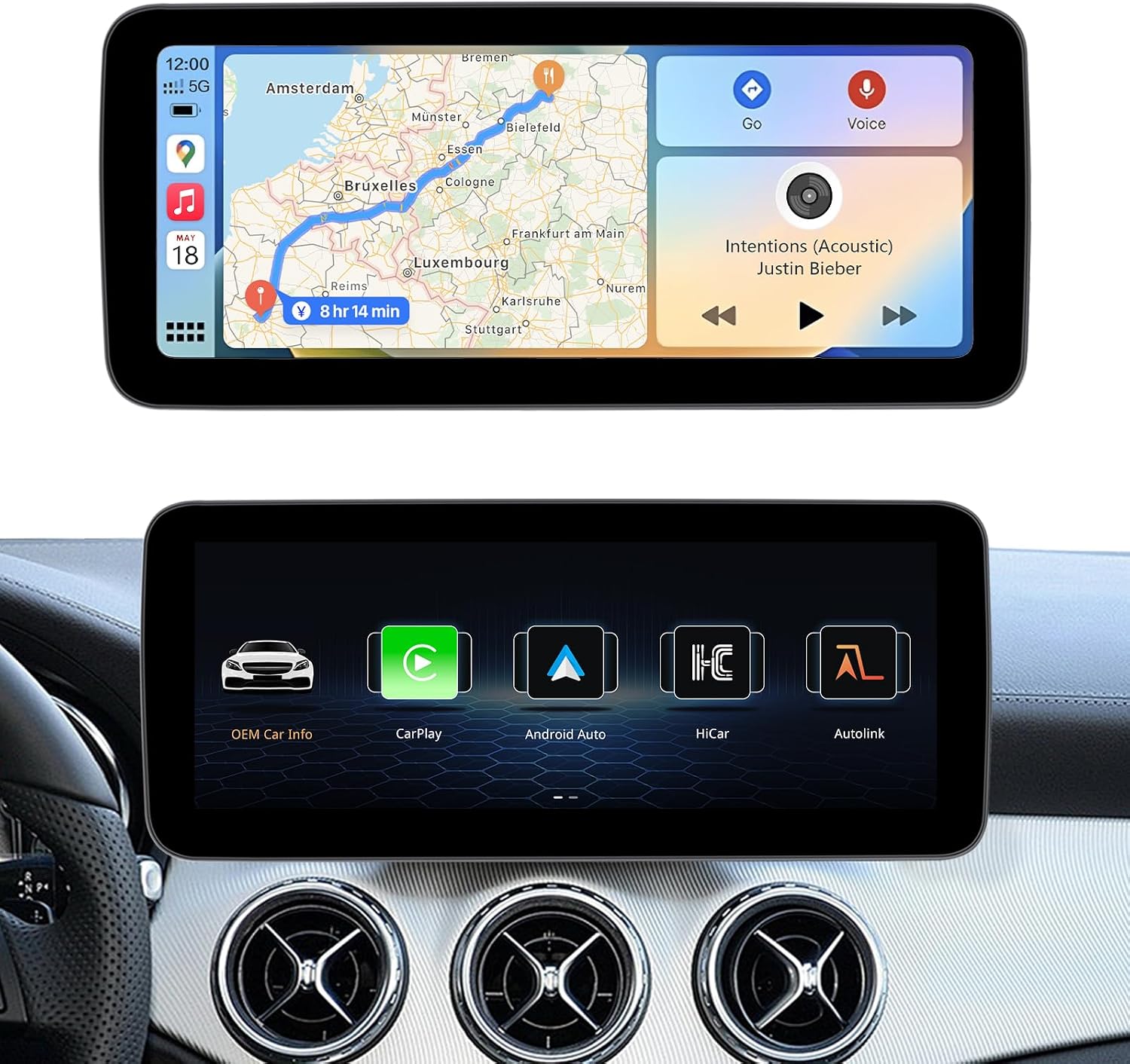
The Uckazy 10.25 Inch Android Auto Radio is a state-of-the-art multimedia stereo touch screen player designed to upgrade your Mercedes Benz vehicle. It features a high-definition 1920*720 LED display and supports dual systems, allowing seamless switching between the Linux system and your original car system. This device enhances your driving experience by integrating wireless Apple CarPlay, Android Auto, Mirrorlink, Bluetooth, and Wi-Fi functionalities, while retaining original car features like steering wheel control and OEM camera compatibility.
What's in the Box
- 10.25inch display
- Bracket frame
- Plug and play power cable
- USB/AUX Cable
- Installation tools

2. Compatibility
This device is designed for specific Mercedes Benz models and NTG systems. Please verify your car's system before installation.
- For Mercedes Benz A-Class W176 (2013 to 2015) - NTG 4.5/4.7
- For Mercedes Benz GLA-Class X156 (2014 to 2015) - NTG 4.5/4.7
- For Mercedes Benz CLA-Class C117 (2013 to 2015) - NTG 4.5/4.7
- For Mercedes Benz G-Class W463 (2013 to 2015) - NTG 4.5/4.7
Note: NTG 4.5 means the display LVDS plug is 4 pins. This item is only compatible with original radios featuring the NTG 4.5/4.7 system. It is not compatible with NTG 4.0, 5.0, or 5.1 systems.

3. Setup and Installation
The Uckazy Android Auto Radio is designed for plug-and-play installation, replacing your original car screen. While professional installation is recommended, the provided tools and cables facilitate the process.
Installation Overview
The installation involves replacing the original display and connecting the provided power, USB, and AUX cables. No software changes are made to the vehicle's control unit, ensuring original functions are retained.

Wiring Diagrams
Refer to the following diagrams for proper cable connections:


USB Connection for Wired Features
For wired CarPlay and Android Auto functionality, ensure you use the designated USB IN 1 port.

4. Operating Instructions
Dual System Switching
The device allows for one-click switching between the new Linux system and your original car system. This ensures you can access all new features while retaining familiar controls and displays.

Wireless CarPlay and Android Auto
Enjoy seamless integration with your smartphone. The system supports wireless (and wired) Apple CarPlay and Android Auto, allowing access to navigation, phone contacts, email, notifications, and music through voice commands or touch.


Voice Control
Utilize Siri or Google Voice Assistant for hands-free operation, including navigation, calls, and music playback, enhancing safety while driving.


DSP and EQ Settings
The built-in DSP with 16 EQ segments allows for detailed audio customization. Adjust the sound quality to your preference, including speaker positioning and various tuning methods.

Retaining Original OEM System Functions
The upgraded display retains all original car functions, including the original car radio, amplifier, factory steering wheel control, original car mouse knob, display of speed, fuel level, oil pressure, safety warnings, and original reverse camera compatibility.


Day and Night Mode
The display features automatic light sensitivity, adjusting between day and night modes based on your car's original headlights for optimal visibility.

Bluetooth Connectivity
Connect your smartphone via Bluetooth for hands-free calling and audio streaming.

Operating Linux System Video
Watch this video for a demonstration of the Linux system's operation and features, including settings and connectivity options.
5. Maintenance
To ensure the longevity and optimal performance of your Uckazy Android Auto Radio, follow these general maintenance guidelines:
- Screen Cleaning: Use a soft, lint-free cloth, slightly dampened with water or a screen-safe cleaner, to gently wipe the display. Avoid abrasive materials or harsh chemicals.
- Dust Removal: Regularly use a soft brush or compressed air to remove dust from around the screen edges and buttons.
- Temperature Control: Avoid exposing the device to extreme temperatures, both hot and cold, for extended periods.
- Cable Inspection: Periodically check all connected cables for any signs of wear or damage. Ensure they are securely plugged in.
6. Troubleshooting
If you encounter issues with your Uckazy Android Auto Radio, consider the following common solutions:
Common Issues and Solutions
- No Power/Display: Ensure all power cables are securely connected. Check your car's fuse box for any blown fuses related to the stereo system.
- No Sound: Verify that the AUX cable is correctly connected and selected as the audio input. Check the volume levels on both the new unit and your original car stereo. Ensure the original car radio is functioning correctly.
- CarPlay/Android Auto Not Connecting:
- For wireless connection, ensure Bluetooth is enabled on your phone and paired with the device.
- For wired connection, ensure you are using the correct USB IN 1 port and a high-quality data cable.
- Check the settings within the unit's 'Smart Phone' menu to ensure CarPlay/Android Auto is enabled.
- Screen Resolution Issues: If the display appears distorted or incorrect, navigate to the setup menu and adjust the screen resolution settings to match your original car's screen resolution.

General Advice
Based on common customer feedback, many issues are related to incorrect wiring or settings. Please provide clear pictures and a detailed description of the problem when seeking support.
7. Specifications
| Feature | Specification |
|---|---|
| Display Size | 10.25 inches |
| Resolution | 1920 x 720 HD LED |
| Operating System | Linux NTG 4.5 System |
| Connectivity Technology | Bluetooth, Wi-Fi |
| Special Features | Android Auto, Apple CarPlay, Built-In Wi-Fi, DSP, IPS 1920*720 |
| Compatible Devices | Smartphone |
| Audio Output Mode | Stereo |
| Surround Sound Channel Configuration | 4 |
| Item Weight | 3.8 pounds |
| Package Dimensions | 14.98 x 7.08 x 7.08 inches |
| Model Number | 102545-LIN |
| Manufacturer | Uckazy |


8. Warranty and Support
Uckazy specializes in automotive electronic products and aims to provide professional support. If you experience any issues with your product, please contact the seller or Amazon customer service.
Many common issues can be resolved with guidance on correct wiring or settings. When contacting support, please describe the problem clearly and provide clear pictures if possible.
For more information about Uckazy products, visit the official Uckazy Store on Amazon.