
TDPRO LK-08
User Manual: TDPRO LK-08 12V 250W Brush Motor Controller
For Electric Vehicles, Mopeds, Scooters, E-Bikes, and Electro-Tricycles
1. Product Overview
1.1. Product Description
The TDPRO LK-08 12V 250W Brush Motor Controller is a high-quality aluminum component designed for electric bicycles and scooters. It ensures stable running and excellent performance for your electric vehicle. This controller is suitable for various applications including electric vehicles, mopeds, scooters, e-bikes, and electro-tricycles.
Condition: 100% Brand New
Item Type: Brush Motor Controller
Material: Aluminum
Rated Power: 250W
Working Voltage: 12V
Dimensions: Approximately 73mm (2.9 inches) x 35mm (1.4 inches) x 59mm (2.3 inches)
1.2. Key Features
- Constructed from durable, good quality aluminum material for long-lasting use.
- Designed to help your electric vehicle or scooter operate smoothly and efficiently.
- Specifically a 12V 250W electric scooter electric brush DC motor speed controller.
- Enables easy regulation of your electric vehicle's or scooter's speed.
- Compact size for versatile installation.
1.3. Package Contents
Upon opening the package, please verify that all components are present and undamaged.
- One (1) TDPRO LK-08 12V 250W Brush Motor Controller
2. Setup
2.1. Installation Guide
Before beginning installation, ensure the power source is disconnected to prevent electrical shock or damage to the controller.
2.1.1. Wiring Diagram
Refer to the diagram below for proper connection of the motor controller to your electric vehicle's components. Each wire is color-coded and labeled for easy identification.
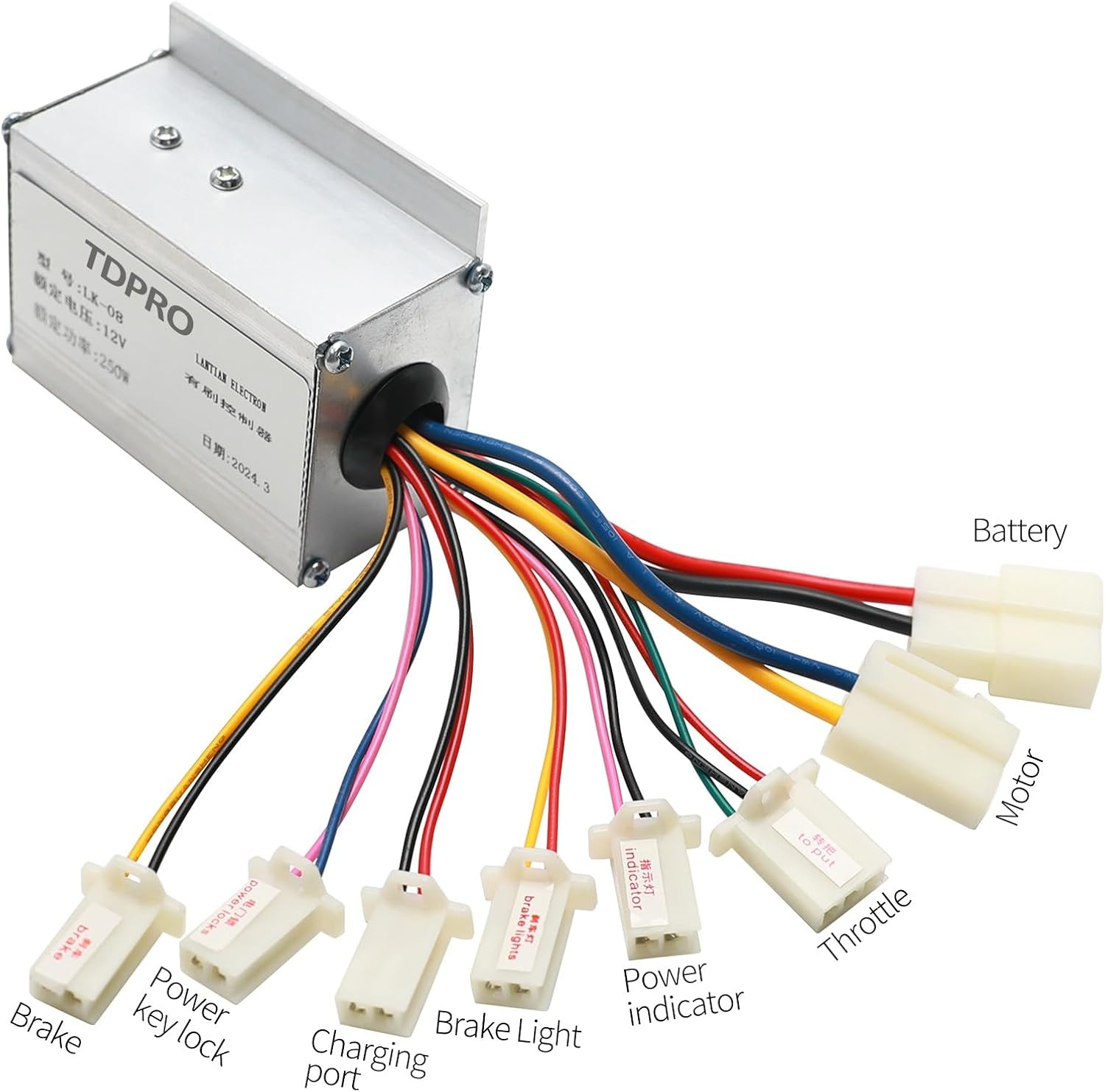
Figure 2.1: Wiring connections for the LK-08 controller. Ensure all connections are secure and match the corresponding components on your vehicle.
- Battery: Connect to your vehicle's 12V battery.
- Motor: Connect to the electric motor.
- Throttle: Connect to the throttle control.
- Brake: Connect to the brake lever switch.
- Power Key Lock: Connect to the ignition switch.
- Charging Port: Connect to the charging input.
- Brake Light: Connect to the brake light circuit.
- Power Indicator: Connect to the power indicator light.
Ensure all connections are firm and insulated to prevent short circuits.
2.1.2. Physical Installation
The controller should be mounted in a secure location, away from direct moisture and excessive heat. Use appropriate fasteners to secure the controller to the vehicle's frame or a suitable mounting surface.

Figure 2.2: Dimensions of the LK-08 controller for installation planning.
Consider the controller's dimensions (73mm x 35mm x 59mm) when selecting a mounting location to ensure adequate space and ventilation.
3. Operating Instructions
3.1. Basic Operation
- Power On: Turn the ignition key (connected to the Power Key Lock wire) to the "ON" position. The power indicator light should illuminate.
- Throttle Control: Gently twist the throttle handle to accelerate. The controller will regulate the motor speed based on the throttle input.
- Braking: Apply the brake lever. The controller will cut power to the motor and activate the brake light (if connected).
- Power Off: Turn the ignition key to the "OFF" position to shut down the system.
Always operate your electric vehicle responsibly and in accordance with local regulations.
4. Maintenance
4.1. Care and Cleaning
- Keep the controller clean and free from dust and debris. Use a soft, dry cloth for cleaning.
- Avoid exposing the controller to water or excessive moisture. While the aluminum casing offers some protection, it is not fully waterproof.
- Regularly inspect all wire connections to ensure they remain secure and free from corrosion.
- Do not attempt to open the controller casing, as this may void the warranty and expose internal components to damage.
4.2. Storage
If the electric vehicle or controller will be stored for an extended period, disconnect the battery to prevent discharge and potential damage to the electrical system. Store the controller in a cool, dry place, away from direct sunlight and extreme temperatures.
5. Troubleshooting
5.1. Common Issues and Solutions
| Issue | Possible Cause | Solution |
|---|---|---|
| Motor does not run. | No power to controller; loose connections; faulty throttle; faulty motor. | Check battery charge and connections. Ensure ignition is on. Inspect throttle and motor wiring. |
| Motor runs intermittently. | Loose wire connections; intermittent short circuit; overheating. | Verify all connections are secure. Check for damaged insulation. Allow controller to cool if hot. |
| Power indicator does not light up. | No power from battery; faulty indicator light; incorrect wiring. | Check battery voltage. Inspect power indicator wiring. Ensure ignition is on. |
| Brakes do not cut motor power. | Brake switch not connected or faulty. | Check brake lever switch connection and functionality. |
If you encounter issues not listed here or if the suggested solutions do not resolve the problem, please contact customer support.
6. Specifications
6.1. Technical Specifications
| Attribute | Detail |
|---|---|
| Brand Name | TDPRO |
| Model Name | LK-08 12V 250W Brush Motor Controller |
| Part Number | LK-08 |
| Rated Power | 250W |
| Working Voltage | 12V |
| Material | Aluminum |
| Color | Sliver |
| Dimensions (L x W x H) | Approx. 73mm x 35mm x 59mm (2.9'' x 1.4'' x 2.3'') |
| Suggested Users | Unisex-adult |
| Manufacturer | JCMOTO |
| Date First Available | July 6, 2024 |
7. Warranty and Support
7.1. Warranty Information
This TDPRO LK-08 12V 250W Brush Motor Controller comes with a 90-day warranty from the date of purchase. This warranty covers manufacturing defects and material flaws under normal use. It does not cover damage resulting from improper installation, misuse, accidents, unauthorized modifications, or normal wear and tear.
Please retain your proof of purchase for warranty claims.
7.2. Customer Support
For technical assistance, troubleshooting, or warranty inquiries, please contact the seller or manufacturer directly through the platform where the product was purchased. Provide your product model number (LK-08) and a detailed description of the issue to facilitate faster support.
Manufacturer: JCMOTO
Ask a question about this manual
Ask about setup, troubleshooting, compatibility, parts, safety, or missing instructions. Manuals+ will review the question and use this page’s manual context to help answer it.