
1. Introduction
Thank you for choosing the JYX Karaoke Machine. This portable Bluetooth PA system is designed to provide high-quality audio for singing, parties, and various entertainment needs. It features two wireless microphones, bass/treble adjustment, and multiple connectivity options. Please read this manual carefully before use to ensure proper operation and to maximize your enjoyment of the product.

Image 1.1: The JYX Karaoke Machine, showcasing its compact design, integrated tablet stand, and two wireless microphones.
2. What's in the Box
- 1 x JYX Karaoke Machine
- 2 x Wireless Microphones
- 1 x Power Adapter
- 1 x User Manual
3. Product Overview
Key Features:
- HD Stereo Sound Quality: Built-in 10" woofer and 3.5" tweeter with up to 500W peak power.
- Independent Reverb/Treble/Bass Adjustment.
- Multiple Playback Modes: Bluetooth, AUX-IN, TWS, USB, TF connection.
- Long-lasting Battery: 11000mAh rechargeable battery for extended playtime.
- TV Connection Support.
- Two Wireless Microphones with 8 Voice Effects.
Components:
Familiarize yourself with the main components of your JYX Karaoke Machine:
- Main Unit: Houses the speakers, control panel, and input/output ports.
- Wireless Microphones: For vocal input, featuring LED displays and frequency adjustment.
- Control Panel: Located on the top of the main unit, includes knobs for volume, bass, treble, reverb, and mode selection buttons.
- Input/Output Ports: Various ports for connecting external devices (USB, TF, AUX, HDMI, Coaxial, Optical Fiber).

Image 3.1: Internal speaker configuration for high-quality stereo sound, including deep bass, midrange, and treble drivers.

Image 3.2: The included wireless microphones, highlighting their LED displays and the remote control for accessing 8 different voice effects.

Image 3.3: A visual summary of the JYX Karaoke Machine's main features and capabilities.
4. Setup
Initial Charging:
Before first use, fully charge the karaoke machine using the provided power adapter. The charging indicator will show the charging status.
Powering On/Off:
Press and hold the power button on the main unit to turn the device on or off.
Microphone Setup:
The wireless microphones are pre-paired with the main unit. Simply insert batteries (not included) into the microphones and power them on. They should automatically connect.
5. Operating Instructions
Mode Selection:
Use the 'Mode' button on the control panel to switch between Bluetooth, AUX, USB, TF, Coaxial, and Optical Fiber input modes.
Playing Music:
- Bluetooth: Select Bluetooth mode, enable Bluetooth on your device (smartphone, tablet, etc.), and select "JYX-XXXX" from the list of available devices.
- USB/TF Card: Insert a USB drive or TF card into the respective slot. The system will automatically switch to USB/TF mode and begin playing compatible audio files.
- AUX-IN: Connect an external audio device (e.g., MP3 player, computer) to the AUX-IN port using a 3.5mm audio cable. Select AUX mode.
Using Microphones:
- Ensure microphones are powered on and connected.
- Adjust microphone volume using the dedicated knob on the main unit.
- Use the remote control to cycle through 8 different voice effects (Male Voice, Female Voice, Monster Voice, Baby Voice, Original Voice, Karaoke Voice, etc.).
- Microphone frequency can be adjusted if interference occurs. Refer to the microphone's specific instructions for frequency adjustment.
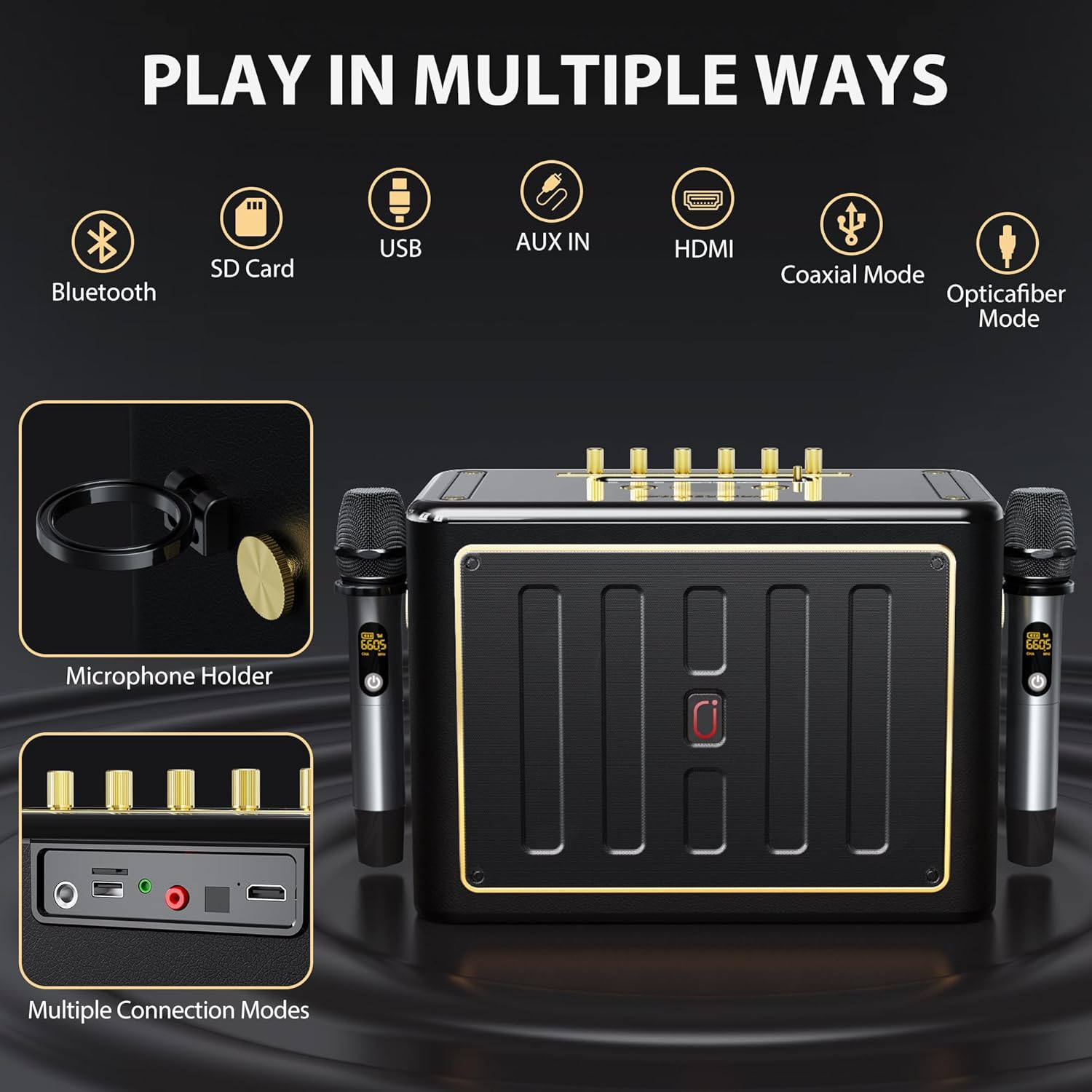
Image 5.1: Overview of the multiple connection modes available on the JYX Karaoke Machine, including wired and wireless options.

Image 5.2: Details of the wireless microphone system and its diverse voice-changing capabilities.
6. Connectivity
Bluetooth Connection:
Activate Bluetooth mode on the karaoke machine. On your smart device, search for and connect to the device named "JYX-XXXX". A confirmation sound will indicate a successful connection.
TWS (True Wireless Stereo) Function:
If you have two JYX Karaoke Machines, you can pair them together for a true wireless stereo experience. Power on both units, select TWS mode on both, and they will automatically pair. Play audio from one device, and it will output through both speakers.
TV Connection:
The JYX Karaoke Machine supports connection to a TV via HDMI, Coaxial, or Optical Fiber ports. Use the appropriate cable (not included) to connect the machine to your TV's audio output. Select the corresponding input mode on the karaoke machine.

Image 6.1: Examples of easy device connection, including Bluetooth, Micro SD, AUX-IN, and USB.

Image 6.2: Demonstrating TV connectivity options for enhanced karaoke and audio experience.
7. Sound Adjustment
The JYX Karaoke Machine features independent controls for sound customization:
- Master Volume: Adjusts the overall output volume of the system.
- Microphone Volume: Controls the volume of the wireless microphones.
- Bass: Adjusts the low-frequency sound output. Turn clockwise for more bass, counter-clockwise for less.
- Treble: Adjusts the high-frequency sound output. Turn clockwise for more treble, counter-clockwise for less.
- Reverb: Controls the echo effect on the microphone vocals.

Image 7.1: Highlighting the independent bass and treble adjustment capabilities for optimal sound quality.
8. Battery Information
The JYX Karaoke Machine is equipped with a large 11000mAh rechargeable battery, providing extended playtime for both indoor and outdoor use.
- Playtime: Up to 120 hours (actual playtime may vary based on volume level and usage).
- Charging Time: Approximately 4-6 hours for a full charge.
- Charging Indicator: The LED display on the unit will indicate the battery level and charging status.
To preserve battery life, fully charge the unit before long periods of inactivity and avoid completely draining the battery frequently.

Image 8.1: Information on the long-lasting rechargeable battery, indicating playing and charging times.

Image 8.2: Illustration of the internal battery, emphasizing its capacity and working time.
9. Maintenance
- Cleaning: Use a soft, dry cloth to clean the surface of the machine. Do not use abrasive cleaners or solvents.
- Storage: Store the machine in a cool, dry place away from direct sunlight and extreme temperatures.
- Battery Care: If not used for a long period, charge the battery every 3 months to maintain its health.
- Microphone Care: Remove batteries from microphones if not used for extended periods to prevent leakage.
10. Troubleshooting
| Problem | Possible Cause | Solution |
|---|---|---|
| No power | Battery drained; Power adapter not connected. | Charge the unit; Ensure power adapter is securely connected. |
| No sound output | Volume too low; Incorrect input mode; Device not connected properly. | Increase volume; Select correct input mode (Bluetooth, AUX, USB, etc.); Reconnect device. |
| Microphone not working | Microphone off; Batteries low/dead; Not paired. | Turn on microphone; Replace batteries; Re-pair microphones if necessary (refer to microphone instructions). |
| Bluetooth connection unstable | Device too far; Interference. | Move device closer to the karaoke machine; Avoid obstacles or other wireless devices. |
11. Specifications
| Feature | Detail |
|---|---|
| Brand | JYX |
| Model | B0D91L16CC |
| Mounting Type | Tabletop |
| Power Source | Battery Powered |
| Connector Type | Aux, Bluetooth, USB, TF, HDMI, Coaxial, Optical Fiber |
| Output Wattage | 500 Watts (Peak) |
| Number of Channels | 1 |
| Audio Input | Bluetooth, AUX-IN, TWS, USB, TF |
| Recommended Uses | Home, Party, Outdoor Gathering |
| Product Dimensions | 3 x 4 x 5 inches |
| Item Weight | 20 pounds |
| Battery Capacity | 11000mAh |
| Color | Black |
12. Warranty and Support
JYX provides comprehensive support for its products:
- Warranty: Enjoy a 12-month warranty from the date of purchase.
- Technical Support: Lifetime technical support is available for all JYX products.
- Customer Service: For any questions, issues, or assistance, please contact our customer support team.
Contact Information:
- Email: service@jyxspeaker.com