
1. Introduction
Thank you for choosing the pecron E2000LFP Portable Power Station with 2x200W Solar Panels. This manual provides essential information for the safe and efficient operation of your solar generator. Please read it thoroughly before use and retain it for future reference.
The pecron E2000LFP is a high-capacity portable power station designed to provide reliable power for various applications, including home backup, camping, RV travel, and emergency situations. Featuring a 1920Wh LiFePO4 battery, 2000W rated AC output, and multiple charging options, it offers a versatile energy solution.
2. Safety Information
Always adhere to the following safety guidelines to prevent injury or damage to the device:
- Do not disassemble, repair, or modify the unit. Incorrect reassembly may cause fire or electric shock.
- Do not expose the unit to fire or high temperatures.
- Do not use or store the unit in direct sunlight, near heat sources, or in high-humidity environments.
- Keep the unit away from water and other liquids.
- Ensure proper ventilation during use to prevent overheating.
- Use only original or certified accessories and charging cables.
- Keep out of reach of children.
- The built-in Battery Management System (BMS) provides protection against short circuit, overload, and overheating.
- The 120V Pure-sine wave inverter ensures safe operation for sensitive electronic devices.

Image: Internal view highlighting the LiFePO4 battery cells for enhanced safety and durability.

Image: Close-up of the integrated Battery Management System (BMS) chip, ensuring safe and reliable power delivery.
3. Package Contents
Verify that all items are included in your package:
- pecron E2000LFP Portable Power Station
- 2 x 200W Solar Panels
- Accessory Pack
- AC Power Adapter
- 2 x Solar Charging Cables
- 2 sets of Parallel Solar Panel Cables
- Car Charger Cable
- User Manual
4. Product Features and Components
The pecron E2000LFP is equipped with various ports and features for versatile power delivery.

Image: Front view of the E2000LFP power station with all 15 output ports and controls clearly labeled.
- 1920Wh LiFePO4 Battery: Provides long-lasting and safe power.
- 2000W AC Output (4000W Surge): Capable of powering demanding appliances.
- 15 Output Ports: Includes 6x AC outlets, 6x USB ports (up to PD 100W), 1x Cigar port, 2x DC ports.
- Expandable Capacity: Can be expanded up to 8064Wh with additional battery packs (sold separately).
- HD LCD Display: Shows real-time power input/output, battery level, and status.
- Wireless Charger: Integrated wireless charging pad for compatible devices.
- Dual MPPT Solar Charging: Optimized for efficient solar power input.

Image: Dimensions of the pecron E2000LFP power station, measuring 16.1"L x 10"W x 11.6"H.
5. Setup
Initial Charging
Before first use, fully charge the E2000LFP power station. This can be done via a wall outlet, solar panels, or a car charger.
Connecting Solar Panels
- Unfold the 200W solar panels and position them in direct sunlight.
- Connect the solar charging cables to the solar panels.
- Connect the other end of the solar charging cables to the DC 32V~95V charging ports on the E2000LFP. For optimal charging, use the provided parallel solar panel cables to connect multiple panels.
- The LCD display will indicate incoming solar power.

Image: The E2000LFP power station connected to solar panels for charging in an open field.
6. Operating Instructions
Turning On/Off
- To turn on the unit, press and hold the main power button until the LCD screen illuminates.
- To turn off the unit, press and hold the main power button until the LCD screen turns off.
Using AC Outlets
- Press the AC Output Switch button to activate the AC outlets. The AC indicator on the LCD will light up.
- Plug your devices into the 120V AC outlets.
- Ensure the total wattage of connected devices does not exceed 2000W.
- After use, press the AC Output Switch button again to turn off the AC outlets.
Using DC and USB Ports
- Press the DC 12V/USB Wireless Switch button to activate the DC and USB ports. The corresponding indicators on the LCD will light up.
- Connect your devices to the appropriate USB-A, USB-C, DC, or Cigar port.
- For wireless charging, place your compatible device on the wireless charging pad.
- After use, press the DC 12V/USB Wireless Switch button again to turn off these outputs.
Recharging the E2000LFP
The E2000LFP offers multiple recharging methods:
- Wall Outlet: Connect the AC power adapter to the unit and a standard wall outlet. Charging time: 3.5-4 hours.
- Dual Wall Outlet: Using a second adapter (sold separately), connect to two wall outlets for faster charging. Charging time: 1.5-2 hours.
- Solar Panel: Connect solar panels as described in the Setup section. Charging time (with 4x200W panels): 3-4 hours.
- Generator: Connect to a compatible generator using the AC power adapter. Charging time: 1.5-2 hours (with 2 adapters) or 3.5-4 hours (with 1 adapter).
- Car Socket: Use the car charger cable to charge from your vehicle's 12V socket. Charging time: Approximately 20 hours.
- Wall + Solar: Combine wall charging with solar input for the fastest recharge. Charging time: 1.5-2 hours (with 1 adapter + 3x200W solar panels).

Image: The E2000LFP power station connected to a single wall outlet for charging.

Image: The E2000LFP power station connected to dual wall outlets for accelerated charging.
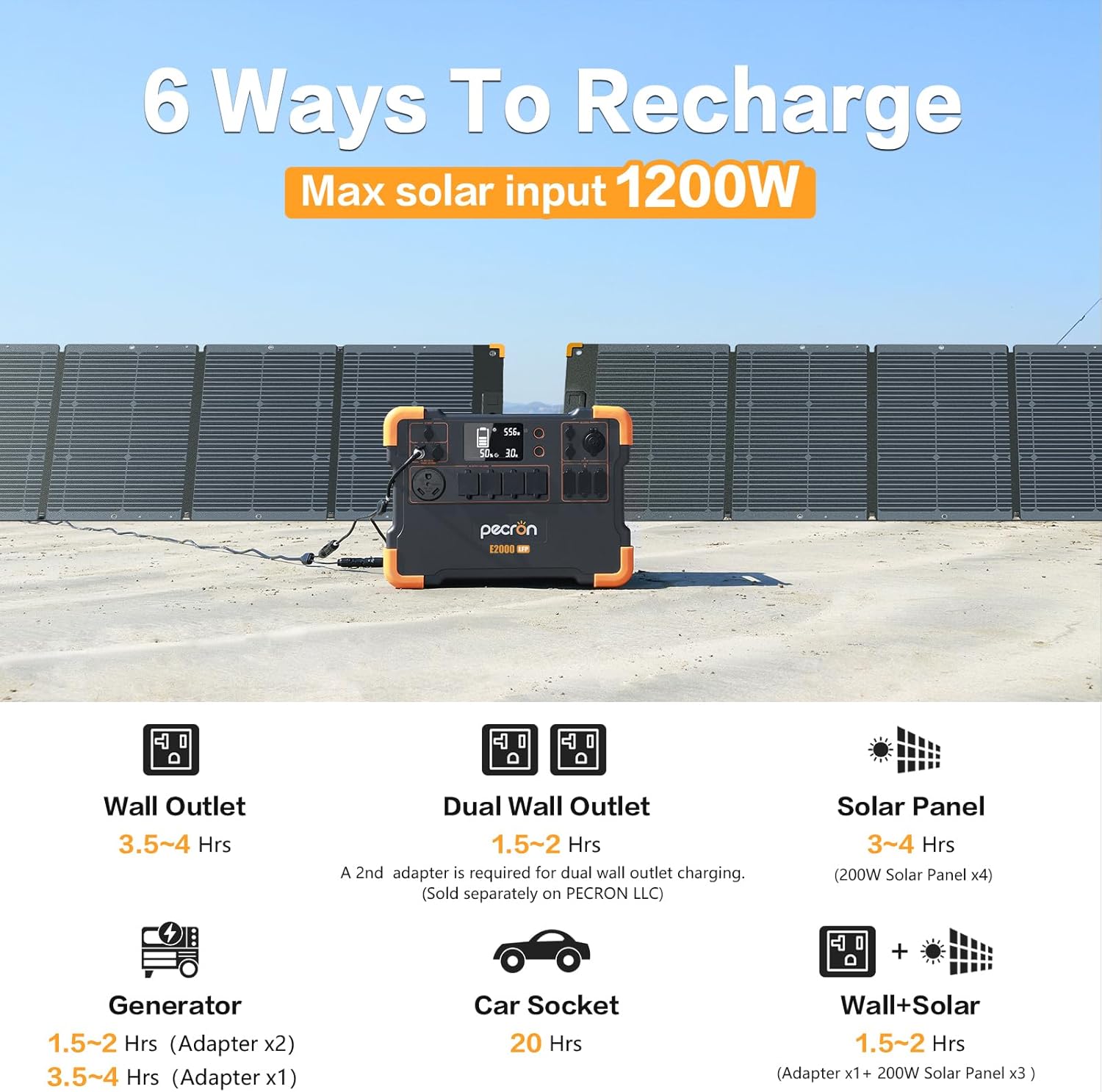
Image: Overview of the six available recharging methods for the E2000LFP, including wall, dual wall, solar, generator, car, and combined wall+solar.
Expandable Capacity
The E2000LFP's capacity can be expanded by connecting additional EB3000 battery packs (sold separately). This allows for increased power storage for longer durations.
- E2000LFP (1920Wh) + 1x EB3000 (3072Wh) = 4992Wh total capacity.
- E2000LFP (1920Wh) + 2x EB3000 (6144Wh) = 8064Wh total capacity.

Image: The E2000LFP power station connected to an EB3000 expansion battery, demonstrating increased capacity.

Image: Visual representation of the E2000LFP's modular power supply, showing how capacity can be expanded with EB3000 units to reach up to 8064Wh.
Typical Device Run Times
The E2000LFP can power a wide range of devices. Below are approximate run times for common appliances:
Outdoor/Portable Devices
- Laptop (50W): 30-34 hours
- Camera (60W): 43 times recharge
- Fridge (60W): 28 hours
- CPAP (40W): 40 hours
- Coffee Machine (800W): 2 hours
- Projector (150W): 10-12 hours

Image: E2000LFP powering various devices in an outdoor setting, illustrating typical run times.
Home Appliances
- Coffee Machine (800W): 2 hours
- Microwave (600W): 2-2.5 hours
- Fridge (200W): 8 hours
- TV (120W): 13-13.5 hours
- Washing Machine (500W): 3-4 hours
- A/C (800W): 2-3 hours

Image: E2000LFP powering various home appliances, indicating their respective run times.
Power Tools
- Electric Chainsaw (1200W): 1.36 hours
- Electric Hammer Drill (1500W): 1 hour
- Cutting Machine (1400W): 1.1 hours
- Corded String Trimmer (1200W): 1.3 hours

Image: E2000LFP powering various power tools, showing their approximate usage durations.
7. Maintenance
- Storage: Store the E2000LFP in a cool, dry place, away from direct sunlight and extreme temperatures.
- Charging Frequency: For optimal battery health, fully charge the unit every 3-6 months if not in regular use.
- Cleaning: Use a dry, soft cloth to clean the exterior of the unit. Do not use harsh chemicals or abrasives.
- Ventilation: Ensure the ventilation openings are clear of dust and debris to prevent overheating.
8. Troubleshooting
Unit Not Turning On
- Check if the battery is completely depleted. Connect the unit to a power source (wall outlet or solar) and attempt to turn it on after a few minutes.
- Ensure the power button is pressed and held for the required duration.
No Output from Ports
- Verify that the specific output (AC, DC, USB) is activated by pressing its respective switch.
- Check the LCD display for any error codes or overload indicators.
- Ensure the connected device's power consumption does not exceed the port's or the unit's maximum output.
- Try a different port or device to isolate the issue.
Slow Charging
- Solar Charging: Ensure solar panels are in direct sunlight, free from obstructions, and angled correctly. Check all cable connections.
- Wall Charging: Verify the AC adapter is properly connected and the wall outlet is functioning.
Overload Protection Activated
- If an overload occurs, the unit will automatically shut down the affected output.
- Disconnect the device causing the overload.
- Restart the unit and try connecting devices with lower power consumption.
9. Specifications
| Feature | Specification |
|---|---|
| Model Name | E2000-KIT400W (E2000LFP + 2x200W Solar Panels) |
| Battery Type | LiFePO4 |
| Capacity | 1920Wh (Expandable up to 8064Wh) |
| AC Output | 2000W (Rated), 4000W (Surge), 120V Pure Sine Wave |
| USB Ports | 6 ports (including PD 100W USB-C) |
| DC Ports | 2 ports + 1 Cigar Port |
| Solar Input | Max 1200W (Dual MPPT) |
| Charging Time (Wall) | 3.5-4 hours (single adapter), 1.5-2 hours (dual adapter) |
| Charging Time (Solar) | 3-4 hours (with 4x200W solar panels) |
| Dimensions | 16.1"L x 10"W x 11.6"H |
| Weight | 48.5 Pounds |
| Material | Steel/Aluminum (Frame & Housing), Plastic/Rubber (Electrical Components), LiFePO4 (Battery) |
10. Warranty and Support
Warranty
The pecron E2000LFP Solar Generator comes with a 24-month worry-free warranty from the date of purchase. This warranty covers manufacturing defects and ensures reliable performance under normal use. Please retain your proof of purchase for warranty claims.
Customer Support
For any questions, technical assistance, or warranty inquiries, please contact pecron customer service. Our team is available 24 hours a day, 7 days a week to provide friendly and efficient support.
Contact Information:
- Website: Visit the pecron Store on Amazon
- Refer to the contact details provided in your accessory pack or on the official pecron website.


