
1. Introduction
Thank you for choosing the Sandberg Survivor Radio All-in-1 2000, Model 421-04. This versatile device is designed to provide reliable communication and essential functions in various situations, including emergencies. It features AM/FM/WB radio reception, a powerful flashlight, an SOS alarm, and multiple charging options including solar, hand crank, and USB. This manual will guide you through the proper setup, operation, and maintenance of your radio to ensure its optimal performance and longevity.
2. Safety Instructions
Please read and understand all safety instructions before using this product. Failure to follow these instructions may result in electric shock, fire, or serious injury.
- Do not expose the device to extreme temperatures, direct sunlight, or high humidity.
- Keep the device away from water and other liquids. If it gets wet, turn it off immediately and allow it to dry completely before reuse.
- Do not attempt to disassemble, repair, or modify the device. Refer all servicing to qualified personnel.
- Use only the specified charging methods (USB, hand crank, solar).
- Keep out of reach of children.
- Dispose of the device and its battery responsibly according to local regulations.
- Avoid prolonged exposure to loud sounds from the radio to prevent hearing damage.
3. Package Contents
Verify that all items are present in your package:
- Sandberg Survivor Radio All-in-1 2000 (Model 421-04)
- USB Charging Cable
- User Manual
4. Product Overview
Familiarize yourself with the various parts and controls of your Sandberg Survivor Radio.
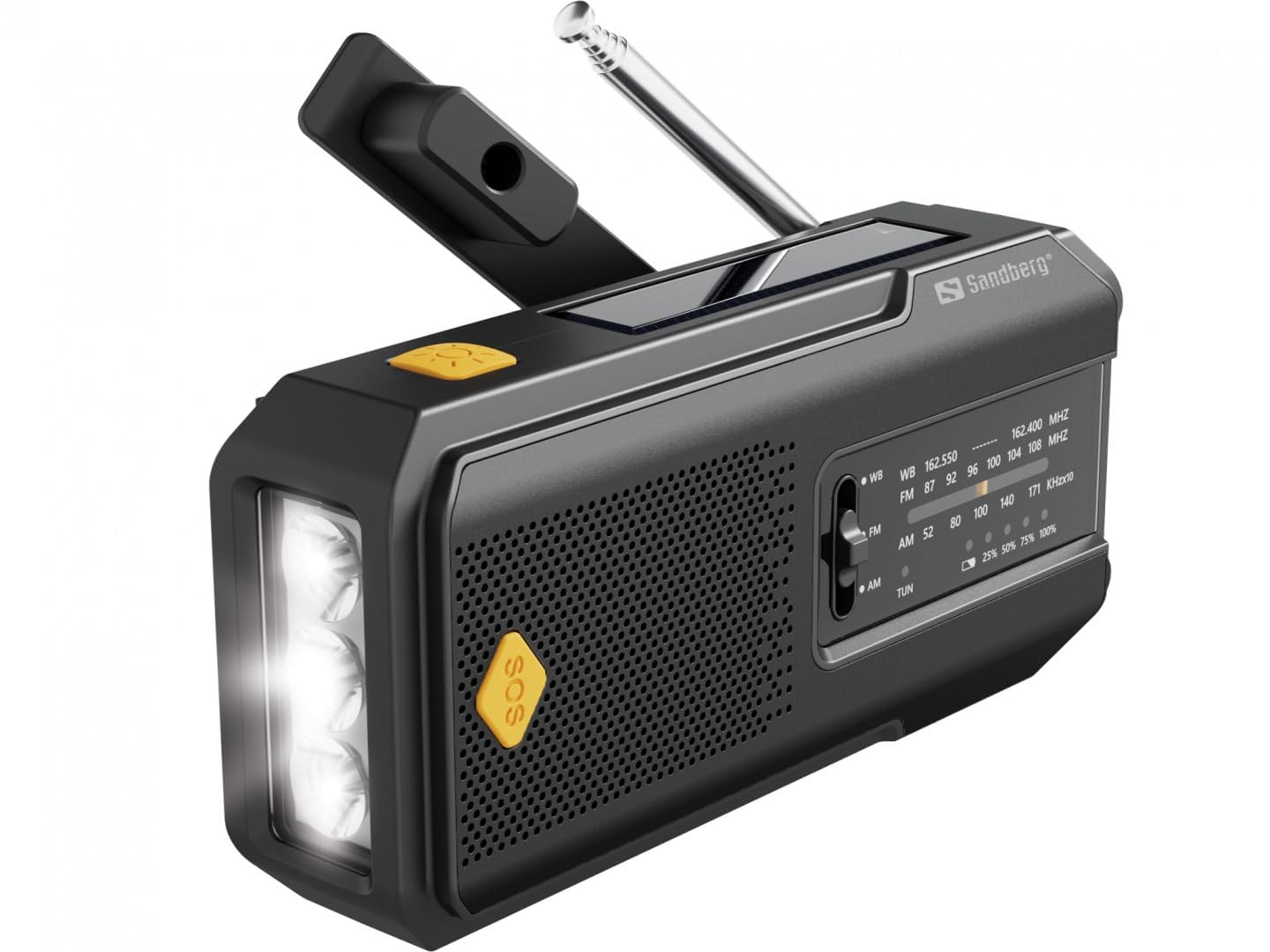
Figure 1: Front view of the Sandberg Survivor Radio, showing the main speaker, tuning dial, antenna, and folded hand crank.
- Telescopic Antenna: For improved radio reception.
- Hand Crank: For manual power generation.
- Solar Panel: For charging the internal battery via sunlight.
- Flashlight: Integrated LED light for illumination.
- SOS Button: Activates an emergency alarm and flashing light.
- Speaker: Audio output for radio.
- Tuning Dial: For selecting radio frequencies.
- Band Selector: Switches between AM, FM, and WB (Weather Band).
- Volume Control / Power Switch: Adjusts volume and turns the radio on/off.
- USB Output Port: For charging external devices.
- Micro USB Input Port: For charging the radio via USB.
- Battery Indicator: Shows current battery level.

Figure 2: Side view highlighting the integrated flashlight and the yellow SOS button.

Figure 3: Top view illustrating the solar charging panel and the hand crank in its operational position.
5. Setup
5.1 Initial Charging
Before first use, it is recommended to fully charge the radio's internal battery using the USB charging cable.
- Connect the micro USB end of the provided cable to the Micro USB Input Port on the radio.
- Connect the standard USB end to a USB power adapter (not included) or a computer's USB port.
- The battery indicator lights will show charging progress. Once all lights are solid, the radio is fully charged.
6. Operation
6.1 Powering On/Off and Volume Control
Rotate the Volume Control / Power Switch clockwise to turn the radio on and increase the volume. Rotate counter-clockwise to decrease volume and turn the radio off.
6.2 Radio Function (AM/FM/WB)
- Extend the Telescopic Antenna fully for optimal reception.
- Use the Band Selector to choose between AM, FM, or WB (Weather Band).
- Rotate the Tuning Dial to scan for radio stations.
- Adjust the Volume Control to your desired listening level.
Note: Weather Band (WB) provides access to NOAA weather alerts and broadcasts in applicable regions.
6.3 Flashlight
Press the dedicated Flashlight Button (usually located on the side or front) to turn the flashlight on. Press again to turn it off.
6.4 SOS Alarm
In an emergency, press and hold the SOS Button (often yellow) to activate a loud siren and a flashing light. Press it again to deactivate the alarm.
6.5 Charging the Radio (Internal Battery)
The radio can be charged using three methods:
- USB Charging: As described in Section 5.1. This is the fastest and most efficient method.
- Hand Crank Charging: Unfold the Hand Crank and rotate it clockwise or counter-clockwise at a steady pace (approximately 130-150 RPM). A few minutes of cranking can provide enough power for a short period of radio use or flashlight operation.
- Solar Charging: Place the radio with the Solar Panel facing direct sunlight. This method is ideal for maintaining charge or slow charging in emergency situations. It is less efficient than USB or hand cranking for rapid charging.
6.6 Charging External Devices (Power Bank Function)
The radio can act as a power bank to charge small electronic devices like smartphones.
- Connect your device's charging cable to the USB Output Port on the radio.
- The radio's internal battery will begin charging your external device.
- Note: This will drain the radio's internal battery. Use this function judiciously, especially in emergency situations.
7. Maintenance
- Cleaning: Wipe the radio with a soft, damp cloth. Do not use harsh chemicals or abrasive cleaners.
- Storage: Store the radio in a cool, dry place away from direct sunlight and extreme temperatures. If storing for extended periods, it is recommended to fully charge the battery every 3-6 months to maintain battery health.
- Battery Care: Avoid fully discharging the battery frequently. Recharge it when the battery indicator shows low power.
8. Troubleshooting
| Problem | Possible Cause | Solution |
|---|---|---|
| Radio does not turn on. | Battery is depleted. | Charge the radio using USB, hand crank, or solar power. |
| Poor radio reception. | Antenna not extended; weak signal; interference. | Extend the telescopic antenna fully. Try repositioning the radio. Tune slowly. |
| Flashlight not working. | Battery is depleted; flashlight button not pressed correctly. | Charge the radio. Ensure the flashlight button is pressed firmly. |
| External device not charging. | Radio battery is low; incorrect cable; device not compatible. | Ensure the radio has sufficient charge. Use the correct USB cable for your device. Some high-power devices may not be fully supported. |
9. Specifications
- Model: 421-04
- Brand: Sandberg
- Radio Bands: AM, FM, WB (Weather Band)
- Charging Methods: USB, Hand Crank, Solar Panel
- Functions: Radio, Flashlight, SOS Alarm, Power Bank
- Manufacturer: Sandberg
- Country/Region of Origin: Germany
10. Warranty and Support
Sandberg products are manufactured to high quality standards. For information regarding warranty terms and technical support, please refer to the official Sandberg website or contact your local retailer. Please retain your purchase receipt as proof of purchase for warranty claims.
For further assistance, visit: www.sandberg.it


