1. Product Overview
The LyLmLe LED Pond Lights are designed to illuminate your outdoor water features such as ponds, waterfalls, streams, and fountains. These lights feature RGB color control, app connectivity, and a durable SS316 stainless steel construction with an IP68 waterproof rating, ensuring long-lasting performance in underwater environments.
The system operates on a safe 12V low voltage, supplied by a built-in transformer, making installation straightforward and secure.

Figure 1.1: LyLmLe LED Pond Light, showcasing the light unit, power adapter, remote control, and smartphone app interface.
2. Safety Information
WARNING: To reduce the risk of electric shock, fire, or injury, read all instructions carefully before installation and operation.
- This product is designed for underwater use ONLY. Do not operate the light in a waterless area for extended periods, as this may cause overheating and damage to the lamp.
- Ensure the power supply is disconnected before any installation, maintenance, or troubleshooting.
- Use only the provided 12V transformer. Connecting to a higher voltage power source will damage the product and void the warranty.
- Do not modify or disassemble the light unit or transformer.
- Keep the transformer and power plug away from water.
- If any damage is observed on the cable or light unit, discontinue use immediately and contact customer support.
3. Package Contents
Verify that all components are present and undamaged upon opening the package:
- 1x LyLmLe LED Pond Spotlight
- 1x Plug-in Transformer with long wire (26 Ft Detachable Cord)
- 1x Remote Control
- 1x User Manual (this document)
4. Setup and Installation
Follow these steps to properly set up your LyLmLe LED Pond Light:
- Positioning the Light: Place the LED pond light in your desired location within the pond, fountain, or waterfall. The light's heavy-duty design ensures stability without additional anchoring. The head of the spotlight can be adjusted 180° to direct the light beam.

Figure 4.1: Product Dimensions. The light measures approximately 3.35 inches in width and 4.92 inches in height.
- Connecting the Transformer: The light comes with a built-in 12V transformer and a 26 ft detachable cord. Connect the light unit's cable to the transformer's detachable connector. Ensure a secure connection.

Figure 4.2: IP68 Waterproof Transformer. The transformer features a secure, detachable connector for the light cable.
- Power Connection: Plug the transformer into a standard AC 90-240V outdoor-rated power outlet. Ensure the outlet is protected from water and moisture.
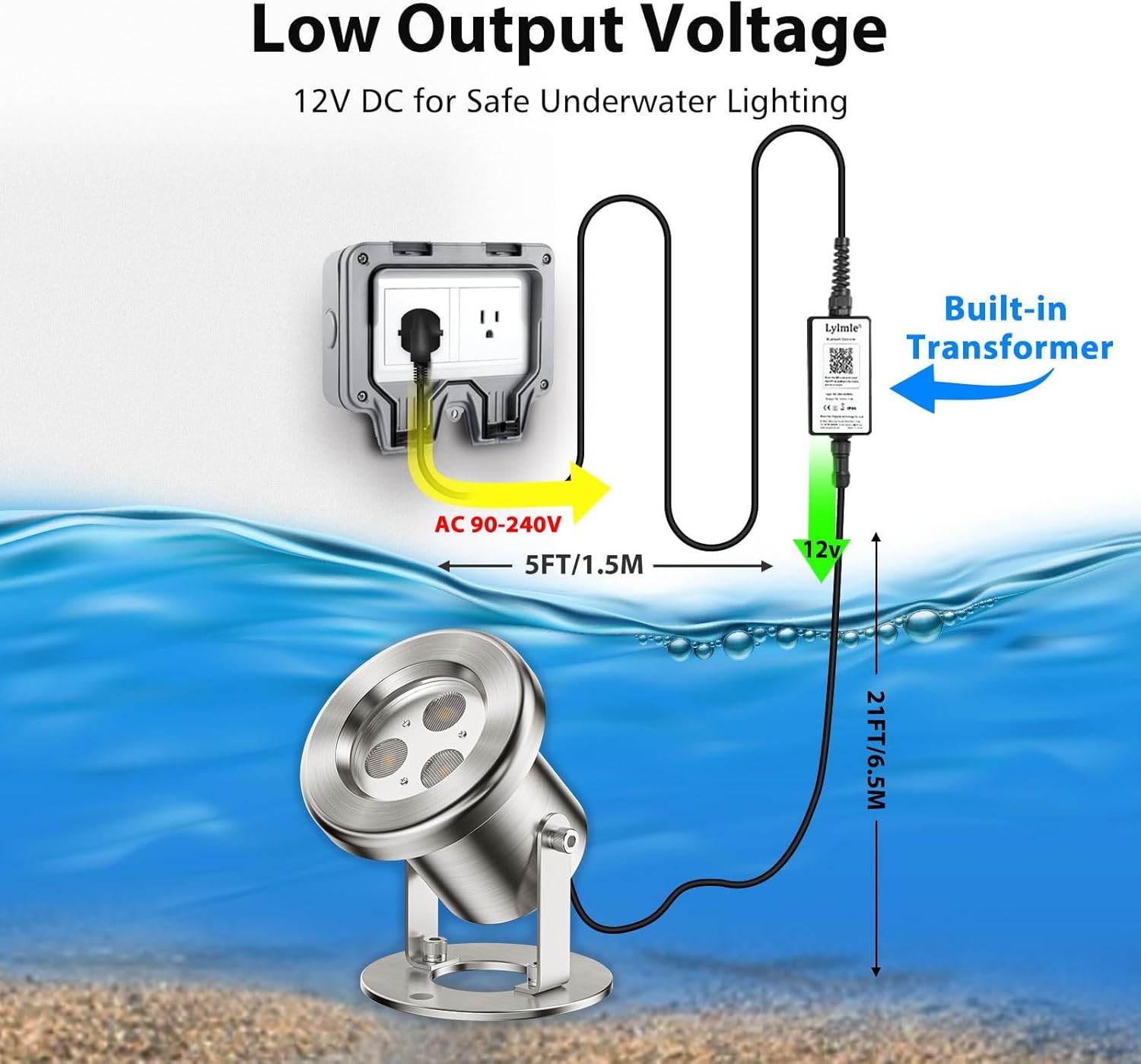
Figure 4.3: Low Output Voltage Setup. The diagram shows the AC 90-240V input to the transformer, converting to 12V DC for the light, with cable lengths indicated.
- Initial Power On: Once connected, the light should power on. You can then proceed to control it via the remote control or the smartphone app.
5. Operating Instructions
The LyLmLe LED Pond Lights offer versatile control options:
5.1. Remote Control Operation
Use the included remote control to adjust basic light functions. Refer to the remote's button layout for specific controls such as power on/off, color selection, brightness adjustment, and mode changes.
5.2. Smartphone APP Control
For advanced features and customization, download the dedicated smartphone application. The app allows for:
- Customizable Colors: Access 16 million vivid colors.
- Brightness Levels: Adjust dimmable settings.
- Dynamic Light Scenes: Choose from 22 dynamic modes and 10 scene modes.
- Music Synchronization: Sync lights with music for a dynamic display.
- Timer Function: Customize on/off times for automated operation.
- Group Control: Control multiple LyLmLe lights simultaneously (if applicable).
Follow the app's instructions for pairing your device with the light. Typically, this involves enabling Bluetooth on your smartphone and selecting the light from the app's device list.

Figure 5.1: Customizable Pond Lights via App. The image displays the app's interface for color selection, dimming, timer, music sync, and group control.

Figure 5.2: LyLmLe RGB LED Pond Light in action, demonstrating music synchronization with visual notes overlayed on a vibrant pond scene.
6. Maintenance
Proper maintenance ensures the longevity and optimal performance of your LyLmLe LED Pond Lights:
- Cleaning: Periodically clean the light's lens to ensure maximum light output. Disconnect power before cleaning. Use a soft cloth and mild detergent if necessary. Avoid abrasive cleaners.
- Inspection: Regularly inspect the power cable and light unit for any signs of wear, damage, or corrosion. Pay close attention to the cable entry points and the transformer.
- Water Level: Ensure the light remains submerged during operation. Operating the light out of water for extended periods can lead to overheating.
- Water Quality: While the light is designed for pond environments, excessive algae or debris buildup on the lens can reduce light output. Clean as needed.
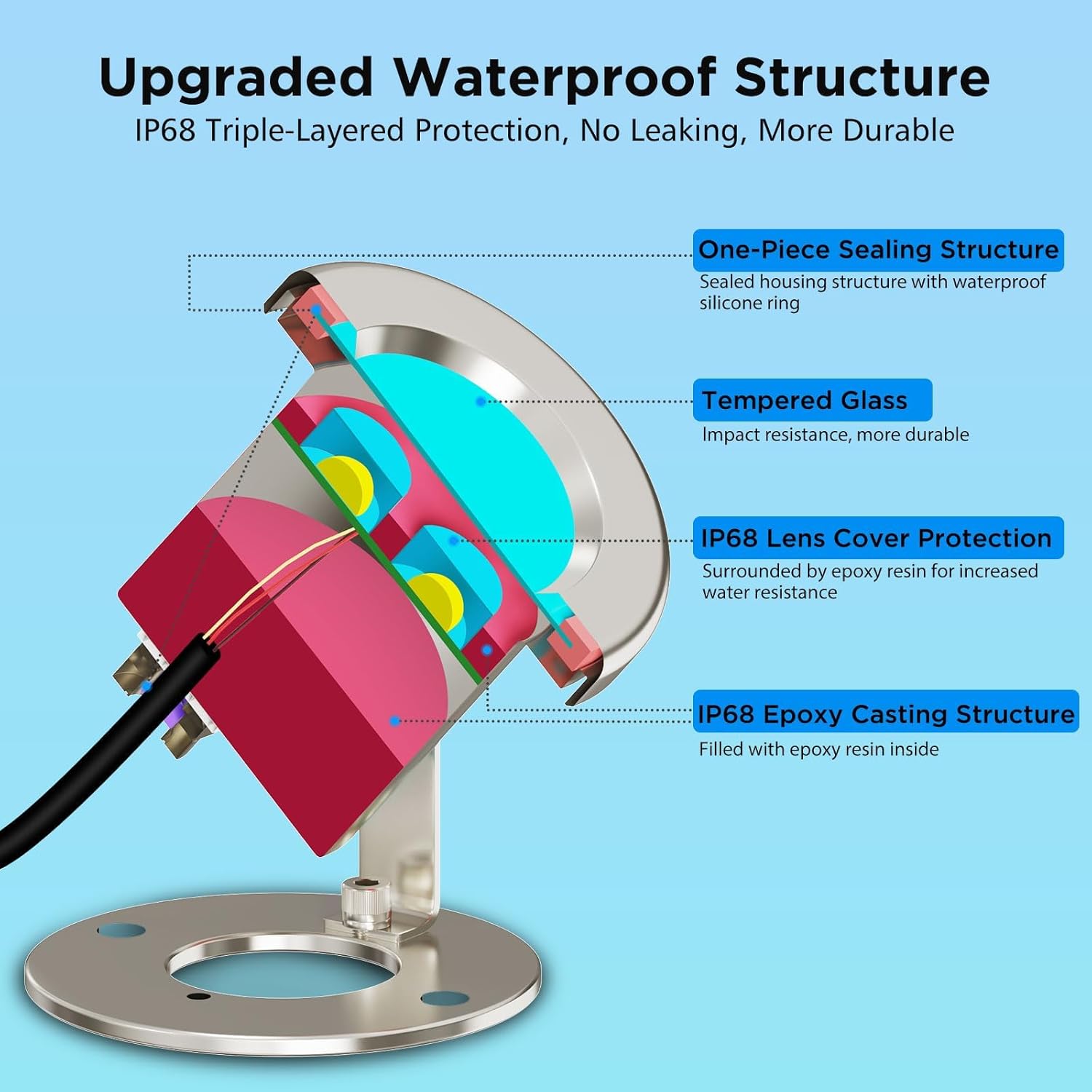
Figure 6.1: Upgraded Waterproof Structure. This diagram illustrates the internal components and sealing mechanisms, including one-piece sealing, tempered glass, IP68 lens cover protection, and epoxy casting structure, contributing to its durability.

Figure 6.2: IP68 Waterproof Design. The image highlights the sealed PG waterproof joint and silicone sealing ring, ensuring robust water resistance.

Figure 6.3: SS316 Stainless Steel Construction. The light is made from upgraded 316 stainless steel, providing excellent high temperature resistance, no rust, and corrosion resistance.
7. Troubleshooting
If you encounter issues with your LyLmLe LED Pond Lights, refer to the following common problems and solutions:
| Problem | Possible Cause | Solution |
|---|---|---|
| Light does not turn on. | No power supply; Loose connection; Faulty transformer. | Check if the power outlet is working. Ensure all cable connections are secure. Test with another compatible 12V transformer if available. |
| Light flickers or changes color erratically. | Unstable power supply; Loose connection; Interference. | Verify stable power. Re-secure all connections. Move away from strong electromagnetic interference sources. |
| Remote control not working. | Dead battery; Obstruction; Out of range. | Replace the remote control battery. Ensure no objects are blocking the signal path. Operate within the specified range. |
| App cannot connect to the light. | Bluetooth off; Light not in pairing mode; App issue. | Ensure Bluetooth is enabled on your smartphone. Restart the light by unplugging and replugging. Restart the app. Reinstall the app if necessary. |
| Light overheats. | Operating out of water. | Ensure the light is fully submerged in water during operation. This product relies on water for cooling. |
If the problem persists after trying these solutions, please contact LyLmLe customer support.
8. Specifications
| Feature | Detail |
|---|---|
| Model Number | R-P01-CB6W |
| Power | 6 Watts |
| Voltage Input | AC 90-240V |
| Voltage Output | 12V DC |
| Beam Angle | 60° |
| Luminous Intensity | 240 Lumens |
| Cable Length | 26 Ft (Detachable Cord) |
| Light Color | RGB (16 Million Colors) |
| Material | SS316 Stainless Steel, Tempered Glass |
| Waterproof Rating | IP68 |
| Product Dimensions | 8.51 x 8.51 x 12.5 cm (3.35 x 3.35 x 4.92 inches) |
| Item Weight | 1.36 kg (approx. 1.3 lb) |
| Operating Condition | Underwater Use ONLY |
9. Warranty and Support
LyLmLe products are manufactured with high-quality materials and craftsmanship. For specific warranty details, please refer to the warranty card included with your purchase or visit the official LyLmLe website.
If you require technical assistance, have questions about installation, or need to report a defect, please contact LyLmLe customer support through the following channels:
- Website: Visit LyLmLe's Amazon Brand Page (for general inquiries and product information)
- Email: Refer to your product packaging or the official website for direct customer service email.
- Phone: Refer to your product packaging or the official website for direct customer service phone number.
When contacting support, please have your product model number (R-P01-CB6W) and purchase date ready.


