
1. Introduction
This manual provides comprehensive instructions for the setup, operation, maintenance, and troubleshooting of your TKLBLS Wireless In-Ear Monitor System, Model PSM410. Please read this manual thoroughly before use to ensure optimal performance and longevity of the device.
The TKLBLS PSM410 is a professional wireless in-ear monitor system designed for stage performances, studio recording, and audio monitoring. It features UHF PLL technology for stable signal transmission and high-fidelity audio.
2. Package Contents
Verify that all items listed below are included in your package:
- Wireless Base Unit Transmitter
- UHF Bodypack Receiver (PSM410-2BP variant includes two receivers)
- In-Ear Earbuds
- Power Adapter
- Antenna(s)
- Audio Cables (XLR to 1/4" TS)
- User Manual
- Carrying Case

3. Setup
3.1 Transmitter Setup
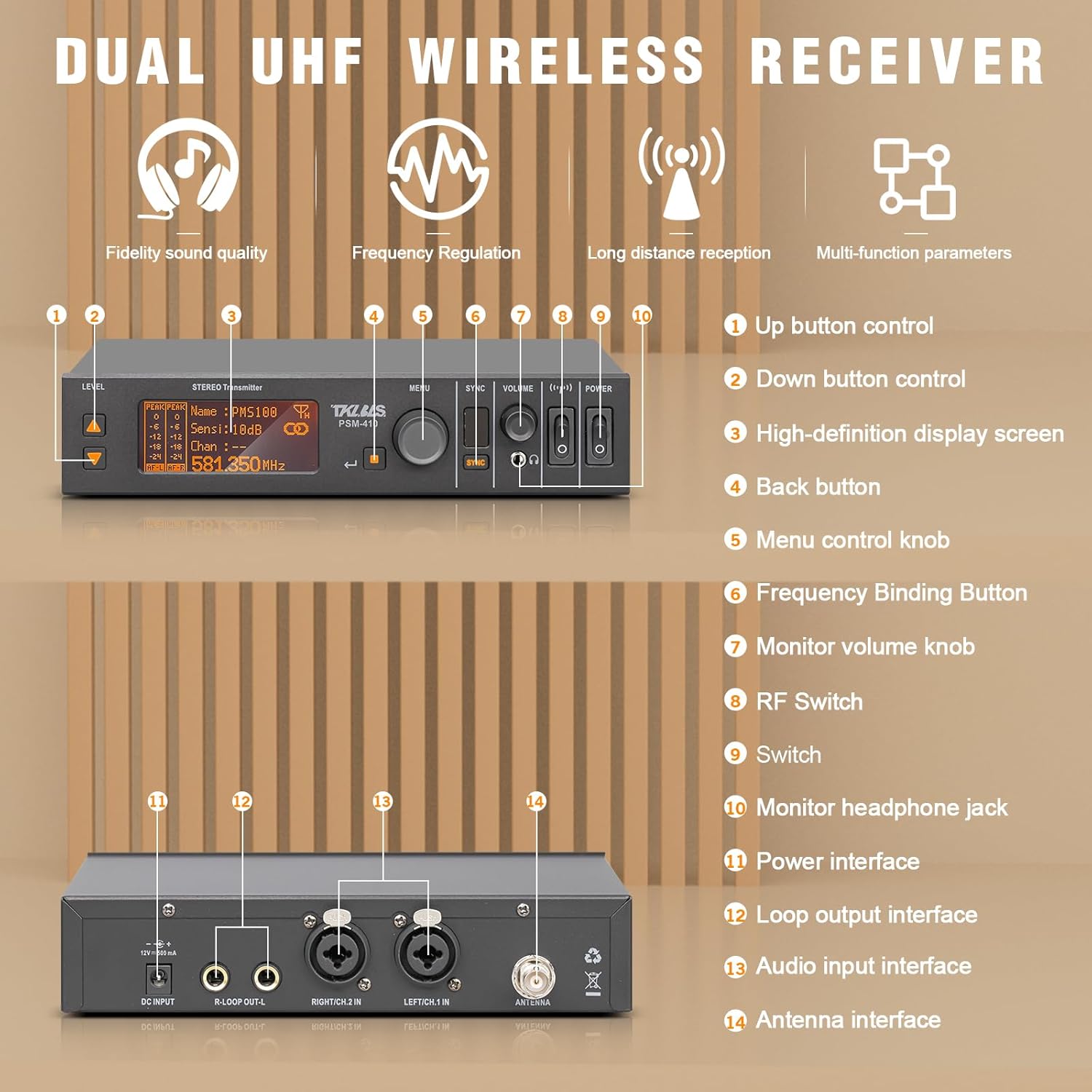
- Connect Antenna: Screw the antenna(s) securely into the ANTENNA ports on the rear panel of the transmitter.
- Connect Power: Plug the power adapter into the DC INPUT jack on the rear panel and then into a power outlet.
- Audio Input: Connect your audio source (e.g., mixing console, digital audio workstation) to the LEFT INPUT and RIGHT INPUT jacks on the rear panel using appropriate XLR or 1/4" TS cables.
- Power On: Press the POWER button on the front panel to turn on the transmitter. The display will illuminate.
3.2 Bodypack Receiver Setup
- Install Batteries: Open the battery compartment on the bodypack receiver and insert two AA batteries, ensuring correct polarity.
- Connect Earbuds: Plug your in-ear earbuds into the 3.5mm headphone jack on the top of the bodypack receiver.
- Power On: Turn the volume knob on the bodypack receiver clockwise until it clicks to power it on.

4. Operating Instructions
4.1 Frequency Synchronization
The transmitter and receiver must be on the same frequency for proper operation.
- Select Frequency on Transmitter: Use the "SET" button and navigation arrows on the transmitter's front panel to select a desired frequency group and channel.
- Initiate IR Sync: Press and hold the "SYNC" button on the transmitter. The IR window on the transmitter will flash.
- Align Receiver: Position the bodypack receiver's IR window (usually near the display) close to the transmitter's IR window. The receiver will automatically synchronize with the transmitter's frequency.
- Verify Connection: Once synchronized, the RF signal indicator on both the transmitter and receiver should show a stable signal.

4.2 Audio Mode Selection (Mono/Stereo)
The system supports both Mono and Stereo audio modes. This can be selected on the transmitter.
- Access Audio Mode: On the transmitter, navigate through the menu using the "MENU" knob until "Audio Mode" is displayed.
- Select Mode: Rotate the "MENU" knob to switch between "Mono" and "Stereo" modes. Confirm your selection by pressing the knob.
- Receiver Display: The bodypack receiver's display will indicate the currently selected audio mode (M for Mono, S for Stereo).

4.3 Adjusting Volume
- Transmitter Output Volume: Use the "VOLUME" knob on the transmitter's front panel to adjust the overall output level.
- Receiver Listening Volume: Use the volume knob on the bodypack receiver to adjust the listening level of your in-ear earbuds.

5. Maintenance
- Cleaning: Use a soft, dry cloth to clean the exterior of the transmitter and receiver. Avoid using liquid cleaners or solvents.
- Battery Care: Remove batteries from the bodypack receiver if it will not be used for an extended period to prevent leakage.
- Storage: Store the system in its original carrying case in a cool, dry place away from direct sunlight and extreme temperatures.
6. Troubleshooting
- No Audio:
- Ensure both transmitter and receiver are powered on.
- Verify that the transmitter and receiver are synchronized to the same frequency.
- Check all audio cable connections.
- Adjust volume levels on both the transmitter and receiver.
- Ensure earbuds are properly connected and functional.
- Interference/Poor Signal:
- Change to a different frequency group/channel on the transmitter and re-synchronize the receiver.
- Ensure antennas are securely connected and unobstructed.
- Reduce distance between transmitter and receiver.
- Avoid placing the system near other wireless devices or sources of electromagnetic interference.
- Receiver Not Powering On:
- Check battery levels and replace if necessary.
- Ensure batteries are inserted with correct polarity.
7. Specifications
| Feature | Detail |
|---|---|
| Brand | TKLBLS |
| Model Name | PSM410-2BP |
| Connectivity Technology | Wireless (UHF PLL) |
| Carrier Wave Frequency Range | 550-580MHz |
| Audio Sampling Rate | 48KHz (DSP Digital Audio Companding) |
| Recommended Uses | Audio Monitoring |
| Compatible Devices | Audio Mixing Console, Digital Audio Workstation |
| Item Weight | 4.19 Pounds |
| Package Dimensions | 16.93 x 12.99 x 3.27 inches |
| Ear Placement | In Ear |
| Form Factor | In Ear |
8. Warranty and Support
For warranty information, technical support, or replacement of defective parts, please contact TKLBLS customer service. Refer to the product packaging or official TKLBLS website for contact details.
9. Product Videos
How to use ER-102 In Ear Monitor System
This video demonstrates the basic setup and usage of a Debra Audio in-ear monitor system, including connecting the receiver and bodypack, and pairing the devices. While it features a similar model (ER-102), the operational principles are applicable to the TKLBLS PSM410.
Wireless in Ear Monitor System
A brief overview of a wireless in-ear monitor system by STABCL, showcasing its compact design and ease of use. This video provides a general visual reference for the type of product.
ST-102 UHF Stereo Wireless in Ear Monitor System
This video from Debra Audio-Direct demonstrates the ST-102 UHF Stereo Wireless In-Ear Monitor System, highlighting its stereo capabilities and various features. It offers insights into the functionality of similar professional audio monitoring equipment.
Phenyx Pro UHF Mono Wireless in-Ear Monitor System
A detailed review of the Phenyx Pro UHF Mono Wireless In-Ear Monitor System, covering its features, setup, and performance. This video provides a good reference for understanding the operation of professional wireless IEM systems.
LEKATO Upgraded Wireless In Ear Monitor System
This video from Mikasu showcases the LEKATO Upgraded Wireless In-Ear Monitor System, highlighting its features and benefits for musicians. It offers a visual demonstration of a modern wireless IEM system.
Wireless in-Ear Monitor System SD-1-2R
An operation guide for the Melonare SD-1-2R Wireless In-Ear Monitor System, demonstrating how to set up and use the device. This video is particularly useful for understanding the practical application of such systems.