
1. Introduction
This manual provides essential information for the safe and effective use of your realme C53 Android Smart Phone. Please read this manual thoroughly before using the device to ensure optimal performance and longevity. The realme C53 features a 50MP AI Camera, 6.74-inch LCD display, 8GB RAM, 256GB ROM, and a 5000mAh battery with 33W SUPERVOOC Charge.

Figure 1.1: realme C53 Android Smart Phone (Champion Gold)
2. Setup Guide
2.1 Package Contents
Ensure all items are present in the box:
- realme C53 Smart Phone
- USB Cable
- European Power Adapter (Note: Adapter type may vary by region)
- SIM Ejector Tool
- Quick Start Guide
- Safety Information
2.2 SIM Card and Micro SD Installation
The realme C53 supports Dual Nano SIM cards and one Micro SD card. This device is designed for GSM carriers only and is NOT compatible with CDMA networks (e.g., Cricket, Verizon, Sprint, Boost Mobile, US Cellular).
- Locate the SIM card tray on the side of the phone.
- Insert the SIM ejector tool into the small hole next to the tray and press gently until the tray pops out.
- Place your Nano SIM card(s) and/or Micro SD card into the designated slots on the tray. Ensure the gold contacts face downwards.
- Carefully reinsert the tray into the phone until it clicks into place.
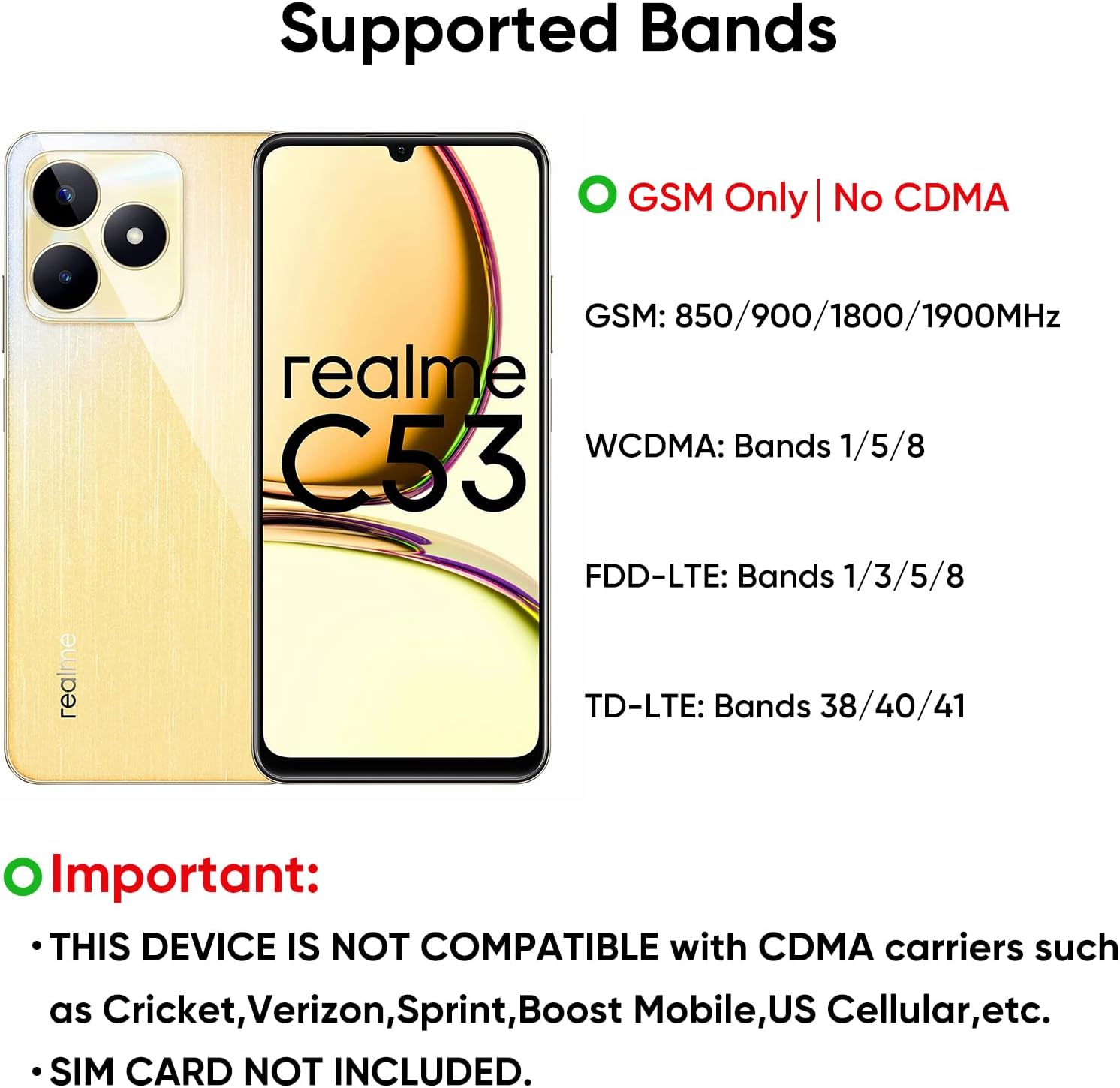
Figure 2.1: Supported Network Bands and SIM Card Information
2.3 Initial Charging and Power On
Before first use, it is recommended to fully charge your device. The realme C53 supports 33W SUPERVOOC Charge, allowing for rapid charging.
- Connect the USB cable to the charging port on the phone.
- Connect the other end of the USB cable to the provided power adapter.
- Plug the power adapter into a wall outlet.
- Once sufficiently charged, press and hold the Power button (located on the side) until the realme logo appears to turn on the device.

Figure 2.2: 5000 mAh Battery and SUPERVOOC Charging
3. Operating Your Device
3.1 Display and Navigation
The realme C53 features a 6.74-inch IPS LCD display with a 90Hz refresh rate and 1080 x 2400 pixel resolution, providing a smooth visual experience.
- Touch Gestures: Tap, swipe, pinch-to-zoom for navigation and interaction.
- Home Screen: Customize with widgets and app shortcuts.
- Notifications: Pull down from the top of the screen to access the notification panel and quick settings.

Figure 3.1: 6.74" HD+ 1080 x 2400 Resolution Display with 90Hz Refresh Rate
3.2 Camera Features
The 50MP AI Camera enhances clarity and detail in your photos. Use 50MP Mode for high-resolution shots.
- Opening Camera: Tap the Camera app icon or double-press the power button (if enabled).
- Modes: Switch between Photo, Video, Portrait, Night, and 50MP modes.
- Settings: Adjust aspect ratio, timer, and other camera parameters.

Figure 3.2: 50MP AI Camera for Enhanced Photography
3.3 Storage and Memory
With up to 256GB of internal storage (ROM) and 8GB of RAM, the realme C53 provides ample space for apps, photos, and videos, ensuring smooth multitasking.
- Managing Storage: Regularly clear cache and unnecessary files to maintain performance.
- Expandable Storage: Use a Micro SD card for additional storage capacity.

Figure 3.3: Up to 256GB Memory for Extensive Storage
3.4 Mini Capsule Feature
The Mini Capsule feature provides essential notifications seamlessly, including battery status, data usage, and step statistics, appearing around the front camera cutout.

Figure 3.4: Mini Capsule for Essential Notifications
4. Maintenance
4.1 Battery Care
- Avoid extreme temperatures (hot or cold) as they can degrade battery life.
- Use only the original charger and cable provided with the device.
- Do not leave the phone charging for extended periods after it reaches 100%.
- For optimal battery health, try to keep the charge level between 20% and 80%.
4.2 Cleaning Your Device
- Turn off the device before cleaning.
- Use a soft, lint-free cloth to wipe the screen and back panel.
- For stubborn smudges, slightly dampen the cloth with water or a screen cleaner. Avoid harsh chemicals.
- Do not spray cleaners directly onto the device.
4.3 Software Updates
Regularly check for and install software updates to ensure your device has the latest features, security patches, and performance improvements. You can usually find this option in Settings > About phone > Software update.
5. Troubleshooting
This section addresses common issues you might encounter with your realme C53.
5.1 Device Not Turning On
- Ensure the battery is charged. Connect the charger and wait a few minutes before attempting to power on.
- Press and hold the Power button for at least 10-15 seconds to force a restart.
5.2 Charging Issues
- Verify the charging cable and adapter are securely connected to both the phone and the power outlet.
- Try using a different power outlet.
- Inspect the charging port on the phone for any debris or damage.
5.3 Network Connectivity Problems
- Ensure your SIM card is correctly inserted and activated.
- Check if your device is set to the correct network mode (e.g., 4G/LTE).
- Restart the phone.
- Verify that your carrier is a GSM network provider, as this device is not compatible with CDMA carriers.
5.4 Audio Quality Issues (Echo/Low Volume)
Some users have reported audio issues, such as echoes or low volume during calls. If you experience this:
- Check Volume Settings: Ensure call volume is set to an audible level.
- Speaker/Microphone Obstruction: Ensure the speaker and microphone openings are not blocked by a case, screen protector, or debris.
- Restart Device: A simple restart can often resolve temporary software glitches.
- Test in Safe Mode: Booting into safe mode can help determine if a third-party app is causing the issue. Consult realme support for instructions on how to enter safe mode.
- Software Update: Ensure your phone's software is up to date. Manufacturers often release updates to fix known bugs.
- Factory Reset: As a last resort, a factory reset may resolve persistent issues. Warning: This will erase all data on your phone. Back up important data before proceeding.
- Contact Support: If the issue persists after trying these steps, contact realme customer support for further assistance.
6. Specifications
Detailed technical specifications for the realme C53 (Model: RMX3760).
| Feature | Specification |
|---|---|
| Model Name | C53 (RMX3760) |
| Operating System | Android 13.0 |
| Display Size | 6.74 Inches |
| Display Type | IPS LCD, 90Hz, 560 nits (peak) |
| Resolution | 1080 x 2400 pixels |
| RAM Memory | 8 GB |
| Storage Capacity | 256 GB |
| Rear Camera | 50MP AI Camera |
| Front Camera | Yes |
| Battery Capacity | 5000 mAh (Lithium Polymer) |
| Charging | 33W SUPERVOOC Charge |
| Connectivity | 2G, 3G, 4G (GSM 850/900/1800/1900, WCDMA: Bands 1/5/8, FDD-LTE: Bands 1/3/5/8, TD-LTE: Bands 38/40/41) |
| SIM Support | Dual Nano SIM + Micro SD |
| GPS | True |
| Color | Champion Gold |
| Product Dimensions | 6.59 x 3.02 x 0.29 inches |
| Item Weight | 1.01 pounds |
7. Warranty and Support
Your realme C53 Smart Phone comes with a standard manufacturer's warranty. For detailed warranty terms and conditions, please refer to the warranty card included in your product packaging or visit the official realme website.
For technical support, troubleshooting assistance, or service inquiries, please contact realme customer support through their official channels. You can typically find contact information on the realme website or in the support section of your device's settings.
Online Resources:
- Official realme Website: www.realme.com
- Support Page: Refer to the realme website for specific support pages for your region.


