1. Introduction
This manual provides comprehensive instructions for the installation, operation, and maintenance of your ZWNAV 14.4inch Android Car Stereo. Designed specifically for Jeep Grand Cherokee models from 2014 to 2021, this head unit integrates advanced features such as GPS navigation, wireless CarPlay, Android Auto, and multimedia capabilities to enhance your driving experience.

Figure 1.1: ZWNAV 14.4inch Android Car Stereo overview, highlighting its integration and core features for Jeep Grand Cherokee 2014+ models.
2. Product Features
- Operating System: Upgraded Android 13 for enhanced fluency and performance.
- Processor & Memory: 8-Core CPU (4*2.0GHz + 4*1.8GHz), 8GB RAM, and 128GB ROM for smooth multitasking and ample storage.
- Display: Dual 12.3-inch large screen with UHD 2K resolution and AdrenoTM 610 GPU for clear visuals.
- Connectivity: Built-in Bluetooth 5.0 for hands-free calling and audio streaming, Wi-Fi, and 4G network support for online access.
- Smartphone Integration: Supports Wireless Apple CarPlay and Android Auto with voice control.
- Audio Features: 16-Band EQ DSP (Digital Sound Processor) with ROHM 32107 sound effect chip for customizable audio output.
- Navigation: Integrated GPS navigation with support for online maps and various navigation applications.
- Control Integration: Supports original steering wheel controls, radar parking sensors, and A/C information display.
- Multimedia: FM Radio, USB, AUX IN, music player, and video player.
- User Interface: Features split-screen functionality and automatic day/night mode switching.

Figure 2.1: Qualcomm Snapdragon CPU and GPU details.
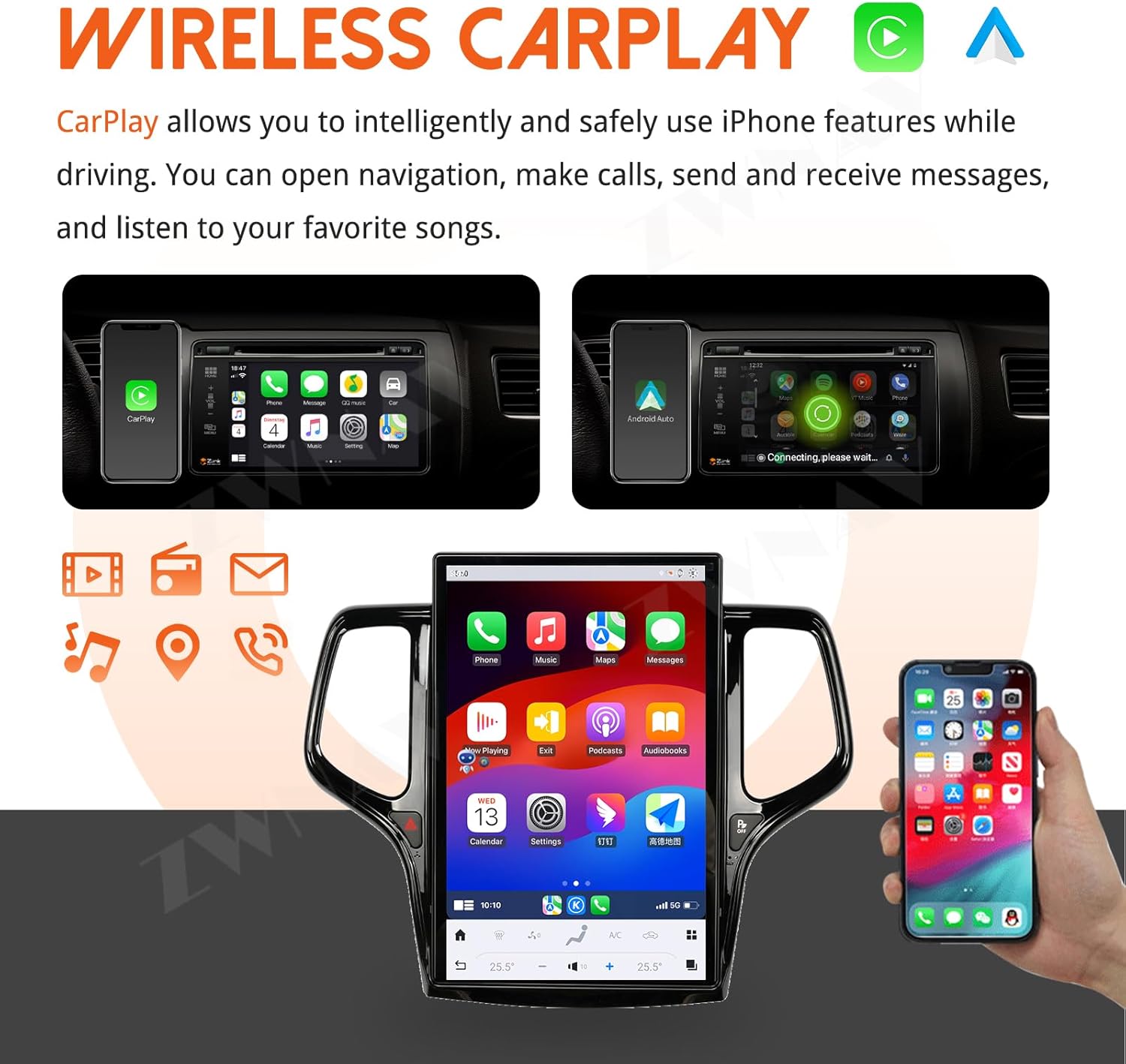
Figure 2.2: Wireless CarPlay and Android Auto capabilities.

Figure 2.3: Split Screen functionality with gesture controls.
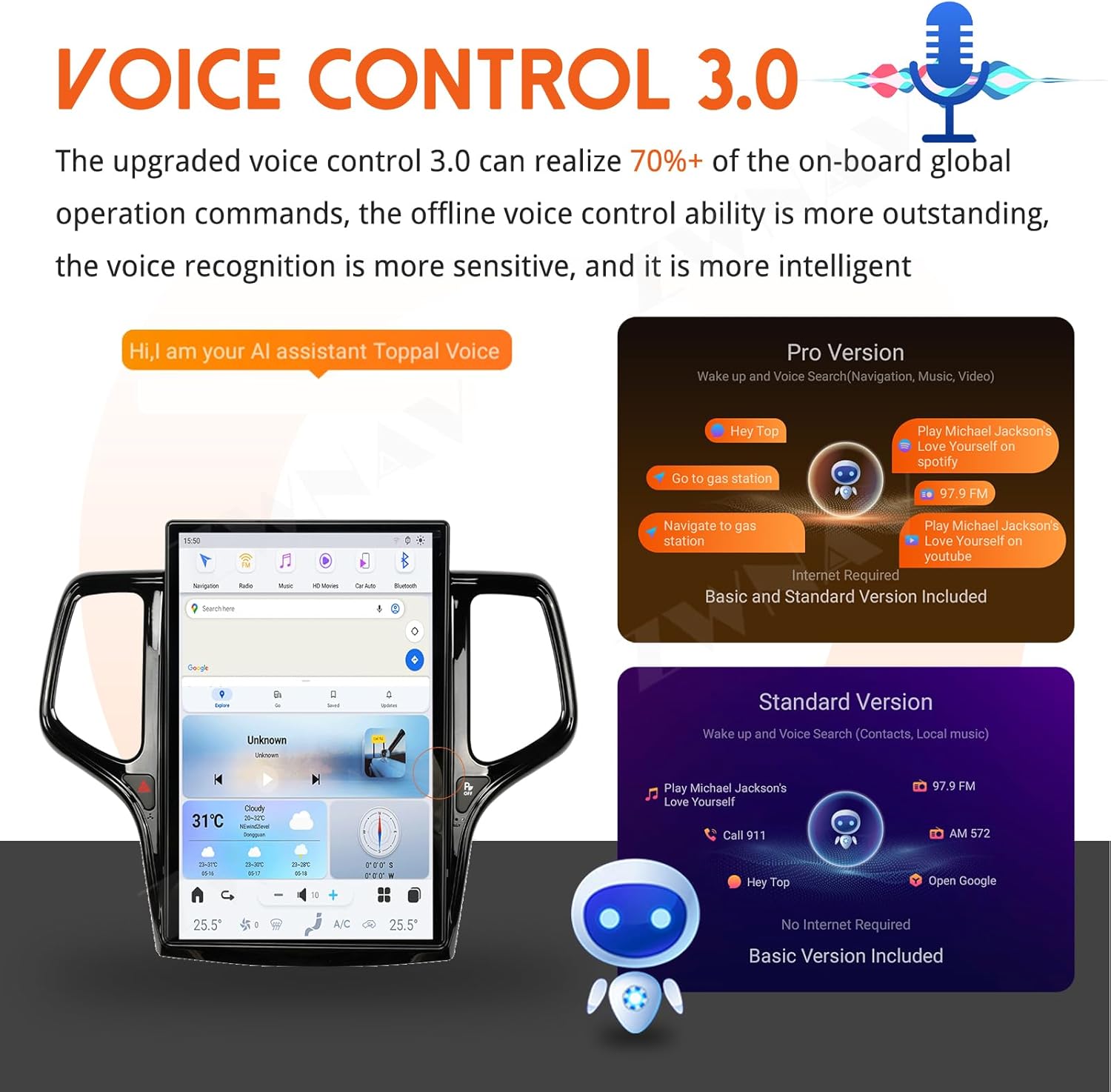
Figure 2.4: Voice Control 3.0 features.

Figure 2.5: 16-Band EQ DSP for audio customization.

Figure 2.6: Automatic Night & Day Time Mode.
3. Setup and Installation
The ZWNAV 14.4inch Android Car Stereo is designed for a plug-and-play installation in Jeep Grand Cherokee 2014-2021 models. It comes with a dedicated cable and CANBUS system to ensure compatibility with your vehicle's existing electronics.
3.1 Pre-Installation Check
- Ensure your vehicle is a Jeep Grand Cherokee manufactured between 2014 and 2021.
- Verify all included components are present as listed in Section 5.
- Disconnect the vehicle's battery before beginning installation to prevent electrical damage.
3.2 Installation Steps
- Carefully remove the original car stereo and dashboard trim according to your vehicle's service manual.
- Connect the provided wiring harness and CANBUS adapter to the new ZWNAV unit and the vehicle's wiring. Ensure all connections are secure.
- Route any additional cables (GPS antenna, USB, camera inputs) as needed.
- Mount the ZWNAV unit into the dashboard opening. Ensure it is securely fastened.
- Reconnect the vehicle's battery.
- Turn on the vehicle and test the unit's functionality, including audio, display, touch response, and steering wheel controls.
- Reinstall the dashboard trim.

Figure 3.1: Before and After installation comparison in a Jeep Grand Cherokee.
4. Operating Instructions
4.1 Basic Operation
- Power On/Off: The unit powers on automatically with the vehicle's ignition. To manually power off, press and hold the power button (if available) or turn off the vehicle.
- Touchscreen Navigation: Navigate through menus and applications by tapping, swiping, and pinching on the touchscreen.
- Volume Control: Adjust volume using the on-screen controls or the vehicle's steering wheel controls.
4.2 Wireless CarPlay & Android Auto
- Ensure Bluetooth and Wi-Fi are enabled on both the car stereo and your smartphone.
- On the car stereo, select the 'CarPlay' or 'Android Auto' application.
- Follow the on-screen prompts to pair your smartphone. Once paired, your phone's compatible apps will appear on the stereo display.
- Use voice commands (Siri/Google Assistant) or the touchscreen to control navigation, calls, messages, and music.
4.3 Split Screen Functionality
- One-Finger Gesture: Drag up or down from the center of the screen to select different combinations of split-screen applications.
- Three-Finger Gesture: Use a three-finger swipe gesture to switch between the upper and lower applications in split-screen mode.
- To exit split screen, drag the divider bar to the top or bottom of the screen.
4.4 Voice Control
- Activate voice control by saying the designated wake-up phrase (e.g., "Hey Top") or by tapping the voice control icon on the screen.
- Speak clear commands for navigation, music playback, calls, and other functions.
- The system supports both online and offline voice commands.
4.5 Audio Settings (DSP)
- Access the DSP settings from the main menu.
- Adjust the 16-band equalizer to customize sound frequencies (bass, treble, etc.).
- Select from various preset sound effect modes (e.g., Rock, Pop, Classical) or create your own custom profile.
- Adjust balance and fader settings to optimize sound distribution within the vehicle.
4.6 Day/Night Mode
- The system automatically switches between day (bright) and night (dark) modes based on ambient light conditions or vehicle's headlight status.
- This feature reduces screen glare during night driving for improved safety.
- Some third-party applications may also support dark mode functions.
5. Product Contents
The ZWNAV 14.4inch Android Car Stereo package includes the following items:
- ZWNAV 14.4inch Android Car Stereo Head Unit
- Main Wiring Harness (Plug and Play cable)
- CANBUS Decoder
- GPS Antenna
- USB Cables
- AUX Input Cables
- External Microphone
- Other necessary installation accessories

Figure 5.1: Product accessories and unit details.
6. Specifications
| Feature | Specification |
|---|---|
| Display Size | 14.4 inches |
| Operating System | Android 13 |
| CPU | 8 Core (4*2.0GHz & 4*1.8GHz) |
| RAM | 8GB |
| ROM | 128GB |
| GPU | AdrenoTM 610 |
| Connectivity | Bluetooth 5.0, Wi-Fi, 4G Network |
| Special Features | Touchscreen, Wireless CarPlay, Android Auto, Voice Control, Split Screen, DSP |
| Vehicle Service Type | Car (Jeep Grand Cherokee 2014-2021) |
| Audio Output Mode | AUX, Stereo |
| Human Interface Input | Buttons, Touchscreen |
7. Maintenance
Proper maintenance ensures the longevity and optimal performance of your ZWNAV car stereo.
7.1 Cleaning
- Use a soft, lint-free cloth to clean the screen and exterior surfaces.
- For stubborn smudges, slightly dampen the cloth with water or a screen-safe cleaner. Avoid harsh chemicals or abrasive materials.
- Do not spray cleaning solutions directly onto the unit.
7.2 Software Updates
- Periodically check for software updates through the unit's settings menu or the manufacturer's official website.
- Updates can improve performance, add new features, and fix bugs.
- Ensure a stable internet connection during updates and do not interrupt the process.
8. Troubleshooting
This section addresses common issues you might encounter with your ZWNAV car stereo. If the problem persists, please contact customer support.
8.1 No Power
- Check the vehicle's fuse box for any blown fuses related to the stereo or accessory power.
- Ensure all wiring connections, especially the power and ground wires, are securely connected.
- Verify the vehicle's battery is charged.
8.2 No Sound
- Check the volume level on the unit and ensure it is not muted.
- Verify speaker wire connections are correct and secure.
- Ensure the correct audio source (FM, USB, Bluetooth) is selected.
8.3 Touchscreen Unresponsive
- Restart the unit by turning off the vehicle's ignition and then restarting it.
- Ensure the screen is clean and free of debris or moisture.
- If the issue persists, a factory reset may be necessary (refer to software settings, note this will erase user data).
8.4 GPS Signal Lost/Inaccurate
- Ensure the GPS antenna is properly installed and has a clear line of sight to the sky (e.g., on the dashboard, not obstructed).
- Verify GPS settings within the unit's navigation application.
- Update map data if available.
9. Warranty and Support
ZWNAV provides comprehensive support for your product.
9.1 Warranty Information
This ZWNAV car stereo comes with a 2-year warranty from the date of purchase. This warranty covers manufacturing defects and malfunctions under normal use. Please retain your proof of purchase for warranty claims.
9.2 Customer Support
For any questions, technical assistance, or warranty claims, please contact ZWNAV customer support:
- Email: zwnavgps@hotmail.com
- Online Support: Visit the ZWNAV Official Store on Amazon and click "ask a question" to contact us directly.
- Service Commitment: ZWNAV offers lifetime after-sale service for this product.