
Tribesigns JL-XK00425CD-HQ
Contents
Tribesigns 63" Large Home Office Desk Instruction Manual
Model: JL-XK00425CD-HQ
Introduction
Thank you for choosing the Tribesigns 63" Large Home Office Desk. This manual provides detailed instructions for assembly, setup, maintenance, and troubleshooting to ensure you get the most out of your new executive computer desk. Designed with modern elegance, this desk features a high-quality engineered wood tabletop with a faux marble veneer and stylish half-moon-shaped metal legs, offering both durability and ample workspace for your home or office.
Important Safety Information
Please read all instructions carefully before assembly and use. Keep this manual for future reference.
- Always ensure the desk is level and stable before use.
- Do not place heavy objects on the desk that exceed the recommended weight limit of 200 pounds to prevent instability and potential injury.
- Keep small parts and packaging materials away from children to prevent choking hazards.
- Assemble the desk on a soft, clean surface to prevent scratches.
- Do not stand or sit on the desk.
- Periodically check all connections and tighten screws as needed.
Package Contents
Before beginning assembly, please verify that all parts are present and undamaged. If any parts are missing or damaged, please contact customer support.
- Desk Top (1)
- Half-Moon Shaped Metal Legs (2)
- Connecting Metal Tube (1)
- Adjustable Foot Pads (4)
- Assembly Hardware (Screws, Washers, Allen Wrench)
- Assembly Guide (1)
Assembly Instructions
Tools Recommended For Assembly: Screw Driver (included). Includes All Assembly Tools: Yes. Recommended Number of People for Assembly: 2.
- Unpack and Identify Parts: Carefully remove all components from the packaging. Lay them out on a clean, soft surface (like a carpet or blanket) to prevent scratches. Identify each part using the provided parts list in the assembly guide.
- Attach Metal Legs to Desk Top: Place the desk top upside down on your protected surface. Align the pre-drilled holes on the half-moon shaped metal legs with the corresponding holes on the underside of the desk top. Secure the legs using the provided screws and the Allen wrench. Do not fully tighten screws yet.
- Connect Legs with Metal Tube: Insert the connecting metal tube between the two assembled legs. Align the holes on the tube with the holes on the legs and secure with the appropriate screws. Once the tube is in place, fully tighten all screws on the legs and the connecting tube.
- Attach and Adjust Foot Pads: Screw the adjustable foot pads into the bottom of each leg. These pads help protect your floor and allow for minor leveling adjustments.
- Flip and Level the Desk: With assistance, carefully flip the desk upright. Place it in its desired location. Adjust the foot pads as necessary to ensure the desk is stable and level on uneven floors.

Image: The fully assembled Tribesigns 63 inch Home Office Desk, showcasing its elegant design and ample workspace in a contemporary office environment.
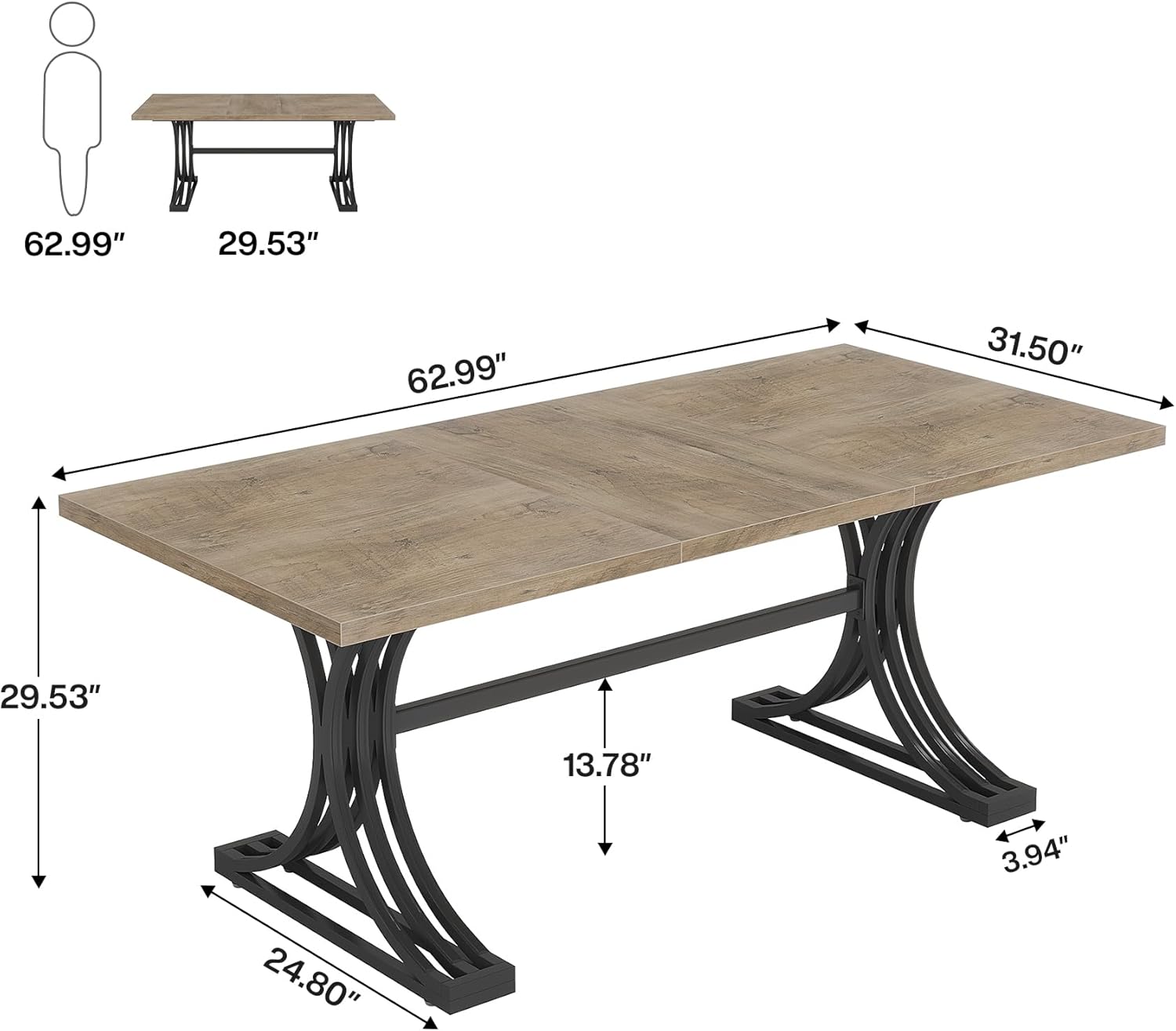
Image: A detailed diagram illustrating the precise dimensions of the desk, including length, width, and height, essential for planning your workspace.
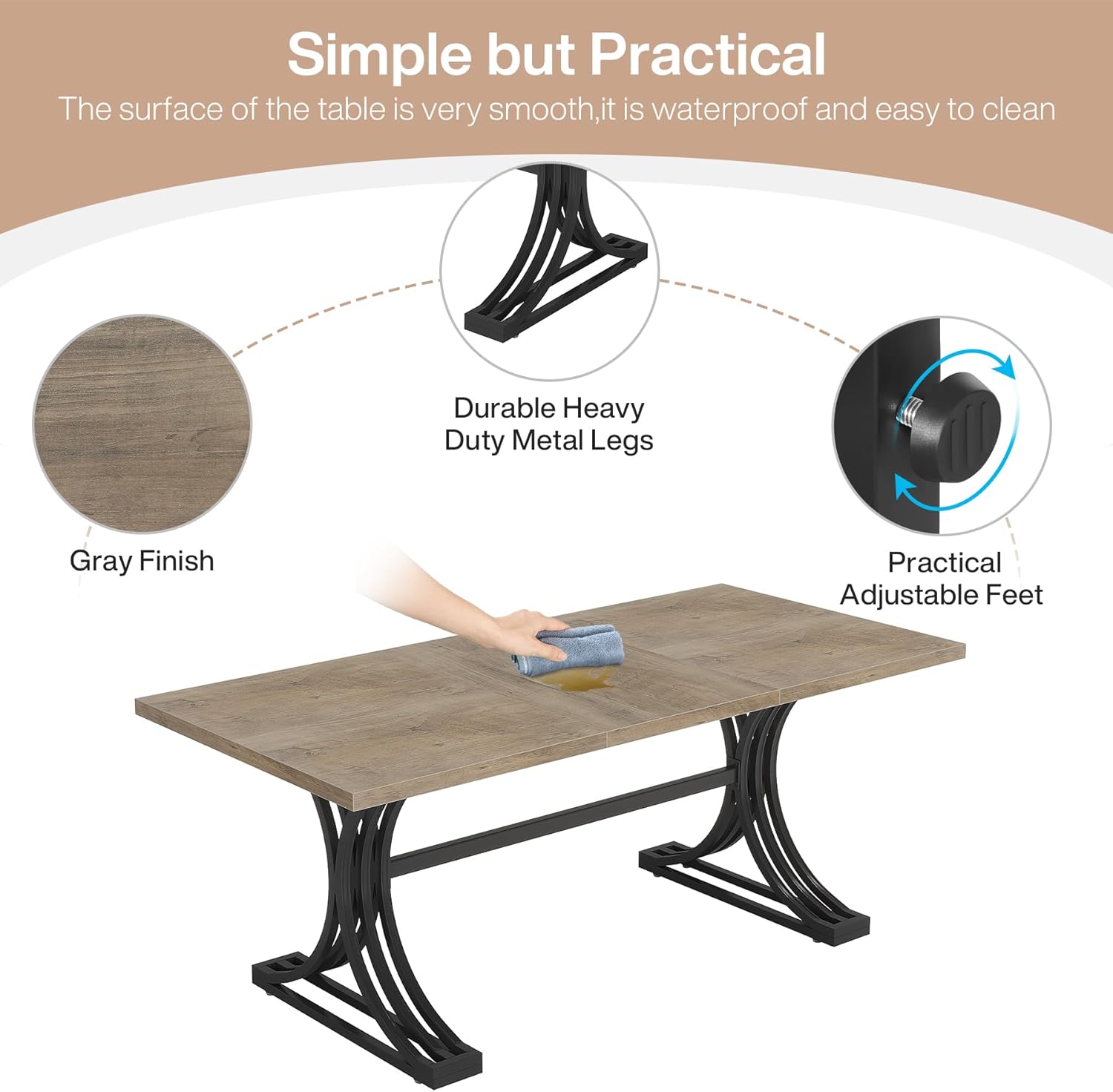
Image: A close-up view highlighting key features such as the gray finish of the tabletop, the durable heavy-duty metal legs, and the practical adjustable feet for stability.
Setup
Once assembled, position your Tribesigns desk in a suitable location. Ensure there is adequate space around the desk for comfortable movement and access to power outlets if needed. Use the adjustable foot pads to level the desk on any uneven flooring, preventing wobbling and ensuring a stable work surface.
Usage Guidelines
The Tribesigns 63" Executive Computer Desk is designed for working and writing. Its spacious surface can accommodate multiple monitors, laptops, and office accessories. Always adhere to the maximum weight recommendation of 200 pounds to maintain the desk's structural integrity and ensure safety.

Image: The desk comfortably accommodating two computer monitors, demonstrating its generous surface area for a productive workspace.

Image: The desk being utilized by multiple individuals, showcasing its versatility for collaborative work environments or shared office spaces.
Care and Maintenance
To ensure the longevity and appearance of your Tribesigns desk, follow these care instructions:
- Cleaning: Wipe with a dry cloth. For spills, use a slightly damp cloth immediately and dry thoroughly. Avoid harsh chemicals or abrasive cleaners.
- Protection: Use coasters for drinks and placemats for hot items to protect the surface from stains and heat damage.
- Stability: Periodically check all screws and connections to ensure they remain tight. Re-tighten if necessary.
- Sunlight: Avoid prolonged exposure to direct sunlight to prevent fading or discoloration of the tabletop.
Troubleshooting
If you encounter any issues with your desk, please refer to the following common problems and solutions:
| Problem | Possible Cause | Solution |
|---|---|---|
| Desk is wobbly | Uneven floor; Loose screws | Adjust the foot pads until the desk is stable. Tighten all assembly screws. |
| Parts are missing or damaged | Packaging error; Shipping damage | Do not proceed with assembly. Contact Tribesigns customer support immediately for replacement parts. |
| Surface scratches easily | Improper use; Sharp objects | Use desk mats or pads for protection. Avoid dragging sharp objects across the surface. |
Product Specifications
| Brand | Tribesigns |
| Model Number | JL-XK00425CD-HQ |
| Product Dimensions (D x W x H) | 31.5"D x 62.99"W x 29.53"H |
| Item Weight | 57 Pounds |
| Color | Gray and Black |
| Style | Mid-Century Modern |
| Top Material Type | Engineered Wood |
| Base Material | Metal |
| Tabletop Thickness | 1.18 Inches |
| Maximum Weight Recommendation | 200 Pounds |
| Required Assembly | Yes |
| Recommended Number of People for Assembly | 2 |
| Product Care Instructions | Wipe with Dry Cloth |
Warranty and Customer Support
Warranty: This Tribesigns product comes with a Limited Warranty. Please refer to the warranty card included in your package for specific terms and conditions.
Returns: This product is eligible for 30-day easy returns. Please refer to your purchase platform's return policy for detailed instructions.
Customer Support: For any questions, concerns, or assistance with assembly or parts, please contact Tribesigns customer support through the retailer's platform or the contact information provided in your product packaging. Please have your model number (JL-XK00425CD-HQ) and purchase details ready when contacting support.
Documents and downloads
Ask a question about this manual
Ask about setup, troubleshooting, compatibility, parts, safety, or missing instructions. Manuals+ will review the question and use this page’s manual context to help answer it.