
1. Introduction
This manual provides detailed instructions for the safe and effective operation of your VAR TECH V92S Smart Digital Multimeter. The V92S is a True RMS, fully auto-ranging digital multimeter designed for precise measurements across various electrical parameters. Please read this manual thoroughly before use and retain it for future reference.
2. Safety Information
Always adhere to basic safety precautions when using this multimeter to prevent personal injury or damage to the instrument. Improper use can result in electric shock or fire.
- Do not exceed the maximum input values specified for each function.
- Ensure test leads are properly connected and in good condition before making measurements.
- Do not use the multimeter if it appears damaged or if the battery cover is not securely closed.
- Exercise extreme caution when working with voltages above 60V DC or 30V AC RMS, as these pose a shock hazard.
- Always disconnect power to the circuit under test before measuring resistance, capacitance, or continuity.
- Replace batteries promptly when the low battery indicator appears to ensure accurate readings.
- Do not operate the multimeter in explosive atmospheres or near flammable materials.
3. Key Features
The VAR TECH V92S Smart Digital Multimeter offers a range of advanced features for comprehensive electrical testing:
- Smart Digital Multimeter with Auto Detection TRMS (True Root Mean Square)
- 600 V AC/DC & 10 A AC/DC measurement capabilities
- 6000 Counts HD Display with Primary & Secondary display and Analog bar graph
- Capacitance Test: 6 nF to 60 mF
- Frequency Test: 6 Hz to 10 MHz
- Temperature Test: -40 ºC to 1000 ºC
- Diode & Continuity Test
- NCV (Non-Contact Voltage) test for live wire detection
- Integrated Torch for illumination in dark environments
- Auto Power Off function to conserve battery life
- Data Hold function to freeze readings on the display
- Low Battery indicator
- Jack Prompt for correct test lead insertion
- Burnt Fuse Prompt for safety and easy maintenance
- Resistance measurement: 600 Ω to 60 MΩ

Figure 3.1: Front view of the VAR TECH V92S Smart Digital Multimeter, showcasing its display and control buttons.

Figure 3.2: The VAR TECH V92S Multimeter held in hand, illustrating its compact and ergonomic design.
4. Product Components
The VAR TECH V92S Smart Digital Multimeter package includes the following items:
- VAR TECH V92S Digital Multimeter
- Test Leads (Red and Black)
- Instruction Manual (this document)
- Carrying Pouch
- 4 AAA Batteries (pre-installed or included separately)

Figure 4.1: Contents of the VAR TECH V92S package, including the multimeter, test leads, manual, and carrying pouch.
5. Setup
5.1. Battery Installation
The VAR TECH V92S requires 4 AAA batteries for operation. If batteries are not pre-installed, or if replacement is needed:
- Ensure the multimeter is powered off.
- Locate the battery compartment on the back of the device.
- Use a screwdriver to open the battery compartment cover.
- Insert 4 AAA batteries, observing the correct polarity (+/-) as indicated inside the compartment.
- Securely close the battery compartment cover.
5.2. Connecting Test Leads
Proper connection of test leads is crucial for accurate and safe measurements.
- Insert the black test lead into the “COM” (Common) jack.
- For most voltage, resistance, continuity, capacitance, frequency, and temperature measurements, insert the red test lead into the “INPUT” jack.
- For current measurements (mA/A), insert the red test lead into the “mA/A” jack.

Figure 5.1: The input jack prompt light feature. When turning on or changing ranges, the corresponding input socket light flashes to indicate where to insert the probe.
6. Operating Instructions
6.1. Power On/Off
Press the Power button (red circle with line) to turn the multimeter on or off.
6.2. Function Selection
The V92S features an auto-ranging function, automatically detecting the measurement type in “SMART” mode. For specific functions, use the SEL and FUNC buttons:
- SEL (Select) Button: Used to switch between different measurement types within a primary mode (e.g., AC Voltage and DC Voltage, or Diode and Continuity).
- FUNC (Function) Buttons: Used to directly select specific measurement functions like Capacitance, Frequency, or Temperature.
6.3. Measurement Modes
Ensure test leads are correctly inserted for the desired measurement.
6.3.1. Voltage Measurement (AC/DC)
- Insert the red lead into the “INPUT” jack and the black lead into the “COM” jack.
- Turn on the multimeter. It will typically default to auto-ranging voltage measurement.
- If needed, press SEL to switch between AC and DC voltage.
- Connect the test probes in parallel to the circuit or component to be measured.
6.3.2. Current Measurement (AC/DC)
- Insert the red lead into the “mA/A” jack and the black lead into the “COM” jack.
- Turn on the multimeter. The device automatically enters the current measurement function when the probe is inserted into the mA/A socket.
- If needed, press SEL to switch between AC and DC current.
- Connect the test probes in series with the circuit to be measured.
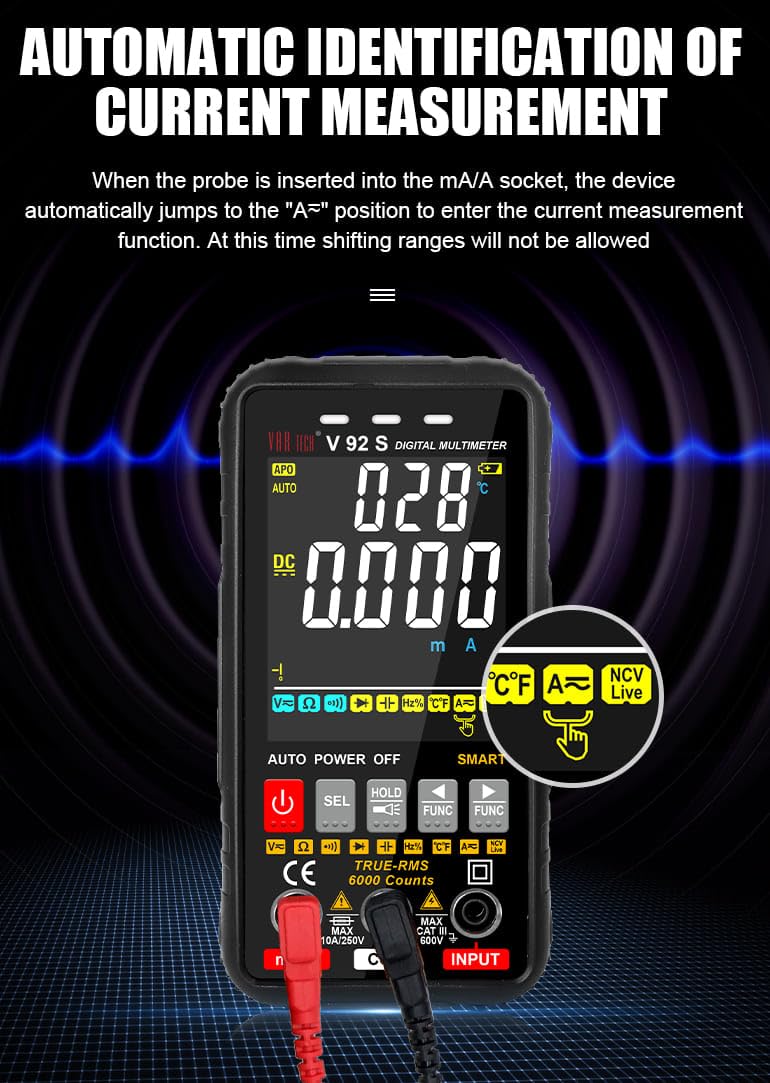
Figure 6.1: Automatic identification of current measurement. The multimeter automatically adjusts to the current measurement function when the probe is inserted into the mA/A socket.
6.3.3. Resistance, Capacitance, Frequency, Temperature, Diode, Continuity
For these measurements, ensure the red lead is in the “INPUT” jack and the black lead in the “COM” jack. Use the SEL or FUNC buttons to select the desired mode. Connect probes to the component or circuit as appropriate for each measurement type.
6.3.4. NCV (Non-Contact Voltage) Test
The NCV function allows for detection of AC voltage without direct contact with conductors.
- Select the NCV function using the appropriate button.
- Bring the top of the multimeter near the conductor or outlet.
- The instrument will emit an audible beep and the alarm indicator light will illuminate when AC signals are detected. A “-H” display indicates a strong signal, while “-L” indicates a weak signal.

Figure 6.2: Auditory and visual alarm during NCV (Non-Contact Voltage) testing, indicating the presence of AC voltage.
6.4. Data Hold Function
Press the HOLD button to freeze the current reading on the display. Press it again to release the hold function.
6.5. Flashlight Function
The multimeter includes a built-in flashlight for illuminating work areas. Activate the flashlight using the designated button (often integrated with the HOLD button or a separate light icon). Press again to turn it off.

Figure 6.3: The integrated flashlight function, useful for working in dimly lit environments.
7. Maintenance
7.1. Cleaning
Wipe the case with a damp cloth and mild detergent. Do not use abrasives or solvents. Ensure the multimeter is powered off and disconnected from all circuits before cleaning.
7.2. Battery Replacement
When the low battery indicator appears on the display, replace the batteries as described in Section 5.1.
7.3. Fuse Replacement
The V92S features an intelligent anti-burn function with a built-in safety fuse to protect the circuit. If the safety fuse burns out, the display screen will show a “FUSE” symbol to prompt replacement.
- Ensure the multimeter is powered off and all test leads are disconnected.
- Open the battery compartment cover on the back of the device.
- Carefully locate and remove the blown fuse.
- Replace it with a fuse of the same type and rating (refer to specifications for fuse type).
- Securely close the battery compartment cover.

Figure 7.1: The intelligent anti-burn function prompt, indicating the location of the fuse for replacement.
8. Troubleshooting
If you encounter issues with your VAR TECH V92S, refer to the following common problems and solutions:
- No Display: Check battery installation and ensure batteries are not depleted. Replace if necessary.
- Incorrect Readings: Verify test lead connections. Ensure the correct measurement function is selected. Check if the fuse is intact for current measurements.
- “OL” or Overload Indication: The measured value exceeds the range of the selected function. Select a higher range if available, or ensure the input is within the multimeter’s capabilities.
- “FUSE” Display: The fuse has blown. Refer to Section 7.3 for fuse replacement.
If the problem persists, contact VAR TECH customer support for assistance.
9. Technical Specifications
| Parameter | Specification |
|---|---|
| Model | V92S |
| Display | 6000 Counts HD Display |
| True RMS | Yes |
| DC Voltage | Up to 600 V |
| AC Voltage | Up to 600 V |
| DC Current | Up to 10 A |
| AC Current | Up to 10 A |
| Resistance | 600 Ω to 60 MΩ |
| Capacitance | 6 nF to 60 mF |
| Frequency | 6 Hz to 10 MHz |
| Temperature | -40 ºC to 1000 ºC |
| Continuity Test | Yes |
| Diode Test | Yes |
| NCV (Non-Contact Voltage) | Yes |
| Power Source | 4 AAA batteries (included) |
| Item Weight | 300 g |
| Product Dimensions (L x W x H) | 14 x 7 x 5 cm |
| Safety Rating | CAT III 600V |
| Certifications | CE, ISO 9001 |

Figure 9.1: A comparison table illustrating the features of various VAR TECH multimeter models, including the V92S.
10. Warranty and Support
The VAR TECH V92S Smart Digital Multimeter comes with a 1-year warranty against manufacturing defects. For warranty claims or technical support, please contact VAR TECH directly.
Manufacturer: V A R TECH, www.var-tech.com
