
1. Introduction
This manual provides detailed instructions for the proper use and maintenance of your BAOFENG GM-5RH GMRS Portable Radio. The GM-5RH is an advanced GMRS two-way radio, featuring 999 storage channels, a 1.77-inch color screen, 11 NOAA weather alert channels, and USB-C charging. It is designed for reliable long-distance communication in various environments, including outdoor activities and emergency situations.
2. Setup
2.1 Package Contents
Verify that all items are present in the package:
- 1x GM-5RH Radio
- 1x USB-C Cable
- 1x High Gain Original Antenna
- 1x 2500mAh Enlarge Capacity Battery
- 1x Desktop Charger
- 1x Belt Clip
- 1x Hand Strap
- 1x English Manual (this document)
- 1x 771 Antenna
- 1x Headset
- 1x Programming Cable
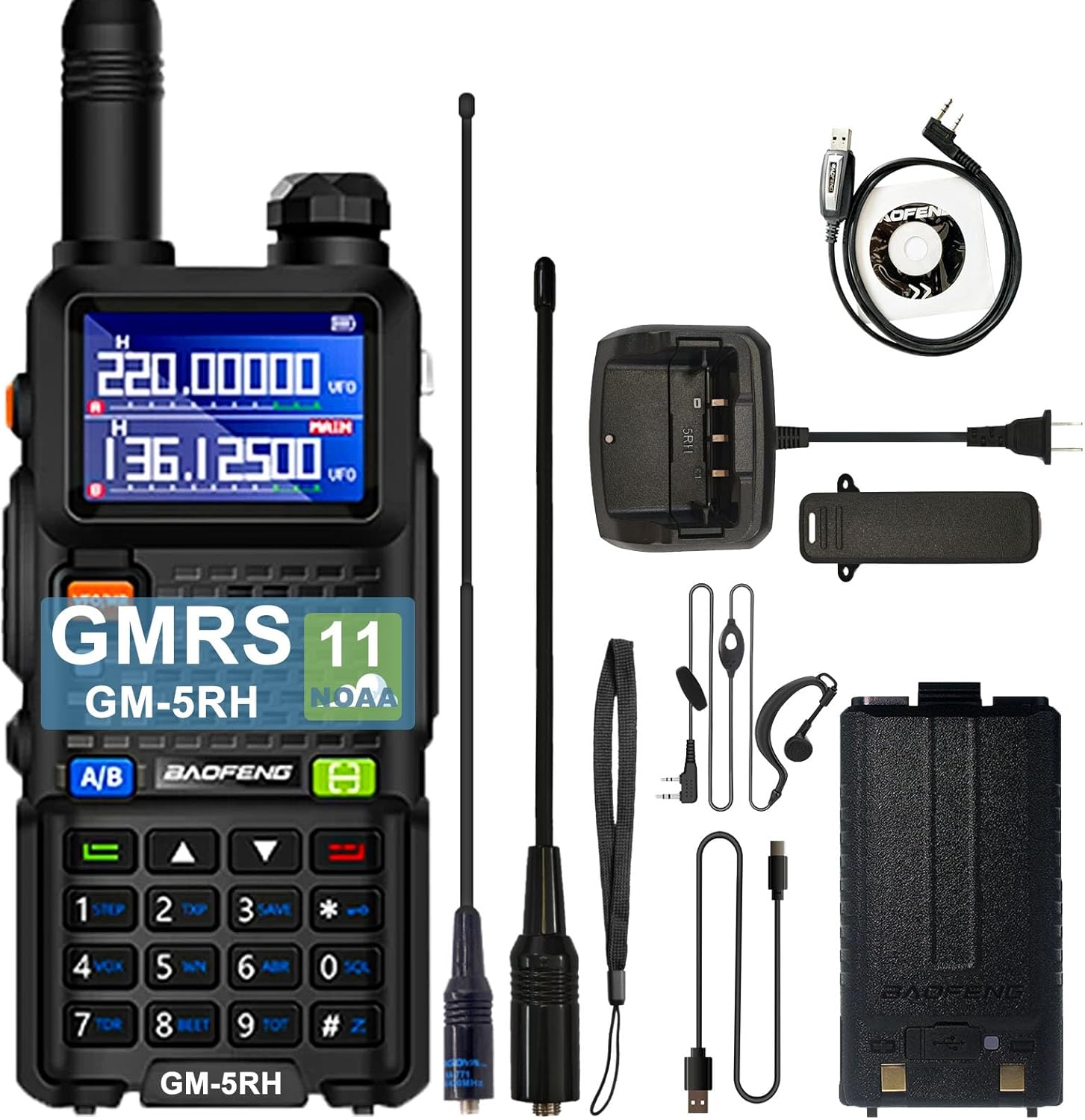
Image: The BAOFENG GM-5RH radio shown with all its included accessories, such as two antennas, a battery, a desktop charger, a USB-C cable, a belt clip, a hand strap, a headset, and a programming cable.
2.2 Battery Installation
- Align the battery with the grooves on the back of the radio.
- Slide the battery upwards until it clicks into place.
- To remove, press the release latch at the bottom of the battery and slide it downwards.
2.3 Antenna Attachment
- Screw the antenna clockwise into the connector on the top of the radio until it is finger-tight.
- Do not overtighten.
2.4 Charging the Battery
The GM-5RH radio can be charged using the included USB-C cable or the desktop charger.
- USB-C Charging: Connect the USB-C cable directly to the radio's USB-C port and to a compatible USB power source (e.g., laptop, car charger, power bank).
- Desktop Charger: Place the radio (with battery installed) into the desktop charging dock. Ensure the charging contacts align. Connect the desktop charger to a power outlet. The indicator light will show charging status.

Image: The BAOFENG GM-5RH radio demonstrating both direct USB-C cable charging and charging via its dedicated desktop dock, illustrating versatile power options.
2.5 Powering On/Off
To power on the radio, rotate the Power/Volume knob clockwise until you hear a click. To power off, rotate the knob counter-clockwise until it clicks.
3. Operating Instructions
3.1 Controls Overview
Familiarize yourself with the radio's controls:

Image: A detailed diagram of the BAOFENG GM-5RH radio, clearly labeling its key components including the antenna, flashlight, power/volume knob, 1.77-inch LCD screen, PTT button, 2-pin jack, microphone, scan button, menu button, keypad, and USB-C port.
- Power/Volume Knob: Controls power and adjusts audio volume.
- Antenna: For transmitting and receiving signals.
- PTT (Push-To-Talk) Button: Press and hold to transmit, release to receive.
- Keypad: Used for entering frequencies, channel numbers, and menu navigation.
- 1.77" LCD Screen: Displays frequency, channel, battery status, and menu options.
- USB-C Port: For direct charging and programming.
- 2-pin Jack: For connecting external audio accessories like headsets.
3.2 Display Features
The 1.77-inch color LCD provides a clear display of operational information, supporting dual-band display and up to 999 channels.

Image: The BAOFENG GM-5RH radio highlighting its 1.77-inch LCD screen, which features a dual-frequency display for enhanced monitoring and clarity in various lighting conditions.
3.3 Channel Selection and Frequency Mode
- VFO/MR Button: Press this button to switch between Frequency (VFO) mode and Channel (MR) mode.
- In Channel mode, use the Up/Down arrow keys or the keypad to select a stored channel.
- In Frequency mode, use the keypad to directly input a desired frequency.
3.4 One-Click Frequency Scanning (Frequency Match)
This feature allows for quick frequency matching with another radio.
- Step 1: Initiate Scan. Turn on the radio. Press and hold the E button (often labeled with a scan icon) until the screen displays "SEARCH".
- Step 2: Copy Frequency. Press and hold the transmit button on the other radio you wish to match. The GM-5RH will scan and display the frequency and decoding information.
- Step 3: Confirm and Communicate. Once the scan is complete, press the E button again to confirm. The radio will switch to channel mode, and you can now communicate on the matched frequency.

Image: A visual step-by-step guide demonstrating the 'One Key Match Frequency' function of the BAOFENG GM-5RH, showing the radio's screen at each stage of the frequency scanning and matching process.
3.5 NOAA Weather Alert
The radio includes 11 built-in NOAA weather alert channels to receive weather reports and alerts.
- Access NOAA channels through the menu or a dedicated shortcut if available. Refer to the full manual for specific menu navigation.
- Enable weather alerts to receive notifications of severe weather conditions.
3.6 VOX (Voice Operated Transmit)
The VOX function allows for hands-free transmission. When activated, the radio will automatically transmit when it detects your voice.
- Adjust VOX sensitivity in the radio's menu to prevent accidental transmissions or missed voice activation.
3.7 Flashlight
The radio is equipped with a built-in flashlight for convenience in low-light conditions.
- Typically activated by a dedicated button or a long press of a function key. Consult the full manual for exact activation method.
3.8 Programming
The BAOFENG GM-5RH supports programming via a programming cable and software like Chirp. This allows for advanced customization of channels, frequencies, and other settings.
- Connect the programming cable to the radio's 2-pin jack and to your computer.
- Install the necessary drivers and programming software (e.g., Chirp).
- Follow the software's instructions to read from and write to the radio.
4. Maintenance
4.1 Battery Care
- Charge the battery fully before first use.
- Avoid overcharging or completely draining the battery, as this can reduce its lifespan.
- Store the radio and battery in a cool, dry place when not in use for extended periods.
4.2 Cleaning
- Clean the radio's exterior with a soft, damp cloth.
- Do not use harsh chemicals or abrasive cleaners.
- Ensure the radio is dry before use or charging.
5. Troubleshooting
| Problem | Possible Cause | Solution |
|---|---|---|
| Radio does not power on | Battery is low or not installed correctly. | Charge the battery. Reinstall the battery securely. |
| Cannot transmit or receive | Incorrect frequency/channel. Antenna not attached. Out of range. | Verify frequency/channel. Attach antenna. Move closer to other radios. |
| Poor audio quality | Low battery. Antenna issue. Interference. | Charge battery. Check antenna connection. Move away from sources of interference. |
| Keypad unresponsive | Keypad lock activated. | Unlock keypad (refer to full manual for specific key combination). |
6. Specifications
| Feature | Specification |
|---|---|
| Model Number | GM-5RH |
| Number of Channels | 999 |
| Frequency Range | 462-467 MHz (GMRS) |
| Screen Type | 1.77 inch LCD |
| Battery Capacity | 2500mAh Lithium Ion (included) |
| Charging Method | USB-C, Desktop Charger |
| Special Features | 11 NOAA Weather Alert, One Key Frequency Match, VOX, Flashlight, GMRS Repeater Support |
| Talking Range Maximum | 10 Kilometer (approx. 6.2 miles) |
| Water Resistance Level | Not Water Resistant |
| Item Weight | 1.63 pounds (approx. 26.1 ounces) |
| Package Dimensions | 8.07 x 4.64 x 4.13 inches |

Image: A comparison chart highlighting the enhanced features of the BAOFENG GM-5RH, such as 999 channels, 2500mAh battery, 1.77" LCD, and USB-C charging, against the previous UV-5R model.
7. Warranty Information
The BAOFENG GM-5RH GMRS Portable Radio comes with a 1-year warranty. This warranty is provided exclusively through "Shiqun Electronics Co., Ltd". Please retain your proof of purchase for warranty claims.
8. Support
For further assistance, technical support, or inquiries regarding your BAOFENG GM-5RH radio, please refer to the contact information provided by your retailer or the official BAOFENG website. Additional resources, including updated firmware and programming guides, may be available online.