
advwin HL-T2X
Electric Cooktop Instruction Manual
Brand: advwin | Model: HL-T2X
1. Introduction
Thank you for choosing the advwin Electric Cooktop. This manual provides essential information for the safe and efficient operation of your new appliance. Please read it thoroughly before installation and use, and keep it for future reference.
This 2-burner electric cooktop is designed for versatility and safety, featuring knob controls, multiple power settings, and built-in protective functions. Its sleek ceramic glass surface is both durable and easy to maintain.

Image: The advwin 2-burner electric cooktop with illuminated heating elements, ready for use in a kitchen setting.
2. Safety Information
Your safety and the safety of others are paramount. Always follow basic safety precautions when using electrical appliances.
2.1 General Safety Warnings
- Ensure the cooktop is installed correctly and connected to a suitable power supply (110V).
- Do not touch hot surfaces. Use handles or knobs.
- Never leave the cooktop unattended during operation.
- Keep flammable materials away from the cooktop.
- Do not use abrasive cleaners or sharp objects on the ceramic glass surface.
- If the temperature gets too high after shutdown, the machine will display "H" and will continue to run to dissipate the heat until it does so successfully. Do not touch the surface while "H" is displayed.
2.2 Child Safety Lock
The cooktop is equipped with a child safety lock to prevent accidental operation. This feature is particularly useful in households with children or pets, preventing unintended activation of the burners.

Image: A child reaching towards a cooktop, illustrating the importance of the child safety lock feature.
3. Product Overview
The advwin Electric Cooktop features a sleek black ceramic glass surface with two infrared heating zones. Control is managed via intuitive rotary knobs, offering a tactile and reliable user experience compared to touch-sensitive interfaces.
3.1 Components and Controls
- Heating Zones: Two independent infrared burners.
- Control Knobs: Separate knobs for each burner to adjust power levels.
- Digital Display: Shows selected power level and timer settings.
- Timer Button: Activates and sets the cooking timer.
- Child Lock Button: Engages/disengages the child safety lock.
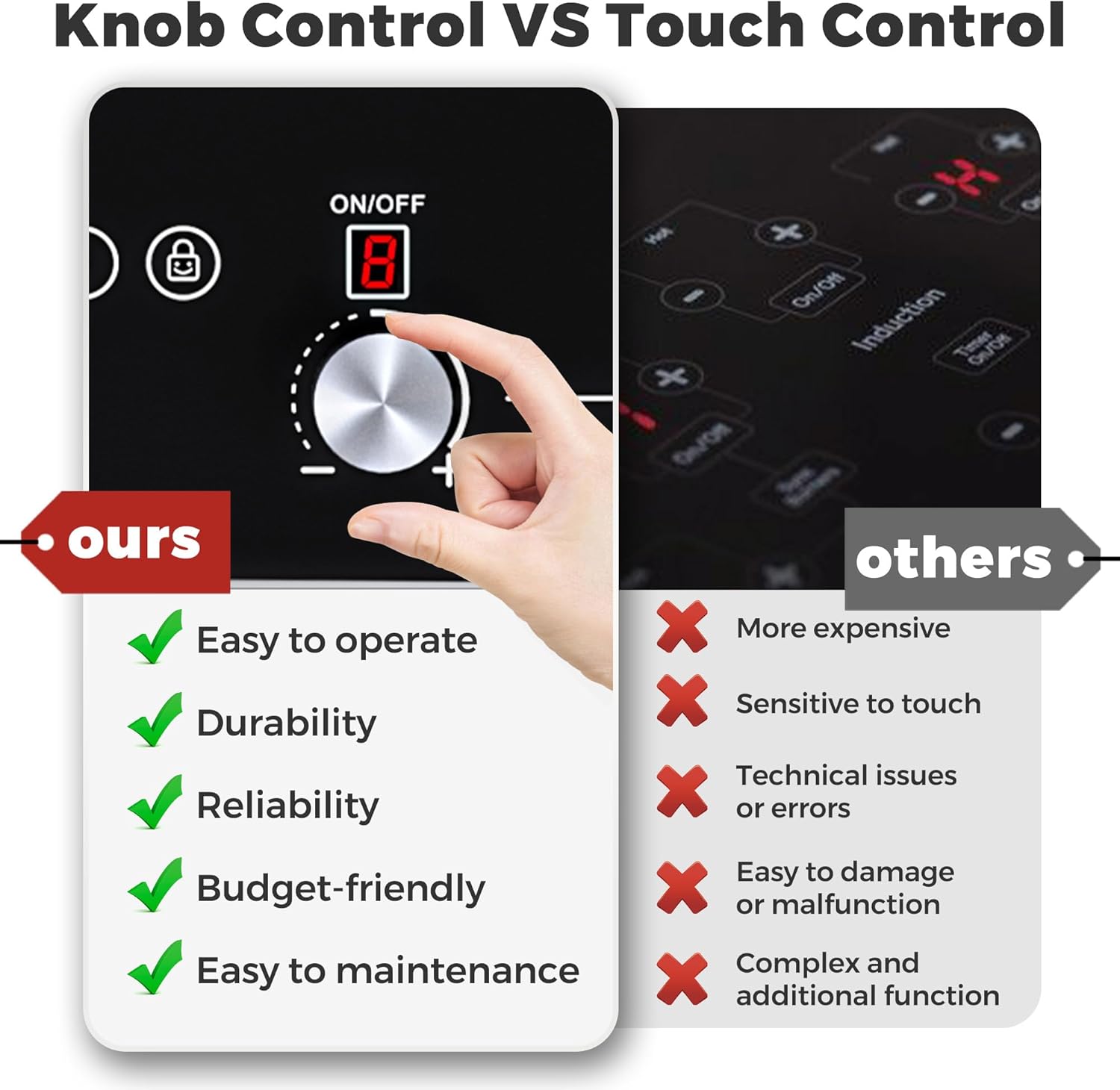
Image: A comparison highlighting the benefits of knob control (easy to operate, durable, reliable, budget-friendly, easy to maintain) over touch control interfaces.

Image: Close-up of the cooktop surface, emphasizing the premium ceramic glass material, its thermal conductivity, and strong microcrystalline glass properties.
4. Setup and Installation
The advwin Electric Cooktop offers flexible installation options, allowing it to be either built into a countertop or used as a portable countertop unit. This plug-and-play design simplifies setup for various kitchen configurations.
4.1 Dimensions and Electrical Requirements
- Product Dimensions (L*W*H): 26.6" x 13.8" x 2.9"
- Cut-out Size (for built-in): 22.4" x 12.6"
- Burner Size: 7.87"
- Rated Power: 1800W (1600W + 1100W)
- Electrical Supply: AC 110-120V / 50-60Hz
4.2 Installation Options
Countertop Use: Simply place the cooktop on a stable, heat-resistant surface and plug it into a standard 110V outlet.
Built-in Installation: Cut an opening in your countertop according to the specified cut-out dimensions. Ensure proper ventilation around the unit as per local building codes.
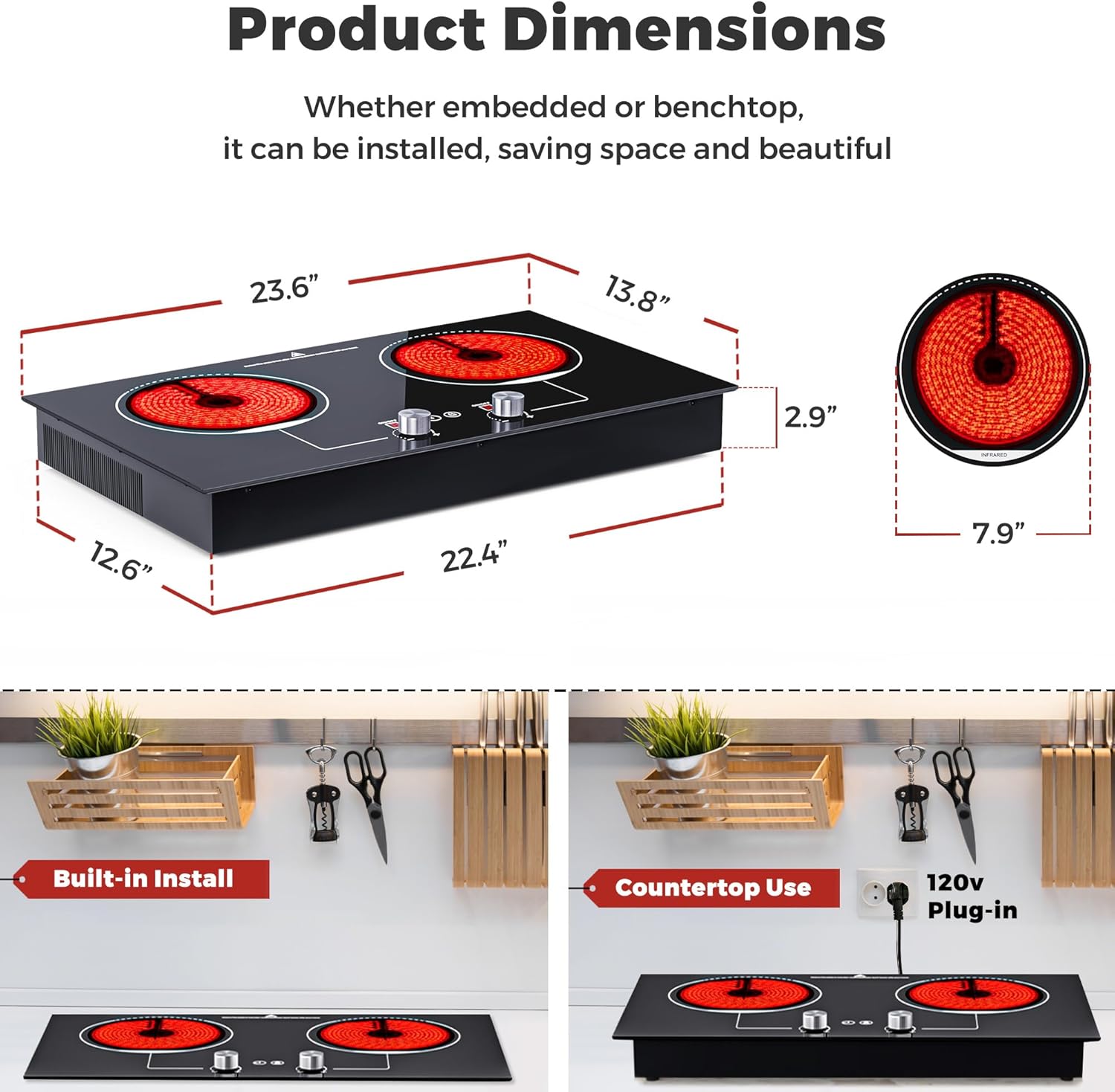
Image: Visual representation of the cooktop's dimensions and two installation methods: built-in and countertop use with a 120V plug-in.
5. Operating Instructions
The advwin cooktop is designed for ease of use, offering precise control over your cooking with its 10 power levels and convenient timer function.
5.1 Power On/Off and Power Level Adjustment
- To Turn On: Press the ON/OFF button for the desired burner. The display will illuminate.
- To Adjust Power: Rotate the corresponding knob to select one of the 10 power levels. Level 1 is the lowest, and Level 10 (or 'P' for preheat/boost) is the highest, providing up to 1800W of power.
- To Turn Off: Press the ON/OFF button again for the specific burner.

Image: A close-up of the cooktop controls, showing the ON/OFF buttons and rotary knobs for adjusting the 10 power levels.
5.2 Timer Function
The integrated 99-minute timer allows for precise cooking times, automatically shutting off the burner once the set time is complete.
- To Set Timer: With a burner active, press the Timer button. The display will show "00".
- Adjust Time: Use the burner's control knob to increase or decrease the minutes (up to 99 minutes).
- Activate Timer: The timer will start automatically after a few seconds of inactivity or by pressing the Timer button again.

Image: A visual representation of the timer function on the cooktop, indicating its presence and utility.
5.3 Cookware Compatibility
The ceramic cooktop is compatible with all types of cookware, including iron, stainless steel, casserole, aluminum, copper, glass, skillet, and ceramic. This provides maximum flexibility for your cooking needs.

Image: Various types of cookware (wok, aluminum, ceramic, stovetop teapot, frying pan, stainless steel saucepan, glass, steak plate) demonstrating the cooktop's universal compatibility.
6. Maintenance and Cleaning
The ceramic glass surface of your advwin cooktop is designed for easy cleaning. Regular maintenance will ensure its longevity and appearance.
- Allow the cooktop to cool completely before cleaning.
- Wipe the surface with a damp cloth and mild detergent.
- For stubborn stains, use a ceramic cooktop cleaner and a non-abrasive pad.
- Avoid using steel wool, abrasive powders, or harsh chemicals.
- Clean spills immediately to prevent them from baking onto the surface.
7. Troubleshooting
This section addresses common issues you might encounter with your cooktop.
7.1 Displaying "H"
If the cooktop displays "H" after use or shutdown, it indicates that the surface is still hot. This is a high-temperature warning feature. The internal fan will continue to operate to dissipate heat until the surface temperature drops to a safe level. Do not touch the surface while "H" is displayed.
7.2 Other Issues
If you experience any other issues not covered here, please refer to the full user manual included with your product or contact advwin customer support.
8. Specifications
Detailed technical specifications for your advwin Electric Cooktop.
| Specification | Value |
|---|---|
| Brand Name | advwin |
| Model Info | HL-T2X |
| Item Weight | 12.34 pounds |
| Product Dimensions | 2.9 x 13.8 x 23.6 inches |
| Country of Origin | China |
| Installation Type | Drop-In |
| Burner Type | Infrared |
| Heating Elements | 2 |
| Color | Black |
| Control Console | Knob |
| Voltage | 110 Volts |
| Wattage | 1800 watts |
| Fuel Type | Electric |
| Material Type | Ceramic Glass |

Image: A graphic summarizing key product specifications including size, rated power, electrical supply, and features like knob control, 10 power settings, timer, residual heat indicator, and over-temperature protection.
9. Warranty and Support
Your advwin Electric Cooktop comes with a user manual and the cooktop unit itself. For specific warranty details or technical support, please refer to the documentation included in your product packaging or contact advwin customer service directly. Keep your purchase receipt as proof of purchase for any warranty claims.
Related documentsHL-T2X

Ask a question about this manual
Ask about setup, troubleshooting, compatibility, parts, safety, or missing instructions. Manuals+ will review the question and use this page’s manual context to help answer it.