
1. Product Overview
The MiCODUS MV710G is a compact 4G GPS tracker designed for real-time location monitoring of vehicles such as cars and motorcycles. This device operates on both 2G and 4G networks, providing reliable tracking capabilities without requiring monthly monitoring fees. It features real-time web monitoring, estimated mileage, overspeed alerts, and geofencing functionalities. The MV710G can be managed via the dedicated MiCODUS mobile application, available for both iOS and Android platforms. A key feature includes the ability to remotely cut off the fuel pump current, which can be used to disable or prevent vehicle ignition.

Figure 1: MiCODUS MV710G GPS tracker with its relay and wiring harness. This image displays the main components included with the device, ready for installation.
2. Setup and Installation
The MV710G GPS tracker requires a nano SIM card for operation. It is recommended to use a SIM card with a per-second billing rate. Please note that the Telcel SIM chip is not included and its use and balance are the user's responsibility. A minimum monthly recharge of 50 (currency not specified, typically MXN in this region) is suggested for continuous location services and line preservation.
2.1 SIM Card Insertion
Locate the SIM card slot on the device. Carefully insert a nano SIM card into the designated slot, ensuring correct orientation. The device supports 2G and 4G networks.
2.2 Wiring and Connection
The installation process is straightforward, even for individuals with basic technical knowledge. However, for optimal safety and performance, it is highly recommended that installation be performed by a professional with experience in GPS equipment installations for vehicles.
The package includes the GPS device, a relay, and a relay socket. The wiring diagram below illustrates the connections required for proper functionality, including the fuel pump cut-off feature.

Figure 2: Detailed wiring diagram for the MiCODUS MV710G. This diagram shows how to connect the tracker to the vehicle's battery, ignition, and the included relay for fuel pump control.
- Connect the red wire to the vehicle's positive battery terminal (+).
- Connect the black wire to the vehicle's negative battery terminal (-) or chassis ground.
- Connect the orange wire to the ACC (Accessory) line, which is live when the ignition is on.
- Connect the yellow wire to the relay as per the diagram for the fuel pump cut-off function.
- Ensure all connections are secure and properly insulated to prevent short circuits.
3. Operating Instructions
The MiCODUS MV710G allows for comprehensive monitoring and control through its dedicated mobile application and web platform.
3.1 MiCODUS Mobile Application
Download the official MiCODUS app from the iOS App Store or Google Play Store. After installation, register your device using the provided serial number or IMEI. The app provides real-time tracking, historical route playback, and various alert settings.

Figure 3: MiCODUS mobile application interface. This screenshot illustrates the real-time tracking feature, displaying the vehicle's location on a map.
3.2 Key Features
- Real-time Tracking: View the precise location of your vehicle on a map in real-time.
- Historical Route Playback: Review past travel routes and estimated mileage.
- Geofencing: Set up virtual boundaries and receive alerts when the vehicle enters or exits these predefined areas.
- Overspeed Alert: Receive notifications if the vehicle exceeds a set speed limit.
- Remote Fuel Cut-off: Use the app to remotely disable the vehicle's fuel supply, preventing it from starting or continuing to run. This feature should be used responsibly and only when necessary.
4. Maintenance
The MiCODUS MV710G is designed for low maintenance. To ensure optimal performance and longevity:
- Keep the device clean and free from dust and moisture.
- Ensure all wiring connections remain secure and free from corrosion.
- Avoid exposing the device to extreme temperatures or direct sunlight for prolonged periods.
- Regularly check the SIM card balance to ensure continuous service.
5. Troubleshooting
If you encounter issues with your MiCODUS MV710G, refer to the following common problems and solutions:
| Problem | Possible Cause | Solution |
|---|---|---|
| Device not reporting location. | No SIM card, insufficient SIM balance, poor network signal, incorrect wiring. | Ensure SIM card is inserted correctly and has sufficient balance. Check network coverage in the area. Verify all wiring connections are secure as per the diagram. |
| Text message responses are blocked. | Provider blocking SMS. | This does not affect device functionality. It is recommended to use the MiCODUS app for all monitoring and control. |
| Fuel cut-off not working. | Incorrect relay wiring, faulty relay, device not receiving command. | Re-check the relay wiring according to the diagram in Section 2.2. Ensure the device has power and network connectivity. |
6. Product Specifications
The following table details the technical specifications of the MiCODUS MV710G GPS tracker:
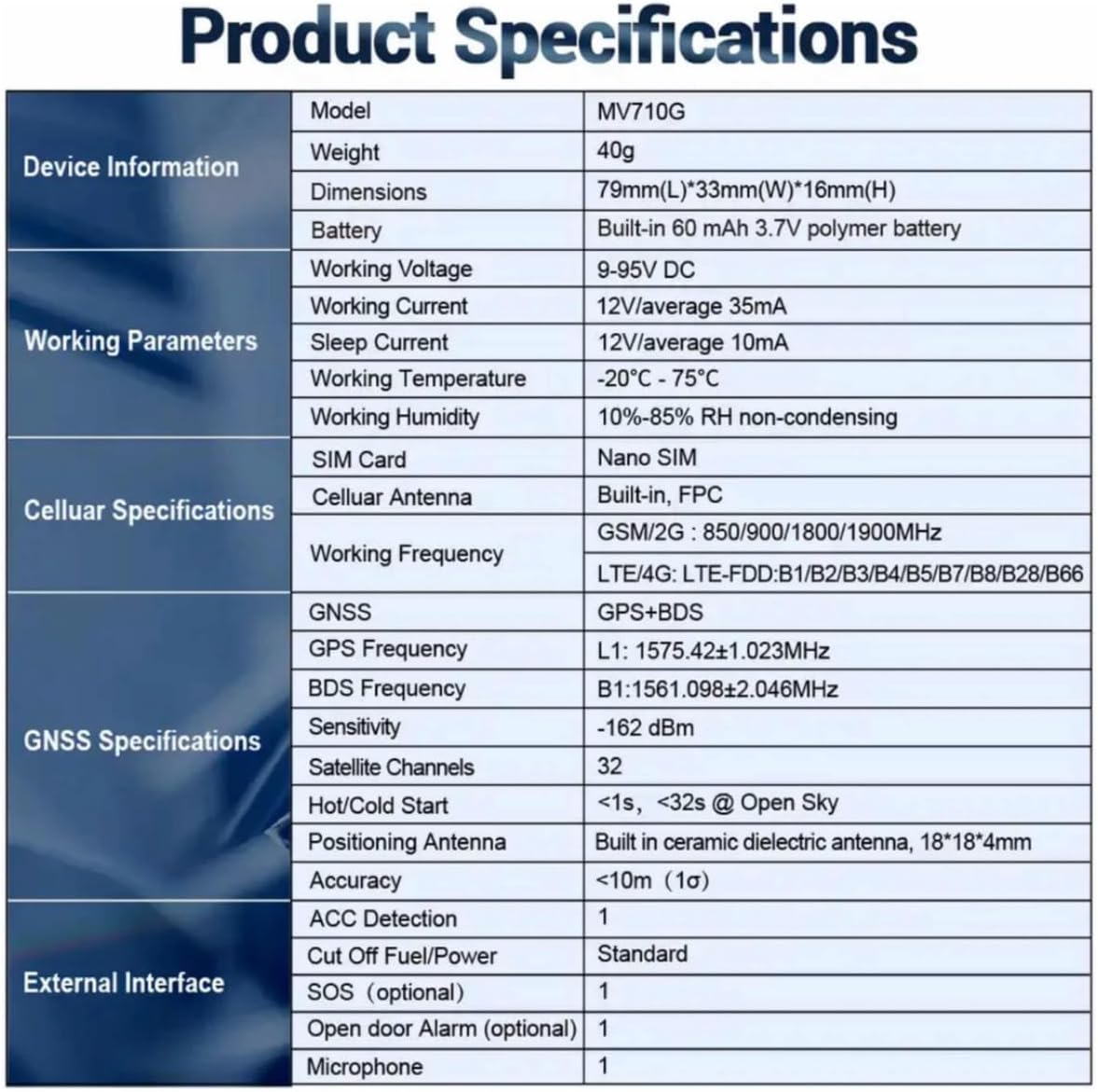
Figure 4: Official product specifications for the MiCODUS MV710G. This image provides a comprehensive list of the device's technical details.
| Category | Specification |
|---|---|
| Model | MV710G |
| Weight | 40g |
| Dimensions (L*W*H) | 79mm * 33mm * 16mm |
| Battery | Built-in 60 mAh 3.7V polymer battery |
| Working Voltage | 9-95V DC |
| Working Current | 12V/average 35mA |
| Sleep Current | 12V/average 10mA |
| Working Temperature | -20°C ~ 75°C |
| Working Humidity | 10%-85% RH non-condensing |
| SIM Card | Nano SIM |
| Cellular Antenna | Built-in, FPC |
| GSM/2G Frequency | 850/900/1800/1900MHz |
| LTE/4G Frequency | FDD:B1/B2/B3/B4/B5/B7/B8/B28/B66 |
| GNSS | GPS+BDS |
| GPS Frequency | L1: 1575.42±1.023MHz |
| BDS Frequency | B1:1561.098±2.046MHz |
| Sensitivity | -162 dBm |
| Satellite Channels | 32 |
| Hot/Cold Start | <1s, <32s @ Open Sky |
| Positioning Antenna | Built-in ceramic dielectric antenna, 18*18*4mm |
| Accuracy | <10m (1σ) |
| ACC Detection | 1 |
| SOS (optional) | 1 |
| Open door Alarm (optional) | 1 |
| Microphone | 1 |
7. Warranty and Support
The MiCODUS MV710G comes with a 30-day seller warranty from the date of purchase. This warranty covers manufacturing defects and ensures the product functions as described.
For any questions, technical assistance, or warranty claims, please contact the seller directly. It is recommended to provide your purchase details for faster support.


