
1. Introduction
This manual provides detailed instructions for the installation, operation, maintenance, and troubleshooting of your Iwillink 2-Port Ethernet Wall Plate and CAT7 Keystone Coupler. This product is designed to provide reliable and high-speed network connectivity for various devices in your home or office environment.
2. Product Overview
The Iwillink 2-Port Ethernet Wall Plate is a standard-sized faceplate designed to accommodate two RJ45 keystone jack inserts. It provides a clean and organized solution for network cable termination. The included CAT7 Keystone Coupler offers a female-to-female connection, extending Ethernet cables and supporting high-speed data transmission.

Figure 2.1: Iwillink 2-Port Ethernet Wall Plate highlighting features such as flame retardancy, high temperature resistance, anti-aging cracking, easy cleaning, and a lifetime guarantee.
Key Features:
- 2-Port Design: Accommodates two RJ45 keystone jacks for dual network connections.
- Wide Compatibility: Supports Cat5e, Cat6, Cat6a, and Cat7 Ethernet cables.
- Superior Shielded Transmission: Minimizes interference for stable and reliable connectivity.
- Lightning-Fast 10G Speed: CAT7 couplers support speeds up to 10 Gigabit Ethernet.
- Tool-Free Installation: CAT7 keystone jacks are designed for quick and easy setup without specialized tools.
- Gold-Plated Pins: Ensures optimal performance and signal integrity.
- Durable Construction: Features flame retardancy, high temperature resistance, and anti-aging properties.

Figure 2.2: Illustration of the wide compatibility of Iwillink keystone jacks with various devices such as PCs, routers, switches, printers, and hubs.

Figure 2.3: Features of the CAT7 Keystone Coupler, including tool-free design, gold-plated contacts, high impact resistance, and fire-retardant material, compatible with shielded/unshielded CAT7/CAT6A/CAT6/CAT5E Ethernet cables.
3. Setup and Installation
The Iwillink Ethernet Wall Plate and Keystone Couplers are designed for straightforward installation. Follow these steps for a secure and functional setup.
Required Tools (Not Included):
- Screwdriver (Phillips head recommended)
- Wire Stripper/Cutter (if terminating raw Ethernet cable)
Installation Steps:
- Prepare the Wall Opening: Ensure you have a standard low-voltage mounting bracket or electrical box installed in the wall where you intend to place the wall plate.
- Route Ethernet Cables: Pull the necessary Ethernet cables (e.g., Cat6, Cat7) through the wall opening. Leave enough slack for easy connection.
- Insert Keystone Jacks: If using the included CAT7 Keystone Couplers, simply snap them into the rectangular openings on the Iwillink 2-Port Ethernet Wall Plate. Ensure they are securely seated. The keystone jacks are designed for tool-free insertion.
- Connect Ethernet Cables: Connect your existing Ethernet cables to the back (female) ports of the keystone jacks. For the CAT7 Coupler, connect one Ethernet cable to one end and another Ethernet cable to the other end to extend the connection.
- Mount the Wall Plate: Align the wall plate with the mounting bracket or electrical box. Use the provided screws to secure the wall plate firmly to the wall. Do not overtighten.

Figure 3.1: Front (Positive) and back (Negative) views of the Iwillink 2-Port Ethernet Wall Plate, showing the screw holes and keystone openings.

Figure 3.2: The Iwillink 2-Port Ethernet Wall Plate with two Cat6 RJ45 keystone jacks securely inserted, ready for installation.
4. Operating Instructions
Once the Iwillink Ethernet Wall Plate and Keystone Couplers are installed, operation is simple.
- Connect Devices: Plug your Ethernet patch cables from your network devices (e.g., computer, router, gaming console) into the front RJ45 ports of the installed keystone jacks on the wall plate.
- Verify Connection: Ensure that the network devices are powered on and configured correctly. Check for network activity lights on your devices or router to confirm a successful connection.
- Extend Cables (if applicable): If using the CAT7 Keystone Coupler to extend an Ethernet cable, simply connect the two Ethernet cables to each end of the coupler. This allows for longer cable runs without signal degradation.
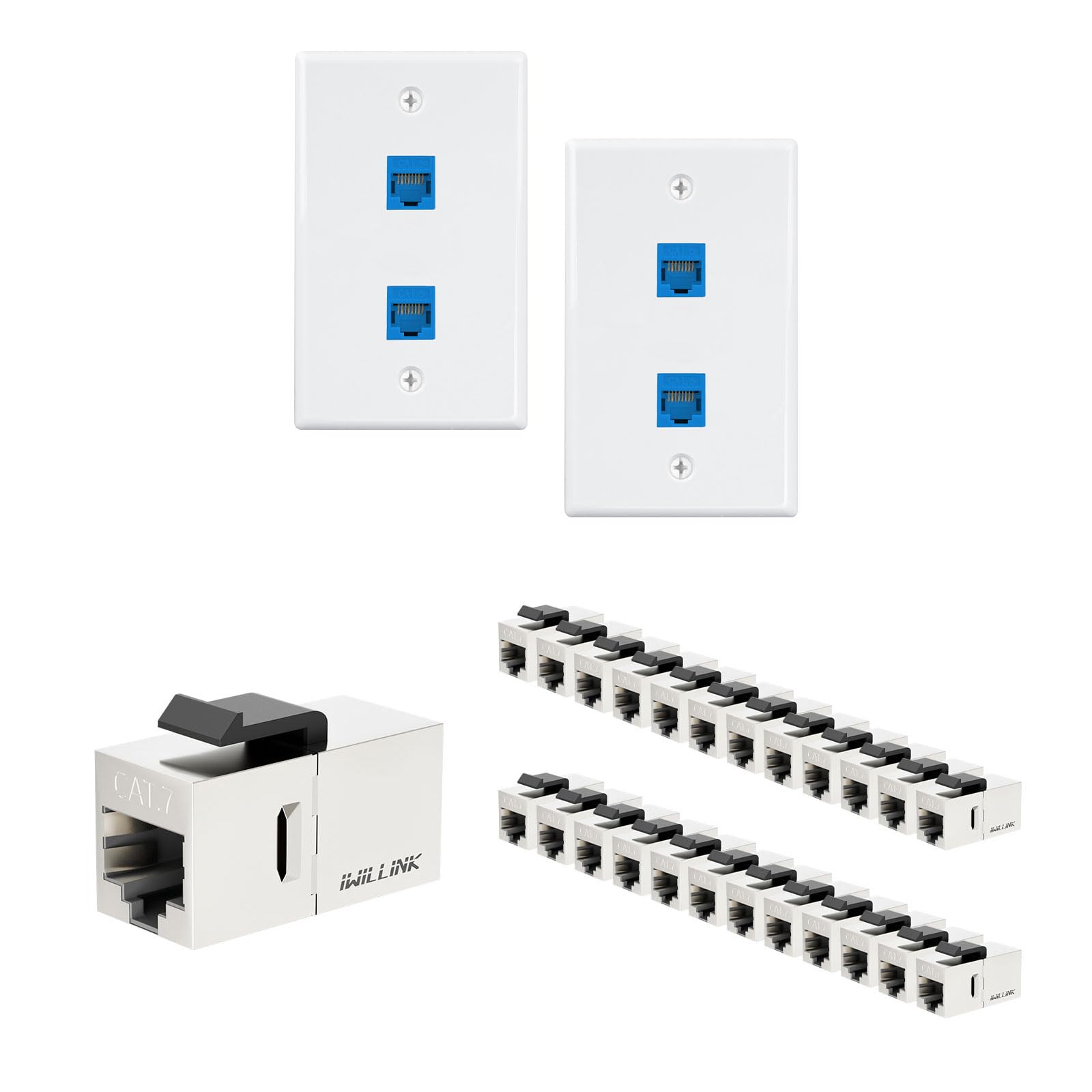
Figure 4.1: An Iwillink 2-Port Ethernet Wall Plate installed and connected to a computer via an Ethernet cable, demonstrating typical usage.
5. Maintenance
The Iwillink Ethernet Wall Plate and Keystone Couplers require minimal maintenance to ensure long-lasting performance.
- Cleaning: The wall plate surface can be cleaned with a soft, dry cloth. For stubborn marks, a slightly damp cloth with mild soap can be used, ensuring no liquid enters the keystone ports.
- Inspection: Periodically check the connections to ensure all cables are securely plugged in and the wall plate is firmly mounted.
- Avoid Physical Damage: Protect the wall plate from impacts or excessive force that could damage the ports or the plate itself.
6. Troubleshooting
If you encounter issues with your network connection, consider the following troubleshooting steps:
- No Network Connection:
- Ensure all Ethernet cables are securely connected to both the wall plate and your network devices/router.
- Verify that the Ethernet cables themselves are not damaged. Try swapping cables if possible.
- Check if the keystone jacks are fully seated in the wall plate.
- Test the network connection directly from your router/switch to your device, bypassing the wall plate, to isolate the issue.
- Slow Network Speed:
- Ensure you are using appropriate category cables (e.g., Cat6 or Cat7 for 10G speeds) throughout your network.
- Check for any kinks or severe bends in the Ethernet cables, which can degrade performance.
- Verify that your network devices (router, switch, network card) support the desired speeds.
- Intermittent Connection:
- Ensure all connections are tight and free from movement.
- Check for potential electromagnetic interference (EMI) from nearby electronics. The shielded design of the CAT7 coupler helps mitigate this, but extreme interference can still be a factor.
7. Specifications
| Feature | Description |
|---|---|
| Product Type | 2-Port Ethernet Wall Plate with RJ45 Keystone Coupler |
| Brand | Iwillink |
| Configuration | Double (for wall plate) |
| Installation Method | Screw-In |
| Keystone Compatibility | Cat5e, Cat6, Cat6a, Cat7 RJ45 Keystone Jacks |
| Coupler Type | Female to Female RJ45 Keystone Coupler (CAT7) |
| Supported Speed | Up to 10 Gigabit Ethernet (10G) |
| Material Properties | Flame Retardant, High Temperature Resistant, Anti-aging |
| Color | White (Wall Plate), Blue (Keystone Jack Inserts) |

Figure 7.1: Illustration demonstrating the capability for high-speed and stable data transmission, supporting up to 10 Gigabit Ethernet (10G) and reducing EMI/RFI interference.

Figure 7.2: Image showing the compact design of the keystone jack with dimensions (1.27 in, 0.56 in, 0.64 in) and its compatibility with patch panels or wall plates featuring standard keystone blanks.
8. Warranty and Support
Iwillink is committed to providing high-quality products and customer satisfaction.
Warranty Information:
This product comes with a Lifetime Guarantee, ensuring long-term reliability and peace of mind. For specific details regarding warranty claims, please refer to the official Iwillink website or contact customer support.
Customer Support:
If you have any questions, require technical assistance, or need to report an issue, please contact Iwillink customer support through the following channels:
- Website: Visit the official Iwillink website for FAQs and support resources.
- Email: Refer to your product packaging or the Iwillink website for customer service email addresses.
- Amazon Seller Page: You can also reach out via the IWILLINK seller page on Amazon for product-related inquiries.