
Introduction
The FitStand Adjustable Overbed Table is designed to enhance comfort and productivity in various settings, including home and hospital environments. This versatile table features a pneumatic height adjustment system, hidden casters for easy mobility, and a spacious desktop suitable for laptops, tablets, and other essentials.
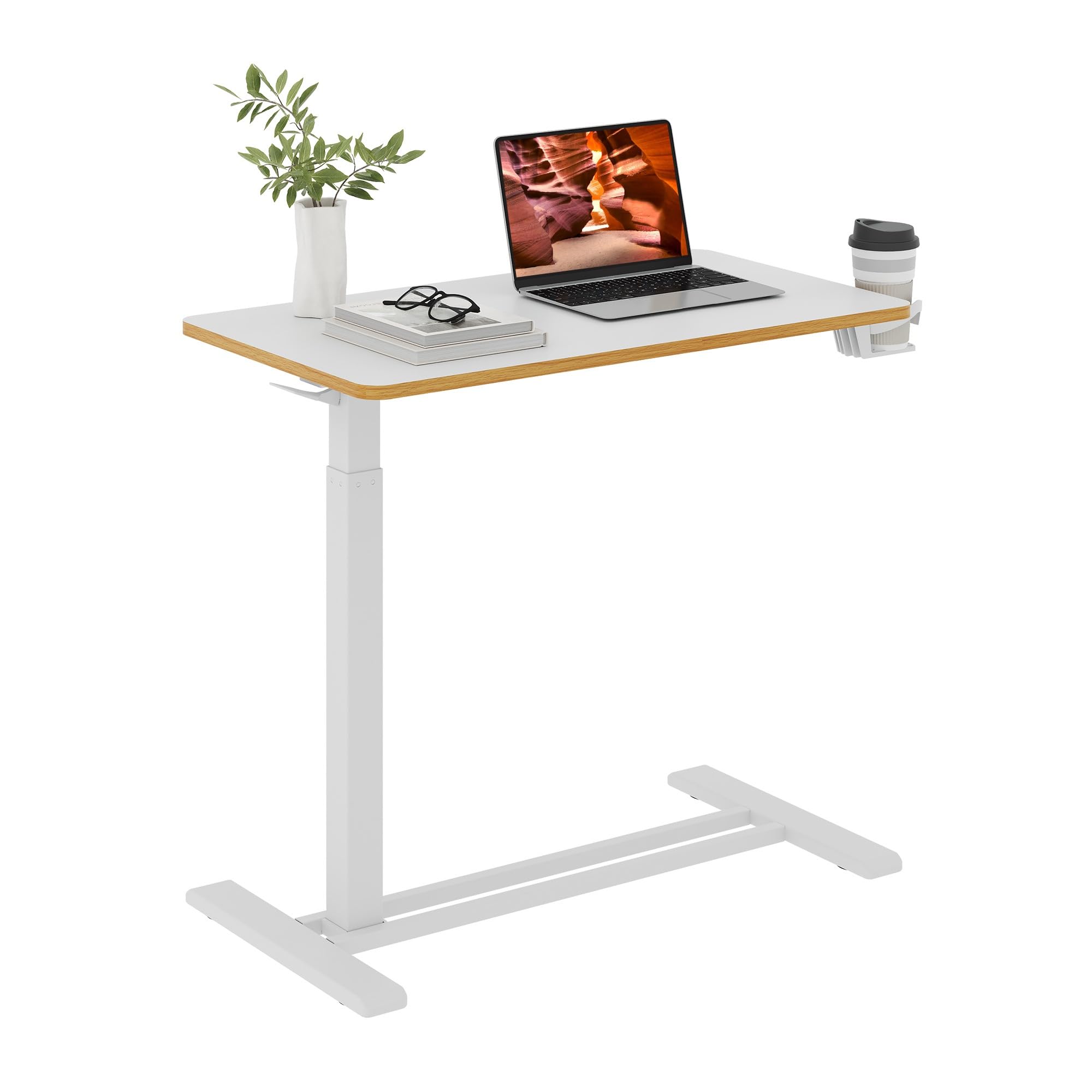
Figure 1: FitStand Adjustable Overbed Table in a living room setting.
Its ergonomic design allows for effortless transitions between sitting and standing positions, adapting to your needs whether you are working, dining, or relaxing. The low-profile base with hidden casters ensures it can slide under most furniture with at least 1.2 inches of clearance, providing convenience without compromising stability.

Figure 2: The overbed table positioned for use while in bed.
Safety Instructions
- Read all safety instructions thoroughly before using the product.
- Keep fingers and other body parts clear of moving components during adjustment to prevent injury.
- Do not exceed the maximum weight limit of 20 lbs (9 kg) on the tabletop.
- Ensure the table is properly secured and stable before placing items on it or applying weight, to prevent tipping.
- Always supervise children and pets when they are near the table.
- Avoid placing hot items directly on the tabletop without protective coasters.
Setup
The FitStand Adjustable Overbed Table is designed for quick and hassle-free assembly, typically taking around 10 minutes. All necessary tools are included in the package.
Assembly Steps:
- Unpack all components and verify against the parts list in your included manual.
- Attach the base supports to the main vertical column using the provided screws and tools.
- Secure the tabletop to the top of the vertical column. Ensure all connections are tight and stable.
- Test the height adjustment mechanism to ensure smooth operation.

Figure 3: Illustrated assembly guide.
Operating Instructions
1. Height Adjustment (26" to 41.7")
The table features a pneumatic gas spring for smooth, single-handed height adjustments. To adjust the height:
- To Raise: Locate the adjustment lever (Figure 4) under the tabletop. Press and hold the lever, then gently lift the tabletop to your desired height. Release the lever to lock it in place.
- To Lower: Press and hold the adjustment lever, then apply gentle downward pressure on the tabletop. The table will smoothly descend. Release the lever to lock it at the desired lower height.
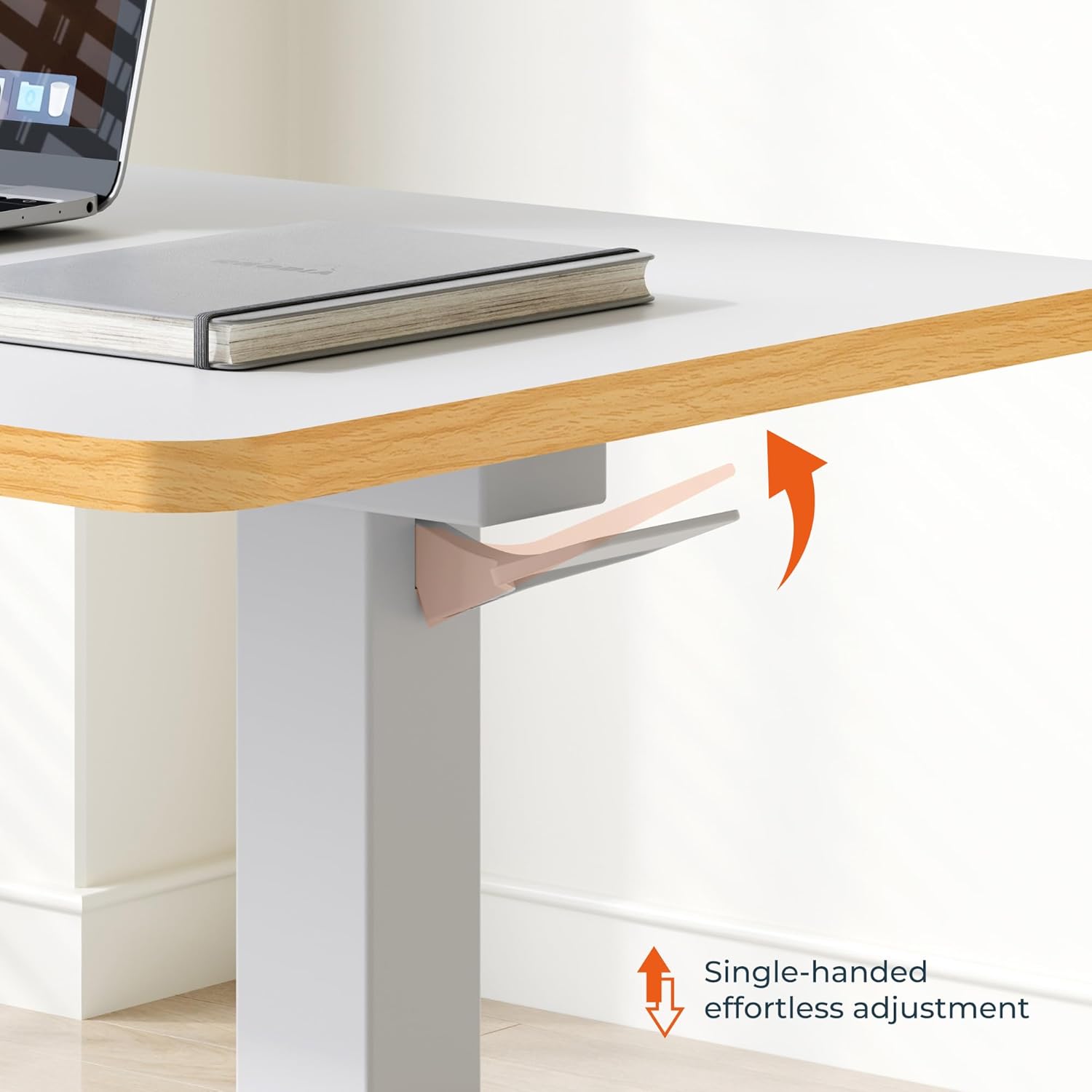
Figure 4: Single-handed height adjustment lever.
Video 1: Demonstration of the adjustable height feature.
2. Desktop Tilting
The tabletop can be tilted to provide an ergonomic angle for reading or using a laptop. To tilt the desktop:
- Locate the tilting mechanism (Figure 5) beneath the tabletop.
- Release the locking mechanism, adjust the tabletop to your desired angle, and then re-engage the lock to secure it.
- Ensure the tabletop is securely locked before placing items on it.

Figure 5: Desktop rotation and tilting mechanism.
Video 2: Demonstration of the desktop tilting feature.
3. Mobility
The table is equipped with hidden casters for easy movement. Simply push or pull the table to reposition it. The low-profile base (1.2" high) allows it to slide under most beds, sofas, or recliners.
Note: Hidden casters may be difficult to roll on low-pile rugs or thick carpets. For optimal mobility, use on hard floors or short-pile rugs.

Figure 6: Hidden casters for effortless movement and space-saving design.
Video 3: Overview of the table's features, including mobility and height adjustment.
Maintenance
- Cleaning: Wipe the tabletop and frame with a dry, soft cloth. Avoid abrasive cleaners or harsh chemicals that may damage the finish.
- Fasteners: Periodically check all screws and bolts to ensure they are tight. Re-tighten if necessary to maintain stability.
- Gas Spring: The pneumatic gas spring is designed for long-term, maintenance-free operation. If you notice any issues with height adjustment, contact customer support.
Troubleshooting
| Problem | Possible Cause | Solution |
|---|---|---|
| Table is difficult to roll. | Operating on carpet or uneven surface. | Move the table to a hard floor or a very low-pile rug. Ensure the path is clear of obstructions. |
| Table wobbles or feels unstable. | Loose assembly screws or uneven surface. | Check and tighten all assembly screws. Ensure the table is placed on a flat, stable surface. |
| Height adjustment is not smooth. | Lever not fully engaged or mechanism obstruction. | Ensure the lever is fully pressed during adjustment. Check for any obstructions around the gas spring mechanism. If issues persist, contact customer support. |
Specifications
| Feature | Detail |
|---|---|
| Brand | FitStand |
| Model Number (ASIN) | B0D8VF7Q5D |
| Product Dimensions (D x W x H) | 31.5"D x 17.72"W x 25.6"H |
| Adjustable Height Range | 26" to 41.7" |
| Frame Material | Aluminum |
| Top Material Type | Engineered Wood |
| Color | White |
| Included Components | Motorized Base (refers to pneumatic gas spring system) |
| Recommended Uses | Reading, Laptop Use, Dining, General Surface |
| Required Assembly | Yes |
| Includes All Assembly Tools | Yes |
| Product Care Instructions | Wipe with Dry Cloth |
Warranty & Support
For warranty information or technical support, please refer to the documentation included with your purchase or contact FitStand customer service directly. Contact details can typically be found on the product packaging or the official FitStand website.