
Introduction
Thank you for choosing the FABATO AE-30KM Loft Bed with Desk. This manual provides essential information for the safe assembly, operation, and maintenance of your new loft bed. Please read all instructions carefully before beginning assembly and retain this manual for future reference.
This single loft bed combines a sturdy sleeping area with a functional workspace, featuring an integrated desk and a movable charging station. Its space-saving design is ideal for smaller rooms, offering both comfort and utility.

Overall view of the FABATO AE-30KM Loft Bed with Desk, featuring the bed frame, integrated desk, and storage shelves. Note: Mattress not included.
Setup and Assembly
The FABATO AE-30KM Loft Bed requires assembly. An installation guide is included with your product. Please ensure all components are present before starting assembly.
Package Contents:
- Metal frame components
- Engineered wood desk and shelf panels
- Movable charging station with cable
- Assembly hardware (screws, bolts, tools)
- Installation Guide
Assembly Steps:
- Unpack all components and verify against the parts list in the installation guide.
- Assemble the main bed frame structure, ensuring all connections are secure.
- Attach the safety guardrails to the upper bunk.
- Install the desk and shelf panels according to the guide.
- Mount the movable charging station to the desired location on the desk or frame.
- Ensure all bolts and screws are tightened. Do not overtighten.

Detailed dimensions of the loft bed, including overall height (185 cm), width (105 cm), and length (200 cm), along with desk and shelf measurements.
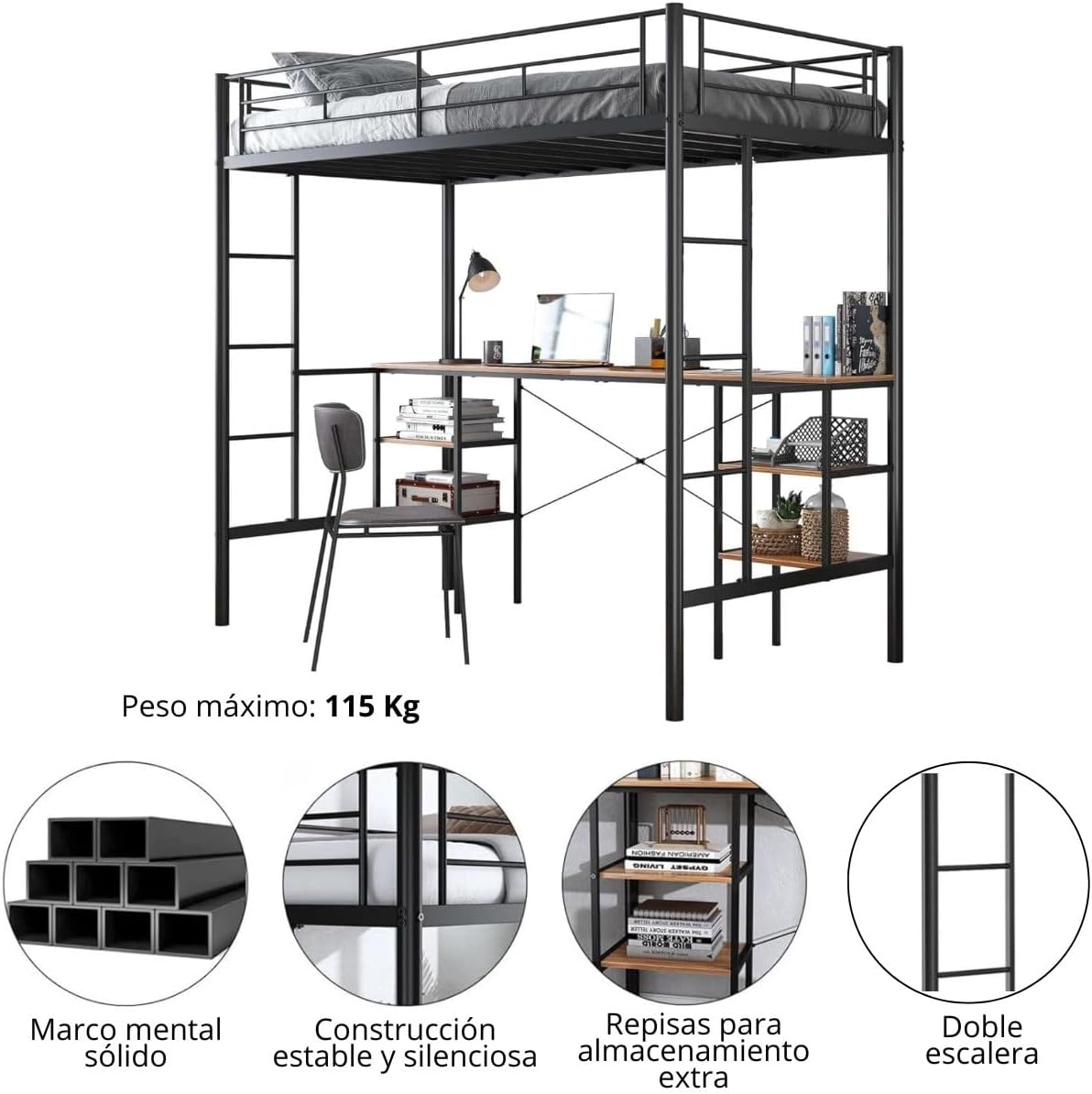
Illustrates key structural features: solid metal frame, stable and quiet construction, additional storage shelves, and a double ladder for access.
Safety Precautions:
- Always assemble with at least two adults.
- Do not use power tools for assembly unless specified, as this may damage components.
- Ensure the bed is placed on a level surface.
- Regularly check and tighten all connections to maintain stability.
- The maximum recommended weight for the upper bunk is 130 kg.
Operating Instructions
Using the Loft Bed:
- Access the upper bunk using the integrated ladder. Always use caution when climbing or descending.
- Ensure the mattress used on the upper bunk meets safety standards and does not exceed the height of the guardrails.
Using the Integrated Desk and Shelves:
- The spacious desk provides an area for work, study, or gaming.
- Utilize the four integrated shelves for organizing books, decor, or other items.
Using the Movable Charging Station:
The loft bed includes a movable charging station designed to adapt to your needs and routine. It can be positioned on the desk surface, attached to the frame rail, or other suitable locations.

The charging station can be easily moved and adjusted to different positions on the desk or frame rail to suit user needs.

Detailed view of the charging station, highlighting its connectivity options: two 120V/12A AC outlets, one 5V/2A USB port, and two 5V/2A Type-C ports, connected by a 2.98m cable.
- The charging station features:
- 2 x AC Outlets (120V / 12A)
- 1 x USB Port (5V / 2A)
- 2 x Type-C Ports (5V / 2A)
- It comes with a 2.98-meter power cable for flexible placement.
- To move the charging station, gently detach it from its current position and re-secure it in the desired new location. Ensure it is firmly attached before use.
Maintenance
Cleaning:
- For the metal frame, wipe with a soft, damp cloth. Avoid abrasive cleaners that may damage the finish.
- For the engineered wood surfaces (desk and shelves), use a soft, dry, or slightly damp cloth. Wipe spills immediately.
Regular Checks:
- Periodically inspect all bolts, screws, and connections to ensure they remain tight. Tighten if necessary.
- Check the ladder for any signs of wear or damage.
- Ensure the guardrails are securely attached and free from damage.
Troubleshooting
Bed Stability Issues:
- Issue: The bed feels wobbly or unstable.
Solution: Ensure all assembly hardware (bolts, screws) are fully tightened. Check that the bed is on a flat, level surface. If necessary, consider adding additional bracing or wall anchors for enhanced stability, especially if the bed is frequently moved or subjected to significant motion.
Charging Station Not Working:
- Issue: Devices are not charging when plugged into the station.
Solution: Verify that the charging station's power cable is securely plugged into a functional wall outlet. Check for any visible damage to the cable or the station itself. Test with different devices and outlets if possible.
Difficulty with Ladder Access:
- Issue: The ladder feels uncomfortable or difficult to use.
Solution: Ensure the ladder is correctly installed and all steps are secure. While the design is fixed, users may find adding non-slip strips to the steps or wearing appropriate footwear can improve comfort and safety.
Specifications
| Brand | FABATO |
| Model Number | AE-30KM |
| Color | Black |
| Product Dimensions (L x W x H) | 200 cm x 105 cm x 185 cm |
| Product Weight | 48 kg |
| Material | Alloy Steel, Engineered Wood |
| Special Features | Space-saving, Movable Charging Station, USB Port |
| Maximum Weight Recommendation | 130 Kilograms |
| Charging Station Output | 2 x AC (120V/12A), 1 x USB (5V/2A), 2 x Type-C (5V/2A) |
| Charging Cable Length | 2.98 meters |
| Mattress Compatibility | Single size (Mattress not included) |
Warranty Information
Specific warranty details for the FABATO AE-30KM Loft Bed are not provided within this manual. Please refer to the product packaging, your purchase receipt, or contact the retailer or manufacturer directly for warranty terms and conditions.
Customer Support
For any questions, missing parts, or assistance with assembly or operation, please contact FABATO customer support through the retailer where the product was purchased. Please have your model number (AE-30KM) and purchase information ready when contacting support.