
1. Introduction
This manual provides essential information for the safe and efficient use of your CUSHYBITE FVB02 USB Lithium 2.0 Ah Rechargeable Battery. Please read these instructions carefully before using the product and retain them for future reference.
2. Safety Information
WARNING: Read all safety warnings and instructions. Failure to follow the warnings and instructions may result in electric shock, fire, and/or serious injury.
- Do not immerse the battery in water or other liquids.
- Do not store or use the battery in temperatures exceeding 120°F (49°C) or below 0°F (-18°C).
- Do not incinerate the battery, even if it is severely damaged or completely dead. The battery can explode in a fire.
- Do not short-circuit the battery terminals.
- Do not attempt to open, disassemble, or service the battery pack.
- Keep the battery away from children.
- Dispose of used batteries responsibly according to local regulations.
3. Product Overview
The CUSHYBITE FVB02 is a USB Lithium 2.0 Ah rechargeable battery designed to power compatible USB Lithium tools and charge mobile devices. It features an on-board LED fuel gauge for battery level indication.
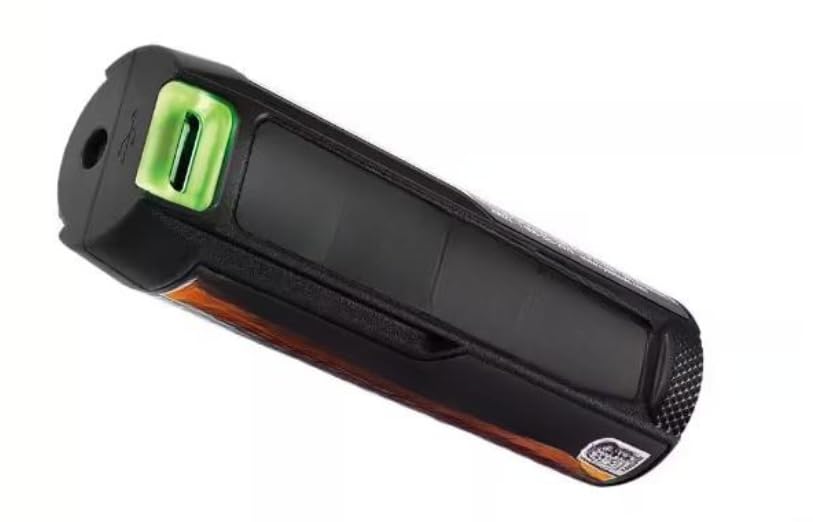
Figure 1: CUSHYBITE FVB02 USB Lithium 2.0 Ah Rechargeable Battery. This image shows the compact, black and green battery unit with its charging port and LED indicator.
Key Features:
- Mobile Device Charging: Charges phones and smartwatches via USB.
- LED Fuel Gauge: Provides a clear indication of the current battery level.
- USB Lithium System Compatibility: Powers all USB Lithium tools.
- Easy Charging: Rechargeable with any USB-C cable or the USB Lithium 3-Port Charger.
- Compact and Portable: Designed for efficient and cordless power needs.
4. Setup
Initial Charging:
- Connect a standard USB-C charging cable (not included) to the battery's USB-C port.
- Connect the other end of the USB-C cable to a compatible USB power source (e.g., wall adapter, computer USB port).
- Alternatively, use a USB Lithium 3-Port Charger (sold separately) for charging.
- The LED fuel gauge will indicate charging status. Allow the battery to fully charge before first use.
Installation into Tools:
Insert the FVB02 battery into the designated battery compartment of any compatible USB Lithium tool. Ensure it clicks securely into place.
5. Operating Instructions
Powering USB Lithium Tools:
Once installed, the battery will provide power to the USB Lithium tool. Refer to your specific tool's manual for operation instructions.
Charging Mobile Devices:
- Connect your mobile device's charging cable to the USB output port on the FVB02 battery.
- The battery will begin charging your device.
- Monitor the LED fuel gauge on the battery to track its remaining charge.
LED Fuel Gauge:
The on-board LED fuel gauge provides a visual indication of the battery's charge level. Consult the tool's manual or battery markings for specific interpretations of the LED patterns (e.g., solid green for full, flashing for low, etc.).
6. Maintenance
Cleaning:
Keep the battery terminals clean and free of debris. Use a clean, dry cloth to wipe the battery. Do not use solvents or harsh chemicals.
Storage:
- Store the battery in a cool, dry place, away from direct sunlight and extreme temperatures.
- For long-term storage, it is recommended to store the battery with a partial charge (around 50%).
- Avoid storing the battery in a completely discharged state for extended periods, as this can reduce its lifespan.
7. Troubleshooting
Battery Not Charging:
- Ensure the USB-C cable is securely connected to both the battery and the power source.
- Verify that the power source is active and providing power.
- Check the USB-C cable for damage. Try a different cable if necessary.
- Ensure the battery is not too hot or too cold, as extreme temperatures can prevent charging.
Battery Not Powering Tool/Device:
- Check the LED fuel gauge to ensure the battery has sufficient charge.
- Ensure the battery is correctly inserted into the tool or that the charging cable is properly connected to the device.
- Verify that the tool or device is compatible with the FVB02 battery.
8. Specifications
| Attribute | Value |
|---|---|
| Model Number | FVB02 |
| Brand | CUSHYBITE |
| Battery Type | Lithium-ion |
| Battery Capacity | 2.0 Ah |
| Voltage | 18 volts |
| Power Source | Battery-powered |
| Material | Plastic |
| Item Weight | 1 pound |
| Product Dimensions | 4 x 3 x 2.1 inches |
9. Warranty and Support
The CUSHYBITE FVB02 USB Lithium 2.0 Ah Rechargeable Battery is backed by a 2-year warranty from the date of purchase. This warranty covers defects in materials and workmanship under normal use.
For warranty claims, technical support, or further inquiries, please contact CUSHYBITE customer service. Refer to the product packaging or the official CUSHYBITE website for contact information.
Manufacturer: CUSHYBITE