
Xtorm XNP100
Xtorm Nova Mini Power Bank 10000 mAh (Model XNP100) User Manual
Your guide to safe and efficient use.
1. Introduction
Thank you for choosing the Xtorm Nova Mini Power Bank 10000 mAh (Model XNP100). This compact and powerful portable charger is designed to provide reliable power for your mobile devices on the go. Featuring a 10000 mAh battery capacity, 30W USB-C Power Delivery, and an advanced intelligent display, it ensures your devices stay charged efficiently.
Please read this manual carefully before using the product to ensure proper operation and to maximize its lifespan.

Image 1.1: The Xtorm Nova Mini Power Bank XNP100, showcasing its compact design and integrated display.
2. Safety Instructions
To prevent damage, electric shock, injury, or fire, always observe the following basic safety precautions:
- Do not expose the power bank to water, moisture, or extreme temperatures (below 0°C or above 45°C).
- Do not attempt to open, disassemble, or repair the device yourself. Refer all servicing to qualified personnel.
- Keep the power bank away from heat sources, direct sunlight, and flammable materials.
- Do not drop, puncture, or apply excessive force to the power bank.
- Use only certified cables and chargers for optimal performance and safety.
- Keep out of reach of children.
- Dispose of the power bank responsibly according to local regulations.
3. Package Contents
Verify that all items are present in your package:
- Xtorm Nova Mini Power Bank 10000 mAh (Model XNP100)
- USB-C to USB-C Charging Cable
- User Manual (this document)
4. Product Overview
The Xtorm Nova Mini Power Bank features a robust aluminum casing and a clear intelligent display. Familiarize yourself with its components:
- USB-C Ports (2x): Both USB-C ports support Power Delivery (PD) up to 30W for both input and output, allowing for fast charging of the power bank itself and connected devices.
- USB-A Port (1x): This port supports Quick Charge (QC) 3.0 up to 18W for output, compatible with a wide range of devices.
- Intelligent Display: Shows real-time battery level, charging/recharging wattage for each port, and estimated remaining charge/recharge time.
- Power Button: Activates the display and initiates charging.

Image 4.1: Overview of the Xtorm Nova Mini Power Bank showing its two USB-C ports, one USB-A port, and the intelligent display.
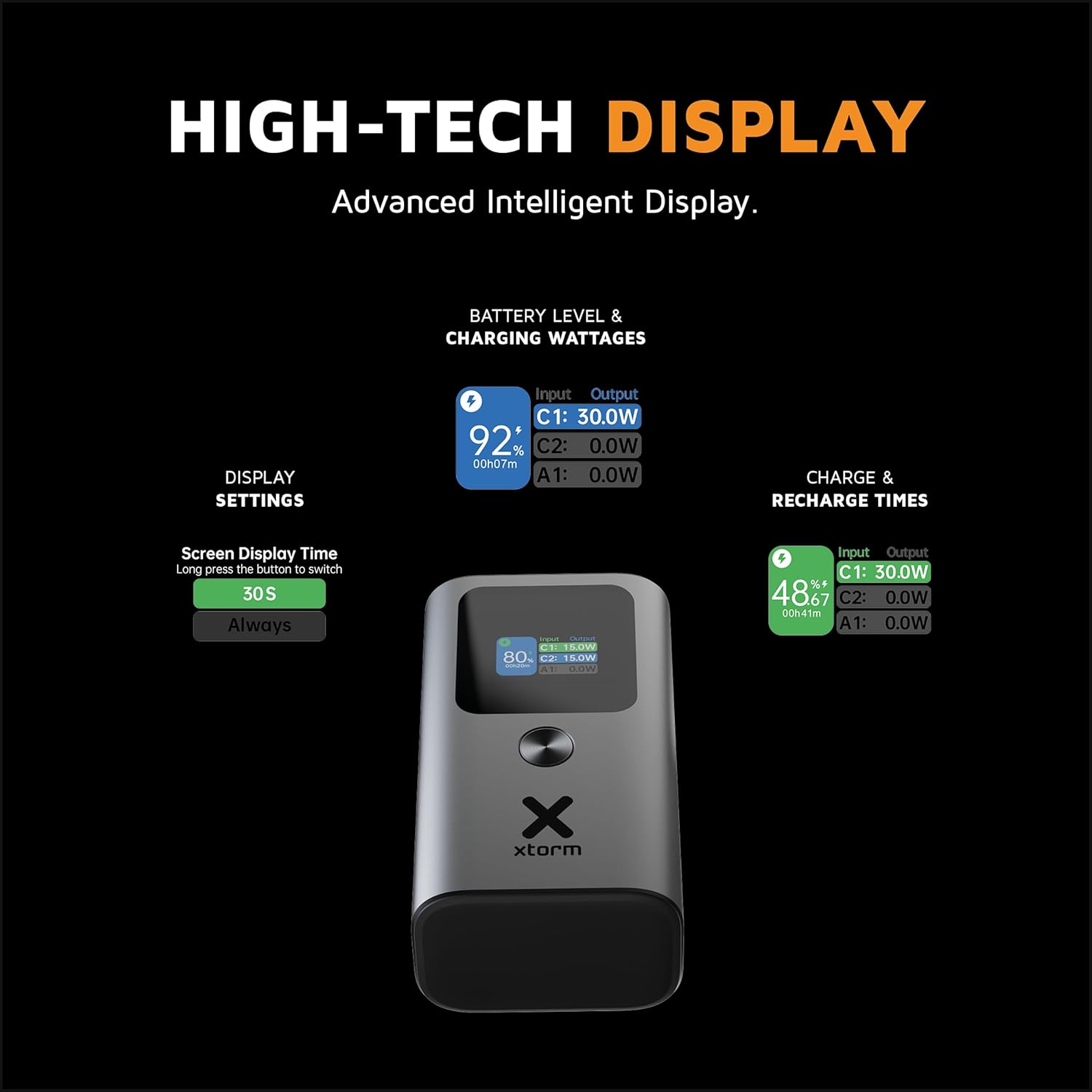
Image 4.2: A detailed view of the intelligent display, illustrating battery level, input/output wattages for C1, C2, and A1 ports, and estimated time remaining.
5. Initial Setup and Charging the Power Bank
5.1. First Use
Before using your Xtorm Nova Mini Power Bank for the first time, it is recommended to fully charge it.
5.2. Charging the Power Bank
- Connect the provided USB-C to USB-C cable to one of the USB-C input/output ports on the power bank.
- Connect the other end of the cable to a compatible USB-C wall charger (not included) with Power Delivery (PD) capabilities for fastest charging.
- The intelligent display will show the input wattage and the estimated time until the power bank is fully charged.
- Once fully charged, disconnect the cable.
6. Operating the Power Bank
6.1. Charging Your Devices
The Xtorm Nova Mini Power Bank can charge up to three devices simultaneously using its two USB-C ports and one USB-A port.
- Connect your device's charging cable to the appropriate port (USB-C or USB-A) on the power bank.
- Connect the other end of the cable to your device.
- Press the power button once to activate the display and initiate charging. The display will show the output wattage for each connected device.
- When your device is fully charged, disconnect it from the power bank.

Image 6.1: The Xtorm Nova Mini Power Bank connected to a smartphone, demonstrating its ability to fully charge a smartphone multiple times with its 10000 mAh capacity.

Image 6.2: The power bank simultaneously charging a smartphone, wireless earbuds, and a tablet, highlighting its multi-device charging capability.
6.2. Understanding the Intelligent Display
The display provides crucial information at a glance:
- Battery Percentage: Shows the current charge level of the power bank.
- Input/Output Wattage: Displays the power (in Watts) being drawn by the power bank (Input) or delivered to connected devices (Output) for each port (C1, C2, A1).
- Estimated Time: Indicates the approximate time remaining for the power bank to be fully charged or for its current charge to be depleted based on current usage.
To adjust the display settings, such as screen display time, long press the power button.
7. Maintenance
7.1. Cleaning
Wipe the power bank with a soft, dry cloth. Do not use abrasive cleaners or solvents.
7.2. Storage
Store the power bank in a cool, dry place away from direct sunlight and extreme temperatures. For long-term storage, it is recommended to charge the power bank to approximately 50-70% every three months to maintain battery health.
8. Troubleshooting
If you encounter issues with your Xtorm Nova Mini Power Bank, refer to the following common solutions:
| Problem | Possible Cause / Solution |
|---|---|
| Power bank not charging | Ensure the charging cable is securely connected to both the power bank and the wall charger. Verify the wall charger is functioning and provides sufficient power (e.g., 30W PD). Try a different cable or charger. |
| Device not charging from power bank | Press the power button to activate output. Check if the cable connecting the device to the power bank is functional and securely connected. Ensure the power bank has sufficient charge. Try a different port or cable. |
| Slow charging | Ensure you are using a fast-charging compatible cable and your device supports fast charging. If multiple devices are connected, the total output power is shared, which may reduce individual charging speeds. High temperatures can also cause the power bank to reduce output to protect its components. |
| Display not working | Press the power button. If the display remains off, the power bank might be completely depleted. Charge the power bank. |
| Power bank feels warm during use | It is normal for the power bank to generate some heat during charging or discharging, especially during fast charging. If it becomes excessively hot, disconnect all devices and allow it to cool down. Excessive heat can trigger internal safety mechanisms, reducing output power to prevent damage. |
9. Specifications
| Feature | Detail |
|---|---|
| Model Name | XNP100 |
| Brand | Xtorm |
| Battery Capacity | 10000 mAh |
| Battery Composition | Lithium-ion |
| USB-C PD Input/Output | 2x USB-C PD (up to 30W) |
| USB-A QC Output | 1x USB-A QC 3.0 (up to 18W) |
| Total Output | 30W Max |
| Compatible Devices | Smartphone, Smartwatch, Tablet |
| Dimensions (L x W x D) | 8.8 cm x 5 cm x 3.4 cm |
| Weight | Approximately 238 grams (as per product information) |
| Color | Seize if grey |
10. Warranty and Support
10.1. Warranty Information
Xtorm products are manufactured to high quality standards. For detailed warranty terms and conditions, please refer to the official Xtorm website or the warranty card included with your purchase.
10.2. Customer Support
If you have any questions, require technical assistance, or need to report an issue, please visit the official Xtorm support website or contact their customer service directly. Contact information can typically be found on the Xtorm website or product packaging.
Related documentsXNP100


Ask a question about this manual
Ask about setup, troubleshooting, compatibility, parts, safety, or missing instructions. Manuals+ will review the question and use this page’s manual context to help answer it.