1. Introduction
This user manual provides essential information for the safe and efficient installation, operation, and maintenance of your Dawnice 10kW Solar Panel Kit Complete System. This comprehensive off-grid solution is designed to provide reliable power for various applications, including homes, sheds, cabins, and RVs. It includes 18 pieces of 550W bifacial solar panels, a 10kW hybrid inverter, and 16kWh lithium batteries, along with all necessary cables and connectors.
2. Safety Information
Important Safety Instructions:
- Installation should only be performed by qualified personnel familiar with electrical systems and local building codes.
- Always disconnect all power sources before performing any maintenance or installation work.
- Wear appropriate personal protective equipment (PPE), including insulated gloves and eye protection.
- Do not attempt to open or repair the inverter or batteries. Refer to qualified service personnel.
- Ensure proper grounding of all components to prevent electrical shock.
- Keep children and unauthorized persons away from the solar power system.
- Avoid direct contact with live electrical parts.
3. What's Included (Packing List)
Your Dawnice 10kW Solar Panel Kit includes the following components:
- 18 x 550W Bifacial Solar Panels
- 1 x 10kW Hybrid Split-phase Inverter
- 1 x 16kWh Lithium Battery Pack (51.2V 314Ah)
- 100m Red Solar Panel Wire
- 100m Black Solar Panel Connecting Wire
- 18 pairs of Solar Connectors (MC4 type)

Figure 3.1: Overview of included components in the Dawnice 10kW Solar Panel Kit.
4. Product Overview
The Dawnice 10kW Solar Panel Kit is a robust system designed for efficient off-grid power generation and storage.
4.1. Bifacial Solar Panels
The system includes 18 pieces of 550W bifacial solar panels. These panels utilize advanced module technology, allowing them to absorb sunlight from both the front and rear sides. The back gain efficiency can reach up to 25%, meaning the maximum power output of each 550W panel can reach up to 688W under optimal conditions.

Figure 4.1: Bifacial Solar Panel operation principle.
4.2. 10kW Hybrid Inverter
The 10kW hybrid inverter is UL certified and supports both off-grid operation and selling electricity back to the grid. It provides a pure sine wave output with selectable voltages of 120V or 240V and a maximum output power of 10000W. The inverter can also be connected to a diesel generator for additional power input.

Figure 4.2: 10kW Hybrid Inverter.
4.3. 16kWh Lithium Batteries
The system includes a 16.07kWh lithium battery pack (51.2V 314Ah) for energy storage. These new-type lithium batteries offer higher charge/discharge efficiency and boast over 6000 cycles, providing a lifespan of over 10 years, significantly longer than lead-acid batteries. A built-in Battery Management System (BMS) protects the battery from overcharge, overdischarge, overheating, and short circuits.

Figure 4.3: 16kWh LiFePO4 Battery.
4.4. Cables and Connectors
The kit provides 100 meters of red and 100 meters of black solar panel connecting wire, along with 18 pairs of MC4 solar connectors, ensuring you have the necessary accessories for system integration.
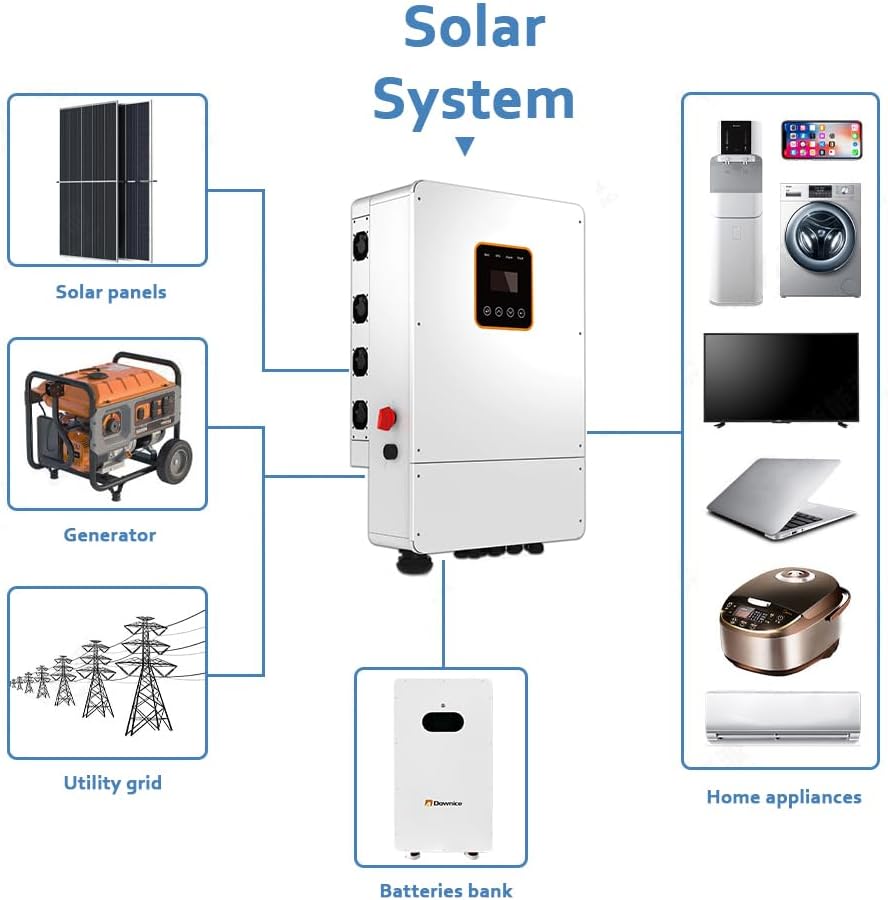
Figure 4.4: Solar Cables and Connectors.
5. Setup and Installation
Proper installation is crucial for the safety and performance of your solar system. It is highly recommended that installation be performed by a certified electrician or solar professional.
5.1. System Connection Diagram
The following diagram illustrates the general connection layout for the off-grid solar system. Ensure all connections are secure and follow local electrical codes.

Figure 5.1: Off-Grid System Connection Diagram.
Key Installation Steps (Summary):
- Mount Solar Panels: Securely mount the solar panels in a location with optimal sun exposure, following manufacturer guidelines for racking and tilt angles.
- Connect Solar Panels: Wire the solar panels in series and/or parallel configurations as required by the inverter's input specifications. Connect them to the inverter's PV input terminals.
- Install Inverter: Mount the hybrid inverter in a cool, dry, and well-ventilated area, away from direct sunlight and flammable materials.
- Connect Batteries: Connect the lithium battery pack to the inverter's battery terminals, ensuring correct polarity.
- Connect to Load/Grid: Connect the inverter's AC output to your home's electrical panel or specific loads. If grid-tied, ensure proper grid connection and compliance with utility requirements.
- Grounding: Ensure all components are properly grounded according to local electrical codes.
- Initial Power-Up: Follow the inverter's specific power-up sequence, typically involving turning on battery breakers first, then PV input, and finally AC output.
6. Operating Instructions
Once installed, your Dawnice solar system will automatically generate power from the solar panels, convert it via the inverter, and either supply it to your loads or store it in the batteries. The 10kW system is capable of generating approximately 38.4kWh per day under 4 hours of full sunlight conditions, providing ample power for various AC 110V/240V devices.
6.1. Inverter Display and Monitoring
The hybrid inverter features a display panel that provides real-time information on system status, power generation, battery charge level, and error codes. Refer to the inverter's dedicated manual for detailed instructions on navigating the display and configuring settings. The battery pack also supports Bluetooth/WiFi/APP monitoring for convenient remote access to battery status.
6.2. System Operation Modes
Your hybrid inverter supports various operation modes, including:
- Self-Consumption Mode: Prioritizes using solar power for loads, then battery power, and finally grid power (if connected).
- Battery Priority Mode: Prioritizes using battery power, then solar, and finally grid.
- Grid-Tie with Backup: Utilizes solar and battery power, but can also feed excess power to the grid and draw from the grid when solar/battery power is insufficient.
Consult the inverter's manual for detailed instructions on selecting and configuring these modes.
7. Maintenance
Regular maintenance ensures the longevity and optimal performance of your solar power system.
- Solar Panels: Periodically clean the surface of the solar panels to remove dust, dirt, and debris that can reduce efficiency. Use a soft brush and water. Inspect for any physical damage or loose connections.
- Inverter: Ensure the inverter's ventilation openings are clear and free from obstructions. Keep the area around the inverter clean and dry. Check for any unusual noises or smells.
- Batteries: While the lithium batteries are low-maintenance, regularly monitor their state of charge via the inverter display or app. Ensure the battery environment is within recommended temperature ranges. The batteries have a lifespan of over 10 years with more than 6000 cycles.
- Cables and Connections: Annually inspect all wiring and connections for signs of wear, corrosion, or loosening. Tighten any loose connections.
8. Troubleshooting
This section provides general guidance for common issues. For complex problems, contact Dawnice support or a qualified technician.
| Problem | Possible Cause | Solution |
|---|---|---|
| No power output from inverter | Inverter off; DC/AC breakers open; Low battery voltage; PV input issue. | Check inverter power switch; Close all breakers; Check battery charge; Inspect PV connections and sunlight. |
| Low power generation | Dirty solar panels; Partial shading; Insufficient sunlight; Panel degradation. | Clean panels; Remove shading; Verify weather conditions; Consult technician for panel health. |
| Battery not charging | Loose battery connections; Inverter settings; BMS fault; Insufficient PV input. | Check battery wiring; Verify inverter charge settings; Check inverter error codes; Ensure adequate solar input. |
| Inverter displaying error code | Internal fault; Overload; Over-temperature; Grid issue. | Refer to the inverter manual for specific error code meanings and troubleshooting steps. Reduce load if overloaded. Ensure proper ventilation. |
9. Specifications
| Feature | Specification |
|---|---|
| Brand | Dawnice |
| Model Number | DW-N550181016 |
| Product Dimensions | 50"L x 50"W x 50"H (Overall System) |
| Solar Panel Type | Monocrystalline Silicon, Bifacial |
| Solar Panel Quantity | 18 pieces |
| Solar Panel Max Power (Each) | 550W (up to 688W with back gain) |
| Inverter Type | 10kW Hybrid Split-phase Inverter |
| Inverter Output Voltage | 120V / 240V (selectable) |
| Battery Capacity | 16kWh (51.2V 314Ah) |
| Battery Type | LiFePO4 Lithium Battery with BMS |
| Battery Cycle Life | Over 6000 cycles |
| Connector Type | MC4 |
| Country of Origin | China |
10. Warranty and Support
Dawnice is committed to providing high-quality clean energy solutions. Our products undergo strict quality inspections to ensure reliability and safety. The lithium batteries are designed for a long lifespan, exceeding 10 years with over 6000 cycles, backed by a robust BMS system.
For technical support, warranty claims, or any inquiries regarding your 10kW Solar Panel Kit, please contact Dawnice customer service. Refer to your purchase documentation for specific warranty terms and contact details.


