
AsperX AX2065
AsperX 65W Power Bank User Manual
Model: AX2065
1. Introduction
Thank you for choosing the AsperX 65W Power Bank. This portable charger is designed to provide efficient and fast charging for a wide range of electronic devices, including laptops, smartphones, tablets, and more. With its high capacity and multiple output ports, it is an ideal companion for travel, business trips, and outdoor activities. Please read this manual carefully before use to ensure optimal performance and safety.

Image: The AsperX 65W Power Bank, showcasing its sleek silver design and digital display indicating battery percentage and power output/input.
2. Package Contents
Please check the package contents upon opening. If any items are missing or damaged, please contact customer support.
- 1 x AsperX 65W Power Bank (Model: AX2065)
- 1 x 0.6m/2ft USB-C to USB-C Cable
- 1 x User Manual
3. Product Overview
Familiarize yourself with the various components and ports of your AsperX Power Bank.

Image: Close-up view of the AsperX Power Bank's smart LED display, showing battery percentage, input wattage, and output wattage.
3.1. Ports and Indicators
- Type-C1 Port (IN/OUT): Supports up to 65W Power Delivery (PD) for both input and output. Use this port for fast charging compatible laptops and devices, and for recharging the power bank itself.
- Type-C2 Port (OUT): Supports up to 65W Power Delivery (PD) output. Ideal for charging laptops, tablets, and other USB-C compatible devices.
- USB-A Port (OUT): Supports up to 20W Quick Charge (QC) output. Suitable for charging smartphones and other USB-A compatible devices.
- Smart LED Display: Shows real-time battery percentage, input power (IN W), and output power (OUT W).
- Power Button: Press once to activate the display and begin charging.

Image: A composite image highlighting the power bank's 20000mAh capacity, airline approval, three output ports (Type-C1, Type-C2, USB-A), and wide compatibility.
4. Setup
4.1. Initial Charge
Before first use, it is recommended to fully charge your AsperX Power Bank. This ensures optimal battery performance and longevity.
- Connect the provided USB-C to USB-C cable to the Type-C1 (IN/OUT) port of the power bank.
- Connect the other end of the cable to a compatible 65W Power Delivery (PD) wall adapter (not included).
- The LED display will show "IN" and the charging wattage, indicating that the power bank is charging. It will display 100% when fully charged.
A full recharge typically takes approximately 2 hours when using a 65W adapter.

Image: The AsperX Power Bank being recharged via a 65W adapter, and separately, charging a Steam Deck console, demonstrating its versatility.
5. Operating Instructions
5.1. Charging Your Devices
To charge your electronic devices using the AsperX Power Bank:
- Connect your device's charging cable to the appropriate output port on the power bank (Type-C1, Type-C2, or USB-A).
- Connect the other end of the cable to your device.
- The power bank will automatically detect the device and begin charging. The LED display will show "OUT" and the current charging wattage.
- To stop charging, simply disconnect the cable from your device or the power bank.

Image: The AsperX Power Bank connected to a laptop via a USB-C cable, illustrating its 65W fast charging capability for laptops.
5.2. Charging Multiple Devices Simultaneously
The AsperX Power Bank is equipped with two USB-C ports and one USB-A port, allowing you to charge up to three devices concurrently.
- Connect each device to an available output port.
- Important Note: When charging multiple devices, the total output power is shared. Using multiple ports simultaneously may affect the individual charging speed of each connected device.
- For optimal fast charging of laptops, it is recommended to use only one of the USB-C ports (Type-C1 or Type-C2) to charge the laptop alone.
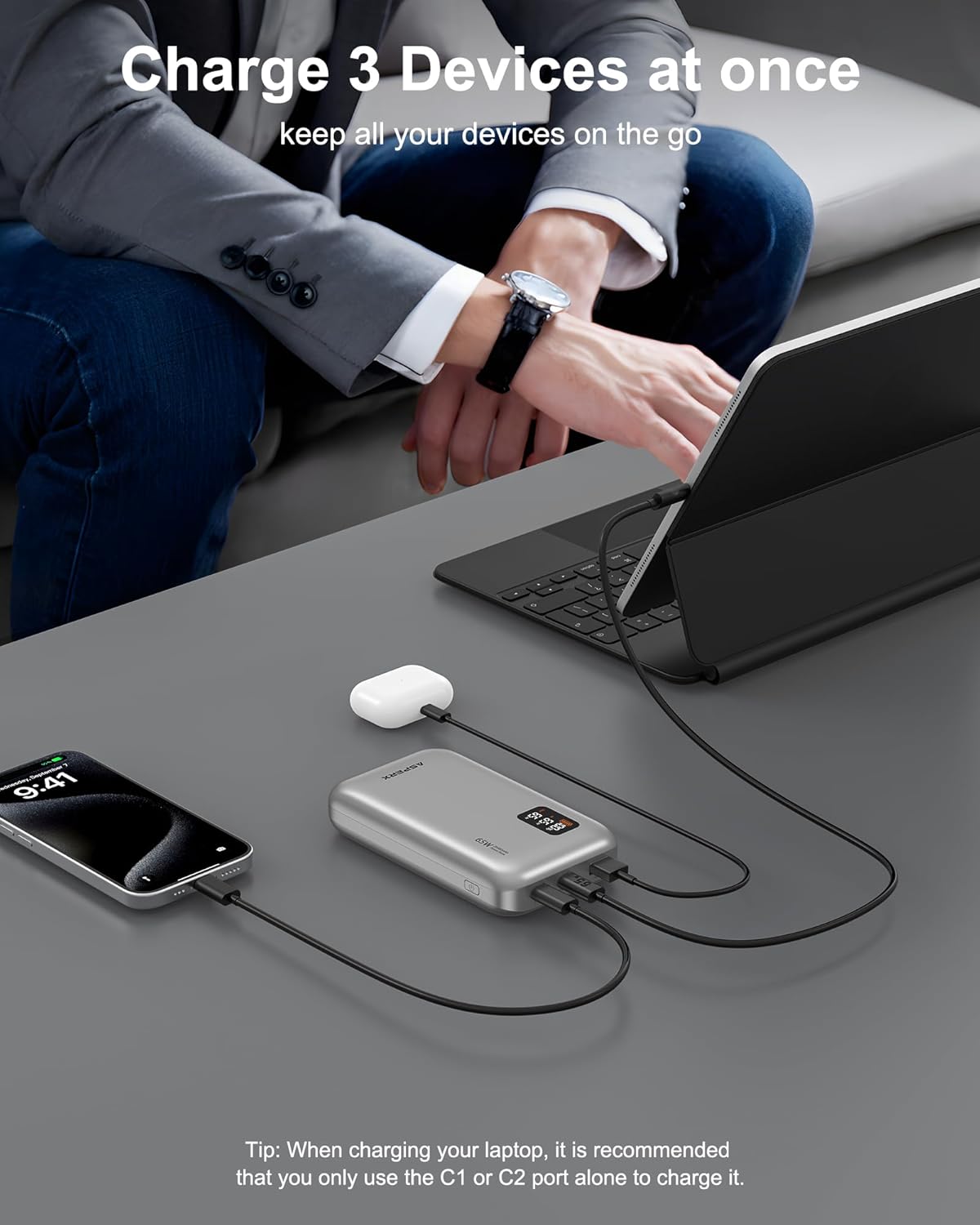
Image: The power bank connected to and simultaneously charging a laptop, a smartphone, and wireless earbuds, demonstrating its multi-device charging capability.
6. Smart LED Display
The intelligent LED display provides crucial information about the power bank's status:
- Battery Level: Displays the remaining battery percentage (0-100%).
- Input Power (IN W): Shows the real-time wattage being drawn by the power bank when it is being recharged.
- Output Power (OUT W): Shows the real-time wattage being delivered to connected devices.
This detailed display allows for intuitive monitoring of your charging and recharging processes.
7. Wide Compatibility
The AsperX 65W Power Bank is designed to be compatible with a broad range of USB-C and USB-A powered devices, supporting various fast charging protocols including PD3.0, QC3.0, SCP, and AFC.
7.1. Compatible Devices Include:
- Laptops: MacBook Pro, Dell XPS, Steam Deck, Lenovo ThinkPad, Surface Pro, and other USB-C charging laptops.
- Smartphones: iPhone 16/15/14/13/12/11 Series, Galaxy S24/S23/S10 Series, Google Pixel, and other Android phones.
- Tablets: iPad Pro, iPad Air, iPad Mini, Galaxy Tab.
- Gaming Consoles: Nintendo Switch, Steam Deck.
- Other Devices: Wireless earbuds, smartwatches, and more.

Image: The power bank positioned among various devices (iPad Pro, iPhone 15, MacBook Pro 13, Galaxy S23), illustrating its capacity to provide multiple charges for each.
8. Safety Information and Precautions
To ensure safe operation and prolong the lifespan of your power bank, please adhere to the following guidelines:
- Do not expose the power bank to extreme temperatures (above 45°C/113°F or below 0°C/32°F), direct sunlight, or high humidity.
- Avoid dropping, hitting, or disassembling the power bank.
- Do not charge and discharge the power bank simultaneously, as this can increase heat generation and potentially affect battery life and charging efficiency.
- Avoid using the power bank in high-temperature environments, which can reduce heat dissipation and lead to overheating.
- Do not run high-power background applications on your phone while charging with the power bank, as this may cause the power bank or phone to overheat.
- Keep the power bank away from water and flammable materials.
- Store the power bank in a cool, dry place when not in use.
- The power bank is equipped with high-quality lithium-ion batteries and multiple protection features (overvoltage, overcharging, overcurrent, short circuit protection) to ensure safe charging.
- This power bank is airline approved for travel.

Image: An exploded view of the AsperX Power Bank, revealing its internal 20000mAh battery cells and circuit board, emphasizing its robust construction.
9. Specifications
| Feature | Detail |
|---|---|
| Model Number | AX2065 |
| Battery Capacity | 20,000 mAh (74Wh) |
| Input (Type-C1) | 5V/3A, 9V/3A, 12V/3A, 15V/3A, 20V/3.25A (65W Max) |
| Output (Type-C1) | 5V/3A, 9V/3A, 12V/3A, 15V/3A, 20V/3.25A (65W Max) |
| Output (Type-C2) | 5V/3A, 9V/3A, 12V/3A, 15V/3A, 20V/3.25A (65W Max) |
| Output (USB-A) | 5V/3A, 9V/2.22A, 12V/1.67A (20W Max) |
| Total Output | 65W Max (shared across ports) |
| Dimensions | 6.18 x 3.62 x 1.81 inches |
| Weight | 1.1 pounds |
| Color | Silver |
| Special Features | Digital Display, Fast Charging, Over Charging Protection, Short Circuit Protection |

Image: A diagram illustrating the precise dimensions of the AsperX Power Bank in millimeters, providing a clear understanding of its physical size.
10. Maintenance
Proper care and maintenance will help extend the life of your power bank:
- Clean the power bank with a soft, dry cloth. Do not use abrasive cleaners or solvents.
- Keep the ports free of dust and debris.
- If storing for a long period, charge the power bank to about 50-70% capacity every 3 months to prevent battery degradation.
- Avoid storing in extremely hot or cold environments.
11. Troubleshooting
If you encounter issues with your AsperX Power Bank, please refer to the following common problems and solutions:
| Problem | Possible Cause | Solution |
|---|---|---|
| Power bank not charging devices. | Low battery on power bank; faulty cable; device incompatibility; power bank not activated. | Recharge the power bank; try a different cable; ensure device is compatible; press the power button to activate. |
| Power bank not recharging. | Faulty charging cable or adapter; power bank is already full. | Try a different USB-C cable and a 65W PD adapter; check the LED display for battery level. |
| Slow charging speed. | Using non-fast charging cable/adapter; multiple devices charging simultaneously; device not supporting fast charge protocol. | Use the provided USB-C cable and a PD-compatible adapter; charge one device at a time for maximum speed; ensure your device supports PD/QC. |
| Power bank overheating. | Charging/discharging simultaneously; high ambient temperature; high-power background apps on device. | Avoid simultaneous charging/discharging; use in a well-ventilated area; close unnecessary apps on your device. If overheating persists, discontinue use and contact support. |
12. Warranty and Customer Support
AsperX provides a 24-month support for this product. If you have any questions, concerns, or require technical assistance, please do not hesitate to contact our customer service team. We are available 24 hours a day, 7 days a week to provide pleasant customer service.
For support, please refer to the contact information provided on the product packaging or the official AsperX website.
Ask a question about this manual
Ask about setup, troubleshooting, compatibility, parts, safety, or missing instructions. Manuals+ will review the question and use this page’s manual context to help answer it.