
Introduction
The OMAIC Universal Replacement Remote Control (Model BN59-1315B) is designed to be fully compatible with a wide range of Samsung Smart TVs. This remote serves as a direct replacement or a convenient backup for your original Samsung TV remote, supporting LED, QLED, SUHD, UHD, HDR, LCD, Frame, Curved, Solar, HDTV, 3D, 4K, and 8K series TVs.
It features robust infrared technology for a strong signal, ensuring a longer transmission distance and quick response without noticeable delay. Constructed from high-quality ABS and silicone, it is built for durability and long-term use.
Setup
This remote control requires no programming or pairing. Simply follow these steps to begin use:
- Open the battery compartment cover on the back of the remote control.
- Insert two AAA batteries (not included), ensuring correct polarity (+/-).
- Close the battery compartment cover.
The remote control is now ready for immediate use with your compatible Samsung TV.

Image: The OMAIC remote control with its battery compartment open, illustrating where to insert the two AAA batteries. The remote measures 6.89 inches in length, 1.73 inches in width, and 0.86 inches in thickness.

Image: A visual representation of the remote control in use, highlighting that no programming or setup is needed after battery insertion.
Operating Instructions
The OMAIC remote control provides comprehensive functionality for your Samsung Smart TV. Below is a guide to the main buttons and their functions:
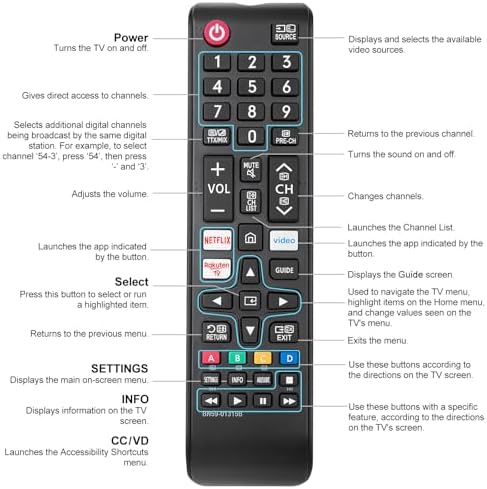
Image: A detailed diagram illustrating each button on the OMAIC remote control and its corresponding function.
- Power Button: Turns the TV on and off.
- Source Button: Displays and selects available video sources.
- Number Buttons (0-9): Gives direct access to channels. For example, to select channel '54-3', press '5', then press '4', and then '3'.
- Volume Up/Down (+/- VOL): Adjusts the volume level.
- Mute Button: Turns the sound on and off.
- Channel Up/Down (CH +/-): Changes channels.
- Netflix Button: Launches the Netflix application directly.
- Prime Video Button: Launches the Prime Video application directly.
- Rakuten TV Button: Launches the Rakuten TV application directly.
- Guide Button: Displays the TV Guide screen.
- Return Button: Returns to the previous menu or screen.
- Exit Button: Exits the current menu or application.
- Directional Pad (Up/Down/Left/Right): Used to navigate TV menus, highlight items, and change values.
- Select Button: Press this button to select or run a highlighted item.
- Settings Button: Displays the main on-screen menu.
- Info Button: Displays information on the TV screen.
- CC/VD Button: Launches the Accessibility Shortcuts menu.
- Color Buttons (Red, Green, Yellow, Blue): Use these buttons according to the directions displayed on the TV screen for specific functions.

Image: The remote control featuring dedicated shortcut buttons for popular streaming services like Netflix, Prime Video, and Rakuten TV, allowing for quick access.
Compatibility
The OMAIC Universal Replacement Remote Control is designed for broad compatibility with Samsung Smart TVs and various Samsung remote control models.
Compatible Samsung TV Series:
- S95 series
- QN9 series
- QN8 series
- QN7 series
- Q95 series
- Q8 series
- Q7 series
- Q6 series
- Q5 series
- LS series
- LST7 series
- AU series
- And other Samsung LED, QLED, SUHD, UHD, HDR, LCD, Frame, Curved, Solar, HDTV, 3D, 4K, 8K Smart TV models from 2017 to 2022 and newer.

Image: The OMAIC remote control displayed alongside a list of compatible Samsung TV series, including S95, QN9, QN8, QN7, Q95, Q8, Q7, Q6, Q5, LS, LST7, and AU series.

Image: The OMAIC remote control positioned next to two Samsung televisions, visually confirming its compatibility with Samsung LCD, LED, QLED, UHD, SUHD, HDR, Curved, Frame, Solar, HDTV, 4K, 8K, and 3D Smart Series TVs.
Compatible Samsung Remote Control Models:
This remote is a universal replacement for many Samsung remote models, including but not limited to:
- BN59-01312A
- BN59-01312G
- BN59-01310A
- BN59-01266A
- BN59-01259E
- BN59-01330A
- BN59-01329A
- BN59-01298A
- BN59-01298H
- BN59-01292A
- BN59-01241A
- BN59-01293A
- BN59-01357A
- BN59-01199F
- BN59-01301A
- BN59-01289A
- AA59-00496A
- AA59-00600A
- AA59-00602A
- AA59-00603A
- AA59-00622A
- AA59-00666A
- AA59-00741A
- AA59-00743A
- AA59-00786A
- AA59-00818A
- AA59-01180A
- AA59-01289A
- BN59-01175B
- BN59-01175N
- BN59-01178W
- BN59-01199F
- BN59-01199G
- BN59-01247A
- BN59-01268D
- BN59-01301A
- BN59-01315A
- BN59-01315B
- BN59-01315J
- BN68-11315D
- BN68-11642D
- BN68-11645A
- BN68-11645G
- BN68-11929D
- BN68-13841B
- BN68-13842D
- BN68-13843D
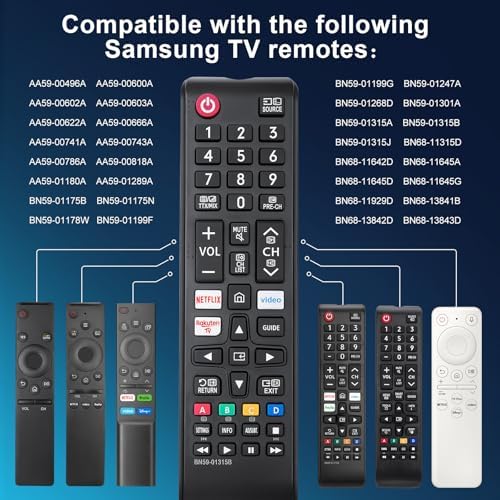
Image: The OMAIC remote control displayed next to a comprehensive list of Samsung remote control model numbers it is designed to replace.

Image: The OMAIC remote control positioned among various original Samsung remote controls, visually demonstrating its compatibility as a replacement.
Maintenance
To ensure optimal performance and longevity of your OMAIC remote control, please observe the following maintenance guidelines:
- Battery Replacement: Replace batteries when the remote's response becomes sluggish or stops working. Always replace both batteries at the same time with new AAA batteries. Do not mix old and new batteries, or different types of batteries.
- Cleaning: Use a soft, dry cloth to clean the remote control. For stubborn dirt, lightly dampen the cloth with water or a mild cleaning solution. Avoid using harsh chemicals or abrasive cleaners, as these can damage the remote's surface or internal components.
- Storage: Store the remote control in a cool, dry place away from direct sunlight, extreme temperatures, and high humidity.
- Avoid Drops and Impacts: Protect the remote from physical damage by avoiding drops or strong impacts.
Troubleshooting
If you encounter issues with your OMAIC remote control, please refer to the following common solutions:
- Remote Not Responding:
- Check Batteries: Ensure the batteries are inserted correctly with the proper polarity.
- Replace Batteries: If the batteries are old or depleted, replace them with two new AAA batteries.
- Line of Sight: Ensure there is a clear line of sight between the remote control and the TV's infrared receiver. Obstructions can block the signal.
- Distance: Confirm you are within the effective operating range (up to 10 meters) of the TV.
- Specific Buttons Not Working:
- Clean the remote control, especially around the non-functional buttons, to remove any dirt or debris that might be obstructing them.
- If only certain buttons are unresponsive after checking batteries and cleaning, the remote may require replacement.
- TV Not Turning On/Off: Verify that the TV's power cable is securely plugged into an active power outlet.
If these steps do not resolve the issue, please contact OMAIC customer support for further assistance.
Specifications
| Brand | OMAIC |
| Model Number | BN59-1315B |
| Connectivity Technology | Infrared |
| Compatible Devices | Samsung LCD LED HDTV 3D Curved Frame Solar Smart TV (various series) |
| Number of Buttons | 25 |
| Controller Type | Button Control |
| Maximum Range | 10 Meters |
| Color | Black |
| Remote Dimensions (L x W x H) | 6.89 inches x 1.73 inches x 0.86 inches |
| Batteries Required | 2 x AAA (not included) |

Image: An internal view of the remote control's upgraded chip, emphasizing its quality construction and features such as signal stabilization and durable ABS material.
Warranty and Support
OMAIC is committed to providing high-quality products and excellent customer service. This replacement remote control is designed for reliability and compatibility.
For any questions, concerns, or assistance regarding your OMAIC Universal Replacement Remote Control, please contact OMAIC customer support directly. Our team aims to respond to all inquiries within 12 business hours.
Please refer to your purchase documentation for specific warranty details and return policies.
