
1. Product Overview
The Lefant M320 is a versatile robot vacuum cleaner designed for efficient home cleaning. It combines sweeping, vacuuming, and mopping functions to provide a comprehensive cleaning solution. Key features include powerful suction, long battery life, and intelligent navigation.
- High Suction Power: Up to 6000Pa for effective removal of dust, pet hair, and debris.
- Long Runtime: Up to 210 minutes on a single charge (Eco mode).
- Slim Design: At 7.9cm height, it easily cleans under furniture.
- 3-in-1 Cleaning: Sweeping, vacuuming, and mopping capabilities.
- Brushless Suction Port: Prevents hair entanglement, ideal for pet owners.
- Intelligent Obstacle Avoidance: PSD anti-obstacle technology with 9 sets of front triangular sensors.
- HEPA Filtration: Captures fine particles and allergens.
- Automatic Recharge: Returns to the charging dock when battery is low.

Figure 1: Lefant M320 Robot Vacuum Cleaner and other Lefant products.

Figure 2: Key features of the Lefant M320.
2. Setup Guide
2.1 Unboxing and Initial Placement
Carefully remove all components from the packaging. Place the charging dock against a wall in an open area, ensuring there are no obstacles within 1 meter (3 feet) to the front and 0.5 meters (1.5 feet) to the sides. Connect the power adapter to the charging dock and plug it into a power outlet.
2.2 Initial Charging
Place the robot vacuum onto the charging dock. Ensure the charging contacts on the robot align with those on the dock. The indicator light on the robot will show charging status. Fully charge the robot before its first use, which may take approximately 3.5 hours.
2.3 Connecting to the Lefant App
To unlock the full potential of your Lefant M320, connect it to the Lefant Life app.
- Press the power button on the robot for 3 seconds to turn it on.
- Download the 'Lefant Life' app from your device's app store.
- Press the power button for 6 seconds until the light flashes, indicating pairing mode.
- Add your robot vacuum to the Lefant app following the in-app instructions.
- Connect to a 2.4 GHz Wi-Fi network.
- Wait for the connection to complete.

Figure 3: Lefant M320 App Connection Steps.
2.4 Connecting to Voice Assistants (Alexa)
You can control your Lefant M320 using voice commands with Amazon Alexa.
- Open the 'Lefant' app > 'Me' > 'Third-party voice service'.
- Register your account and voice passwords.
- Open the 'Alexa' app > 'More' > 'Skills & Games'.
- Search for 'Smart Life'.
- Click 'Enable to Use'.
- Select the region and enter the account and password from Step 2.
- Wait for the connection to complete.

Figure 4: Lefant M320 Alexa Connection Steps.
3. Operating Instructions
3.1 Cleaning Modes
The Lefant M320 offers various cleaning modes to suit your needs:
- Auto Cleaning (Zigzag): The robot cleans in an efficient zigzag pattern, covering the entire area.
- Edge Cleaning: The robot cleans along walls and furniture edges.
- Spot Cleaning: The robot focuses on a specific dirty area, cleaning in a spiral pattern.

Figure 5: Zigzag Cleaning Pattern.

Figure 6: Edge Cleaning.

Figure 7: Spot Cleaning.
3.2 Carpet Detection and No-Go Zones
The M320 features ultrasonic carpet detection. When the mop holder is attached, it intelligently avoids carpets to prevent wetting. In pure vacuuming mode, it automatically increases suction on carpets for deeper cleaning. You can also set virtual No-Go Zones via the app to restrict the robot from certain areas.

Figure 8: Ultrasonic Carpet Detection.
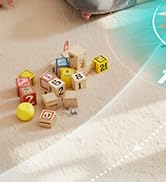
Figure 9: Intelligent No-Go Zones and Virtual Walls.
3.3 App and Voice Control
Control your M320 conveniently through the Lefant Life app or via voice commands using compatible smart assistants like Alexa or Google Assistant.

Figure 10: Controlling the M320 via the Lefant App.

Figure 11: Voice Control with Alexa/Google Assistant.
4. Maintenance
Regular maintenance ensures optimal performance and extends the lifespan of your Lefant M320.
4.1 Dustbin and Filter Cleaning
The 800ml transparent dustbin can hold up to two weeks of dust. It is recommended to empty and clean the dustbin and filters regularly.
- Open the front panel and remove the dustbin.
- Open the dustbin latch and empty the debris.
- Remove the filter assembly.
- Clean the pre-filter.
- Clean the HEPA filter. Note: The metallic (pre-filter) filter is washable, but the HEPA filter is not.
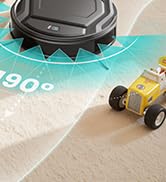
Figure 12: Dustbin and Filter Cleaning Steps.

Figure 13: HEPA Filter System Components.
4.2 Mop Holder Maintenance
The magnetic mop holder features a honeycomb design to effectively capture hair and dust. Disposable wet and dry towels can be used with the mop holder.

Figure 14: Magnetic Mop Holder Design.
4.3 Brushless Suction Port
The M320 features a brushless suction port, which significantly reduces hair entanglement compared to traditional roller brushes. Periodically check the suction port for any blockages.
5. Troubleshooting
If you encounter issues with your Lefant M320, refer to the following common problems and solutions:
| Problem | Possible Cause | Solution |
|---|---|---|
| Robot does not turn on | Low battery; Power button not pressed correctly | Charge the robot fully; Press and hold the power button for 3 seconds. |
| Robot does not charge | Charging contacts are dirty; Charging dock not powered; Robot not properly aligned | Clean charging contacts; Ensure dock is plugged in; Realign robot on dock. |
| Robot gets stuck frequently | Too many obstacles; Loose cables/rugs; Narrow spaces | Clear the cleaning area; Secure cables/rugs; Use No-Go Zones for problematic areas. |
| Poor suction performance | Dustbin full; Filters clogged; Suction port blocked | Empty dustbin; Clean/replace filters; Check and clear suction port. |
| App connection issues | Incorrect Wi-Fi band (not 2.4GHz); Incorrect password; Robot not in pairing mode | Ensure 2.4GHz Wi-Fi; Verify password; Put robot in pairing mode (flashing light). |
| Mop function not working | Mop pad not attached; Water tank empty (if applicable); Sensor error | Attach mop pad correctly; Fill water tank; Check for sensor blockages. |
6. Specifications
| Feature | Specification |
|---|---|
| Brand | Lefant |
| Model Name | M320 |
| Suction Power | Up to 6000 Pa |
| Battery Life | Up to 3.5 hours (210 minutes) |
| Battery Composition | Lithium Ion |
| Dustbin Capacity | 800 ml |
| Filter Type | HEPA |
| Control Type | App Control, Voice Control |
| Compatible Devices | Voice assistant devices (Alexa, Google Assistant) |
| Dimensions (LxWxH) | 28L x 28W x 7.8H cm |
| Item Weight | 3.35 Kilograms |
| Recommended Surfaces | Multi-surface |
| Special Features | Edge Cleaning, Ultrasonic Carpet Detection |
| Included Components | Charging Station, HEPA Filter, Remote Control |
7. Warranty and Support
Lefant products come with a standard manufacturer's warranty. For specific warranty details, please refer to the documentation included with your product or visit the official Lefant website. If you experience any issues or require assistance, please contact Lefant customer support. Many users have reported excellent and responsive customer service.
You can often find support contact information on the Lefant brand store page on Amazon or through the Lefant Life app.