
1. Introduction
This manual provides detailed instructions for the assembly, operation, and maintenance of your Tribesigns 4-Tier Retail Display Rack. Please read this manual thoroughly before assembly and use to ensure proper function and safety.
The Tribesigns 4-Tier Retail Display Rack is designed for versatile storage and display, featuring sturdy particleboard shelves and a heavy-duty metal frame. It is suitable for various environments including retail stores, kitchens, offices, and living areas.
2. Safety Information
Important Safety Warnings:
- Do not exceed the maximum weight capacity of 20 pounds (approximately 9 kg) per shelf. The total weight limit for the entire unit is 100 pounds (approximately 45 kg).
- Ensure the rack is properly assembled and stable before placing any items on it.
- Avoid overloading or improperly supporting the shelves to prevent accidents, tipping, or structural damage.
- Keep small parts away from children during assembly to prevent choking hazards.
- Place the rack on a flat, level surface to ensure stability.
3. Package Contents
Please verify that all components are present before beginning assembly. If any parts are missing or damaged, contact customer support.
- Metal Frame Components
- 4 Particleboard Shelves
- 4 Metal Hooks
- Adjustable Foot Pads
- Assembly Hardware (screws, bolts, etc.)
- Assembly Guide (this document)

Image: Detailed view of the rack's construction, highlighting the quality particleboard, metal hooks, heavy-duty metal frame, and adjustable foot pads.
4. Assembly Instructions
Assembly is designed to be straightforward. It is recommended to have a Phillips head screwdriver and possibly a rubber mallet (not included) for easier assembly. Follow these steps carefully:
- Unpack Components: Carefully remove all parts from the packaging and lay them out on a clean, soft surface to prevent scratches. Verify all parts against the package contents list.
- Assemble the Side Frames: Attach the horizontal support bars to the vertical metal frame posts using the provided screws. Ensure all connections are secure but do not fully tighten screws until the entire frame is assembled.
- Attach Shelves: Slide each particleboard shelf into the designated slots on the metal frame. The shelves are designed to be slightly angled for display purposes. Secure each shelf with the appropriate hardware.
- Install Metal Hooks: Attach the four metal hooks to the side of the top shelf frame as desired. These hooks provide additional hanging storage.
- Attach Foot Pads: Screw the adjustable foot pads into the bottom of the vertical metal frame posts. Adjust them to ensure the rack is level and stable on your floor.
- Final Tightening: Once all components are in place and the rack is stable, fully tighten all screws and bolts.
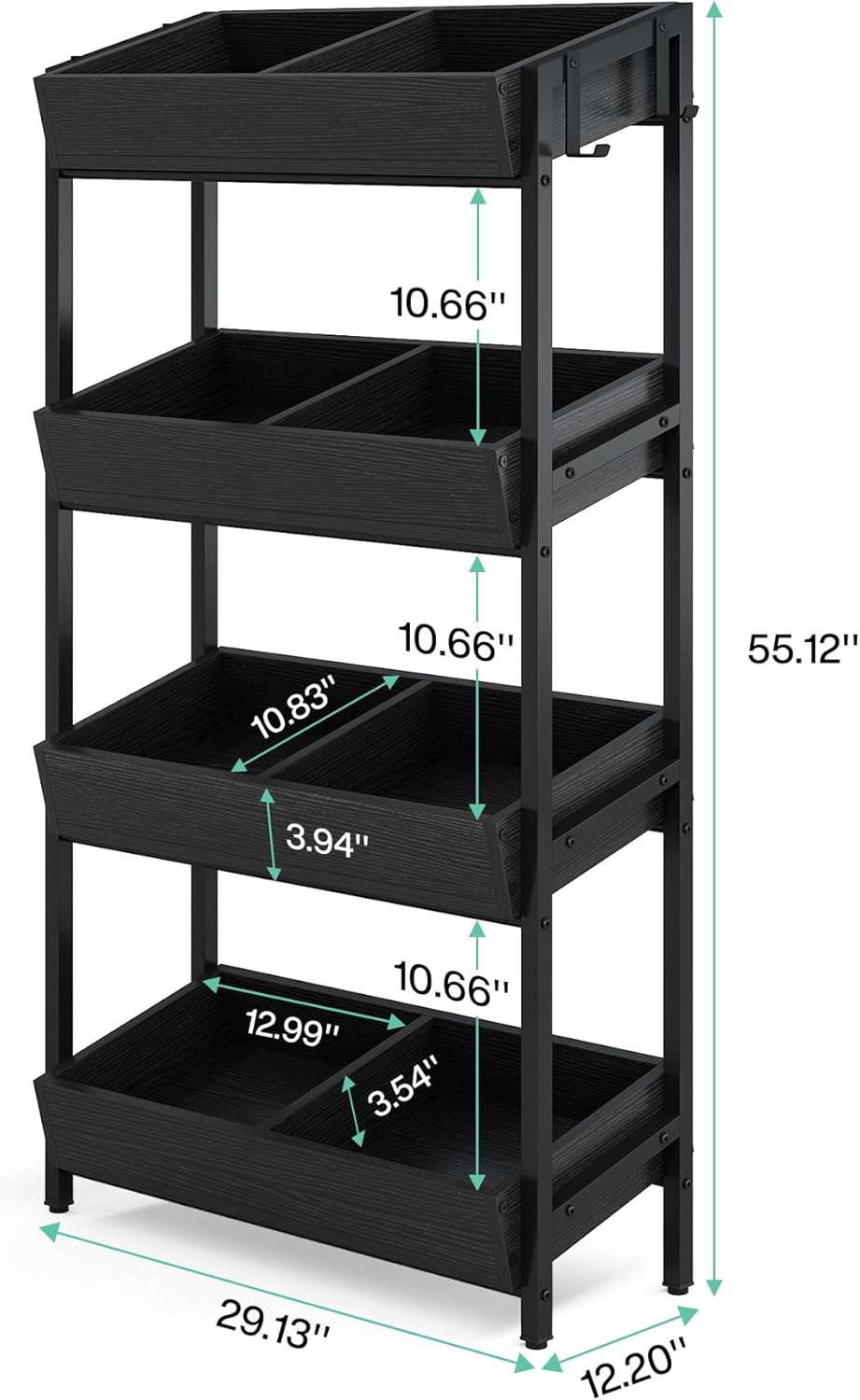
Image: Dimensional diagram of the Tribesigns 4-Tier Retail Display Rack, illustrating its overall size and individual shelf dimensions for assembly reference.
5. Operating Instructions / Usage
Your Tribesigns 4-Tier Retail Display Rack is ready for use. Consider the following for optimal operation:
- Placement: Position the rack in your desired location, ensuring it is on a stable and level surface.
- Loading: Distribute weight evenly across the shelves. Do not concentrate heavy items on one side or one shelf. Remember the 20 lbs per shelf limit.
- Utilizing Hooks: The included metal hooks can be used to hang lightweight items such as bags, small accessories, or promotional materials.
- Versatile Display: This rack is ideal for displaying snacks, candy, potato chips, small retail items, books, kitchen supplies, or office organizers.

Image: The display rack showcasing various products in a retail environment, demonstrating its capacity and angled shelves.
6. Maintenance and Care
To ensure the longevity and appearance of your display rack, follow these simple care instructions:
- Cleaning: Wipe the surfaces with a dry, soft cloth. For stubborn marks, a slightly damp cloth can be used, followed immediately by a dry cloth. Avoid abrasive cleaners or harsh chemicals.
- Inspection: Periodically check all screws and connections to ensure they remain tight. Re-tighten if necessary.
- Avoid Moisture: Do not expose the rack to excessive moisture or direct sunlight for prolonged periods, as this may damage the particleboard.
7. Troubleshooting
If you encounter any issues with your display rack, refer to the following common solutions:
- Rack is Unstable/Wobbly:
- Ensure all assembly screws are fully tightened.
- Adjust the foot pads on the bottom of the frame to level the rack on uneven surfaces.
- Verify that the rack is placed on a flat, solid floor.
- Missing Parts:
- Double-check the packaging and assembly area.
- If parts are genuinely missing, contact Tribesigns customer support with your purchase details.
- Difficulty Assembling:
- Review the assembly instructions carefully, paying attention to diagrams.
- Ensure components are oriented correctly. Some parts may only fit one way.
- Do not force parts together; if they don't fit, re-check the instructions.
8. Specifications
| Feature | Detail |
|---|---|
| Brand | Tribesigns |
| Model Name | JW0428 |
| Product Dimensions | 12.2"D x 29.13"W x 55.12"H (31cm D x 74cm W x 140cm H) |
| Number of Shelves | 4 |
| Shelf Material | Particleboard (Laminated Finish) |
| Frame Material | Heavy-Duty Metal |
| Weight Limit (per shelf) | 20 Pounds (approx. 9 kg) |
| Total Weight Limit | 100 Pounds (approx. 45 kg) |
| Item Weight | 40 Pounds (approx. 18 kg) |
| Assembly Required | Yes |
| Product Care Instructions | Wipe with Dry Cloth |
| Installation Type | Freestanding |
| Included Components | Assembly Guide, 4 Metal Hooks |
9. Warranty and Support
For warranty information, missing parts, or technical assistance, please contact Tribesigns customer support directly. Keep your purchase receipt and model number (JW0428) handy for faster service.
You can visit the official Tribesigns store for more information: Tribesigns Store