
1. Introduction
The ARROWMAX SGS PRO Smart Mini Electric Engraving and Polishing Pen is a versatile tool designed for precision work on various materials. It is suitable for refreshing, customizing, and creating intricate designs on plastic, wood, stone, steel, aluminum, gold, glass, ceramics, jade, and other crystals/minerals. This tool is ideal for craftwork, including miniatures, jewelry, prototypes, sculptures, and detailed art or design projects.
Key features include a diamond-tipped engraving head for precise designs, a magnetic USB charging system for convenience, and a smart motion system that adjusts speed based on the tool's angle. The device also offers optional app customization for precise speed and direction control.
2. Package Contents
Verify that all items listed below are included in your package:
- 1 x SGS PRO Electric Engraving and Polishing Pen
- 30 x Engraving Bits
- 12 x Polishing Bits
- 1 x Storage Bag
- 1 x USB Charging Cable
- 1 x User Manual (this document)

Figure 2.1: Complete set of ARROWMAX SGS PRO included items.
3. Product Overview
Familiarize yourself with the components of the SGS PRO engraving pen:
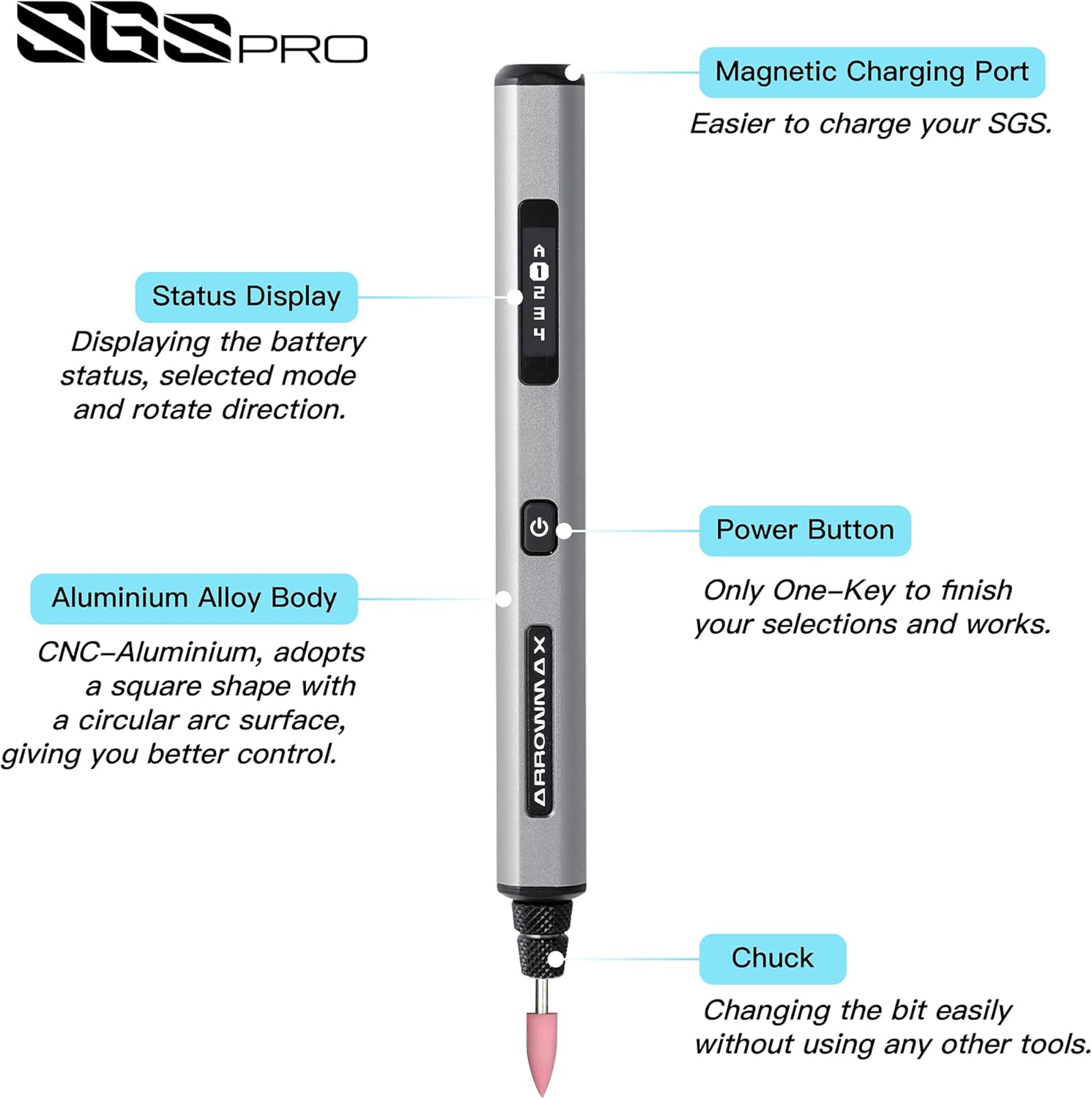
Figure 3.1: SGS PRO Component Diagram.
- Magnetic Charging Port: Located at the top, this port allows for convenient magnetic USB charging.
- Status Display: An OLED screen that shows battery status, selected mode, and rotation direction.
- Aluminium Alloy Body: The main body of the pen, designed for durability and comfortable grip.
- Power Button: Used to power the device on/off and to cycle through modes or confirm selections.
- Chuck: The mechanism at the tip where engraving and polishing bits are inserted and secured.
4. Setup
4.1 Charging the Device
Before first use, fully charge the SGS PRO pen. The device features a 4V rechargeable battery that provides approximately 90 minutes of operation on a full charge.
- Connect the provided USB charging cable to the magnetic charging port on the top of the pen.
- Connect the other end of the USB cable to a compatible USB power source (e.g., computer USB port, USB wall adapter).
- The Status Display will indicate the charging progress. Once fully charged, the display will show a full battery icon.

Figure 4.1: Charging the SGS PRO pen.
4.2 Installing Engraving/Polishing Bits
The SGS PRO comes with 30 engraving bits and 12 polishing bits. Select the appropriate bit for your task.
- Ensure the device is powered off.
- Gently insert the shaft of the desired engraving or polishing bit into the chuck at the tip of the pen.
- Push the bit firmly until it is securely seated. The chuck is designed for easy bit changes without additional tools.
- To remove a bit, gently pull it straight out from the chuck.

Figure 4.2: Assortment of engraving and polishing bits.
5. Operating Instructions
5.1 Powering On/Off and Basic Operation
- To power on the device, press and hold the Power Button until the Status Display illuminates.
- The display will show the current speed mode and rotation direction.
- Press the Power Button briefly to cycle through the preset speed modes.
- To power off, press and hold the Power Button until the display turns off.
5.2 Smart Motion System
The SGS PRO features a smart motion system that automatically adjusts the tool's speed based on the angle of the twist. This allows for precise and consistent engraving and polishing results, adapting to your hand movements during operation.
5.3 App Customization (Optional)
For advanced control, the ARROWMAX smartphone app (available for Android and iOS) allows precise customization of speed and direction. The app allows for speeds up to 30,000 RPM, with adjustments in 500 RPM increments.
- Download the "Arrowmax" app from your device's app store.
- Ensure Bluetooth is enabled on your smartphone and the SGS PRO pen is powered on.
- Open the app and follow the on-screen instructions to pair with your SGS PRO device.
- Within the app, you can precisely adjust the speed and switch between forward and reverse rotation directions for each mode.

Figure 5.1: ARROWMAX App Interface for customization.
5.4 Material Compatibility and Applications
The SGS PRO is designed for use on a wide range of materials, including but not limited to:
- Plastic
- Wood
- Stone
- Steel
- Aluminum
- Gold and other metals
- Glass
- Ceramics
- Crystals and minerals (e.g., jade)
Common applications include:
- Engraving and carving intricate designs
- Polishing surfaces
- Grinding and shaping
- Model making and prototyping
- Customizing personal items

Figure 5.2: Examples of material customization.

Figure 5.3: SGS PRO features in use.
6. Maintenance
Proper maintenance ensures the longevity and optimal performance of your SGS PRO pen.
- Cleaning: After each use, gently wipe the pen body with a soft, dry cloth to remove dust and debris. Use a small brush to clean around the chuck area, ensuring no material residue accumulates. Do not use harsh chemicals or abrasive cleaners.
- Bit Care: Inspect engraving and polishing bits regularly for wear and tear. Replace dull or damaged bits to maintain precision and prevent damage to the workpiece or the tool. Store bits in their designated slots within the aluminum case to prevent loss and damage.
- Storage: When not in use, store the SGS PRO pen and its accessories in the provided aluminum case in a cool, dry place, away from direct sunlight and extreme temperatures.
- Charging: Avoid overcharging the battery. Disconnect the charger once the battery is full. If storing for extended periods, charge the battery to approximately 50% to prolong its lifespan.
7. Troubleshooting
If you encounter issues with your SGS PRO pen, refer to the following common problems and solutions:
| Problem | Possible Cause | Solution |
|---|---|---|
| Device does not power on. | Battery is depleted. | Charge the device fully using the provided USB cable. |
| Device does not charge. | Charging cable or power source issue. | Ensure the USB cable is securely connected. Try a different USB port or power adapter. Verify the magnetic connection is clean and secure. |
| Bit is loose or falls out. | Bit not inserted correctly or chuck is worn. | Ensure the bit is pushed firmly into the chuck until it is secure. If the problem persists, contact customer support. |
| Inconsistent speed or performance. | Low battery, incorrect mode, or app connection issue. | Charge the battery. Check the Status Display for the current mode. If using the app, ensure a stable Bluetooth connection. |
| App cannot connect to the device. | Bluetooth is off, device is off, or app issue. | Ensure Bluetooth is enabled on your phone and the SGS PRO is powered on. Restart the app and/or the device. |
| Device does not rotate in reverse. | Direction setting not activated. | Use the ARROWMAX app to select the reverse rotation direction. |
8. Specifications
| Feature | Detail |
|---|---|
| Model Number | AM-199213 |
| Brand | ARROWMAX |
| Voltage | 4 Volts |
| Power Source | Battery Powered |
| Battery Type | 1 Lithium Polymer battery (included) |
| Operating Time | Approx. 90 minutes (after full charge) |
| Recommended Uses | Engraving, Polishing |
| Special Features | Rechargeable, Smart Motion System, App Customization (Optional) |
| Item Weight | 13.4 ounces |
| Package Dimensions | 8.82 x 3.11 x 1.26 inches |
| Manufacturer | Freemax Technology Company Limited (IMPORT) |
| Date First Available | July 4, 2024 |
9. Safety Information
Please read and understand all safety warnings and instructions before operating the SGS PRO pen to prevent electric shock, fire, and serious injury.
- Always wear appropriate personal protective equipment (PPE), such as safety glasses, to protect your eyes from flying debris.
- Ensure your work area is well-lit and clean. Cluttered or dark areas invite accidents.
- Keep children and bystanders away while operating the tool. Distractions can cause you to lose control.
- Do not operate power tools in explosive atmospheres, such as in the presence of flammable liquids, gases, or dust.
- Avoid accidental starting. Ensure the switch is in the off-position before connecting to battery pack, picking up or carrying the tool.
- Do not force the tool. Use the correct tool for your application. The correct tool will do the job better and safer at the rate for which it was designed.
- Disconnect the battery pack from the tool before making any adjustments, changing accessories, or storing power tools.
- Store idle power tools out of the reach of children and do not allow persons unfamiliar with the power tool or these instructions to operate the power tool.
- Maintain power tools and accessories. Check for misalignment or binding of moving parts, breakage of parts and any other condition that may affect the power tool’s operation. If damaged, have the power tool repaired before use.
- Use the power tool, accessories and tool bits etc. in accordance with these instructions, taking into account the working conditions and the work to be performed. Use of the power tool for operations different from those intended could result in a hazardous situation.
- Do not expose the tool to rain or wet conditions. Water entering a power tool will increase the risk of electric shock.
- Only use the charger specified by the manufacturer. A charger that is suitable for one type of battery pack may create a risk of fire when used with another battery pack.
- Use power tools only with specifically designated battery packs. Use of any other battery packs may create a risk of injury and fire.
10. Warranty and Support
The ARROWMAX SGS PRO Electric Engraving and Polishing Pen is manufactured by Freemax Technology Company Limited (IMPORT).
For product support, warranty inquiries, or technical assistance, please contact the manufacturer directly using the information below:
- Manufacturer: Freemax Technology Company Limited (IMPORT)
- Address: Room 1203, 12F, Wah Shing Centre, 11-13 Shing Yip Street, Kwun Tong, Hong Kong
- Website: arrowmax-rc.com
- Email: info@arrowmax-rc.com
- Phone: +852 3590 9790
Please retain your proof of purchase for any warranty claims.
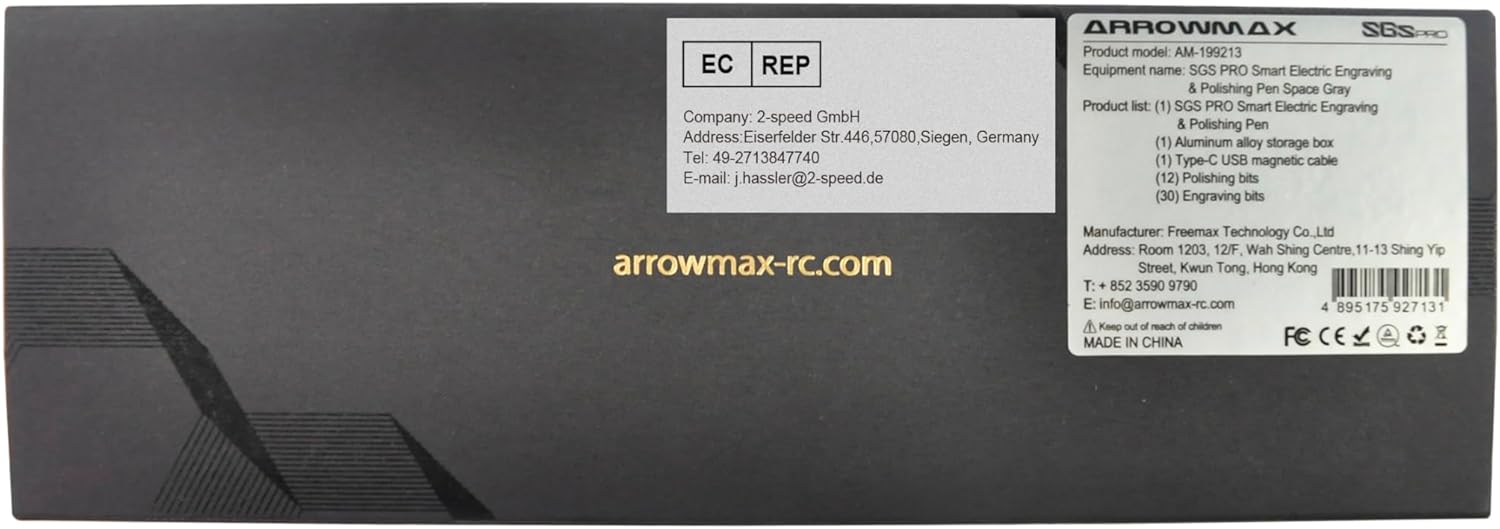
Figure 10.1: Manufacturer and contact information from product packaging.

